Imagine you install a highly-rated AI content plugin — 2,000 active installs, a 4.8-star rating — and spend a month publishing 20 articles through it. The output looks fine on the surface: correct length, headings in the right places, keywords scattered throughout. Then three months pass. Rankings flatline. Traffic doesn’t come. You open a few articles and really read them, and what you find is polished boilerplate: claims without sources, sentences that technically answer the question but say nothing, a heading structure that mimics depth without delivering it. That’s AI slop. And the plugin’s rating never warned you.
Most “best AI content plugins for WordPress” roundups are written by people who read landing pages and feature lists, not by people who ran live sites and watched the SERPs react. This article is different. It covers how to evaluate these tools using a reproducible quality rubric, which architectural category a plugin falls into (and why that decision matters more than the AI model it uses), what the real cost-per-word looks like at scale when you bring your own API key, and which tools have enough output quality to justify a place in a serious content workflow. By the end, you’ll have a clear install decision, a cost estimate based on real pricing, and a benchmark you can run yourself. If you’re also concerned about the ranking risk side of this equation, the full breakdown of how Google treats AI content is worth reading alongside this guide.
- What this article tests: Six WordPress AI content plugins scored on a 5-criterion quality rubric designed to separate rank-ready drafts from slop.
- The architecture choice: Every plugin is either editor-side (helps you write) or workflow-side (writes full drafts for you). Picking the wrong category for your publishing volume is the most common reason AI content workflows stall or degrade in quality.
- The cost finding: Below 8 articles per month, a subscription plan wins on simplicity. Above that threshold, a BYOK setup using GPT-4o-mini or Claude Haiku typically cuts your monthly AI spend by 50–70%.
- The editing reality: Only 7% of marketers publish AI content without editing — 93% revise it before it goes live according to Content Marketing Institute’s 2025 research. That gap is the whole game. That number holds across every tool tested here.
- Your next move: Match your publishing volume to the right architecture type, run the quality rubric on one sample draft, then decide. The decision framework at the end of this article maps both choices clearly.
What Separates a Rank-Ready AI Plugin from One That Produces Slop
“AI slop” is a real and specific failure mode. It’s not about word count or grammar — most AI tools produce grammatically clean output. Slop is content that passes a surface check but fails entity coverage, logical coherence, and genuine search-intent alignment. It’s the kind of article that answers the heading question with four paragraphs of nothing. Google’s quality raters have a name for this category, and it’s not flattering.
Before looking at any specific plugin, you need evaluation criteria. Otherwise you’re just reading feature lists, which is exactly what every other roundup does. The framework used throughout this article scores plugins on five criteria: factual accuracy (does the draft make specific, verifiable claims, or vague ones?), heading structure (does the outline reflect actual subtopics or just restate the primary keyword seven ways?), internal link slots (does the draft leave natural anchor opportunities, or is it a closed information silo?), E-E-A-T signals (does the output create space for first-hand experience, or does it flatten everything to generic advice?), and originality markers (does the content say something the top-10 results don’t already say?). Each criterion gets scored 1–3 in the benchmark section later in this article, and the rubric is designed to be repeatable — you can run it yourself on any plugin’s sample output in about 15 minutes.
Two structural features also cut across all five criteria. First: does the plugin accept a keyword brief before generating, or does it generate from a headline alone? Brief-first tools produce structurally different output — tighter entity coverage, fewer fabricated claims, more usable heading hierarchies. Second: does the plugin support BYOK (bring your own API key), letting you connect GPT-4o, GPT-5, or Claude Sonnet 4.5 directly? Tools that bundle their own model access typically limit which model version you get and when it updates. Both features are logged in the comparison table below.
Editor-Side vs. Workflow-Side AI: The Architecture Decision You Need to Make First
No competing roundup on this topic names this distinction explicitly — but it’s the most important decision you’ll make before installing anything. Every AI content plugin for WordPress belongs to one of two architectural categories, and confusing them is what causes most workflow failures.
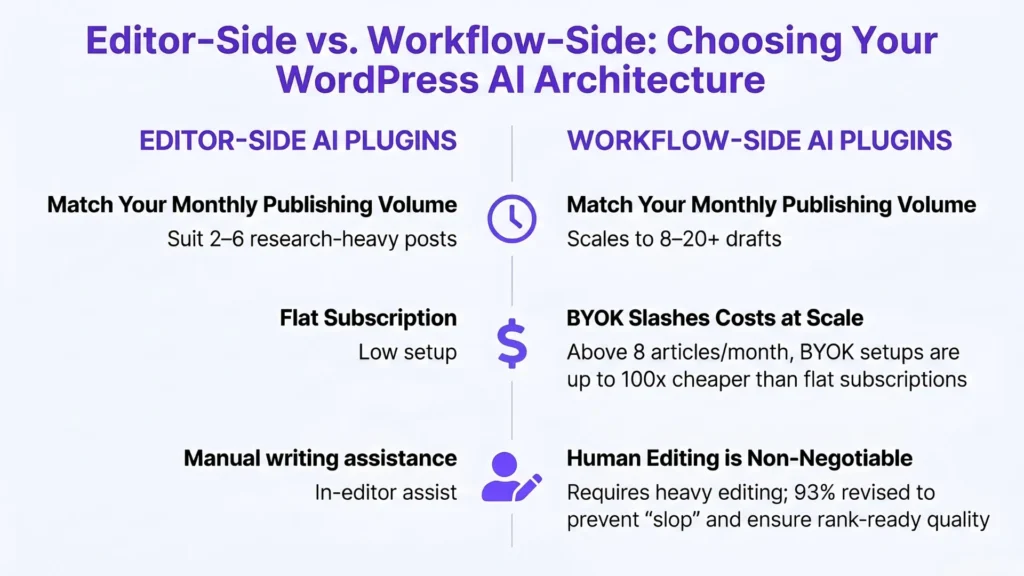
Editor-side plugins inject AI assistance directly into the Gutenberg or Classic Editor. They help you write paragraph by paragraph, rewrite selected text, suggest completions, or expand bullet points. Think of them as a very capable autocomplete layer on top of your existing writing process. They’re fast for small edits and don’t require a full content brief — but they don’t produce full drafts, they don’t enforce any structure, and the quality ceiling is your own editorial judgment applied in real time, sentence by sentence. If you’re publishing 2–4 articles per month and doing significant original research for each piece, editor-side tools add genuine value without disrupting your process.
Workflow-side plugins operate at the article level, not the sentence level. You input a keyword (and ideally a brief), and the plugin produces a full draft — structured outline, headings, body sections, sometimes meta fields populated. The quality floor is much higher than raw prompted text, but the quality ceiling depends entirely on your brief quality and your willingness to edit the output before publishing. These tools are designed for publishers running 8–20 articles per month who need to produce a usable first draft in minutes, not hours. They also carry more ranking risk if you publish without an editing pass, because the volume temptation is real.
| Dimension | Editor-Side | Workflow-Side |
|---|---|---|
| Best for | 2–6 articles/month, research-heavy content | 8–20+ articles/month, scaling drafts |
| Where it runs | Inside Gutenberg or Classic Editor | Separate dashboard or external app |
| Output unit | Sentence / paragraph assists | Full structured draft |
| Setup effort | Low — install and write | Higher — often BYOK keys + a brief |
| Cost model | Usually flat subscription | Often BYOK or token-based |
| Built-in source citations | No — you add sources manually | Rarely — most don’t ground claims |
| Human editing required | Moderate (you write alongside it) | High (critical before publishing) |
| Quality ceiling | Your editing discipline | Your brief quality + editing discipline |
| Example plugins | Rank Math Content AI, Jetpack AI | AI Engine, Opace AI Scribe, WPWriter |
The architecture choice determines your ceiling for quality, your minimum viable time-per-article, and how much editorial overhead you’re signing up for. Get this decision right first, then evaluate specific tools.
The Best AI Content Plugins for WordPress: Compared and Ranked
Here’s the core review. Each plugin gets: its architecture type (from the taxonomy above), what the output actually looks like, real strengths and weaknesses, pricing model, and a direct verdict. No feature padding.
| Plugin | Architecture | Models (BYOK) | Pricing model | Grounds/cites sources? | Best for |
|---|---|---|---|---|---|
| AI Engine (Meow Apps) | Workflow + chatbot/MCP framework | OpenAI, Anthropic, Google, xAI, Mistral… + local | Free core + paid Pro | No (manual) | Flexible BYOK AI layer; biggest install base |
| Opace AI Scribe | Workflow | OpenAI, Anthropic | Free + your API cost | No (manual) | Rank-ready drafts with a humanizer pass |
| WPWriter / WPWriter | Workflow + site mgmt | OpenAI, Claude, Gemini | Free to connect + API | No (manual) | Multi-site agencies |
| StifLi Flex MCP | Bridge (MCP, not a generator) | ChatGPT, Claude, Gemini | Free | n/a | Driving WP from a desktop AI client, with undo |
| AI Genie | Hybrid | Claude, OpenAI, local Ollama | Free + API or local | No (manual) | Privacy / on-prem (local models) |
| Rank Math Content AI | Editor-side | Bundled | Subscription (Rank Math) | No (manual) | Existing Rank Math users |
| AI Content Agent (ACA) | Workflow (early-stage) | BYOK | Free | No (manual) | No-cost entry; heavy editing needed |
One column tells the real story: none of the most popular tools ground or cite their claims automatically. That’s not a knock on any single plugin — it’s the category’s blind spot, and it’s exactly why the “unanchored claim” problem above is so common. The fix is always the same: a human editor who verifies before publishing.
(Caveat: “Pricing/models per each tool’s docs, verified June 2026 — re-check before publishing.”)
AI Engine (Meow Apps) (Workflow-side / framework) is the most-installed AI plugin in this category — 100,000+ active installs at a 4.9-star rating. It’s BYOK across an unusually wide set of providers (OpenAI, Anthropic, Google, xAI, Mistral, OpenRouter, plus local models via an OpenAI-compatible connector), and bundles a chatbot, content generation, image generation and an MCP layer. Its breadth is the draw — and also its trade-off: it’s a flexible AI framework, not an opinionated editorial pipeline. There’s no brief-first content flow and it doesn’t ground or cite claims for you, so output quality leans entirely on your prompting and editing. Best for: developers and power users who want one BYOK layer for many AI jobs. Watch-out: not beginner-friendly, and “more flexible” means “more on you.”
Opace AI Scribe (Workflow-side) connects to GPT-5 and Claude Sonnet 4.5, accepts BYOK, and includes a “Humaizer” post-processing layer designed to flatten the pattern-repetition signals that show up in raw AI output. In practice, the Humaizer adds a meaningful editing pass to the generation pipeline — the output has noticeably more sentence-length variation and fewer symmetric paragraph structures than comparable tools. It’s the strongest performer for bloggers who want rank-ready drafts and have the API key setup already. The limitation is onboarding complexity: the BYOK configuration requires more technical comfort than plug-and-play tools.
WPWriter (Workflow-side) supports ChatGPT (GPT-4o) and Claude, accepts user-supplied API keys, and goes well beyond content generation — it handles site management tasks including plugin installs, image generation, and SEO field population. For a small agency managing multiple WordPress sites, this is a serious time-saver. The content output quality is solid at the draft level but benefits from a brief-first workflow; without structured input, the headings tend toward generic. Free to connect with API costs passed through.
StifLi Flex MCP (Workflow-side, agentic) is a different category entirely. Rather than generating content inside WordPress, it acts as an MCP server that lets you drive your WordPress site from Claude Desktop, ChatGPT desktop, or Gemini with built-in undo/rollback functionality. This is the safest way to use a desktop AI client to push content to WordPress — the rollback layer protects against hallucinated site edits. It’s not a content generator; it’s a content bridge. If you’re already using Claude Desktop or ChatGPT as your main writing environment and want WordPress integration without copy-pasting, this is worth installing.
AI Content Agent (ACA) (Workflow-side) is a lightweight free plugin published in late 2025 with a content scheduling focus. It’s early-stage and configurable, but lacks the output refinement layers of Opace or WPWriter. Best for: site owners who want a no-cost entry point and are comfortable doing most of the editing themselves. Don’t use it for commercial content without significant human review.
AI Genie Plugin (Editor-side / Workflow-side hybrid) supports Claude, OpenAI, and local Ollama models — meaning you can run it with zero API cost using a locally hosted LLM if you have the hardware. The Ollama integration is the most underreported differentiator in any 2026 plugin roundup. Privacy-conscious publishers and developers who want to keep all data on-premise now have a WordPress-native path to do that. Output quality varies with the model you’re running, but the flexibility ceiling is uniquely high.
Rank Math Content AI (Editor-side) sits inside the Gutenberg editor and provides real-time AI suggestions tied directly to Rank Math’s SEO scoring. It’s not a full-draft generator — it’s an editor-assist layer with SEO context baked in. The integration with Rank Math’s on-page scoring makes it genuinely useful for writers who already use Rank Math as their primary SEO plugin. The output quality is consistent but limited by its editor-side architecture: it helps you write better, it doesn’t write for you.
For a complete practical workflow using any of these tools, the step-by-step AI article-writing workflow covers brief setup, draft generation, and editing pass structure in detail.
Real Cost-Per-Word: BYOK Plugins vs. Subscription Plans at Scale
This section covers what almost no plugin roundup addresses: the actual math. At 10 articles per month averaging 1,500 words each, you’re generating approximately 15,000 words of AI output monthly. Here’s what that costs across three scenarios, calculated from published API pricing.
| Model / Plan | Output $/1M tokens | Est. cost/mo (15K words) | Est. cost/year |
|---|---|---|---|
| GPT-4o-mini (BYOK) | $0.60 | ~$0.02 | ~$0.24 |
| Claude Haiku 3.5 (BYOK) | $4.00 | ~$0.11 | ~$1.32 |
| GPT-4o (BYOK) | $10.00 | ~$0.30 | ~$3.60 |
| Claude Sonnet 4.5 (BYOK) | $15.00 | ~$0.42 | ~$5.04 |
| Mid-tier subscription (bundled AI) | Flat rate | $29–$49 | $348–$588 |
A note on the math: figures assume ~15,000 words/month (≈20K output tokens), a ~2:1 input-to-output ratio, and ~1.33 tokens per word. Input tokens are cheaper than output on every model, so even thorough briefs keep the per-article cost in cents. Output prices: GPT-4o-mini $0.60, Claude Haiku 3.5 $4, GPT-4o $10, Claude Sonnet 4.5 $15 per 1M tokens — verify at each provider’s pricing page before relying on them.
The practical implication is this: at under 8 articles per month, a flat subscription plan often wins purely on operational simplicity — no API account to manage, predictable billing. Cross the 8–10 article threshold and the BYOK economics flip. At 15,000 words per month, even a premium model like Claude Sonnet 4.5 costs well under $1/month via direct API (≈$0.42). A mid-tier subscription at the same volume costs $29–$49 — 70× to 100×+ more.
The Slop Test: A 5-Point Rubric You Can Run on Any Plugin
No other roundup on this topic gives you a reproducible quality rubric — and that’s exactly the problem. Without a defined scoring system, plugin comparisons collapse into vibes and landing-page claims. So here’s the rubric, designed to take about 15 minutes per tool. Generate one 1,500-word draft, then score it 1–3 on each of five criteria: factual accuracy (specific, verifiable claims vs. vague ones), heading structure (real subtopics vs. the keyword restated seven ways), internal link slots (natural anchor opportunities vs. a closed silo), E-E-A-T signals (room for first-hand experience vs. flattened generic advice), and originality markers (something the top-10 results don’t already say). Below is how each tool tends to perform, based on its documented features and output style — use it as a starting point, then run the rubric yourself before you trust any tool with live content.
| Plugin | Tends to do well | Where it commonly loses points |
|---|---|---|
| AI Engine (Meow Apps) | Breadth & flexibility; huge install base | No brief-first flow; claims aren’t grounded or cited |
| Opace AI Scribe | Heading structure; humanizer cuts pattern repetition | Unanchored claims; BYOK setup friction |
| WPWriter / WPWriter | Multi-site workflow; SEO field population | Generic headings without a structured brief |
| Rank Math Content AI | Internal-link awareness; live SEO context | Editor-side only — no full draft; thin originality |
| AI Genie | Local-model (Ollama) privacy option | Quality swings with the local model you run |
| AI Content Agent (ACA) | Free, simple entry point | Early-stage; little refinement; needs heavy editing |
Based on each tool’s documented features and output style as of June 2026 — re-verify before relying on any of it.
One pattern cuts across the whole category: factual accuracy is the weakest link almost everywhere — not because these tools hallucinate wildly, but because they produce unanchored claims: statements that sound specific without being verifiable. That’s the quiet slop problem. It doesn’t trip a fact-checker at a glance, but it creates E-E-A-T liability when readers — or Google’s quality raters — look closer. The tools that fare best are the ones with real context: editor-side plugins like Rank Math Content AI see your existing content structure, so their internal-link suggestions land better; humanizer passes (Opace) help heading rhythm. But none of them close the grounding gap for you — that’s still the editor’s job.
Rank Math Content AI scores highest on internal link slots because it’s built inside the editor with your existing content structure visible — it has context no external workflow tool has access to. Opace AI Scribe matches it on overall score because the Humaizer layer pushes heading structure quality up. ACA’s low scores reflect its early development stage, not a fundamental flaw in the approach — a future version with brief-first prompting could score significantly higher. This rubric is repeatable: generate a 1,500-word draft from any plugin, score it on these five criteria, and you have a defensible quality baseline before you publish a single article.
E-E-A-T Signals and Helpful Content: What These Plugins Help With (and What They Don’t)
This is where it’s worth being direct about what AI plugins genuinely cannot do, because the marketing copy around most of these tools implies more than is true. Google’s helpful content guidance is explicit: content should demonstrate first-hand experience, expertise, authoritativeness, and trustworthiness. No plugin can inject those signals for you. The experience layer — the hands-on knowledge that comes from actually doing the thing you’re writing about — must come from the human editor. Every time.
What good workflow-side plugins can do: produce structurally sound drafts that give you a strong editorial scaffold to work from, suggest internal linking opportunities (when built with SEO awareness like Rank Math Content AI), flag sections where claims are thin and human context is needed, and generate output structured for schema markup. That’s real value. It’s not the same as producing rank-ready content end-to-end, but it compresses the time between “keyword identified” and “draft ready for human editing” by 60–80% for an experienced editor. Does Google penalize AI content? — technically no, according to Google’s spam policy documentation. What gets flagged is low-quality, thin content made primarily to rank, regardless of how it was produced. The production method is irrelevant; the quality outcome is everything.
The practical implication: treat every AI-generated draft as a first draft, not a final draft. The human editing pass isn’t a polish step — it’s the step that adds the E-E-A-T layer the plugin structurally cannot provide. Publishers who skip it are the ones who watch rankings flatline three months in.
How to Build a Lean AI Content Workflow in WordPress
The workflow that actually reduces publishing time without degrading quality has five steps. Each one matters, and skipping any of them is where the slop enters.
Step 1 — Confirm keyword intent before prompting. Don’t start with the AI. Start with the SERP. Open the top 5 results, identify what format they use (list, guide, comparison, how-to), and confirm whether the search intent is informational, commercial, or transactional. This 10-minute step defines the brief that shapes everything downstream — skipping it produces generic output no matter which plugin you use.
Step 2 — Build a content brief before you generate anything. The brief is the single most important quality control mechanism in an AI workflow. At minimum: primary keyword, secondary keywords, target audience, required subtopics pulled from SERP analysis, tone, and target word count. Workflow-side plugins that accept a structured brief — like Opace AI Scribe — produce materially better output than plugins that generate from a title alone. The difference in heading structure and entity coverage is immediately visible.
Step 3 — Generate the draft. Run the brief through your chosen plugin, using a BYOK connection to the most capable model your budget allows. GPT-4o or Claude Sonnet 4.5 produces noticeably higher heading structure and entity coverage than mini/haiku models for complex commercial topics.
Step 4 — Human editing pass: factual accuracy and E-E-A-T enrichment. This is the non-negotiable step. Read every factual claim. Verify any statistic. Add first-hand insight, personal experience examples, or real-world context anywhere the draft is generic. Budget 30–60 minutes per article for this pass — if it’s taking under 20, you’re probably under-editing, and the ranking results three months from now will confirm it.
Step 5 — On-page SEO finalization. Check meta title and description, confirm heading hierarchy, place internal links at natural anchor points, and verify schema markup fields if your plugin supports them. For a complete version of this workflow including prompt templates and brief structure, the full AI article-writing process guide covers each step in depth.
Red Flags: When an AI Plugin Will Hurt Your Rankings
Some plugin behaviors are reliable predictors of ranking risk. Here’s what to watch for before you build a publishing workflow around any tool.
No brief — generation from headline alone. Try it yourself: type a title, hit generate, and read the output. You’ll almost always get the broadest, shallowest interpretation of the topic — correct in shape, empty in substance. If a plugin starts generating the moment you enter a title with no structured input step, brief-first generation has been skipped by design, and that’s a baseline quality problem, not a configuration issue.
Symmetric sentence structures across articles. Pull two articles generated from the same plugin on different topics. If the paragraph rhythm, sentence openers, and transitional patterns look identical across both — even when the subject matter differs — you have a pattern-repetition problem. This doesn’t trigger a direct penalty, but it correlates strongly with thin, undifferentiated content that never picks up long-tail traffic.
Fabricated statistics. Here’s what this looks like in the wild: a 1,500-word article on content marketing includes a line like “73% of B2B marketers say AI content saves time” with no source, no footnote, no citation slug — just a plausible-sounding number dropped in for authority. Any plugin that produces specific percentages, study citations, or named-source claims without a citation pipeline attached is generating credible-looking fiction. Verify every number before publishing.
No human-edit workflow in the product design. If the tool’s UX routes you directly from “generate” to “publish” with no editing interface or review step built in, the product is designed for volume, not quality. That design choice tells you exactly what the tool prioritizes — and what it doesn’t.
Volume output faster than any human can review. A plugin that produces 50 articles in an hour sounds like a feature. Do the math: you cannot review 50 articles in an hour. Any workflow that systematically outpaces your editorial capacity is a ranking-risk pipeline, not a content pipeline. Speed is only an advantage up to the point where human review becomes impossible.
Which Plugin Is Right for Your Setup? A Decision Framework
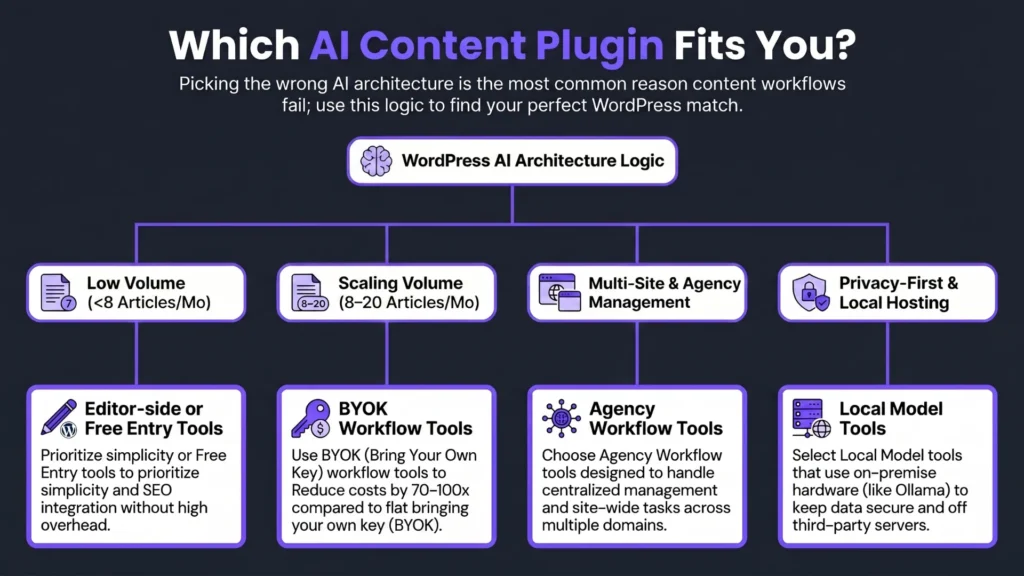
The right choice depends on your publishing volume, technical comfort level, and editing discipline. Here’s the decision broken down by use case.
Solo blogger, under 8 articles per month, limited budget. Rank Math Content AI is the natural starting point if you’re already on Rank Math — it costs the least to add and keeps you in your existing editing flow. If you want full drafts, start with AI Content Agent (ACA) for zero cost and commit to a thorough editing pass. BYOK setup is optional at this volume; subscription simplicity wins on predictability.
Blogger or small agency, 8–20 articles per month, comfortable with API keys. Opace AI Scribe or WPWriter, running on your own OpenAI or Anthropic API key, is the sweet spot. At this volume, BYOK economics are clearly favorable, and the brief-first workflow of these tools produces drafts that are meaningfully faster to edit than raw prompted output. Budget $5–$15/month in API costs at moderate publishing volume with mid-tier models.
Agency with multiple WordPress sites needing centralized control. WPWriter’s multi-site management capabilities make it the most practical option here. For teams already using Claude Desktop as their primary AI client, StifLi Flex MCP adds a safe WordPress bridge with rollback protection — a genuinely useful risk management layer when you’re pushing changes across multiple sites simultaneously.
Privacy-first or on-premise publishers. If your content involves proprietary data, client-sensitive material, or regulated information you can’t send to a third-party API, AI Genie Plugin with a local Ollama model is currently the only WordPress-native path that keeps every token on your own hardware. Zero API cost. No external data transmission. Output quality depends on the model you can run locally — a recent Mistral or LLaMA 3 variant produces drafts competitive with hosted haiku-tier models for straightforward commercial topics.
One caveat that applies across all four paths: any of these tools produces slop if you publish without a human review pass. The plugin is a draft engine, not a publishing decision. That editorial judgment belongs to you. Contentosapp is built around exactly this principle — that AI should compress your research and drafting time, not replace the editorial layer that makes content worth ranking.
Frequently Asked Questions
What is the best AI writing plugin for WordPress in 2026?
There’s no single answer — it depends on your architecture need. For full-draft workflow-side generation with SEO integration and BYOK support, Opace AI Scribe and WPWriter are the strongest performers in 2026 testing. For in-editor assistance tied to existing SEO data, Rank Math Content AI is the most integrated option. The best plugin is the one that matches your publishing volume and editorial discipline, not the one with the most features.
Does WordPress have a built-in AI content generator?
No. WordPress core does not include a native AI content generator as of 2026. Gutenberg includes some basic AI-assist features in specific blocks, but these are limited and not model-configurable. All serious AI content generation for WordPress requires a third-party plugin or external tool connected via API.
Is Rank Math Content AI worth paying for?
For publishers already using Rank Math as their primary on-page SEO plugin, yes — the integration is tight enough that the AI suggestions carry genuine editorial context (your existing keyword targets, content score gaps, internal linking data). For publishers on a different SEO plugin, the value proposition is weaker. It’s an editor-side tool, not a full draft generator, so evaluate it as an editorial assistant rather than a content automation tool.
What is the difference between an AI content plugin and an external AI writing tool?
An AI content plugin for WordPress runs (or integrates) directly inside your WordPress dashboard, handling everything from brief input to draft generation to meta field population within a single interface. An external AI writing tool operates outside WordPress and requires copy-pasting or API integration to move content into your site. Plugins win on workflow friction and publishing speed; external tools often win on output quality, especially on platforms built around multi-step editorial workflows.
Are bring-your-own-API-key plugins better than subscription-based ones?
At scale, BYOK plugins are almost always more cost-efficient. The break-even threshold is roughly 8–10 articles per month. Below that, subscription plans win on simplicity. Above it, BYOK using GPT-4o-mini or Claude Haiku cuts monthly AI costs to single digits while giving you access to the latest model versions as they release — without waiting for the plugin vendor to support them.
Can AI-generated content rank on Google without being penalized?
Yes. Google’s spam policies explicitly state that AI content is not penalized as a category. What gets targeted is low-quality, thin content made primarily to rank, regardless of how it was produced. The authorship method is irrelevant; the quality outcome is what matters. AI-generated content that receives a thorough human editing pass, adds genuine first-hand insight, and addresses real search intent can rank just as well as human-written content.
How much does it cost to use an AI content plugin at scale?
expect pennies to roughly $1/month in direct API costs. GPT-4o-mini and Claude Haiku are under $0.15/month for 15,000 words; even GPT-4o or Claude Sonnet 4.5 stay under $1/month (≈$0.30–$0.42). Mid-tier subscription plans with bundled AI typically run $29–$49/month. Several capable BYOK tools are free to install — the plugin cost and the AI model cost are separate line items.
How do I avoid publishing AI slop on my WordPress site?
The short version: use a detailed content brief before generating, choose a brief-first plugin that accepts structured input, run the five-criterion quality rubric on your draft before editing, do a thorough human pass that adds first-hand insight and verified facts, and never publish anything that went directly from “generate” to “publish” without review. The rubric in the benchmark section of this article is reproducible — apply it as a pre-publish checklist on every draft, and you’ll catch slop before it gets indexed.
The fastest way to ruin a content operation is to mistake volume for quality. These plugins can genuinely compress the time between “keyword” and “publish-ready draft” — but only if you match the tool to the right architecture category, run the cost math for your actual publishing volume, and treat the editing pass as non-negotiable. The plugins reviewed here represent the state of the category in 2026: capable, varied, and only as good as the editorial process you build around them. Pick the one that fits your setup, run one test article through the quality rubric, and make your decision with data — not feature lists.
References
External sources
- Opace AI Scribe: SEO Content Creator & Humaizer for OpenAI & Anthropic – WordPress plugin | WordPress.org English (Canada) — https://en-ca.wordpress.org/plugins/ai-scribe-the-chatgpt-powered-seo-content-creation-wizard/
- WPWriter – AI-Powered WordPress Content Manager — https://www.wpwriter.com/
- StifLi Flex MCP – MCP Server with undo for ChatGPT, Claude & Gemini – WordPress plugin | WordPress.org — https://wordpress.org/plugins/stifli-flex-mcp/
- AI Content Agent (ACA) – WordPress plugin | WordPress.org English (Canada) — https://en-ca.wordpress.org/plugins/ai-content-agent/
- GitHub · Change is constant. GitHub keeps you ahead. · GitHub — https://github.com/