To optimize your website for ChatGPT and Perplexity, start with access, then give them something worth citing. Allow OAI-SearchBot and PerplexityBot in robots.txt and at your firewall, keep each page’s answer in plain HTML near the top, and add evidence the official documentation and competing pages don’t have. Then measure each platform separately. No schema type, llms.txt file or prompt guarantees a citation, and OpenAI says so directly: “Placement is not guaranteed.”
This is a practical, WordPress-friendly guide to those checks. Every platform rule below comes from OpenAI, Perplexity, Google or Microsoft documentation, read again on November 19, 2026. Where advice rests on third-party studies instead, we say so.
Why this page exists: in the 28 days to November 16, 2026, this guide earned about 600 Google impressions at an average position of 24 and no clicks. Those are Google Search numbers, not citations. When we asked ChatGPT and Perplexity the question this page answers, neither cited it (details below), and our analytics recorded 8 visits from ChatGPT over three months and none from Perplexity. This update is our attempt to earn the citation, and the numbers are here so you can judge the result.
How to Optimize Your Website for ChatGPT and Perplexity: 8 Steps
The useful starting point is a checklist you can test, not a promise to “rank in AI.” Follow these steps in order, because content changes won’t help if a crawler can’t reach the page.
- Check robots.txt and firewall rules. Make sure
OAI-SearchBotandPerplexityBotaren’t blocked from public content, by robots.txt or by a bot challenge. Both OpenAI and Perplexity say robots.txt changes can take about 24 hours to apply. - Confirm your important URLs work. The page should return a normal response, carry no unwanted
noindex, and show its main answer in readable HTML. - Check the platform settings you control. In Search Console, confirm the Search generative AI control includes your site. Verify the site in Bing Webmaster Tools, which reports Copilot citations.
- Match a real question to each page. Give a direct answer near the top and make the rest of the page genuinely useful. Don’t spin up a page for every phrasing of the same question.
- Add what the documentation doesn’t have. Your own test, a number from your analytics, a screenshot of a real setup. Link the original sources, show dates, and separate your findings from third-party ones.
- Validate your schema.
Articleand author details should describe what readers see. Don’t add markup to game AI citations. - Maintain your best pages. Fix broken sources, update changed facts, and tell Bing about updates with IndexNow.
- Track outcomes per platform. Use Search Console’s Generative AI report, Bing’s AI Performance report, analytics referrals and a fixed set of test prompts, and keep them separate.
For a more general framework, see our Generative Engine Optimization guide. The rest of this article turns the eight steps into specific checks.
Can You Rank in ChatGPT? How Citations Get Picked
“Ranking in ChatGPT” is shorthand for being one of the sources an answer cites. There is no position one to hold. OpenAI’s help center describes the mechanics plainly: ChatGPT search “typically rewrites your query into one or more targeted queries,” sometimes sends them to partner search providers, reviews the results, and may follow up with more specific searches. It then “ranks search results using multiple factors,” and “Placement is not guaranteed.”
Google describes the same pattern for AI Overviews and AI Mode and calls it query fan-out: the model issues related searches across subtopics and picks supporting pages from the results. In Google’s example, a question about a lawn full of weeds fans out into “best herbicides for lawns,” “remove weeds without chemicals” and “how to prevent weeds in lawn.” Your page competes in those sub-searches, not only for the words a person typed.
What we saw when we asked the question this page answers
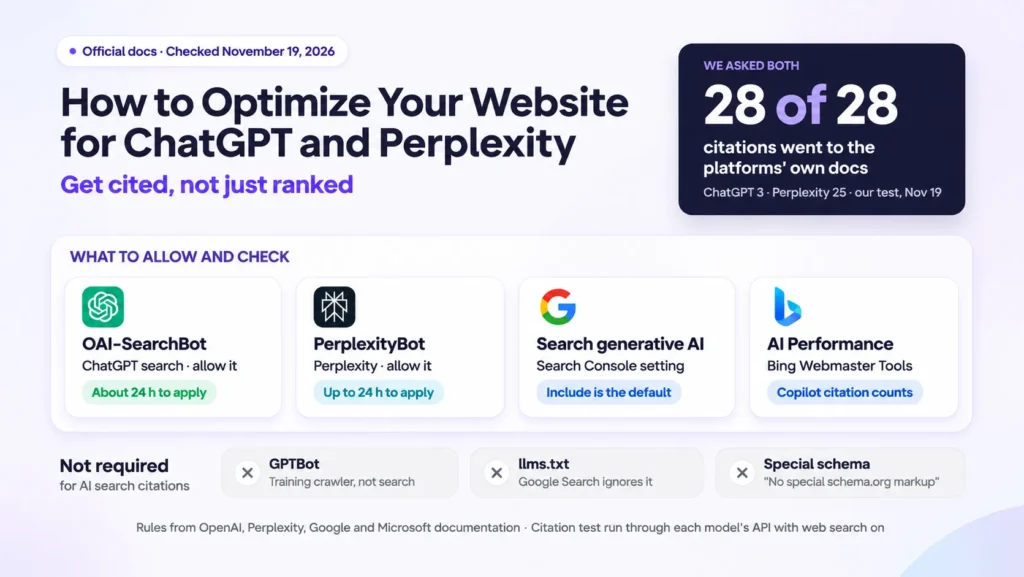
On November 19, 2026, we asked ChatGPT and Perplexity “How do I optimize my website for Perplexity and ChatGPT so my pages get cited?” through OpenSEO’s prompt explorer, which queries the models’ APIs with web search on. ChatGPT (GPT-5.6 Luna) ran searches such as “site:help.openai.com ChatGPT search citations website owners” and “site:docs.perplexity.ai crawler robots,” then cited three OpenAI help pages. Perplexity (Sonar Reasoning Pro) cited 25 URLs, every one of them on help.openai.com, developers.google.com or perplexity.ai. Neither cited this page, and neither cited any blog or agency guide.
One sample isn’t a ranking study, but the lesson is useful. When the platforms document a topic themselves, their documentation is the source to beat, and a page that only restates the docs adds nothing to the answer. A page that adds what the docs leave out, such as a test, a log excerpt, a number from your own analytics or a screenshot of a real configuration, gives the answer something new to cite. Google’s own guide makes the same point: “Creating content that people find unique, compelling, and useful will likely influence your website’s presence in generative AI search in the long run more than any of the other suggestions in this guide.”
AI Ranking Claims vs. What the Platforms Document
Most “how to rank in ChatGPT” advice, including the earlier guide this page replaces, mixes platform documentation with figures from third-party studies. Studies can be useful, but their numbers depend on their samples and aren’t settings you can rely on. Here is how common claims compare with what OpenAI, Perplexity, Google and Microsoft publish.
How ChatGPT, Perplexity, Copilot and Google AI Features Differ
These products don’t share one ranking algorithm, and none of them publishes its weights. What they do document is how site owners control access and eligibility, and that is where the differences matter.
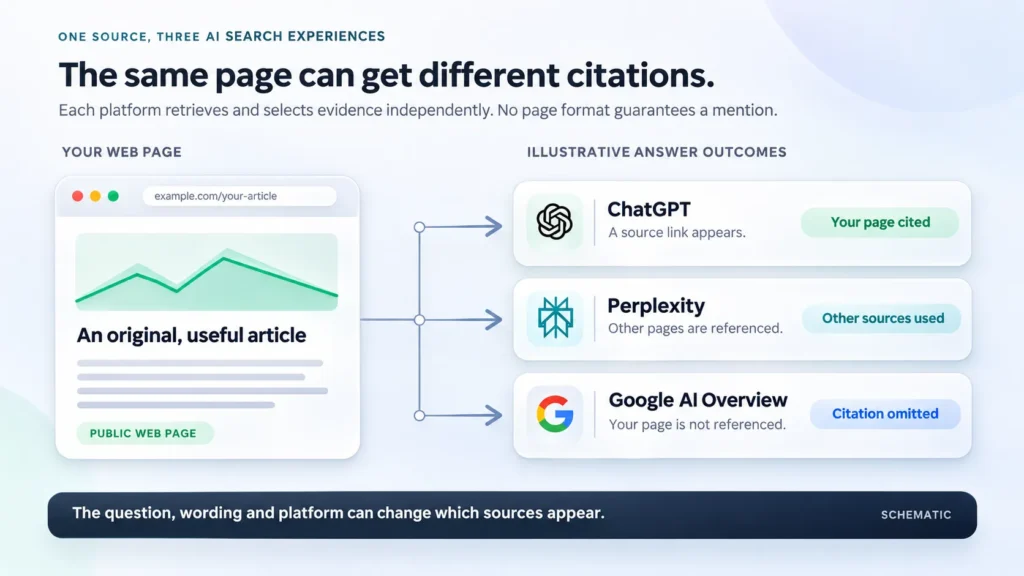
The same page can be cited in one answer and not another, or drop out when the wording changes. That variation doesn’t reveal a hidden freshness weight or a preferred format. Check each platform on its own instead of relying on a single “AI ranking score.”
Make Your WordPress Site Accessible to Search Crawlers
1. Check robots.txt and the right bot names
Open https://yourdomain.com/robots.txt and read the published rules. For search, the names that matter are OAI-SearchBot and PerplexityBot. Don’t confuse OpenAI’s search bot with GPTBot: OpenAI says each setting “is independent of the others,” so a site can allow OAI-SearchBot for search while disallowing GPTBot for training. A simplified example of a permissive search policy is below; it is not a replacement for your existing WordPress robots file.
User-agent: OAI-SearchBot
Allow: /

User-agent: PerplexityBot
Allow: /
Before adding that example, read every existing bot-specific group, private path and hosting rule. A new user-agent group can change how rules apply, so keep the restrictions your site actually needs. These lines grant crawler permission; they don’t override a firewall, a login, a paywall, an IP block or a noindex. OpenAI says it can take “~24 hours from a site’s robots.txt update” for its systems to adjust, and Perplexity gives the same window. See OpenAI’s crawler names and IP ranges and Perplexity’s crawler names and IP ranges.
2. Look beyond robots.txt
If you use Cloudflare, a managed WordPress host or another web application firewall, review bot challenges and blocked-request logs. OpenAI publishes its search bot’s addresses at openai.com/searchbot.json, and Perplexity publishes perplexitybot.json along with sample Cloudflare and AWS WAF rules that match the user agent and the IP range together. Match both rather than trusting a user-agent string alone, and don’t switch off security controls site-wide just to admit crawlers.
Then check that public pages respond normally to logged-out requests, that redirects land on the intended URL, and that the main text loads without a login. Search Console’s URL Inspection tool covers the Google side. A normal browser visit can’t prove that the search crawlers are allowed.
3. Make important pages indexable and readable
For AI Overviews and AI Mode, Google says a page must be indexed and eligible to appear with a snippet. Review noindex, leftover staging protection, canonical URLs, internal links, and whether the main answer is visible text. Preview controls apply here too: nosnippet, data-nosnippet, max-snippet and noindex limit what Google can show from a page. See Google’s AI features documentation.
On WordPress, don’t hide key instructions inside an image or an element that only appears after JavaScript runs. Keep screenshots as supporting evidence, but put the essential explanation in HTML. Google notes it can process JavaScript “as long as it isn’t blocked,” but other crawlers may not render it the same way. Our AI Overviews content guide covers the writing side in more depth.
4. Check Search Console and Bing Webmaster Tools
Google now gives site owners a direct switch: Settings → Search generative AI in Search Console. “Include” is the default, and it lets your pages appear as links in AI Overviews, AI Mode and generative AI features in Discover, and help ground those answers. “Exclude” removes them within 1–2 days after the change goes live, though Google says some content can take longer. A URL-prefix property inherits the setting from its parent domain unless someone changes it. The control doesn’t affect AI training; Google points to Google-Extended for that.
Then verify the site in Bing Webmaster Tools. Bing’s index feeds Copilot, its AI Performance report is the only first-party source of AI citation counts we know of, and Bing recommends IndexNow to report new and updated pages. On WordPress you can use an IndexNow key file at the site root or an SEO plugin feature such as Rank Math’s Instant Indexing module. We set up our IndexNow key while updating this guide and submitted this page the same day.
Write Content That Can Be Verified and Cited
The best content change is rarely more keywords. It’s making the page answer a specific question with enough context and evidence for readers, and any retrieval system, to see what the answer depends on. Google’s guide calls this “non-commodity content”: a first-hand review or an inside look, rather than “7 Tips for First-Time Homebuyers” built from common knowledge.
Lead with the answer, then substantiate it
Instead of opening a WordPress tutorial with three paragraphs about the history of automation, start with what works and the main limitation. Then give screenshots, code, versions, test conditions and links to documentation. A direct answer helps readers even if no AI service ever cites the page.
Vague answer
“Use the latest SEO strategies to improve visibility across AI search engines.”
Checkable answer
“ChatGPT search only shows sites that allow OAI-SearchBot, and OpenAI says a robots.txt change takes about 24 hours to apply.” Source: OpenAI.
Show your work and who is responsible
When you publish a comparison or tutorial, name the author or editor, explain how the information was gathered, and tie important claims to primary sources. If you tested a product, say what you tested and when. If you only read vendor documentation, say that. An author bio, accurate dates and references help readers judge reliability; they are not a proven formula for any AI system.
Original measurements, screenshots with context, reproducible prompts, code and stated limitations make a page more useful than a rewritten summary. This page’s own example is the prompt test above: the docs can’t say what ChatGPT cited on November 19, 2026, but we can. Our E-E-A-T guide covers authorship and evidence without treating them as guaranteed citation signals.
Cover the follow-up questions, not every variation
Because AI answers fan out into related searches, a page that also answers the obvious follow-up questions has more chances to be picked. Google draws a line, though: creating separate pages for every variation of a query “primarily to manipulate rankings or generative AI responses in Google Search violates Google’s scaled content abuse spam policy.” One thorough page per real question beats twenty near-copies. Google also says you don’t need to rewrite pages “just for generative AI search” or chase every long-tail phrasing, because its systems understand synonyms.
Update for accuracy, not just freshness
Review articles when a platform changes features, prices, crawlers or policies. Correct the facts, note meaningful changes, and keep the publication date separate from the modified date. Changing dateModified without changing the content isn’t a strategy. When you do update a page, IndexNow tells Bing and the other participating engines right away; Google relies on its own crawling and the URL Inspection tool’s indexing request.
Use Schema Markup Correctly (No AI Shortcut)
Accurate structured data helps Google understand an article’s author, headline and dates, and Google still recommends it for rich results. It is not a documented shortcut to ChatGPT or Perplexity citations. Google’s generative AI guide says “Structured data isn’t required for generative AI search, and there’s no special schema.org markup you need to add.” Be wary of claims that FAQPage, HowTo, knowsAbout or speakable are preferred by AI systems. Google’s Article documentation describes the supported use.
Here is a simplified illustration of an Article object. It’s a teaching example, not markup to paste into a live page. Replace every value and include only fields that match visible, real content:
{
  "@context": "https://schema.org",
  "@type": "Article",
  "headline": "An Accurate, Visible Article Title",
  "author": {
    "@type": "Person",
    "name": "Actual Author Name",
    "url": "https://example.com/about/author/"
  },
  "datePublished": "2026-08-21",
  "dateModified": "2026-11-19"
}
Important for WordPress: if Rank Math or another SEO plugin already outputs Article, WebPage or author schema, configure it there instead of pasting a second, competing version into the post. Check the canonical URL, author and dates in the generated output, then validate the page with Google’s Rich Results Test or the Schema Markup Validator.
Google documents speakable as a beta feature for reading news aloud on Google Assistant devices, for U.S. English users, not as a boost for AI Overviews. See the speakable documentation. FAQ markup no longer produces a rich result either: Google stopped showing FAQ rich results on May 7, 2026, and removed the documentation on June 15, as its documentation updates page records. A visible FAQ section can still help readers, and Bing lists “Clear headings, tables, and FAQ sections” among the ways to make content easier for AI systems to reference.
What llms.txt Can and Cannot Do
llms.txt is a proposal, now in version 2 at llmstxt.org, for a Markdown file that points AI agents to clean Markdown copies of a site’s key pages. Its author says thousands of sites publish one and that OpenAI, Anthropic and Google publish llms.txt files for their developer docs. That makes it useful for agents that read documentation, such as coding assistants. It is not a replacement for robots.txt, a sitemap, canonical tags or access controls, and it doesn’t tell any search engine to cite you.
Google is explicit: you don’t need llms.txt or other AI text files to appear in Google Search, including its AI features, because “Google Search itself doesn’t use them,” and maintaining one “will neither harm nor help your site’s visibility or rankings in Google Search.” OpenAI’s and Perplexity’s crawler pages don’t mention it. If you keep one, treat it as documentation for tools that read it, not as an SEO requirement.
Measure AI Search Visibility Without Mixing Up Metrics
A Google impression, a referral visit and a link inside an AI answer are different events, so don’t add them together. Two first-party reports now cover part of the AI side: Google’s Generative AI performance report and Bing’s AI Performance report. For ChatGPT and Perplexity, you still have to sample answers yourself.
For scale, here is our own site. From August 20 to November 18, 2026, GA4 recorded 8 sessions from chatgpt.com / ai-assistant, 138 from google / organic, and none from Perplexity. Small numbers like these are normal for a young site, and they’re the reason to track citations directly instead of waiting for referral traffic to tell you.
A simple weekly tracking routine
- Pick five to ten questions your customers really ask, including variations such as “how to optimize website for ChatGPT and Perplexity” and “how to optimize website for Perplexity.”
- For each prompt and platform, record the date, the exact wording, whether your domain was cited and which URL. Use the same process every week.
- Note which sources get cited instead of you. If they are the platforms’ own docs, add something the docs don’t have; if they are competitors, compare what their page offers that yours doesn’t.
- Check Search Console’s Generative AI performance and Performance reports, and Bing’s AI Performance, over weeks rather than days.
- Check analytics for landing-page sessions from AI referrals, kept separate from Google organic visits.
- Log every material edit to the page, then reassess after several weeks. Don’t credit a change to one factor without evidence.
To dig into Google AI Overviews exposure specifically, our AI Overviews traffic analysis adds context. For the broader picture, see our Answer Engine Optimization guide.
WordPress Implementation Checklist
If you run a WordPress site, this order keeps the work practical and lowers the risk of breaking something that already works.
- Back up first. Take a backup or use staging before changing SEO plugins, bot rules or security settings.
- Inspect the exact URL in Search Console. Review the canonical, indexability and the HTML Google retrieves. Look for unintended
noindexon important pages. - Check Settings → Search generative AI. Confirm it includes your site, and that no URL-prefix property overrides the domain setting.
- Open your robots.txt file. Confirm the site’s policy against the documented
OAI-SearchBotandPerplexityBotrules, and decide onGPTBotseparately. Don’t overwrite unrelated path restrictions. - Check CDN and security logs. See whether legitimate crawler requests are challenged or blocked, and use the official IP lists when you change allowlists.
- Verify the site in Bing Webmaster Tools and set up IndexNow. A key file at the site root or an SEO plugin’s indexing module both work; submit pages after you update them.
- Review the first screen of your target pages. Answer the exact question early, state your assumptions, cite sources and keep the key instructions in HTML.
- Review Rank Math output. Keep one coherent set of metadata and structured data, with the right author, title, dates and canonical URL.
- Set a baseline. Save your Search Console and Bing numbers and a small log of AI-answer citations before you judge the changes.
If you’d rather hire this work out, our comparison of answer engine optimization services lists what 10 agencies deliver, which publish prices, and on what terms.
Frequently Asked Questions
How do I optimize content to appear in ChatGPT and Perplexity answers?
Let both search crawlers in, then give them something worth citing. Allow OAI-SearchBot and PerplexityBot in robots.txt and at your firewall, keep the answer in plain HTML near the top of the page, and add evidence that the platform documentation and competing pages don’t have, such as your own tests, data or screenshots. OpenAI says placement is not guaranteed and neither platform publishes a recipe for citations, so check a fixed set of prompts every few weeks instead of assuming an indexed page gets cited.
How do I optimize my website for Perplexity?
Allow PerplexityBot in robots.txt and let its published IP ranges through your firewall; Perplexity documents Cloudflare and AWS WAF rules for this, and changes can take up to 24 hours. If you block PerplexityBot, Perplexity says it won’t index the page text but may still keep the domain, headline and a brief factual summary. Perplexity-User, which fetches pages when someone asks a question, generally ignores robots.txt. After that, the work is the same as for any search engine: a clear answer, sources and facts you keep current.
How do I rank in ChatGPT?
There is no fixed position to rank for. ChatGPT search rewrites a question into one or more search queries, picks sources and cites them, and OpenAI says it ranks results using multiple factors and that placement is not guaranteed. What you control is eligibility, by allowing OAI-SearchBot and OpenAI’s IP ranges, and whether your page answers the question better than the sources it competes with. Track it by running the same prompts over time and recording which URLs get cited.
Does ChatGPT search use Bing?
Partly. OpenAI says ChatGPT search sometimes partners with other search providers and lists Microsoft’s privacy statement among them, but it also runs its own crawler, OAI-SearchBot. The only eligibility step OpenAI documents is allowing OAI-SearchBot and its IP addresses. Verifying your site in Bing Webmaster Tools is still worth it, because Bing indexes your pages for Copilot and reports AI citations in its AI Performance report.
Do I need to allow GPTBot to appear in ChatGPT search?
No. OpenAI says its robots.txt settings are independent: OAI-SearchBot decides whether a site can appear in ChatGPT search answers, and GPTBot covers content that may be used to train its models. You can allow OAI-SearchBot and disallow GPTBot. A site that blocks OAI-SearchBot won’t be shown in ChatGPT search answers, though it can still appear as a navigational link.
Which schema type is best for AI search citations?
None is documented as best. Google says structured data isn’t required for its generative AI features and that no special schema.org markup is needed, and neither OpenAI nor Perplexity names a schema type in its crawler documentation. Use Article or BlogPosting markup that matches the visible page, and keep FAQ sections for readers: Google stopped showing FAQ rich results on May 7, 2026.
Is llms.txt required for ChatGPT, Perplexity or Google AI Overviews?
No. llms.txt is a proposal, now in its second version, for pointing AI agents to Markdown copies of your key pages. Google says Google Search ignores llms.txt files and that keeping one neither helps nor harms visibility, and the OpenAI and Perplexity crawler pages don’t mention it. It can still help tools that read it, such as coding agents fetching documentation.
How can I tell whether AI search optimization is working?
Use the reports each platform offers and keep them separate. Search Console’s Generative AI performance report shows impressions in AI Overviews and AI Mode by page, country, date and device. Bing Webmaster Tools’ AI Performance report shows citations in Copilot and Bing’s AI summaries, with sample grounding queries. Analytics show referral visits; in our GA4, ChatGPT visits appear as chatgpt.com / ai-assistant. For ChatGPT and Perplexity answers themselves, run a fixed set of prompts, note the date and record which URLs are cited.
Conclusion
Start with one page that already earns impressions. Check crawler access, Google indexability and the Search generative AI setting first, then improve the answer and add evidence only you can provide, without changing the URL. Record a baseline in Search Console, Bing and a small prompt log, make the changes, and review the same signals after the crawlers have had time to return. When we asked the question this page answers, the platforms cited their own documentation; that is the bar a page like this has to clear, and it’s the bar we’ll keep measuring against.
References
Platform rules in this guide come from the operators’ own documentation, read on November 19, 2026. Third-party figures are labeled as such where they appear.
- OpenAI — Overview of OpenAI Crawlers
- OpenAI Help Center — Searching the Web with ChatGPT
- Perplexity — Perplexity Crawlers
- Perplexity Help Center — How Does Perplexity Follow robots.txt?
- Google Search Central — Optimizing Your Website for Generative AI Features on Google Search
- Google Search Central — AI Features and Your Website
- Search Console Help — Search Generative AI Control
- Search Console Help — Generative AI Performance Report
- Google Search Central — Latest Documentation Updates (FAQ rich results, llms.txt)
- Google Search Central — Article Structured Data
- Google Search Central — Speakable Structured Data (Beta)
- Bing Webmaster Blog — Introducing AI Performance in Bing Webmaster Tools
- IndexNow
- llms.txt — The /llms.txt File, v2 (proposal)