
Most WordPress publishers are running a workflow by accident. The keyword research happens in one tab. The brief lives in a Notion page nobody revisits. The draft comes back from Google Docs with broken heading levels and a paste that doubles every line break. SEO metadata gets added in the final three minutes before hitting publish. And the moment an article goes live, it disappears from the team’s attention — until someone notices it has never ranked for anything and suggests “we should probably update it.”
That description isn’t a worst-case scenario. It’s the median reality for solo publishers and small agencies managing content across three to five disconnected tools. The WordPress Content Workflow problem isn’t that people don’t know what stages exist — it’s that no one has formalized those stages into a connected system with defined inputs, outputs, and human decision points at every gate. This article builds that system. Eight stages, each with a named input, a named output, a role, and a quality gate. The two stages most published workflow guides skip entirely — Opportunity Identification (before the brief) and the Performance Review Loop (after publication) — get the same treatment as every other stage, because skipping them is where most content failure originates. For the approval-gate detail — post statuses, team roles, multi-author handoffs — see the dedicated Editorial Workflow in WordPress guide. For the AI writing process in depth, the How to Write SEO Articles With AI guide covers it fully. This article is about the operational system those two resources sit inside.
A WordPress Content Workflow is not a writing workflow. It is not an approval workflow. It is an operational system that connects discovery, research, production, quality control, delivery, and post-publish learning into a single repeatable loop — running inside WordPress, with humans controlling every decision point that matters.
Key Takeaways
- Eight formal stages: Opportunity Identification, Research and Source Verification, Editorial Brief, Writing and SEO Packaging, Visual Production, WordPress Build and Human Review, QA and Pre-Publish Check, and Performance Review Loop — each with a defined input, output, and quality gate.
- Two stages most workflows skip: Opportunity Identification (before the brief) and the Performance Review Loop (after publication) are where most content failure originates — both are treated here as formal, gated stages.
- Fragmentation has specific costs: Docs-to-WordPress paste breaks formatting; SEO metadata written in Docs never reaches WordPress fields; Slack feedback disappears in threads. The full eight-stage map is in the table below.
- Post-publish loop is not optional: Triggered by Google Search Console data at 90 days, the refresh decision — update, expand, rewrite, or retire — is a formal, schedulable workflow event with specific metric thresholds, not a vague periodic task.
The Full WordPress Content Workflow at a Glance
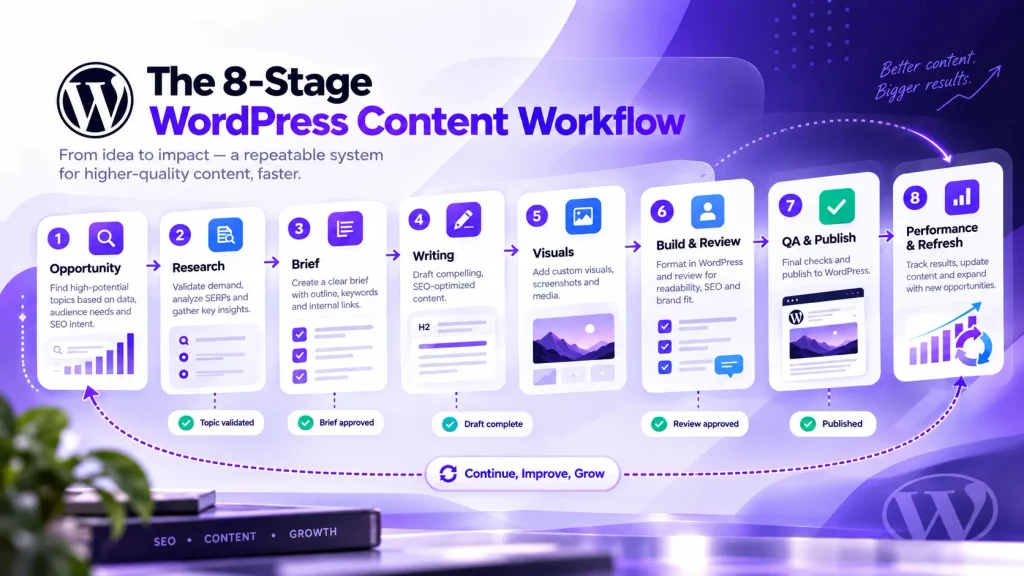
Before you dive into each stage, the table below gives you the map. Every H2 section after this expands one row. Print it, paste it into your project management tool, or pin it to your WordPress dashboard — it’s the reference point the rest of this article builds on.
| # | Stage | Input | Output | Accountable Owner | Quality Gate |
|---|---|---|---|---|---|
| 1 | Opportunity Identification | Keyword data, GSC opportunities, competitor and SERP analysis | Validated topic, target keyword, search intent, and opportunity rationale | SEO Lead / Content Strategist | Search intent confirmed; SERP fit and opportunity rationale documented |
| 2 | Research & Source Verification | Validated topic and research brief | Verified source set, fact inventory, and claims matrix | Researcher / Writer | Material factual claims are supported by relevant, live, and authoritative sources |
| 3 | Editorial Brief & Angle | Research output and verified source set | Structured brief with outline, editorial angle, information-gain opportunities, audience notes, and tone guidance | Editor / Content Strategist | Intent, angle, scope, and differentiation approved before drafting begins |
| 4 | Writing & SEO Packaging | Approved editorial brief and verified sources | Complete draft with body copy, title, meta description, slug, links, and supporting SEO elements | Writer / Editor | Draft matches the approved brief; factual claims are verified and required SEO elements are complete |
| 5 | Visual Production | Approved draft and visual requirements | Featured image, supporting visuals, screenshots, diagrams, and descriptive alt text | Designer / Editor | Visuals are relevant, appropriately sized, compressed, delivered in a modern web format, and include descriptive alt text where needed |
| 6 | WordPress Build & Human Review | Approved draft, visuals, and SEO assets | Post assembled in WordPress with formatting, metadata, links, media, and editorial feedback resolved | Editor / Publisher | WordPress preview is correct; links, media, metadata, and editorial requirements are complete |
| 7 | QA & Pre-Publish Check | Fully assembled WordPress post | Go / no-go publish decision | Editor / Publisher | Title, metadata, canonical settings, structured data, links, media, and final rendering verified |
| 8 | Performance Review & Refresh Loop | Published URL and accumulated performance data | Performance assessment and documented next action: maintain, expand, update, rewrite, merge, or retire | SEO Lead / Editor | Enough performance evidence exists to support the next action; the decision is logged and the next review is scheduled when appropriate |
Two structural gaps explain most content that ranks nowhere and never gets fixed. Stages 1 and 2 — Opportunity Identification and Research — are almost always treated as pre-workflow activities, informal tasks someone does before the “real work” begins. They are not. They are the first two formal gates of the system, each with a named output and a quality check before the next stage opens. And Stage 8 is almost always missing entirely. A workflow that ends at “publish” is a production line without a feedback loop. The 90-day performance review is not a content marketing tip — it is the mechanism that makes publishing a learning system instead of a content landfill.
Stage 1: Opportunity Identification and Brief Construction
Here is the distinction that separates a functioning WordPress Content Workflow from a content calendar: a calendar item says “write about X.” A workflow-ready brief says “write X because it targets this specific intent gap, the competing articles miss Y, and the differentiating angle is Z, verified against current SERP structure.” The second is a gate with a deliverable. The first is a wish with a due date.
Keyword discovery and brief construction are the first two formal stages of the workflow — not activities that happen before the workflow starts. The output of Stage 1 is a validated keyword with confirmed search intent, a volume-to-difficulty ratio within the site’s current authority range, and a documented reason why this article belongs in the production queue ahead of other candidates. Until that output exists, the brief stage cannot open. That is what makes it a gate rather than a suggestion.
A completed brief — the Stage 1 output that unlocks Stage 2 — includes: the target keyword and its intent classification, a SERP analysis identifying who ranks and why, the article’s differentiating angle (what it does differently from the top-5 results), required sources, planned internal links, and a word-count range grounded in what currently ranks. Tools like Contentosapp run both stages natively inside WordPress — keyword research and brief generation happen in the editor, connected to the post, not in a separate tool that gets abandoned when drafting starts. The AI Content Case Study: 25 Articles in 25 Days shows what a tight upstream process produces at volume.
Stage 2: Research and Source Verification
Research is not optional background reading. It is a formal stage with a specific deliverable: a verified source set and a claims matrix — a list of every factual assertion the article will make, each matched to a citable, live, authoritative source before a single sentence of draft copy is written. The difference between research and reading is that research has an output you can hand to the next person in the workflow.
The question most practitioners get wrong is what counts as a citable source for an SEO article. Government databases, academic institutions, regulatory bodies, primary research publications, and official platform documentation are citable. Secondary summaries — blog posts that cite other blog posts, aggregator articles, marketing pages — are not, even when they appear on high-DA domains. Source quality is not the same as domain authority. An unverified stat from a high-DA site is still an unverified stat, and it creates E-E-A-T risk that a reviewer has to catch downstream. The verification step must happen before drafting, not during it.
WordPress 6.9 introduced block-level Notes, which lets you attach source context to specific content blocks inside the editor — a meaningful native improvement for research and review stages. The feature closes one of the persistent gaps in WordPress’s native workflow tooling: feedback and source references used to live outside the editor, disconnected from the content they referenced. With block-level Notes, a researcher can pin a verified source to the exact block that uses it, and a reviewer can flag a claim at the sentence level. That is infrastructure for a quality-controlled system, not a workaround.
- Every factual claim in the brief has a named source
- Each source is live, authoritative, and directly supports the claim (not a secondary summary)
- Statistics include the publication date — data older than 24 months is flagged for freshness risk
- Claims without a citable source are either cut or reframed as editorial assertions
- Source URLs are pasted into the post draft (as Notes or a draft block) before writing starts
- AI-generated research output has been cross-checked against a primary source — not treated as ground truth
Stage 3: Writing and AI-Assisted Drafting
Writing is the execution stage, not the workflow itself. That distinction matters because most people design their entire production process around the writing stage and treat everything else as peripheral. The brief is done informally. Research is cursory. The post-publish loop doesn’t exist. And then they wonder why the article that took four hours to write is sitting at position 34 six months later.
At the workflow level, AI’s role in writing is well-defined: it executes discrete tasks (expanding the brief into a full draft, generating meta description candidates, suggesting H2 structures) while the human controls angle, voice, and factual accuracy. The workflow gate at this stage is not “is the draft done” — it is “does the draft match the approved brief’s angle, cover the verified sources correctly, and meet the content quality standard before it moves to packaging.” That is a human decision point, and it requires someone to actually open the brief alongside the draft and compare them. The complete AI SEO writing workflow goes deep on prompting structure, fact-checking steps, and iteration — if you want to go further on that specific execution layer, that guide is the right place to continue. This article treats writing as one stage in a larger system.
The three-question review gate that closes Stage 3: Does the draft answer the stated search intent from the brief? Does it use the verified sources correctly, with no AI-hallucinated claims left in place? Does the angle match what was approved at Stage 1? If any answer is no, the draft goes back — not to a generic “needs revision” state, but to the specific earlier stage where the gap originated.
Stage 4: Visual and SEO Packaging
SEO packaging is a stage, not a last-minute checklist. The difference in practice: when it’s a stage, SEO metadata is written during production, by the person who knows the article’s intent best, with time to think. When it’s a checklist item added at publish, it’s written in two minutes by whoever is hitting the publish button, under time pressure, with no review.
Before a post reaches the human review gate, the following must be complete: title tag and meta description written to intent and within character limits, featured image with descriptive alt text, internal links placed and anchored to the correct target articles, schema markup noted where applicable, and canonical URL set if needed. These are not optional polish items. Title and meta description directly determine click-through rate. Alt text is an accessibility requirement and an SEO signal. Missing internal links represent lost PageRank flow. None of these should be decided under publish pressure.
The practical recommendation here is structural: treat the SEO packaging checklist as a block template or a WordPress custom field, not a separate document. When the packaging lives in the same place as the content — attached to the post, not in a Notion sidebar — it travels through every review stage. The reviewer sees it. The publisher checks it. It doesn’t get skipped because no one remembered to open the external checklist. That is a workflow design decision, not a discipline problem.
Fragmented Workflow vs. WordPress-Centered System: What the Handoffs Actually Cost You
The case against fragmented content stacks isn’t that they’re messy. It’s that each tool handoff is a specific failure point that introduces a specific, recoverable but often unrecovered error. A pattern practitioners consistently identify: the copy-paste step from Google Docs into WordPress is where the system breaks — SEO metadata decided during drafting never makes it into the published post’s actual fields. That’s not a coordination failure. It’s a structural consequence of keeping the content and the metadata in different systems.
Here are the exact failure modes, labeled by risk category:
| Handoff Point | Fragmented Stack Failure | Risk Category |
|---|---|---|
| Keyword data → Brief | Keyword data lives in a spreadsheet or SEO tool, while the reasoning behind search intent, prioritization, and angle may never be carried into the brief | Strategy risk — the brief loses the rationale behind the target topic and angle |
| Research notes → Writer | Sources and research notes live in separate Docs, Notion pages, or browser tabs; the writer may miss important evidence or lose the connection between a source and the claim it supports | Evidence risk — unsupported or poorly sourced claims can enter the draft |
| Docs draft → WordPress | Formatting can degrade during transfer: headings, spacing, lists, links, tables, or other elements may require rebuilding or correction in WordPress | Production risk — the published post may differ from the reviewed source document |
| SEO metadata → Published post | Approved title tags, meta descriptions, slugs, or schema notes may live in a document or comment and require a separate manual transfer into WordPress SEO fields | SEO implementation risk — approved metadata may be omitted, altered, or left inconsistent with the final article |
| Feedback → Writer | Feedback spread across Slack, email, comments, and documents can lose context as the draft changes, making it harder to track what was requested and what was resolved | Review-traceability risk — editors may lack a clear record of decisions and revisions |
| Published post → Performance data | Performance is checked manually or inconsistently; without a scheduled review trigger, declining impressions, weak CTR, or emerging query opportunities can remain unnoticed | Performance risk — optimization opportunities may be discovered late or missed entirely |
A WordPress-centered workflow doesn’t fix these problems through better communication or stronger discipline. It fixes them by removing the handoffs. When the brief, draft, research notes, SEO metadata, editorial feedback, and post status all live inside WordPress — attached to the same post object — there is no transfer step where information gets lost. The VIP Workflow Plugin from Automattic demonstrates this at the enterprise level: custom statuses and transition notifications that keep every stage inside the WordPress environment, with no external coordination layer required.

Stage 5: Human Review and the Publish Gate
The human review stage has one purpose: to verify that the content matches the brief, the sources are correctly used, the SEO packaging is complete, and the publish decision is intentional. It is not a spell-check. It is not a style pass. Those things happen earlier, during writing. The review gate exists to catch structural failures — a draft that drifted from the approved angle, a factual claim with no source, a meta description that was never written.
WordPress’s native tools support this gate without any additional plugin. Post statuses — Draft, Pending Review, Scheduled, Published — provide the handoff structure. WordPress’s built-in roles and capabilities define who can move a post through each status transition: Contributors submit, Authors publish their own posts, Editors publish anyone’s. For teams needing custom intermediate statuses — “In Review,” “Approved,” “Needs Revision” — the Editorial Workflow in WordPress guide covers the full status and approval architecture in detail, including plugin options for teams who need more than core supplies.
The publish gate itself is a three-check sequence. First: does the content match the approved brief? Second: are all sources cited and verified? Third: is SEO packaging complete and correct in WordPress — not in a Google Doc, but in the actual Yoast or Rank Math fields on the post? If any check fails, the post returns to the specific upstream stage where the failure originates, not to a generic revision queue.
Stage 6: Publication and the Performance Clock
Publication is a handoff point, not an endpoint. The moment a post publishes, its performance clock starts. That framing changes how you treat the publication step. Instead of “we’re done,” the question becomes “what is the earliest date we will pull Search Console data for this URL?” Write that date down. Schedule it as a task. The 90-day mark is the earliest meaningful signal for a typical SEO article — enough time for indexing, initial ranking movement, and impression data that reflects real query matching, not crawl variance.
Before hitting publish or scheduling, run a final technical pass: canonical URL confirmed, all internal links live and pointing correctly, featured image published with the correct alt text, any structured data active, and the URL queued in Google Search Console for inspection. The inspection request doesn’t guarantee faster indexing, but it signals the URL to Google’s crawl prioritization queue — a low-effort, zero-cost step. Teams running automated publishing pipelines will find the auto-publishing AI content to WordPress guide directly useful — it covers scheduling logic and pre-publish QA checks in an automated context where the manual steps described here happen programmatically.
The scheduling decision is a workflow feature, not a workaround. If a post has passed every gate but publication timing is strategic — managing cadence, building a topical cluster, coordinating internal links from posts that haven’t published yet — use WordPress’s native scheduling. The quality gate has already been passed. The post is ready. Scheduling it is a production decision, not a sign of delay.
Stage 7: The Performance Review and Content Refresh Loop
This is the stage that most published workflow guides either skip or mention in a single paragraph. “Keep your content fresh.” “Update old posts.” That framing treats the post-publish loop as a vague content maintenance habit. It is not. It is a formal, recurring workflow stage with specific triggers, defined decision criteria, and a clear output: a logged refresh decision that either spawns a new production task or closes the post’s review cycle until the next scheduled check.
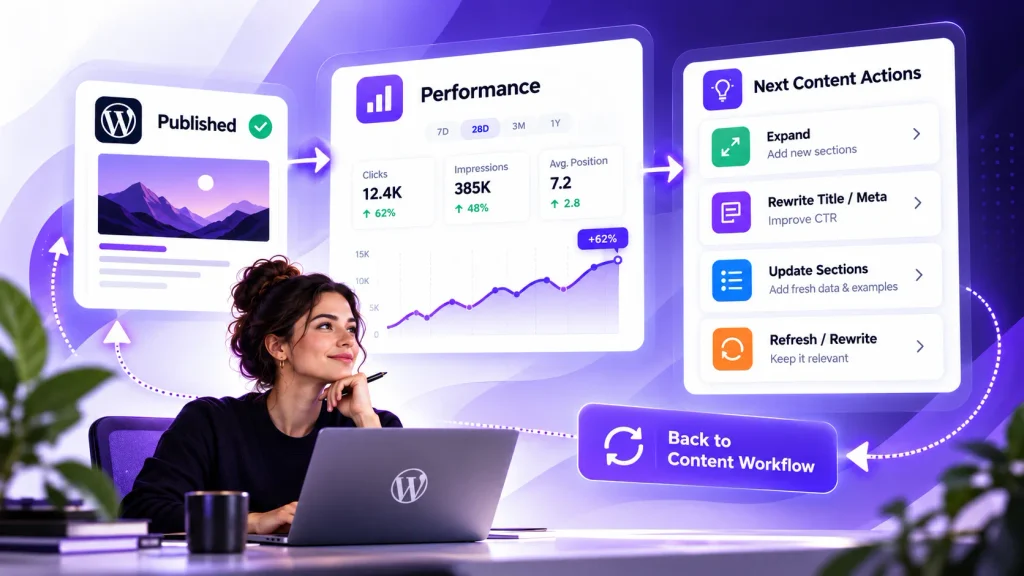
The review triggers at 90 days post-publish for a new article, and quarterly thereafter. The inputs are Google Search Console data — specifically the Search Performance report, which provides impressions, average position, and click-through rate at the query and page level. Google’s guidance on creating helpful content makes clear that post-publish quality assessment is an ongoing obligation, not a one-time check — confirming that the refresh loop is a production requirement, not a periodic nice-to-have.
The decision framework below is an operational construct — not rules prescribed by Google, but a defensible, threshold-based system you can schedule and delegate. Treat the thresholds as editorial heuristics: adjust them to your site’s authority baseline, niche competitiveness, and typical indexing speed before applying them mechanically.
| GSC Signal | Review Window / Evidence | Recommended Action |
|---|---|---|
| Impressions are growing and average position is approaching page one | Typically after 60–90 days, once query and page data show a consistent upward trend | Expand missing subtopics, strengthen relevant internal links, and improve sections already attracting impressions |
| Promising rankings but CTR is weaker than expected | Enough impressions have accumulated to make the CTR pattern meaningful for the page and query set | Review the title tag and meta description for intent alignment, clarity, differentiation, and SERP appeal; test revisions where appropriate |
| Clicks or impressions are declining across comparable periods | A persistent decline across multiple comparable periods, rather than a short-term fluctuation | Run a content and SERP audit: check freshness, competing pages, search-intent changes, lost query coverage, and internal-link support |
| Little impression growth and weak alignment with the intended query set | Roughly 90–180 days, depending on niche, crawl frequency, competition, and the site’s existing visibility | Reassess search intent and editorial angle; consider expanding, rewriting, merging with a stronger page, or redirecting when consolidation makes sense |
| Unexpected query clusters are consistently gaining impressions | Repeated query-level signals show that Google is associating the page with an adjacent topic or intent | Evaluate whether the queries fit the page’s purpose; if they do, expand the relevant sections and reinforce the topic with appropriate internal links |
The loop’s most important structural feature is what a rewrite decision triggers: it spawns a new brief, which restarts the workflow from Stage 1. The angle was wrong, or the keyword target was off, or the SERP has changed enough that the original approach no longer fits. A rewrite is not a “bigger update” — it is a new production cycle for a URL with an existing authority baseline. That is a faster path to ranking than starting a brand-new URL, and it is the mechanism that makes a WordPress Content Workflow a loop rather than a line.
Frequently Asked Questions
What is a WordPress content workflow?
A WordPress Content Workflow is a stage-by-stage operational system that governs how content moves from keyword opportunity through research, brief, writing, visual production, review, publication, and post-publish performance analysis. Unlike a simple editorial calendar or an approval checklist, a workflow defines the input, output, accountable owner, and quality gate at each stage — so every article produced follows the same repeatable path regardless of who is working on it.
What is the difference between an editorial workflow and a content workflow in WordPress?
A content workflow covers the full production lifecycle: from deciding what to write (Opportunity Identification) through writing, packaging, review, publishing, and ongoing performance analysis. An editorial workflow is a subset of that — specifically the approval and handoff mechanics: who reviews a post, what statuses it moves through, who has permission to publish. Both are necessary. The Editorial Workflow in WordPress guide covers the approval architecture in detail; this article covers the broader system those approvals sit inside.
How do I set up a content workflow in WordPress without a large team?
A solo operator or two-person team can run a functional workflow using WordPress’s native tools: Draft and Pending Review statuses to separate writing from publication, the block editor for drafting and SEO packaging in a single environment, Google Search Console for post-publish performance data, and a simple task in your calendar for the 90-day review trigger. The stages are the same whether you have one person or ten — what changes is how you split the roles, not whether the gates exist.
How do I manage content approvals in WordPress without a plugin?
WordPress core ships four post statuses (Draft, Pending Review, Scheduled, Published) and four content roles (Contributor, Author, Editor, Administrator) that cover the basic approval flow without any additional plugin. A Contributor submits a draft; an Editor reviews and publishes. For teams needing custom intermediate statuses — “In Review,” “Approved,” “Needs Revisions” — the VIP Workflow Plugin from Automattic is a production-grade, first-party option. For simpler teams, Edit Flow provides modular additions including custom statuses, editorial comments, and a content calendar.
How do I use Google Search Console data to decide when to refresh a post?
Pull the Search Performance report for the specific URL at 90 days post-publish. Check average position, impressions, and CTR for the target keyword and related queries. Use the thresholds in the decision framework above as a starting baseline — adjust them to your niche and site authority. Position 11–20 with growing impressions points to a content expansion task; position 4–10 with low CTR points to a title and meta rewrite; position 30+ with no impression growth after 180 days suggests a rewrite with a revised keyword target or a redirect to a stronger related page. Schedule a calendar task for the review rather than checking ad hoc — the consistency is what makes the loop repeatable.
How do I create a repeatable content workflow for SEO that scales?
The key is separating decisions from execution. Decisions — what to write, what angle to take, what sources to use, whether the draft passes the quality gate — are human-owned and stage-gated. Execution — drafting, generating meta descriptions, producing image alt text — can be assisted or automated at the appropriate stages. When those two categories are clearly separated, adding AI tools or additional writers scales the execution layer without degrading the decision quality. The system scales; ad-hoc content production does not.
At what stage should AI be used in a WordPress content workflow?
AI adds the most value at the execution stages: Stage 1 (keyword clustering and SERP gap analysis), Stage 4 (drafting from a detailed brief, generating meta description candidates), Stage 5 (image description drafts), and Stage 8 (content gap analysis for the refresh decision). AI should not own the decision points: angle selection, source verification, the three-question review gate at Stage 3, and the refresh decision at Stage 8 are human responsibilities. Using AI at the execution stages while keeping humans at the decision points is what separates a quality-controlled workflow from AI slop at scale.
The eight-stage system in this article is operational, not theoretical — you can map your current process against it today and identify exactly where your handoffs break. Most publishers will find the same two gaps: the upstream stages treated as informal tasks before the “real workflow,” and the post-publish loop that simply doesn’t exist. Fix those two structural holes and the rest of the system — writing, packaging, review, publication — runs on a foundation that actually produces compounding results. Start with Stage 1. Build the brief as a formal gate. Set the 90-day calendar task for every post you publish this month. The system works when you treat every stage as mandatory, not when you run the ones that feel productive and skip the ones that feel like overhead.
References
External sources
- GitHub – Automattic/vip-workflow-plugin: This WordPress plugin adds additional editorial workflow capabilities to WordPress. · GitHub — https://github.com/Automattic/vip-workflow-plugin
Related content
- Editorial Workflow in WordPress: A Step-by-Step System From Idea to Publish — Contentosapp
- How to Write SEO Articles With AI: The Complete Workflow That Actually Ranks — Contentosapp
- How to Auto-Publish AI Content to WordPress (Without Becoming a Spam Blog) — Contentosapp
- AI Content Case Study: 25 Articles in 25 Days on WordPress — Real Numbers at Day 25 — Contentosapp