Claude SEO means using Anthropic’s Claude, together with skills and your own data, for SEO audits, keyword triage and content briefs. Ask Claude to audit a website with nothing attached and you’ll get a confident, nicely formatted report in under a minute. Some of it will be true. Some of it will be invented, and nothing on the page tells you which is which.
The fix is not a better prompt. It’s a rule that runs through every step of this article: Claude reads and reasons over the data you give it, and it does not know search volume, keyword difficulty or rankings on its own. Anthropic’s own seo-audit skill says as much, telling you to connect an SEO tool via MCP when you need volume and difficulty data. Google puts the underlying reason plainly: generative models predict a likely sequence of words and don’t retrieve facts.
So the work is to feed Claude real exports, make it show its evidence, and check the output by hand. Done that way, you get research-backed audits and briefs that can become helpful content. Done carelessly, you get generic AI filler with a spreadsheet’s formatting.
This guide has five parts. First, what Claude can and can’t do for SEO. Second, a five-step audit you can run on exported data. Third, skills: the three options, and how to vet one before it touches your files. Fourth, which plan and data connector you actually need. Fifth, the workflow we use on this site, including the time a connector failed and what we did about it.
You should be comfortable with Search Console and have some SEO tool, even a free one. You don’t need to be a developer. And nothing here promises rankings or traffic. It’s a method for producing audits you can trust enough to act on.
What Claude can and can’t do for SEO
Can Claude do SEO for a website? For analysis, structure and drafting over data you provide, yes. For facts it can’t know, no. The line between those two is the whole game, and it’s easier to see in a table than in a paragraph.
Read the table as a division of labor. The first column is what you get if you open a chat and ask. The second is what changes when you give Claude exports or connect a data source. The third is the part that stays with you.
| Task | Claude alone | With your data or a connector | What a human must check |
|---|---|---|---|
| On-page and technical audit | A generic checklist, partly from web search. No site-specific truth. | Reads a crawl file and Search Console export, and quotes the rows and URLs behind each issue. | Open the top findings by hand. |
| Keyword research and triage | Can cluster and group by intent the keywords you paste in. | Triage against your real impressions and positions from Search Console. | Compare any tool figure with Search Console. |
| Search volume, keyword difficulty and rankings | No reliable figures. Any number is a guess. | Real numbers only from an SEO tool or a connector, such as Semrush via MCP. | Compare the number with Search Console impressions. |
| Content brief | Can structure and draft. | Better grounded when you supply sources, SERP notes and brand voice. | Fact-check claims, titles, meta descriptions, schema and alt text. |
| Cannibalization check | Can reason over pages you paste in. | Compares your page list and Search Console queries. | Decide which post to update. |
| Reading Search Console exports | Can’t see your account. | Reads Pages and Queries exports and flags pages with impressions but few clicks. | Spot-check rows against the Search Console interface. |
| Fact and source checks | May state claims it can’t support. | Quote-first checks against sources you provide. | Open each source yourself. |
The “what a human must check” column isn’t politeness. It maps to Google’s guidance, which says it’s critical to manually fact-check and review AI-generated content before publishing, including title elements, meta descriptions, structured data and image alt text. The same page notes that generative AI can be useful for researching a topic and adding structure to original content. Both statements hold at once.
Why search numbers must never come from Claude’s memory
A search volume figure looks like a fact, which is exactly why it’s dangerous. If Claude gives you “2,400 searches a month” without a connected tool, it has produced a plausible-sounding number, not a measurement. Anthropic’s seo-audit skill behaves accordingly: with no SEO tool connected, it falls back to web search and tells you to connect Ahrefs or Semrush for volume and difficulty.
Treat that as the template for everything else. Wherever a claim could be measured, make Claude point to the measurement. Wherever it can’t be measured from your data, you want the answer “not in the data”, and the next section shows how to get it.
How to use Claude for SEO audits, step by step
Here’s the audit process we’d hand to any teammate. It works on one page or a whole site, and it needs nothing except exports you already have access to. The five steps below are short on purpose. The discipline is in steps 2 and 4.
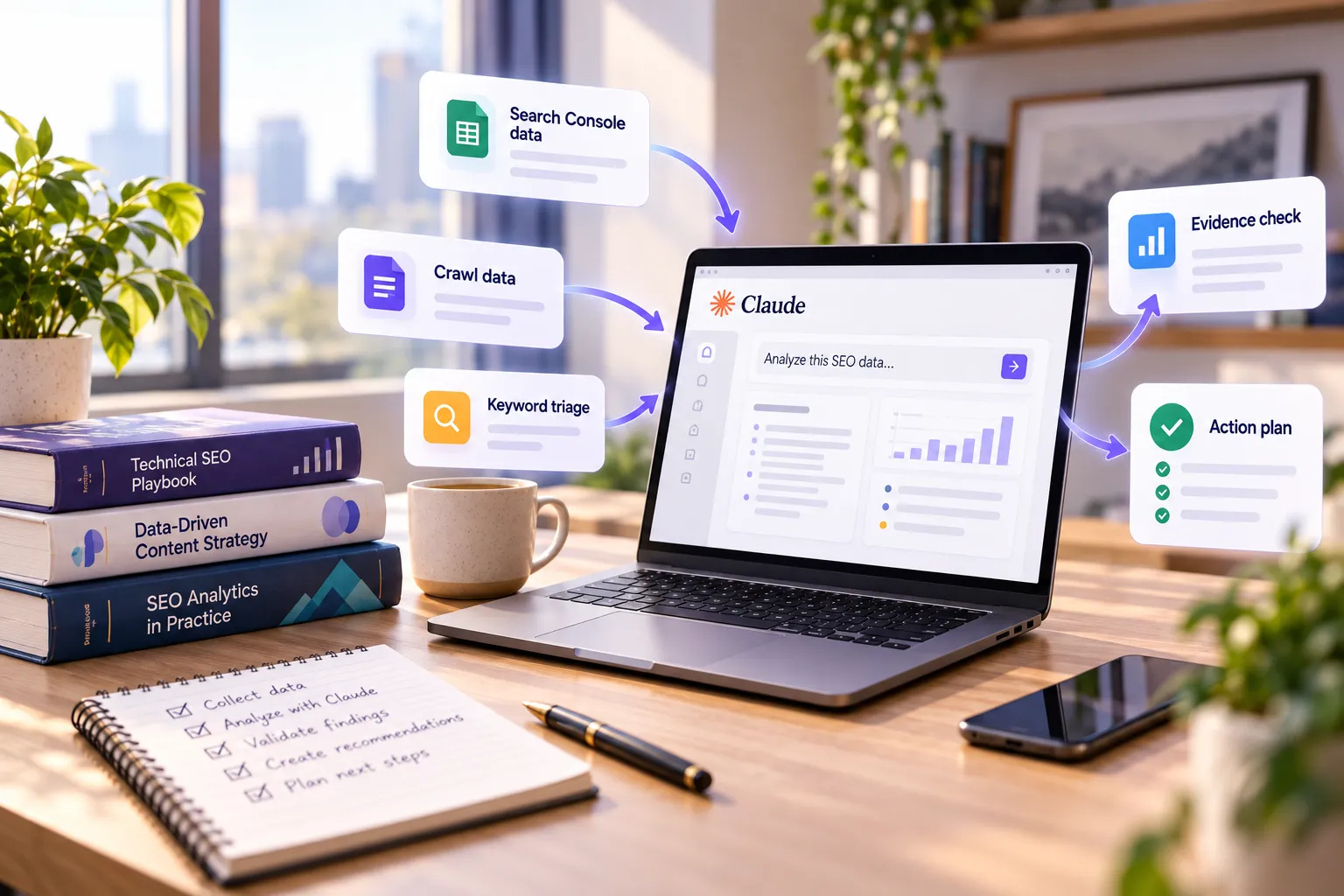
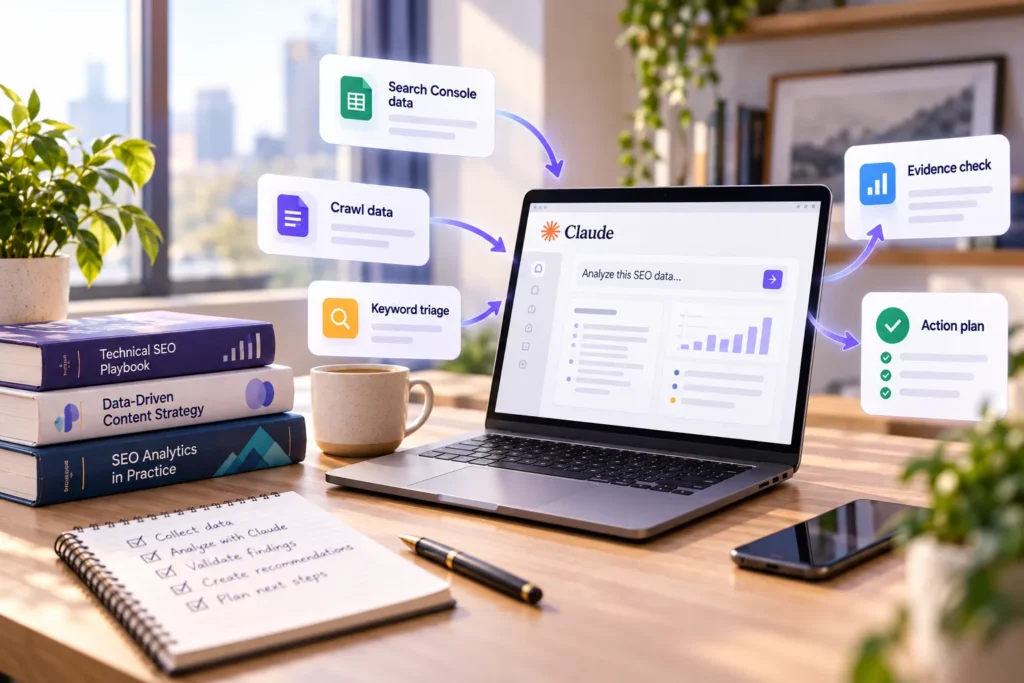
On step 1, the choice is mostly about volume of files and whether scripts are involved. The app handles a Search Console export and a crawl file comfortably. Claude Code is the better fit once you’re working across a folder, and it’s included from the Pro plan up, as the plans and pricing page shows. Step 2 is where most people cut corners. A crawl export plus Pages and Queries from Search Console gives Claude something concrete to quote.
Here’s the prompt we use for step 3. It’s our own wording, not Anthropic’s:
Audit example.com for SEO. Use only the attached Search Console export (Pages and Queries, last 3 months) and the crawl file. For every finding, quote the row or URL it comes from; if the data doesn’t show it, write “not in the data”. Return a table with page, issue, evidence, fix and priority (quick win or strategic).
Here’s the shape of output that prompt should return. The rows below are illustrative, on example.com, not data from a real site. Note the last row: when the data can’t answer, the right finding is “not in the data”.
| Page | Issue | Evidence | Fix | Priority |
|---|---|---|---|---|
| /pricing/ | Title tag is 78 characters | Crawl file, row 14 | Rewrite to 50–60 characters, main keyword first | Quick win |
| /blog/seo-checklist/ | Many impressions, few clicks, average position near 6 | Queries export, row 3 | Rewrite the title and meta description to match the query | Quick win |
| /blog/old-checklist/ | Competes with /blog/seo-checklist/ for the same query | Queries export, rows 3 and 41 | Merge into the stronger page and redirect | Strategic |
| Backlinks | Not in the data | — | Add a backlink export before judging authority | — |
Free SEO Audit Evidence Log: Download our editable spreadsheet to track findings, source evidence, recommended fixes and human verification.
The evidence rule, and why it works
Step 4 is built from Anthropic’s own guidance on reducing hallucinations. The Reduce hallucinations page recommends letting Claude say “I don’t know”, asking for word-for-word quotes before the task, restricting it to the documents you provided, and having it retract any claim it can’t support with a quote. Our prompt applies each one: “use only the attached”, “quote the row or URL”, “not in the data”.
Now the limit, stated in Anthropic’s words: these techniques significantly reduce hallucinations but don’t eliminate them entirely. So step 5 isn’t optional. Open the top findings, confirm them against the source, and only then put them on a to-do list.
What a good finding looks like versus a bad one
A good finding is specific and checkable: “page X has a title of 78 characters (crawl row 14).” You can open row 14 and verify it in ten seconds. A bad finding is vague and unfalsifiable: “your site lacks authority.” There’s no row to check, no fix to apply, and no way to tell whether Claude knew or guessed.
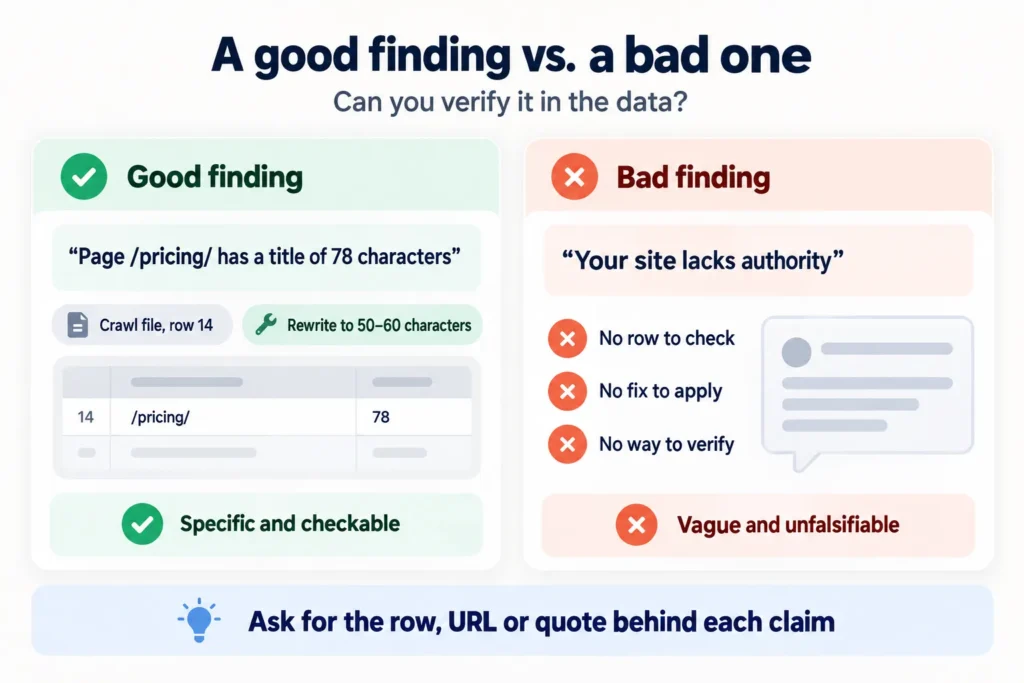
If your audit returns more of the second kind, tighten the prompt or the data, not your trust. The skill’s on-page checks, such as title tags of 50 to 60 characters, one H1 per page and image alt text, are the kind of concrete criteria that produce the first kind.
Claude SEO skills: what they are, which to try and how to vet one
A skill is a folder with a SKILL.md file plus optional scripts and resources. Anthropic defines skills as reusable, filesystem-based resources that give Claude domain-specific expertise, and unlike a prompt they load on demand. At startup Claude reads only the name and description from the file’s metadata, then pulls in the rest when your request matches. That’s why a skill can hold a long audit checklist without flooding every conversation.
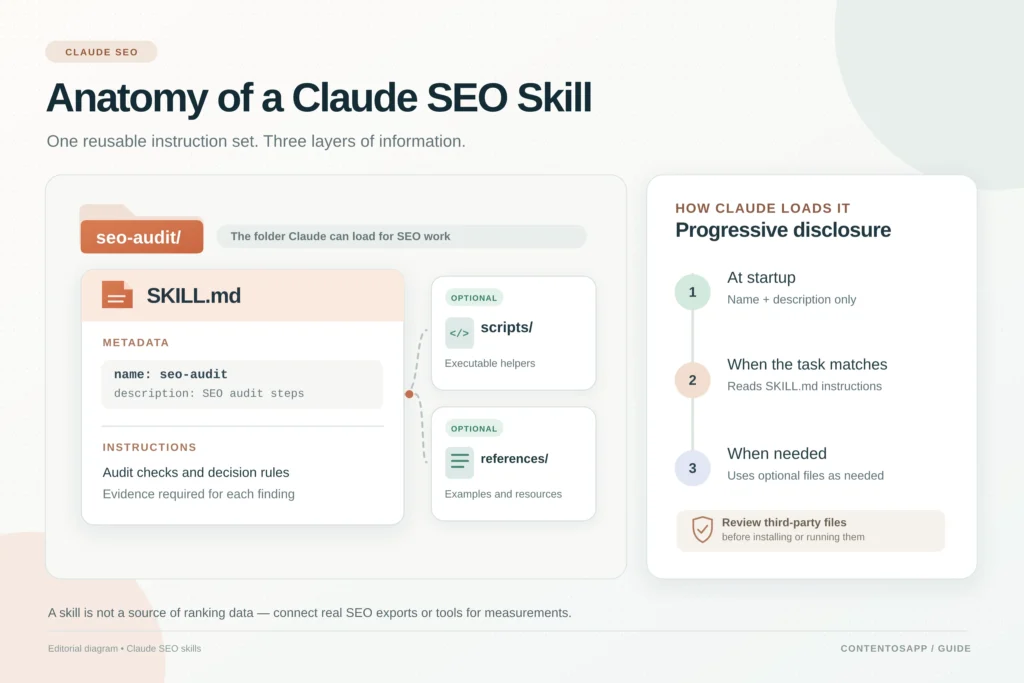
For SEO you have three practical options. They differ less in capability than in who you’re trusting.
Three options
| Option | Who maintains it | License | What it does | Needs |
|---|---|---|---|---|
| Anthropic’s seo-audit skill | Anthropic (official), part of the marketing plugin in the knowledge-work-plugins repository | Apache-2.0 | Five modes: full site audit, keyword research, content gap analysis, technical SEO check, competitor SEO comparison. Returns a prioritized plan split into quick wins and strategic investments. | Anthropic’s marketing plugin, installed in the Claude desktop app or in Claude Code. Without an SEO tool it falls back to web search; connect Ahrefs or Semrush through MCP for volume and difficulty. |
| Claude SEO by Agrici Daniel | Community project, not Anthropic | MIT | A Claude Code plugin with 26 sub-skills (the README also lists 19 sub-agents) covering technical SEO, E-E-A-T, schema and more. | Claude Code and Python 3.10+ (the README recommends 3.11 or newer for new installs). Google API credentials are optional and add Search Console, PageSpeed and GA4 data; without them, Core Web Vitals are lab estimates only. |
| Your own SKILL.md | You | Yours | Your audit checklist, in a file you control, loaded on demand. | A text editor and the discipline to write down your standards. |
The facts on the first row come from the seo-audit file itself. It defaults to a full site audit when you don’t specify a mode, and it runs as /seo-audit <url or topic> [audit type]. For the second row, they come from the project’s own README, which also says five judgment-heavy agents run on Opus and the rest on Sonnet, so a full audit costs more than in earlier versions. That’s a cost note worth reading before you run it across a big site.
To install the official skill, add Anthropic’s marketing plugin. In the Claude desktop app, install it from claude.com/plugins. In Claude Code, the plugin’s README gives two commands:
claude plugin marketplace add anthropics/knowledge-work-plugins
claude plugin install marketing@knowledge-work-plugins
Then run /seo-audit followed by a URL or topic and, optionally, the audit type, for example /seo-audit example.com technical SEO check. Anthropic’s repository shows plugin commands with the plugin’s name in front, so it may appear as /marketing:seo-audit.
The community project has real adoption: as of October 13, 2026 it shows more than 18,800 GitHub stars, while Anthropic’s repository shows more than 29,000. Treat those numbers as context only. Stars measure attention, not safety and not quality.
The third option is the one most SEOs underrate. A SKILL.md you wrote encodes your standards, runs no outside code and can’t surprise you. If you’ve ever written an audit checklist for a client, you already have the content.
Vet a third-party skill before you use it
Anthropic’s rule on this is blunt: “Use Skills only from trusted sources: those you created yourself or obtained from Anthropic.” The reason is that a malicious skill can direct Claude to invoke tools or execute code in ways that don’t match its stated purpose. For a skill from an unknown source, Anthropic says to audit every bundled file: SKILL.md, scripts and resources.
A community project is by definition not on that trusted list. That doesn’t make it bad. It means the review is your job, and it takes about as long as reading a short README. This one helps with a checklist item: its README says the free tier makes no third-party API calls by default, although audits still fetch the URLs you point them at, and optional Google credentials are stored under ~/.config/claude-seo/.
Only after that review, and only if you’re comfortable, does the install make sense. For the community plugin, the README gives three commands in Claude Code:
/plugin marketplace add AgriciDaniel/claude-seo
/plugin install claude-seo@agricidaniel-claude-seo
/seo setup
To use skills in the Claude app on Free, Pro or Max, go to Settings > Capabilities and turn on “Code execution and file creation”, then open Customize > Skills. There you can toggle example skills or upload your own as a ZIP of the skill folder, as the Claude Help Center explains. Skills work on Free, Pro, Max, Team and Enterprise, and in Claude Code.
Connect Claude to real SEO data, and what each plan includes
Your plan decides which surface you can use, and your connector decides whether Claude ever sees live search data. The two questions are separate. A Free account can audit uploaded files and connect to a tool. A paid plan adds Claude Code, which matters once the audit stops fitting in a single upload.
What each plan gives you for SEO
Prices and features below come from Anthropic’s pricing page and were checked on October 13, 2026. Usage limits apply on all plans, and Anthropic says prices are subject to change at its discretion.
| Plan | Price | Skills | Claude Code | Custom connectors |
|---|---|---|---|---|
| Free | $0 | Yes | No | Yes, limited to one |
| Pro | $17 per month with annual billing ($200 billed up front), or $20 billed monthly | Yes | Yes | Yes |
| Max | From $100 per month, with 5x or 20x more usage than Pro | Yes | Yes | Yes |
Skills need code execution turned on. Custom connectors using remote MCP are available on Free, Pro, Max, Team and Enterprise, and Free users are limited to one custom connector. The practical reading: a one-off audit of uploaded files works on Free. Folder-wide audits and skills with scripts point to Claude Code, which means Pro or Max. Max adds more usage rather than a different kind of capability.
Connectors, with Semrush as the example
A connector gives Claude live access to a tool’s data over MCP, the Model Context Protocol, an open standard that Anthropic created so AI apps can connect to tools and data. Semrush is a useful example, not a recommendation. According to a PPC Land report, Semrush published its official Claude connector on August 26, 2026, for Semrush One and SEO Classic subscribers; customers on other plans aren’t included. By Semrush’s own account, its data covers 28.8 billion keywords.
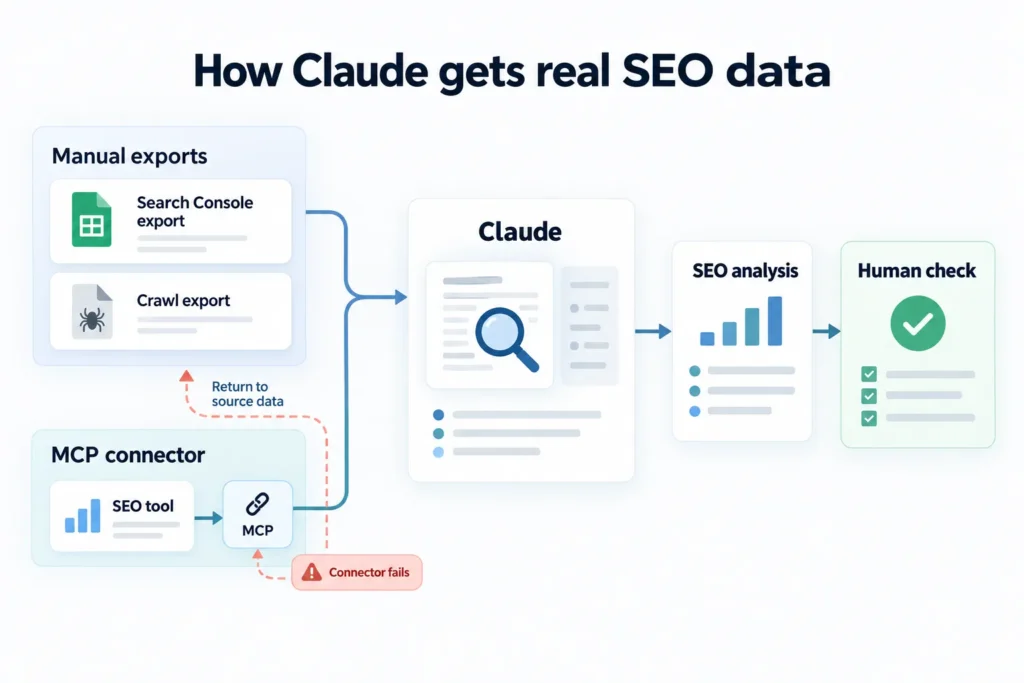
Two cautions. First, the report notes that Semrush publishes no latency or accuracy comparison against its dashboard, so the four workflows it describes are vendor descriptions, not benchmarks. Second, Anthropic’s warning applies: custom connectors reach services Anthropic hasn’t verified, and once connected, Claude can access those services and take action in them. Connect only to servers you trust, and review the permissions they request.
One more thing to remember: connector data still draws on the tool’s own limits. That detail sets up the failure we describe next. If your end goal is publishing rather than analysis, our guide to connecting Claude to WordPress covers that side separately.
How we use Claude for SEO on this site
This section describes our own practice, not a recommendation to copy blindly. The items below are real tasks from our workflow as of October 2026. One of them is a failure, and we’ve left it in on purpose.
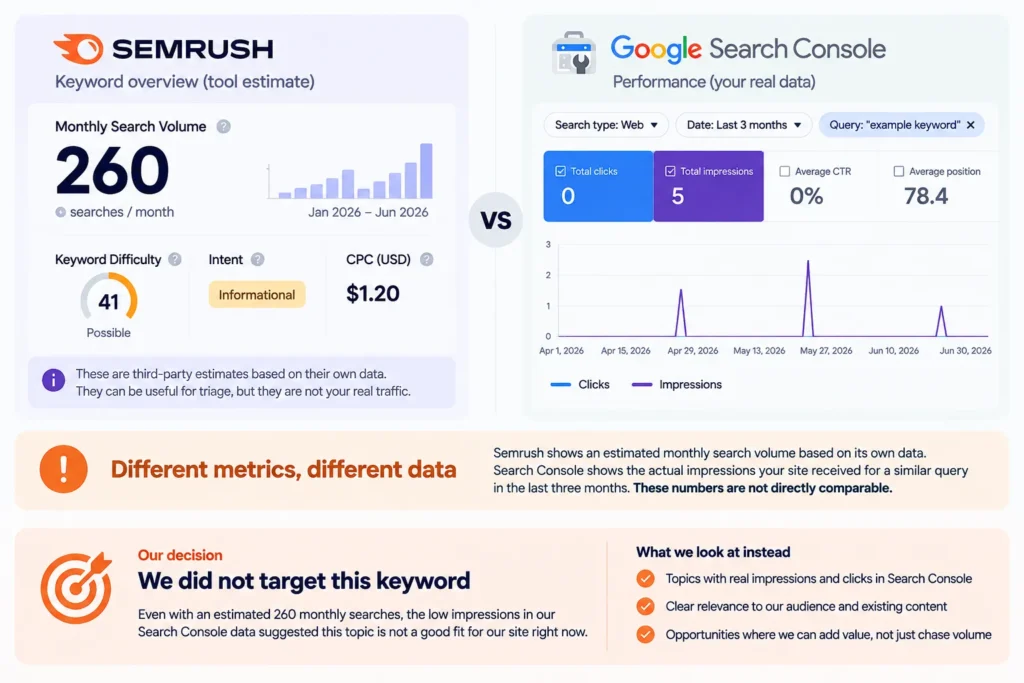
- Keyword triage with Claude Code. We work from a 3-month Search Console export, Google autocomplete and SERP checks, with Semrush data pasted in as screenshots. One example: Semrush showed about 260 monthly searches for a long “AI content pipeline” query, while Search Console showed a near-identical query with 5 impressions in 3 months at position 4.2. We dropped the keyword. The tool estimate and our own data disagreed, and our own data won.
- Cannibalization check. Before writing about “byok ai”, Claude found three existing posts that already define BYOK. We changed the plan: update the best-ranked one instead of publishing a fourth.
- Source checks. Every reference link is tested with a script that mimics the plugin’s link reader: a plain request with no JavaScript, keeping about the first 2,500 characters of text. Links that fail, such as ones returning HTTP 403, are removed before production.
- Fact checks against source code. Before writing our n8n tutorial, Claude read the n8n WordPress node’s source code and confirmed the node has no featured image field. That saved us from writing a step that couldn’t work.
- Safe edits to a live post. We made 18 exact find-and-replace edits to a published post’s block markup. Before pasting it back, we checked block balance, the FAQ JSON-LD and the table-of-contents anchors.
- Where it fell short. The Semrush connector in Claude returned an error saying the account did not have enough API units, so the numbers came from Semrush screenshots instead. Search data still has to come from an SEO tool or from Search Console.
What it costs, and a disclosure
Across 24 productions on Claude Sonnet 5.5 at Anthropic’s list price (October 2026), our seven-agent pipeline averaged about $0.49 in model cost and 15.4 minutes of model time per article. The breakdown is in our AI SEO agent guide, which also covers where a human must approve.
Disclosure: that pipeline is Contentosapp Studio, made by this site’s publisher. It’s a WordPress plugin with seven agents (Discoverer, Strategist, Researcher, Writer, Editorial Reviewer, Visual Designer, Social Media). It runs on your own Anthropic (Claude), OpenAI or Google Gemini key with no plugin fee and no Contentosapp article limit, with the provider billing usage, or on the managed ContentOS Auto service. Each article goes to WordPress as a draft by default, or scheduled or published, in English, Spanish or Brazilian Portuguese, per the WordPress.org listing.
What the six items have in common
None of them works because Claude is clever. They work because every claim leans on an export, a quote or a test. The keyword was dropped on Search Console data. The cannibalization call came from our own posts. The links were tested by a script, and the markup edits were verified before they went live.
And the one time a connector failed, the fix wasn’t a smarter prompt. We went back to the source data.
Frequently Asked Questions
Can Claude do SEO for my website?
Yes, for analysis, auditing exports, briefs, cannibalization checks and drafting, as long as you give it your data. No, for search volume, keyword difficulty or rankings, which it can’t know on its own.
The table in the first section lays out the split task by task. Nothing here implies a traffic or ranking result; Search Console is where you measure those.
Is Claude or ChatGPT better for SEO?
We won’t name a winner, because the answer depends on the task, and the model matters less than your data and the evidence rule. What we can share is our own test: six models on the same two SEO briefs, where Claude Sonnet 5 had the highest blind reader score, 9.55 out of 10. You can read the setup in our six-model writing test.
What does that show? How blind readers scored those drafts on those two briefs. What it doesn’t show is how any model performs on your site, on audits, or on keyword research. Don’t read it as “best model for SEO”.
How do I install the Claude SEO skill?
It depends which one you mean. Anthropic’s official seo-audit skill comes with its marketing plugin: install the plugin from claude.com/plugins in the Claude desktop app, or in Claude Code with claude plugin marketplace add anthropics/knowledge-work-plugins and then claude plugin install marketing@knowledge-work-plugins. Then run /seo-audit with a URL or topic.
For the community Claude SEO plugin by Agrici Daniel, review the files first, per Anthropic’s guidance to audit every bundled file in a skill from an unknown source. Then, in Claude Code, run /plugin marketplace add AgriciDaniel/claude-seo, /plugin install claude-seo@agricidaniel-claude-seo and /seo setup. It’s a community project, not an Anthropic product. You can also upload your own SKILL.md folder as a ZIP under Customize > Skills.
Can Claude do keyword research?
It can cluster, group by intent and triage keywords you give it, and it can spot gaps and cannibalization in your own data. It can’t supply search volume or difficulty from memory.
Those numbers come from Search Console, an SEO tool or a connector. In our case, a tool showed about 260 monthly searches for a query where Search Console showed 5 impressions in 3 months.
Which Claude plan do I need for SEO?
Free covers a one-off audit of uploaded files, with skills available and one custom connector. Pro, at $17 per month billed annually or $20 billed monthly, adds Claude Code, which is where folder-wide audits and script-based skills come in. Max starts at $100 per month and adds 5x or 20x more usage than Pro, not a different kind of capability.
These are Anthropic’s published prices as checked on October 13, 2026. They can change, and usage limits apply on every plan.
Will Google penalize SEO content written with Claude?
Google’s guidance doesn’t target the tool. It says generative AI can be useful for researching a topic and adding structure to original content, but generating many pages without adding value for users may violate its spam policy on scaled content abuse. It also says to review AI output for accuracy, including title elements, meta descriptions, structured data and image alt text.
So the risk sits with unreviewed output published at scale. No tool, Claude included, guarantees either outcome. Our look at whether Google penalizes AI content goes further.
Start with one export
Pick one section of your site and export its Pages and Queries from Search Console for the last three months. Add a crawl file if you have one. Run the prompt from the audit section, with the “not in the data” rule intact, and ask for a table of ten findings.
Then open the top three yourself. Did the cited row exist? Did the fix make sense? If two of three hold up, keep going. If not, tighten the data before you tighten the prompt.
Once that works, decide whether you want a skill. Start with your own SKILL.md, and read every file in anything you didn’t write.
References
External sources
- knowledge-work-plugins/marketing/skills/seo-audit/SKILL.md at main · anthropics/knowledge-work-plugins · GitHub — https://github.com/anthropics/knowledge-work-plugins/blob/main/marketing/skills/seo-audit/SKILL.md
- knowledge-work-plugins/marketing (Marketing plugin README) · anthropics · GitHub — https://github.com/anthropics/knowledge-work-plugins/tree/main/marketing
- Google Search’s Guidance on Generative AI Content on Your Website | Google Search Central | Documentation | Google for Developers — https://developers.google.com/search/docs/fundamentals/using-gen-ai-content
- Plans & pricing | Claude by Anthropic — https://claude.com/pricing
- Reduce hallucinations – Claude Platform Docs — https://platform.claude.com/docs/en/test-and-evaluate/strengthen-guardrails/reduce-hallucinations
- Agent Skills – Claude Platform Docs — https://platform.claude.com/docs/en/agents-and-tools/agent-skills/overview
- GitHub – AgriciDaniel/claude-seo: Universal SEO skill for Claude Code. 26 sub-skills + 19 sub-agents covering technical SEO, E-E-A-T, sch… — https://github.com/AgriciDaniel/claude-seo
- Use skills in Claude | Claude Help Center — https://support.claude.com/en/articles/12512180-use-skills-in-claude
- Get started with custom connectors using remote MCP | Claude Help Center — https://support.claude.com/en/articles/11175166-get-started-with-custom-connectors-using-remote-mcp
- Semrush gains native Claude connector covering 28.8 billion keywords — https://ppc.land/semrush-gains-native-claude-connector-covering-28-8-billion-keywords/
- Contentosapp Studio – AI Content Writer & SEO (BYOK) – WordPress plugin | WordPress.org — https://wordpress.org/plugins/contentosapp-studio/