
Most AI writing subscriptions are charging you 5× to 20× what the underlying API actually costs. You know this. That’s why “BYOK” — bring your own key — sounds like a fix. And it is, when it’s real. The problem is that “BYOK” has become a marketing badge applied loosely, including by tools that accept your API key and then quietly route every request through their own servers anyway. You get the branding without the actual cost transparency.
This article cuts through that. It covers what genuine BYOK architecture looks like under the hood, why the distinction matters beyond cost savings alone, and which tools for WordPress genuinely qualify in 2026. You’ll also get the actual cents-per-article math at realistic publishing volumes — because almost no one publishes those numbers — plus a repeatable checklist you can use to vet any “BYOK” claim before handing over your key.
- True BYOK means direct passthrough: your request hits the provider’s API endpoint directly — the tool vendor never touches your token stream or adds a margin.
- The label is unregulated, so verify architecture yourself: some “BYOK” tools accept your key but still proxy every request through their own servers (where logging — and a hidden margin — become possible). Others are genuinely direct. The two-minute network test below tells them apart.
- Verified WordPress options in 2026: AI Engine, AI Puffer (formerly AI Power), and Opace AI Scribe all qualify architecturally with zero hidden credits and multi-provider support.
- Cost math at scale: a 1,500-word article via Claude Sonnet 4 costs approximately $0.032 at token rates. At 150 articles per month, that is under $5 — versus $49–$99 on a mid-tier subscription.
- Model flexibility is underrated: tools that lock you to one provider undercut the entire value of BYOK. The best options let you swap between GPT-4o, Claude, and Gemini per task.
- Always verify by checking which API endpoint appears in the plugin’s settings — api.openai.com versus a vendor subdomain tells you everything.
What True BYOK Actually Means (and the Version to Avoid)
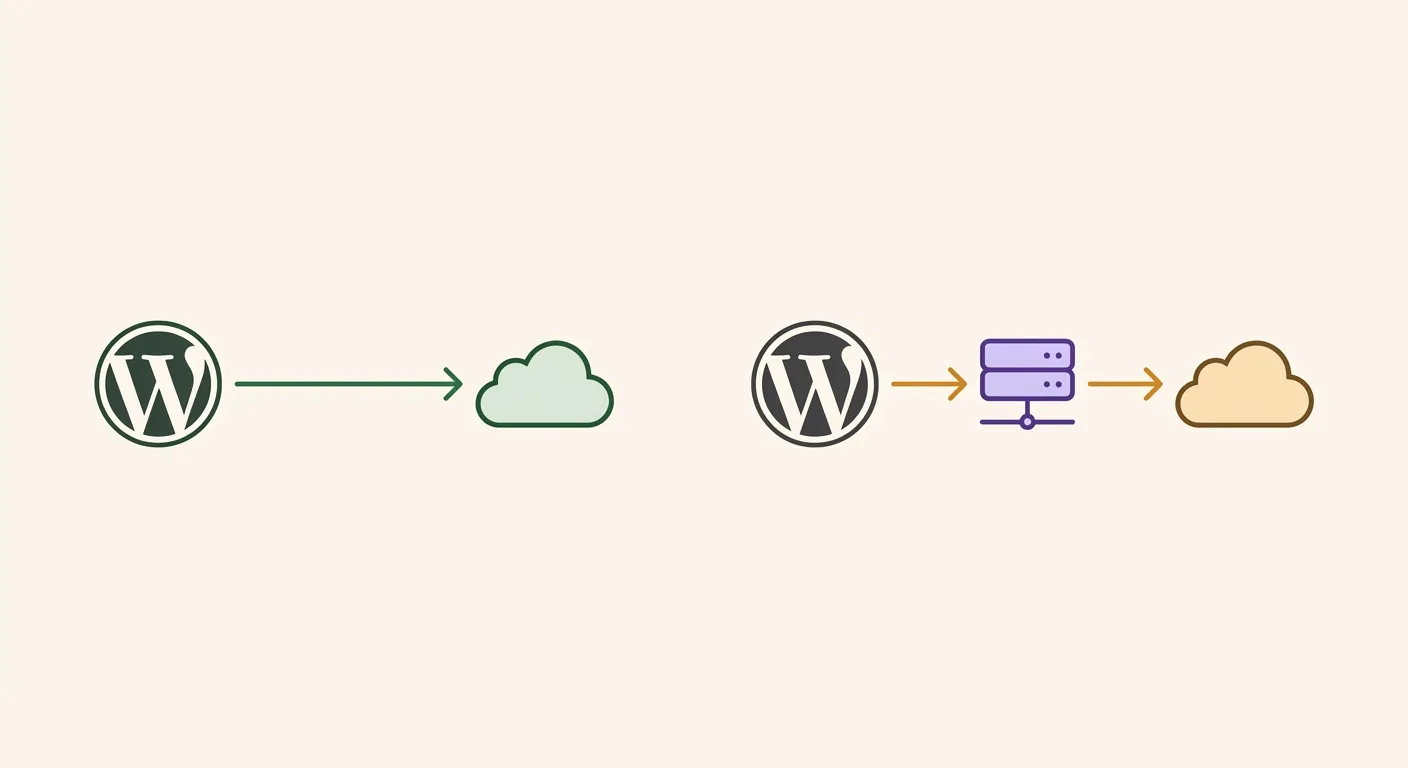
There are two architectures hiding behind the same four-letter label. In the first — call it genuine BYOK — you enter your API key into the tool, and when you trigger a generation, the HTTP request goes from your browser or your WordPress server directly to the provider’s endpoint (api.openai.com, api.anthropic.com, and so on). The tool vendor is never in the loop. They do not see the request, cannot log the tokens, and have zero ability to apply a per-call margin. Your billing statement comes from OpenAI or Anthropic, not from the plugin. In the second architecture — the half-true version — the tool accepts your key, stores it somewhere in their system, and then proxies every API call through their own infrastructure before forwarding it to the provider. From a billing standpoint, you may still pay the provider’s raw rate. But the vendor controls the routing, can log your prompts and completions, and could theoretically apply a markup without surfacing it in your dashboard.
Here is the test you can run in under two minutes. Open your browser’s developer tools, navigate to the Network tab, trigger a content generation inside the plugin, and look at the outbound requests. If the call goes to a vendor-owned subdomain (something like api.yourtoolname.com or generate.yourtoolname.io), your traffic is being proxied. If it hits the provider’s root domain directly, you are using genuine BYOK. You can also check the plugin settings — tools that route through their own servers rarely advertise the intermediate endpoint, while genuinely direct tools often show you exactly which provider URL is being called. This is the single most reliable field test, and you will not find it in any of the mainstream “BYOK tools” comparison posts currently ranking.
The Actual Cost Math: Subscription Caps vs. API Token Pricing
Let’s put real numbers on this. At published provider token rates (OpenAI and Anthropic, mid-2026), a 1,500-word article — roughly 800 input tokens and 2,000 output — costs about $0.032 on Claude Sonnet 4, around $0.09 on a reasoning-tier model like OpenAI’s o-series, and closer to $0.36 on a premium model. Run those across volumes and the math gets stark fast: at 50 articles a month, even the premium tier costs about $18 — less than half a mid-tier subscription. At 150 articles, Claude Sonnet 4 totals under $5. We worked the full per-model, per-volume breakdown in our true cost of AI content per article deep-dive; the short version is that token-priced BYOK lands in cents per article at any realistic volume.
But here is the nuance that competitor articles skip: BYOK is not worth the setup friction for everyone. If you are publishing fewer than 20 articles per month and your time cost matters, a flat-rate subscription with a bundled UI may still make sense. But here is the nuance that competitor articles skip: on raw cost, BYOK is cheaper at essentially any volume — even a handful of articles beats a $49 cap. What sits around 30–40 articles a month is a different crossover: the point where the savings clearly outweigh the effort of managing a key, monitoring usage, and handling rate limits. Below it the money saved is real but may not be worth the setup time; above it — especially at 100+ articles monthly — BYOK wins on both axes. A $49/month subscription capped at 50,000 words cannot scale with you; token-priced BYOK scales linearly and never hits an artificial ceiling. Above it, especially if you are running a content operation at 100+ articles monthly, the difference compounds fast. A $49/month subscription capped at 50,000 words cannot scale with you; token-priced BYOK scales linearly and never hits an artificial ceiling.
Genuine BYOK AI Writing Tools for WordPress in 2026
Not every tool that claims BYOK passes the architectural test above. The shortlist below was filtered on three criteria: direct API passthrough (no vendor proxy), support for at least two model providers, and either a native WordPress plugin or tight integration that does not require exporting through a third-party dashboard. Multi-provider support matters more than most publishers realize — the tool that locks you to a single provider gives you cost control but zero flexibility to route prompts to the model that is cheapest or most capable for a given task at a given moment. For the broader landscape of AI content plugins across all categories, the full ranked comparison of AI content plugins for WordPress covers the complete picture — BYOK and non-BYOK alike.
AI Engine connects directly to OpenAI, Anthropic, Google, Mistral, and more via stable connectors — all from inside your WordPress dashboard. It supports MCP, REST endpoints, and function calling, which makes it the most developer-extensible option on this list. AI Puffer (formerly AI Power) is explicit about its model: “No hidden credits — you use your own account and control your costs.” Its provider list includes OpenAI, Google Gemini, Azure, OpenRouter, DeepSeek, xAI, and Ollama — that last one meaning you can run local inference at zero API cost entirely. Opace AI Scribe is open-source, supports GPT-4.5, o3, Claude Sonnet 4, and Claude Opus 4, and publishes exact token pricing on its plugin page. Cuppa AI is genuine BYOK on the token layer — you connect your own OpenAI or Anthropic key and pay the provider directly, with no per-token markup. The trade-offs are different: it charges a flat monthly software fee ($30–$200/mo) on top, and it’s a hosted external app rather than a WordPress-native plugin, so drafts don’t land straight in your editor. Fair for agencies who want a managed hosted workflow; less ideal if you want everything inside WordPress at zero platform fee. WPWriter is BYOK-first by its own documentation — it supports OpenAI, Anthropic and Google, lets you switch models, and stores your key encrypted (AES-256) locally rather than on its servers. As always, run the two-minute network test to confirm direct passthrough before you commit.

How to Vet Any “BYOK” Label Before You Commit
The “BYOK” badge is unregulated. Any tool can apply it. The BYOKList directory catalogs tools that claim BYOK and frames it clearly: “get control of your budget, data usage, AI integrations, and unlock custom models with BYOK flexibility.” That framing is correct — but the directory lists tools by self-reported category, not independently verified architecture. You need your own checklist, because you need your own checklist, because the label alone tells you nothing — a tool can market hard on “no token markup” and still route every call through its own servers, where logging and margins become possible. Verify the architecture yourself rather than trusting the badge..
Four steps, in order. First: check the API endpoint field in the plugin’s settings. A direct-passthrough tool will show you a URL pointing to the provider’s own domain. A proxied tool either hides this field or shows a vendor subdomain. Second: run the browser network test described earlier — trigger a generation and watch where the HTTP request goes. Third: read the privacy policy specifically for language about “storing,” “transmitting,” or “processing” API keys on the vendor’s servers; direct tools have no reason to retain your key server-side. Fourth: check whether the tool’s pricing page changes when you enter your own key. A tool that still charges per-word or per-article credits after you have entered your API key is not meaningfully BYOK — you are just paying two bills instead of one. Four steps, five minutes, zero ambiguity.
Frequently Asked Questions
What does BYOK mean for AI writing tools?
BYOK stands for “bring your own key.” In the context of AI writing tools, it means you supply your own API key from a provider like OpenAI, Anthropic, or Google, and the tool uses that key to make AI calls on your behalf. The core promise is that you pay the provider’s published rate directly, rather than a subscription markup. Whether a specific tool actually delivers on that promise depends on its architecture — specifically, whether it passes your key directly to the provider or routes requests through its own servers first.
Is BYOK cheaper than a subscription AI writing plan?
It depends on your publishing volume. Based on current provider token pricing for models like Claude Sonnet 4 and OpenAI’s o-series, a 1,500-word article can cost as little as $0.032–$0.09 — see our full cost-per-article breakdown. At 150 articles per month, that is under $15 even with o3 — compared to $49–$99 for most mid-tier subscriptions. For publishers doing fewer than 30 articles per month, the savings are real but may not justify the setup and monitoring overhead. Above that threshold, BYOK scales far more efficiently.
Which BYOK AI writing tools work directly inside WordPress?
Three plugins have been independently verified as genuine BYOK options with direct API passthrough: AI Engine, AI Puffer (formerly AI Power), and Opace AI Scribe. All three are available through the WordPress plugin repository, have free core versions, and support multiple AI providers. They install and operate entirely within your WordPress dashboard without requiring an external SaaS account for content generation.
Can I use my own Anthropic or Gemini key, or only OpenAI?
You are not limited to OpenAI. AI Puffer supports seven providers including Google Gemini, Microsoft Azure, OpenRouter, DeepSeek, xAI, and Ollama for local inference. AI Engine connects to Anthropic, Google, and Mistral alongside OpenAI. Opace AI Scribe supports Claude Sonnet 4 and Opus 4 via the Anthropic API. The ability to swap between providers is one of the most underrated advantages of genuine BYOK — you can route to whichever model is cheapest or best-suited for a given task on a given day.
How do I know if a tool is actually using my API key or routing through its own servers?
Open your browser’s developer tools, go to the Network tab, and trigger a content generation. Check the outbound request URL. If it points directly to api.openai.com, api.anthropic.com, or another provider’s root domain, your request is passing through cleanly. If it hits a vendor-owned subdomain or a third-party relay, the tool is proxying your calls. You can also inspect the plugin settings for the API endpoint field — genuine direct-passthrough tools typically display the provider URL, while proxied tools obscure or omit it.
Are there any risks to entering my API key into a third-party writing tool?
Yes, and they are worth taking seriously. Any tool that stores your API key server-side could expose it in a data breach or misuse it to make unauthorized calls on your account. Before entering a key, read the privacy policy for language about key storage and transmission. Set spending limits on your API account so runaway usage cannot generate unexpected charges. Prefer tools that store your key locally in your WordPress database (encrypted) rather than transmitting it to an external server. Revoke and regenerate keys if you stop using a tool. These are standard API hygiene practices — BYOK does not introduce new risks, but it makes existing ones more personal.
Conclusion
True BYOK has a precise architectural definition, and on raw cost it wins at almost any volume. The real threshold around 30–40 articles a month is about effort, not price: below it the savings may not be worth the setup, above it — especially at 100+ articles monthly — the difference between $0.032 per article and a capped subscription stops being a rounding error and becomes a business-model decision. Above it — especially at 100+ articles monthly — the difference between $0.032 per article and a capped subscription is not a rounding error, it is a business model decision. The tools that will matter most in this category over the next 12 months are the ones combining genuine API passthrough with multi-provider support, because model pricing and capability are both shifting fast. Locking into a single provider today, even via BYOK, is a constraint you will feel by mid-2026. Build your stack accordingly — and remember that cheap to generate isn’t the same as ready to rank: an ungrounded draft still needs the editing pass that keeps it clear of thin-content search risk
References
External sources
- Opace AI Scribe: SEO Content Creator & Humaizer for OpenAI & Anthropic – WordPress plugin | WordPress.org — https://wordpress.org/plugins/ai-scribe-the-chatgpt-powered-seo-content-creation-wizard/
- AI Engine – The Chatbot, AI Framework & MCP for WordPress – WordPress plugin | WordPress.org — https://wordpress.org/plugins/ai-engine/
- Blog Tool, Publishing Platform, and CMS – WordPress.org — https://wordpress.org/plugins/gpt3-ai-content-generator/
- BYOKList – AI Tools with Bring-Your-Own-Key (BYOK) | BYOKList — https://byoklist.com/
- WPWriter – AI-Powered WordPress Content Manager — https://www.wpwriter.com/
- Cuppa AI | Rated #1 Profit-Focused Tool for AI-Powered Brand Growth — https://cuppa.ai/