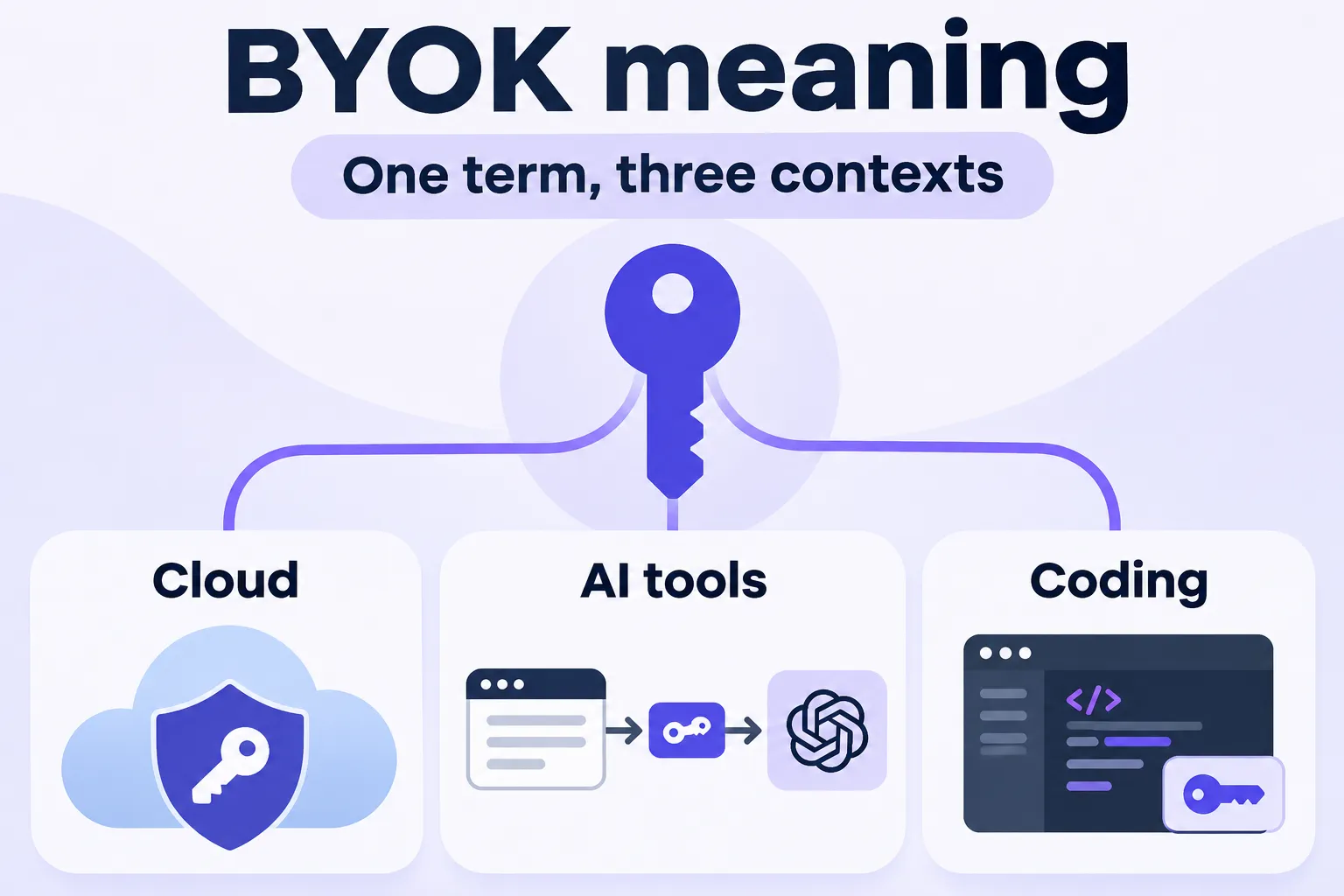
BYOK stands for “bring your own key”: you supply the key instead of the vendor supplying it. That’s the BYOK meaning in one line. The trouble is that the term shows up in three very different places, and the key means something different in each.
You might meet it in a cloud security document, where it’s about encryption key material. You might meet it on an AI tool’s pricing page or settings screen, where it means pasting in an API key. Or you might meet it in a coding assistant’s model picker. The definition stays the same in all three, but the consequences don’t: one version makes you responsible for key custody, another puts a metered bill on your own provider account.
This article lays the three meanings side by side in one table, explains what each one asks of you, and ends with a checklist for using your own key without surprise charges. It sticks to that one question. If you’re weighing specific writing tools, the comparison lives elsewhere.
What BYOK Means: One Idea, Three Contexts
The idea is constant: a key you control replaces a key the vendor would otherwise generate or supply. What changes is the type of key, who holds it, and what you take on in exchange. The table below puts the contexts next to each other. The cloud rows come from the AWS KMS documentation and Microsoft’s Azure Key Vault specification, the coding row from the VS Code documentation, and the plugin row from Contentosapp Studio’s readme.
See what “bring your own key” means in cloud encryption, coding assistants and AI writing tools.
| Context | What the key is | Who holds it | What changes for you |
|---|---|---|---|
| AWS KMS Cloud encryption | Imported encryption key material You supply the cryptographic material for an AWS KMS key. | You remain responsible for your original key material. AWS KMS uses an imported copy to perform cryptographic operations. | You can manage expiration, deletion and re-import of the key material. Important limit: ciphertext encrypted under a symmetric KMS key cannot be decrypted outside AWS KMS, even with imported material. |
| Azure Key Vault Cloud encryption | An HSM-protected key Transferred from your on-premises hardware security module into the HSM backing Azure Key Vault. | The key originates in your on-premises HSM. During transfer, the key is protected outside an HSM by a key held in the Azure Key Vault HSM. | You follow a controlled, HSM-based import process. The HSM vendor’s BYOK tool creates the protected transfer package using a Key Exchange Key (KEK). |
| VS Code Coding assistant | A model-provider API credential or configured model endpoint Local models can work without an external provider API key. | You manage the credential for the provider you connect. For a local model, the endpoint and model run in your own environment. | You can use compatible models in the VS Code chat experience. Semantic search, inline code suggestions and features based on embeddings are not available through BYOK models. |
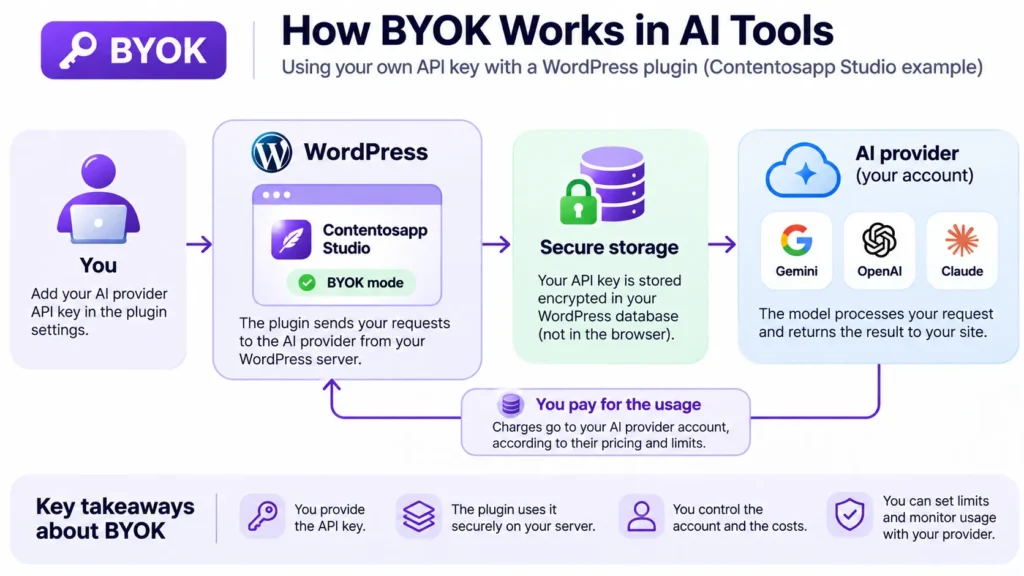
| Contentosapp Studio AI writing plugin First-party example | Your AI provider API key Connect Google Gemini, OpenAI or Anthropic Claude. | You own the provider account. The plugin stores the credential encrypted in your WordPress database. Requests are sent from the WordPress server, not the browser. | Your AI provider bills you for usage. BYOK mode requires no plugin license. Provider pricing, quotas and usage limits still apply. |
Here’s the rule of thumb I use (mine, not a vendor’s): ask who holds the key, and who gets the bill or the risk. In the cloud meanings the risk is custody and recoverability. In the AI and coding meanings the risk is spend and exposure of a credential. That one question tells you which BYOK you’re reading about faster than the vendor’s wording does.
BYOK in Cloud and SaaS Encryption
By default, AWS KMS generates the key material for a KMS key. According to the AWS documentation, you can instead create a KMS key without key material and import your own, “a feature often known as ‘bring your own key’ (BYOK).” The catch is in AWS’s own wording: “you remain responsible for the key material while allowing AWS KMS to use a copy of it.” Here is what that buys you, and where it stops:
- Proof and ownership: you can show the key material was generated with a source of entropy (the quality of randomness used to create a key) that meets your requirements, use key material from your own infrastructure, and keep the original copy outside AWS for durability and disaster recovery.
- Control over timing: you can set an expiration time for the key material, delete it and make it available again later. Scheduling deletion of a KMS key, by contrast, means a waiting period of 7 to 30 days, after which the key can’t be recovered.
- A hard limit: AWS KMS does not support decrypting ciphertext from a symmetric encryption KMS key outside AWS KMS, even with imported key material, because AWS does not publish the ciphertext format and it might change without notice.
Azure describes the same idea for hardware. Microsoft Learn describes the scenario as a customer who wants to securely transfer a key from an on-premises HSM (hardware security module, a dedicated device that protects keys) into the HSM backing Azure Key Vault. Outside an HSM, the key being moved is always protected by a key held in the Azure Key Vault HSM. The transfer uses a Key Exchange Key (KEK), an HSM-backed RSA key of 4096, 3072 or 2048 bits that is generated in the vault and can be used only for import. The HSM vendor’s own BYOK tool produces the transfer blob. If a SaaS vendor advertises BYOK, look in its security documentation for two answers: which key service holds your key, and what happens to your data if you revoke it.
BYOK in AI Tools and Coding Assistants
In AI writing tools, BYOK means you paste an API key from a provider such as OpenAI, Anthropic or Google into the tool. Requests then run on your own provider account, and that provider bills you. Coding assistants follow the same pattern: VS Code’s documentation says BYOK “lets you connect to any compatible model provider” while you keep the VS Code chat experience and tools, so you can reach other providers’ models, run models locally or use models not yet built in. If you’re choosing between writing tools rather than just decoding the term, my guide to genuine BYOK AI writing tools for WordPress covers that comparison.
The price is capability, and VS Code spells it out:
- Semantic search, inline suggestions (code completions) and features that rely on embeddings need a GitHub account and internet connectivity, and they “are not available through BYOK models.”
- In Local harness sessions, BYOK models work without a GitHub sign-in and without a Copilot plan, including offline with local models such as Ollama.
- On Copilot Business or Enterprise plans, BYOK depends on the “Bring Your Own Language Model Key in VS Code” policy, which your organization’s administrator controls.
For a WordPress example, I’ll use Contentosapp Studio, which is made by the publisher of this site. Its readme says you connect a Google Gemini, OpenAI or Anthropic Claude key and requests go directly from your site to that provider, with no plugin markup, no per-article cap and limits that come from your own provider account. BYOK mode works without a license; without a key, the plugin falls back to the managed ContentOS Auto service. The saved key is stored encrypted in the WordPress database (AES-256-GCM where the server’s OpenSSL supports it), and requests are sent from the WordPress server, not the browser. On the publisher’s own blog, 24 productions averaged about $0.49 in model cost and 15.4 minutes of model time per article on Claude Sonnet 5.5 at Anthropic’s list price in October 2026. For the break-even math, see the cost breakdown for BYOK writing.
How to Tell Which BYOK You Are Looking At, and How to Use Your Own Key Safely
Three signals tell you which meaning a page is using:
- The page talks about key material, HSMs or vaults: it’s the cloud meaning, and custody is your job.
- The page talks about provider accounts and API keys: it’s the AI meaning, and the bill goes to your provider account.
- The option sits in an editor’s model picker: it’s the coding-assistant meaning, so check which features are excluded.
Once you know it’s an API key, the risk is a leaked credential and a bill you didn’t plan. Anthropic’s help center puts it bluntly: “Much like a credit card number, if someone obtains and uses your API key, they incur charges on your behalf.” It adds that accidental exposure in public code repositories or third-party tools is one of the most frequent causes of leaks. My default is one key per tool, each with a spend limit, so a single leak stays contained. The vendors’ own guidance covers each piece:
BYOK API Key Safety Checklist
Using your own API key gives you control over your provider account, but also makes credential security and usage monitoring your responsibility. Follow these six checks when connecting an AI tool or WordPress plugin.
Protect your credentials
-
Create a dedicated API key
Use separate credentials for different tools or purposes, where your provider supports them. Avoid reusing one key across unrelated integrations.
-
Configure spending controls
Set available spend and workspace rate limits. Check whether each control actually blocks further usage or only sends a notification.
-
Evaluate third-party tools
Before entering a key, review how the tool stores credentials, where it sends requests and which parties can access the key.
-
Keep secrets out of the browser
Keep API keys in a secure server-side environment. Never expose them in client-side code or public repositories. Use environment variables or a secrets manager where appropriate.
Monitor and maintain access
-
Monitor usage and logs
Review the provider’s usage dashboard and logs. Look for unexpected requests, unusual spikes in consumption or charges you cannot explain.
-
Rotate and revoke keys
Rotate credentials according to your security policy. Anthropic gives 90 days as an example. Revoke a key promptly if you suspect exposure.
Provider controls vary. Some warn you when a threshold is reached; others can restrict further usage. Verify the behavior in your provider’s documentation rather than assuming unexpected charges are fully prevented.
For step-by-step WordPress setup, follow the guide to using your own AI API key in WordPress.
Frequently Asked Questions
What does BYOK stand for?
BYOK stands for “bring your own key.” You provide the key instead of letting the vendor generate or supply one. Which key that is depends on the context: encryption key material in cloud security, or an API key in AI tools and coding assistants.
What does BYOK mean in AI?
In AI tools, BYOK means you paste an API key from a provider such as OpenAI, Anthropic or Google into the tool. Requests run on your own provider account, and the provider bills you for that usage.
What is BYOK in cloud encryption?
It means you supply the encryption key material. AWS describes importing your own key material into a KMS key and says you remain responsible for it. Azure describes transferring a key from your on-premises HSM into the HSM backing Key Vault.
Is BYOK the same in AI tools and in cloud security?
The idea is the same, but the key and the stakes differ. In cloud security the key is encryption key material, and the risk is custody and recoverability. In AI tools it’s an API key, and the risk is spend and credential exposure.
Is it safe to paste my API key into a tool?
Only if you trust the tool and limit the damage. Anthropic says to be cautious before uploading a key to third-party tools. A safe default is a dedicated key for each tool, with a spend limit, plus a check on where the tool sends requests from.
Can BYOK models run offline?
Only local models can. VS Code says a BYOK local model such as Ollama can be used “completely offline.” Semantic search, inline suggestions and embeddings-based features are not available through BYOK models, so offline BYOK covers chat, not code completions or semantic search.
Conclusion
One question sorts every case: who holds the key, and who gets the bill or the risk? With cloud BYOK, you hold the key material and the responsibility that comes with it. With AI tools and coding assistants, you hold a provider key, and your account carries the spend. Before you paste a key into anything, create a dedicated one with a spend limit, so a leak costs you a capped amount instead of an open-ended bill. If WordPress is your case, the setup guide linked above walks through it step by step.
References
External sources
- Importing key material for AWS KMS keys – AWS Key Management Service — https://docs.aws.amazon.com/kms/latest/developerguide/importing-keys.html
- Bring your own key specification – Azure Key Vault | Microsoft Learn — https://learn.microsoft.com/en-us/azure/key-vault/keys/byok-specification
- AI language models in VS Code — https://code.visualstudio.com/docs/agent-customization/language-models
- API key best practices: keep your keys safe and secure | Claude Help Center — https://support.claude.com/en/articles/9767949-api-key-best-practices-keep-your-keys-safe-and-secure
- Best Practices for API Key Safety | OpenAI Help Center — https://help.openai.com/en/articles/5112595-best-practices-for-api-key-safety
- AI Content Pipeline for WordPress | Contentosapp Studio — https://contentosapp.com/