BYOK, short for “bring your own key,” means you paste an API key from your own OpenAI, Anthropic or Google account into a tool, and the provider bills you for the usage. The label is easy to claim, though. Two things can hide behind it: a tool that relays your requests through its own servers, where it handles your prompts and your key, or a tool that still charges credits or a per-word fee on top of your provider bill.
This guide checks five tools that work with WordPress against their own documentation, as of November 18, 2026: where requests go, which providers they accept, and what else you pay. It also shows what an article really costs on your own key, using provider-billed numbers from our own test, plus a checklist for vetting any BYOK claim. One disclosure up front: Contentosapp Studio, one of the five, is made by the publisher of this site.
What True BYOK Actually Means (and the Version to Avoid)
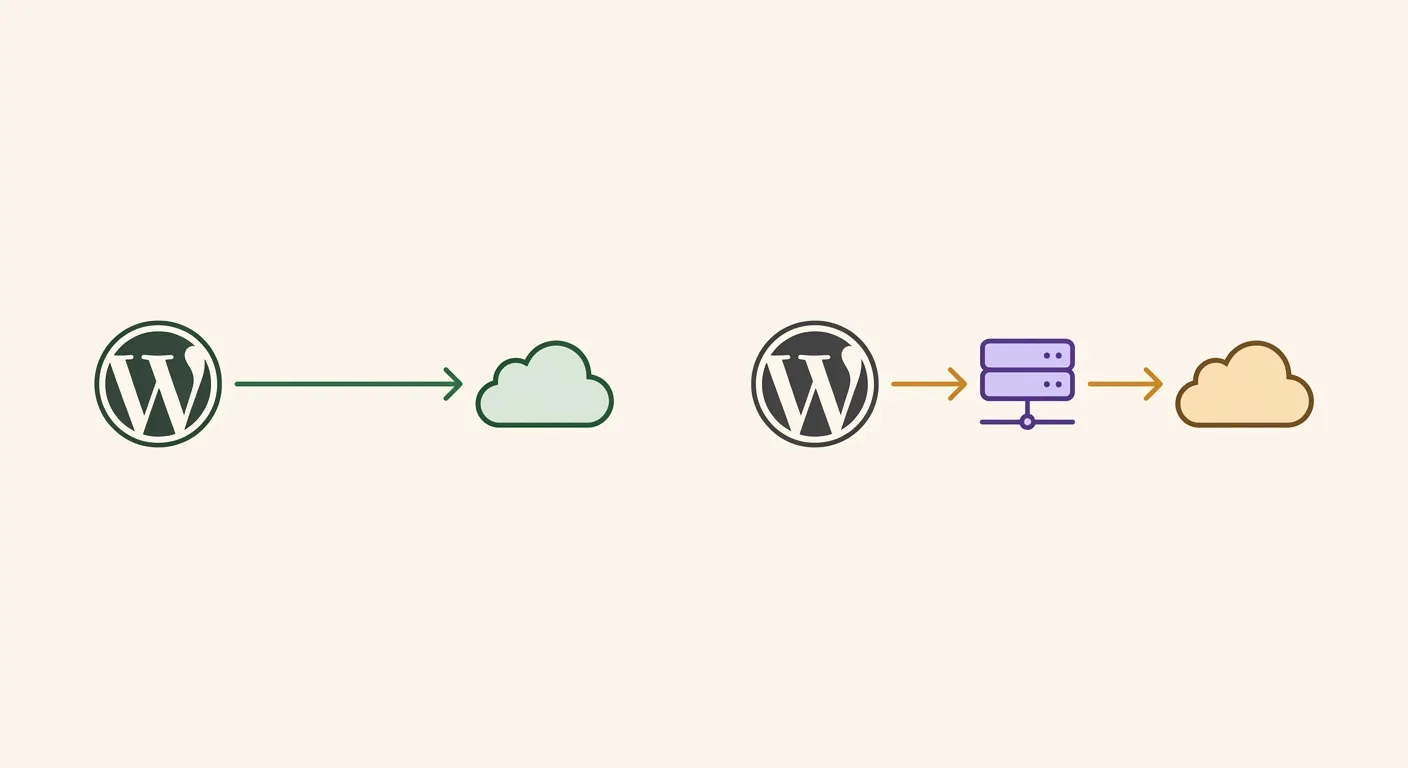
Two setups hide behind the same four letters. In genuine BYOK, you save your API key in the tool, and each generation goes from your WordPress server straight to the provider’s API (api.openai.com, api.anthropic.com and so on). The provider bills your account, and the tool’s vendor never sees the request. In the relayed version, the tool takes your key and forwards each call through its own servers first. You may still pay the provider’s normal rate, but the vendor now handles your prompts, your outputs and your key, and your workflow depends on its servers staying up. A third pattern isn’t BYOK at all: the tool uses its own key and sells you credits, which is where markup lives. If you came for the term itself, our guide to what BYOK means covers it in AI tools and in cloud encryption.
Here is a test you can run in a few minutes. First, read the plugin’s documentation or readme for where requests go: genuinely direct tools name the provider’s API, while relayed tools mention their own servers or stay vague. Then trigger one generation and open your provider’s usage or logs page to confirm the request appears under your key at that moment. Skip the browser’s Network tab: a WordPress plugin that calls the API from your server won’t show the request there at all, and a plugin that calls the provider from your browser is exposing your key, which OpenAI’s key safety guidance tells developers never to do.
BYOK vs. Subscription: What an Article Actually Costs
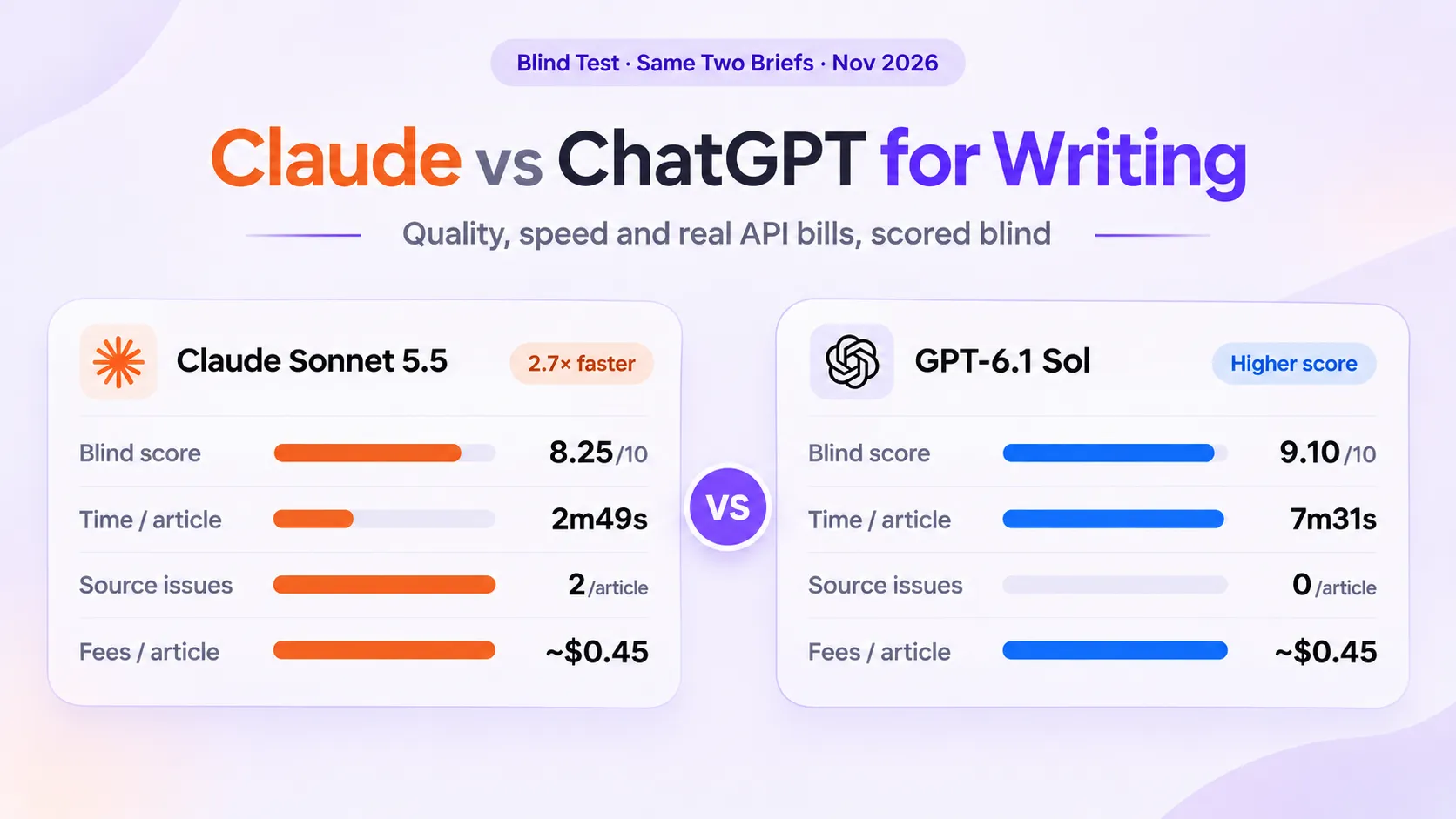
Start with list prices. Claude Sonnet 5.5 costs $2 per million input tokens and $10 per million output tokens on Anthropic’s API, and GPT-6.1 Sol is priced the same on OpenAI’s. One bare prompt that returns a 1,500-word draft, about 800 input tokens and 2,000 output tokens, comes to roughly two cents. Hardly anyone publishes that draft as is. A real workflow also pays for research, outlining, review and revision, and every step uses tokens. In our blind test of Claude Sonnet 5.5 and GPT-6.1 Sol, two complete Claude articles were billed $0.44 and $0.47 on Anthropic’s console, prompt caching included, and the two GPT-6.1 Sol articles came to about the same.
So the honest comparison is about $0.45 per finished article against what your plan costs per article. Divide the monthly price by the articles you actually publish: a hypothetical $49 plan works out to $2.45 an article at 20 articles a month and $0.98 at 50. At about $0.45 an article, BYOK stays cheaper than that $49 plan up to roughly 100 articles a month. Above that, the question becomes whether the plan’s word or credit limits even allow that volume.
Money isn’t the only cost. With BYOK you create and protect a key, set spend limits and watch usage. If you publish a handful of articles a month, a bundled tool can be worth the convenience even when it costs more per article. We worked through word caps, seat fees and editing time in the true cost of AI content per article.
Genuine BYOK AI Writing Tools for WordPress in 2026
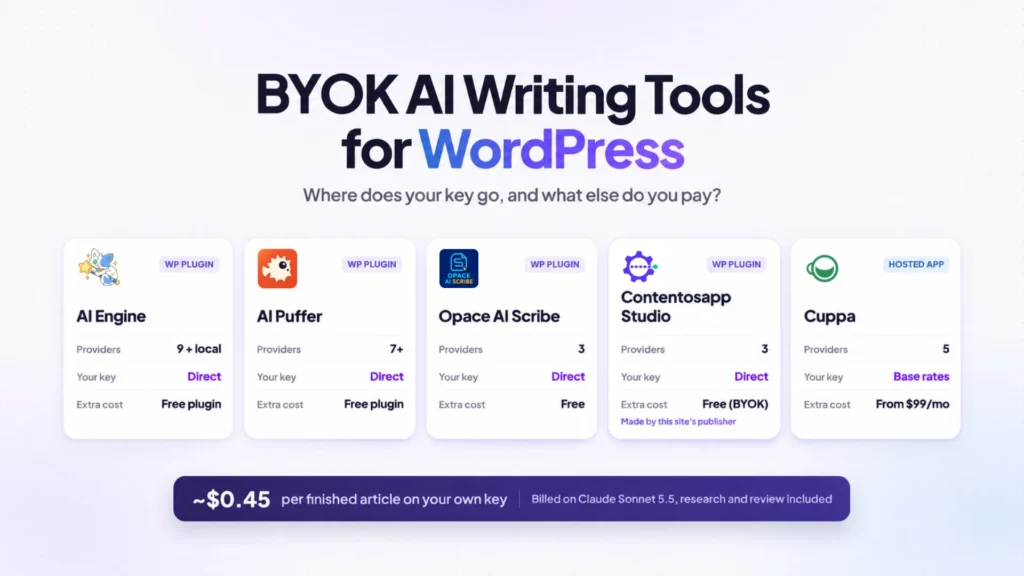
We checked each tool against its own WordPress.org listing or website on November 18, 2026, on three points: requests go from your site to the provider with your key, OpenAI, Anthropic and Google are all supported, and the output lands in WordPress. This is a documentation check, not a hands-on benchmark, so run the usage-log test above before you commit. For AI content plugins beyond BYOK, see the full ranked comparison of AI content plugins for WordPress.
What each tool’s own listing or website says about providers, routing and extra cost.
| Tool | Keys it accepts | What its docs say | Cost beyond your provider |
|---|---|---|---|
| AI Engine WordPress plugin Editor Copilot, chatbot, MCP server. Updated Nov 12, 2026. | OpenAI, Anthropic, Google, xAI, Mistral, Perplexity, OpenRouter, Replicate, Azure Plus an OpenAI-compatible connector for local servers such as Ollama or LM Studio. | Connects to the services you configure “with your own API keys.” Its Copilot rewrites, shortens and translates text in the editor; its MCP tools let Claude or ChatGPT write posts block by block. | Free plugin A Pro version adds integrations such as WooCommerce, page builders and multilingual plugins. |
| AI Puffer WordPress plugin Formerly AI Power. Content writing, chatbots, MCP server. Updated Nov 17, 2026. | OpenAI, Anthropic, Google Gemini, xAI, DeepSeek, OpenRouter, Azure OpenAI Plus OpenAI-compatible endpoints. | Own-key requests “go straight from your server to the provider you chose.” Its FAQ adds that they do not pass through AI Puffer Cloud. | Free plugin works on its own Paid plans add features, Ollama among them. An optional Cloud mode runs on credits. |
| Opace AI Scribe WordPress plugin Free and open source. Updated Aug 27, 2026. | OpenAI, Anthropic, Google Gemini Keys live in the free Opace AI Hub plugin, which fetches the models on your account. | “Nothing is sent to Opace’s servers.” It connects only to the provider APIs you configure. | Free Shows estimated, actual and running provider spend when pricing data is available. |
| Contentosapp Studio WordPress plugin Multi-agent article workflow. Made by this site’s publisher. Updated Nov 6, 2026. | Google Gemini, OpenAI, Anthropic Claude Keys are stored encrypted at rest in your WordPress database. | Sends requests “directly from your site to that provider.” No plugin markup and no per-article cap, per its listing. | Free in BYOK mode, no license An optional managed service, ContentOS Auto, covers people who don’t want to manage a key. |
| Cuppa Hosted app Agency workspace that publishes to WordPress and other CMSs. | OpenAI, Anthropic, Google, xAI, DeepSeek | You pay providers “directly at their base rates.” Its plan features list zero token markup. | Plans from $99 a month, billed annually The platform fee, not tokens, is the main cost. |
How to read the table: if you want an article workflow inside WordPress, Opace AI Scribe and Contentosapp Studio are built for that, and AI Puffer covers content writing alongside chatbots and automations. AI Engine suits developers who want Claude or ChatGPT working on the site over MCP. Cuppa makes sense for agencies running several brands from one hosted workspace, where the plan fee matters more than token costs. Whichever you pick, give it its own API key with a spend limit.
How to Vet Any “BYOK” Label Before You Commit
The BYOK badge isn’t regulated, and directories only go so far. BYOKList says its 123 tools are “checked by hand” and sums up the promise well: “you pay the provider directly at API prices, with no markup.” A listing tells you a tool accepts your key. It can’t tell you how your own setup routes requests or what else you’ll be billed, so check those yourself, in this order:
- Read where requests go. The docs, readme or privacy policy should name the provider’s own API. If they mention the vendor’s servers or stay vague, ask before you paste a key.
- Look for a relay or cloud mode. Some tools offer both their own cloud and your key. Make sure your key is the one selected.
- Run one generation and check the usage log. The request should appear in your provider’s usage page under the key you created for that tool.
- Read the pricing page with your key in mind. A tool that still charges per-word or per-article credits after you add your key isn’t meaningfully BYOK: you’d be paying two bills.
Frequently Asked Questions
What does BYOK mean for AI writing tools?
It means you supply your own API key from a provider such as OpenAI, Anthropic or Google, and the tool uses it to make requests that the provider bills to your account. For the term in other contexts, including cloud encryption, see our guide to what BYOK means.
Is BYOK cheaper than a subscription AI writing plan?
Per article, usually yes. Our complete Claude Sonnet 5.5 articles were billed $0.44 and $0.47 on Anthropic’s console, research and review included, while a $49 monthly plan works out to $2.45 per article at 20 articles a month. Against that $49 price, BYOK stays cheaper up to roughly 100 articles a month. What you give up is convenience: you manage the key, the spend limits and the usage.
Which BYOK AI writing tools work directly inside WordPress?
As of November 2026, AI Engine, AI Puffer (formerly AI Power), Opace AI Scribe and Contentosapp Studio all document direct requests from your site to the provider with your own key, and all four run inside the WordPress dashboard. Contentosapp Studio is made by the publisher of this site. Cuppa is also BYOK, but it runs as a hosted app that publishes to WordPress.
Can I use my own Anthropic or Gemini key, or only OpenAI?
You aren’t limited to OpenAI. All five tools in this guide accept OpenAI, Anthropic and Google keys. AI Engine and AI Puffer add more, including xAI, OpenRouter and Azure OpenAI, and AI Engine can also reach local servers such as Ollama through an OpenAI-compatible connector.
How do I know if a tool is actually using my API key or routing through its own servers?
Read the plugin’s documentation or readme first: genuinely direct tools name the provider’s API (api.openai.com, api.anthropic.com and so on), while proxied tools mention their own servers or stay vague. Then run one generation and check your provider’s usage or logs page. If the request shows up under your key at that moment, the tool is using your key, though the usage page cannot tell you whether the call passed through the vendor’s servers on the way; if nothing shows up, the tool is not using your key at all. The browser’s Network tab won’t settle it, because WordPress plugins that call the API from your server never show the request there.
Are there any risks to entering my API key into a third-party writing tool?
Yes, and they are worth taking seriously. Any tool that stores your API key could expose it in a breach, and a leaked key lets someone run up charges on your account. Before entering a key, read how the tool stores it and where it sends requests. Give each tool its own key with a spend limit, and check whether that limit blocks usage or only sends an alert. Prefer tools that keep the key encrypted in your WordPress database rather than on an external server, and revoke the key if you stop using the tool.
Conclusion
Genuine BYOK passes a simple test: your requests go from your site to the provider, the provider bills you, and nobody adds credits on top. On cost, a complete article on your own key lands around $0.45 at today’s mid-tier model prices, which is less than a $49 plan costs per article until you pass roughly 100 articles a month. The tools worth shortlisting combine direct calls with several providers, because model rankings keep moving: Claude led our six-model blog writing test in September, and GPT-6.1 Sol came out ahead of Claude Sonnet 5.5 two months later. And cheap to generate isn’t the same as ready to rank: an ungrounded draft still needs the editing pass that keeps it clear of thin-content search risk.
References
External sources
- AI Engine – MCP Server & AI Chatbot for WordPress, with Claude, ChatGPT & Gemini | WordPress.org — https://wordpress.org/plugins/ai-engine/
- AI Puffer – MCP Server for Claude & ChatGPT, with AI Chatbot | WordPress.org — https://wordpress.org/plugins/gpt3-ai-content-generator/
- Opace AI Scribe: SEO Content Creator & Humanizer for OpenAI, Anthropic & Gemini | WordPress.org — https://wordpress.org/plugins/ai-scribe-the-chatgpt-powered-seo-content-creation-wizard/
- Cuppa – Agency Brand Operating System — https://cuppa.ai/
- BYOKList – AI Tools with Bring-Your-Own-Key (BYOK) — https://byoklist.com/
- Best Practices for API Key Safety | OpenAI Help Center — https://help.openai.com/en/articles/5112595-best-practices-for-api-key-safety
- Contentosapp Studio – AI Content Writer & SEO (BYOK) | WordPress.org — https://wordpress.org/plugins/contentosapp-studio/
Related content
- BYOK Meaning: Bring Your Own Key in AI and Cloud — Contentosapp
- Claude vs ChatGPT for Writing: Two-Brief Blind Test — Contentosapp
- How to Use Your Own AI API Key in WordPress: The Honest BYOK Guide — Contentosapp