Something changed. Maybe you switched to a Mac and realized ZimmWriter won’t install. Maybe the monthly license plus your OpenAI bill crossed a number you can’t justify. Maybe you want the article to land in WordPress as a draft you review — not auto-publish straight to your live site. Whatever the trigger, you’re not looking for a generic “top AI writing tools” list. You already know what ZimmWriter does. You want to know which ZimmWriter alternative solves your specific problem without creating a new one.
This guide covers six tools: ZimmWriter, Contentosapp Studio, WordRaptor, AI Puffer, Koala AI, and SEOWriting.ai. Every claim is traced to an official source. Prices are date-stamped at September 2026. Where a fact could not be verified, this guide says so rather than inventing a cell to fill a table.
One disclosure before anything else: Contentosapp Studio is made by the publisher of this article. It receives no special treatment here — the same evidence rules, the same constraint reporting, and the same evidence gaps apply to it as to every other tool. You’ll see its limitations stated directly.
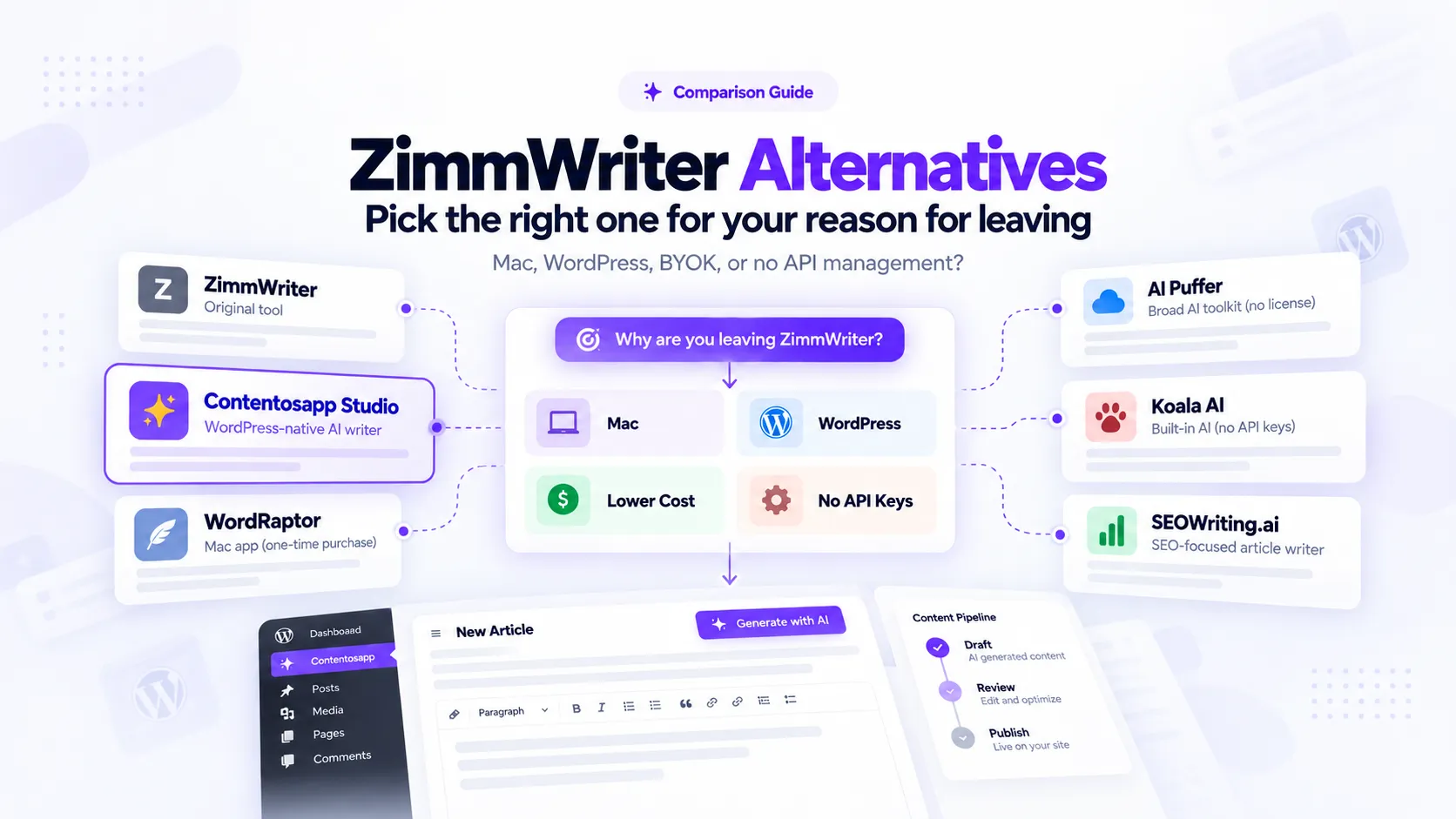
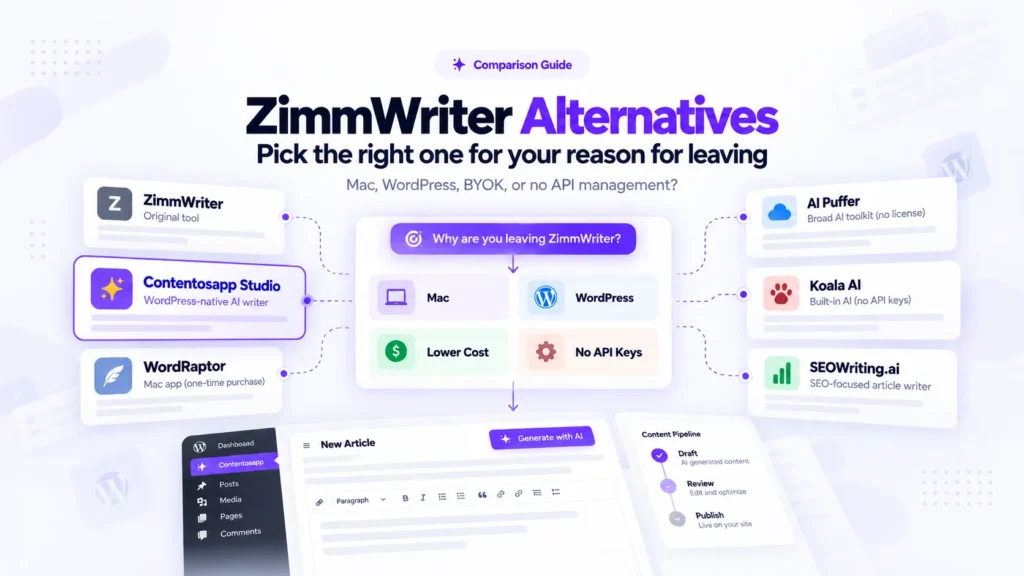
The guide is organized around four exit reasons. Not feature categories. Not price brackets. The actual reasons niche-site builders leave ZimmWriter:
- Mac support — ZimmWriter runs on Windows. Full stop.
- WordPress-native workflow — you want AI generation to happen inside your CMS, not a separate desktop app.
- No license fee on top of API costs — you already pay OpenAI or Anthropic; a second monthly bill is the friction.
- No API key management — you want a tool that handles AI costs inside a subscription so you don’t touch provider accounts at all.
Find your reason. Everything else in this guide follows from it.
Quick Guide: Which Alternative Fits Your Exit Reason
- On a Mac: WordRaptor is a native Mac app with a one-time purchase — but only OpenAI and Claude are currently active; Gemini and Ollama are listed as coming soon.
- Want to work inside WordPress: Contentosapp Studio (free BYOK, draft-for-review pipeline) or AI Puffer (broad toolkit, but not a focused long-form article writer).
- Done paying a license on top of API costs: Contentosapp Studio (free BYOK tier), AI Puffer (free plugin), or WordRaptor (buy once). Each trades something — language support, pipeline depth, or Mac-only access.
- No API key management: Koala AI (subscription with AI included, word caps per plan) or SEOWriting.ai (auto-posts to WordPress in bulk; pricing not publicly verified).
- Stay with ZimmWriter if: you run 50–1,000 article batches on Windows and publish across many sites simultaneously — no alternative in this guide verifies that combination at the same scale.
- No tool here currently combines verified bulk volume with a mandatory human review step at scale — that gap is real and worth factoring before you switch.
Why Your Reason for Leaving ZimmWriter Determines the Right Alternative
These are not variations of the same preference. They are structurally different problems that lead to structurally different tools. Getting this wrong means you switch, hit a wall you didn’t see coming, and switch again.
If you’re on a Mac, no amount of features in a Windows-only app helps you. The platform question is binary. ZimmWriter positions itself explicitly as the best AI writer for a Windows computer — that sentence is a constraint statement, not a selling point, for anyone outside Windows. WordRaptor was built specifically for this gap. It’s a native Mac app; your drafts stay on your machine, and it uses your own API keys. That’s the entire value proposition, and it matches the exit reason precisely.
If you want the AI to run inside WordPress, the platform question disappears — but the workflow question opens up. Contentosapp Studio and AI Puffer both live in the WordPress dashboard. The difference is what they’re designed to do: Contentosapp Studio is a focused seven-agent article pipeline that outputs a draft into your WordPress editor for human review; AI Puffer is a broader AI toolkit with chatbot, automation scheduling, image generation, WooCommerce tools, and an article writer as one of many features. Same platform, different primary job.
If your issue is the license fee, understand what you’re actually paying for. ZimmWriter’s cost is $24.97/month or $247/year — on top of your API bill. Free-tier alternatives like Contentosapp Studio and AI Puffer eliminate the license layer. WordRaptor replaces recurring fees with a single purchase. But “BYOK” is never truly free: every article still costs you tokens, and a high-volume batch on GPT-4o or Claude Sonnet can exceed a flat subscription at scale. The BYOK AI Writer explainer covers this arithmetic clearly — read it before you assume BYOK is automatically cheaper.
If API key management itself is the friction — you don’t want a provider account, you don’t want to think about token limits — Koala AI solves this with AI usage bundled into its subscription. SEOWriting.ai does not document a BYOK requirement, but its AI billing model could not be fully verified from official sources.
Decision Matrix
Every cell below is traceable to an official source at the URLs listed in this guide. Where a fact could not be confirmed, the cell says so.
| Tool | Platform | Pricing model (Sep 2026) | BYOK / AI included | Batch volume | WordPress publishing flow | Languages verified |
|---|---|---|---|---|---|---|
| ZimmWriter | Windows desktop only | $24.97/mo or $247/yr license + API costs billed separately | BYOK only — required (GPT, Claude, Perplexity Sonar, OpenRouter, Ollama) | Up to 1,000 articles; 50 product roundups per batch | Direct publish or schedule to up to 100 WP installs | Not publicly verified |
| Contentosapp Studio | WordPress plugin only | Free (BYOK, no plugin fee, no article cap); optional managed plans from 5 to 100 articles/month | BYOK — Gemini, OpenAI, Claude; no plugin markup | One production at a time per site | Draft by default for human review; Scheduled or Published optional per production | English, Spanish, Brazilian Portuguese only |
| WordRaptor | Mac native app only | One-time purchase; vendor states under $50 on Mac App Store — verify current price | BYOK — OpenAI and Claude; Gemini, Groq and Ollama marked coming soon | Batch confirmed; maximum size not publicly verified | Publish to WP, Shopify, Wix, Ghost, Webflow — draft-vs-auto-publish detail not publicly verified | 8+ languages: EN, FR, ES, PT-BR, IT, DE, NL, AR, RO |
| AI Puffer | WordPress plugin only | Free plugin; Pro tier pricing not publicly verified | BYOK — OpenAI, Gemini, Azure, OpenRouter, DeepSeek, xAI, Ollama; no hidden credits | Automation engine supports scheduled batch tasks; max article batch size not publicly verified | Publishing-status control in the article generator; automation engine schedules recurring tasks | Not publicly verified |
| Koala AI | Web app (browser) | Starter $25/mo; Professional $49/mo; Boost $99/mo; 20% off annual | No BYOK — AI usage included in subscription; word caps per plan | Bulk writing mode; 2x faster bulk on Boost and above | Direct publish to WP, Shopify, Webflow, Ghost, webhooks — draft-vs-review detail not publicly verified | Not publicly verified |
| SEOWriting.ai | Web app (browser) | Not publicly verified — check current pricing | Not publicly verified | Up to 100 articles per batch with auto-posting | Auto-posts to WP directly — mandatory review step not confirmed | Not publicly verified |
What Each Tool Actually Costs: License Fee, API Bill, or Subscription
Three cost structures exist in this market. You need to know which one you’re buying into before you switch.
The first is license plus API bill. ZimmWriter charges a recurring license — $24.97/month or $247/year — and your AI provider charges separately per token. You bring your own keys; there are no word limits, but every generation hits your provider account directly. WordRaptor replaces the recurring license with a one-time purchase (vendor states under $50 on the Mac App Store — this is WordRaptor’s own claim on their comparison page; confirm the live price before purchasing) and similarly passes API costs to your provider. Contentosapp Studio and AI Puffer remove the license fee entirely — both have free tiers where you supply your own key and pay your provider nothing beyond what the requests cost. Contentosapp Studio explicitly states no plugin markup and no per-article cap on the free BYOK tier. AI Puffer advertises no hidden credits — you use your own account and control your costs.
The second structure is subscription with AI included. Koala AI bundles AI generation into its plan pricing. Starter is $25/month for 45,000 KoalaWriter words and 500 credits; Professional runs $49/month for 100,000 words and 1,000 credits; Boost is $99/month with 2x faster bulk creation. Annual billing saves 20%. No API accounts needed. But word caps are real — a productive niche site can exhaust a Starter plan’s monthly allowance on a handful of long articles.
The third is unverified. SEOWriting.ai’s pricing page was not accessible at the evidence date. Do not make a cost decision based on what you read elsewhere — check current pricing directly on their site.
Three Ways AI Writing Tools Charge You
The sticker price is only part of the equation. What matters is who charges for the tool and who charges for the AI usage.
Model 01
License + API Usage
ZimmWriter charges a recurring software license while your AI provider bills usage separately.
Two separate costsModel 02
BYOK Without a Recurring License
Contentosapp Studio and AI Puffer offer free BYOK paths. WordRaptor uses a one-time purchase model.
You still pay API usageModel 03
Subscription With AI Included
Koala AI bundles generation into the subscription. You do not manage separate provider API accounts.
One bundled billThe honest math for BYOK: if you’re running ZimmWriter with GPT-4o at volume, your API bill may already be substantial. Switching to a free BYOK plugin only removes the license layer — the AI spend stays. For lighter-volume publishers, the license savings are real. For high-volume operations, run the actual token calculation before assuming you’ll save money. The BYOK AI Writer explainer walks through this comparison in detail.
The Six Tools, Analyzed
ZimmWriter — Reference Baseline
ZimmWriter’s core value proposition is batch volume without word caps, on Windows. You can generate up to 1,000 blog posts in one run, handle product roundups up to 50 per batch, and publish or schedule directly to up to 100 WordPress installations. The model roster is broad: GPT-5 variants, the full GPT-4.1 and 4o family, Claude 3.5 Haiku, Claude 4 Sonnet and Opus, Perplexity Sonar, OpenRouter (hundreds of additional models), and locally hosted models via Ollama. Beyond article generation, it works across Word, Google Docs, VS Code, Gmail, LinkedIn, and over 1,000 other applications through a cross-app AI assistant.
The constraint is plain: Windows-only. Mac users have no supported path. Output language support is not stated on the official site — that’s an evidence gap, not a verified limitation, but it means you can’t confirm multilingual support from official sources. If you’re on Windows, running volume, and publishing to many sites, nothing in this guide verifiably matches that combination at the same scale.
Evidence gaps: output languages; trial or refund policy; draft-vs-publish workflow controls beyond direct publish.
Official source: ZimmWriter official website
Contentosapp Studio — Publisher’s Product
Disclosure: Contentosapp Studio is built by the publisher of this article. The same evidence rules apply.
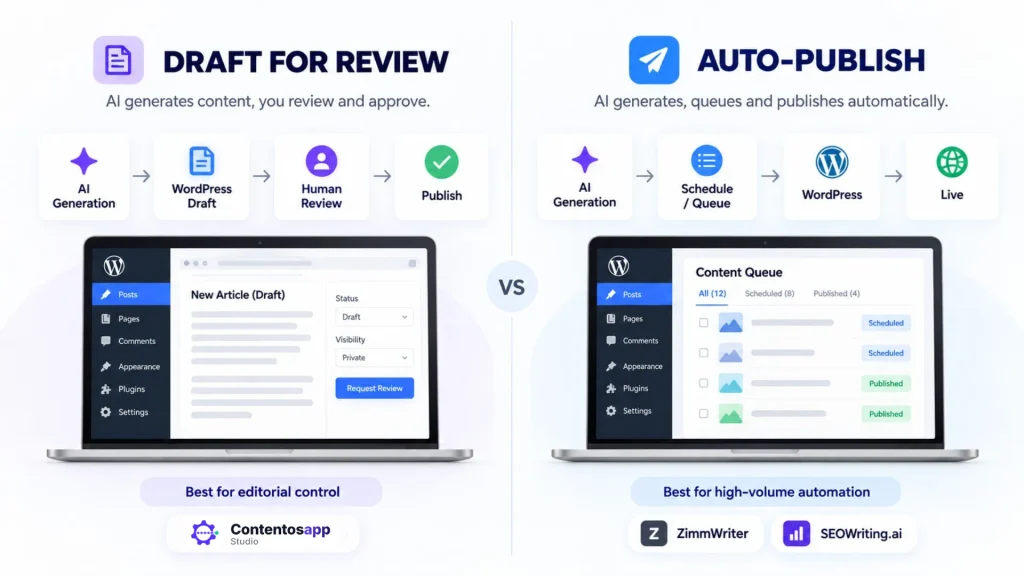
Contentosapp Studio is a WordPress plugin that runs a seven-agent pipeline: Discoverer, Strategist, Researcher, Writer, Editorial Reviewer, Visual Designer, and Social Media. Each article passes through all seven before landing in your WordPress editor. Draft is the default, so a person reviews each article before it goes live, and the pipeline is built around that step. You can also set a production to Scheduled or Published when you want it to go out automatically.
BYOK works without a license. You connect your own Gemini, OpenAI, or Anthropic key; requests go directly from your site to that provider with no plugin markup and no per-article cap. The publisher’s own case study — vendor-reported, not independently audited — documented 25 articles in 25 days at approximately $0.20 per article in AI usage. Optional managed plans (ContentOS Auto) start with 3 free done-for-you articles, then Starter (5 articles/month), Pro (30) and Studio (100), with 2 months free on annual billing. Current prices are listed on contentosapp.com.
The hard constraints are worth stating directly. One production runs at a time per WordPress site — this is not a bulk-batch tool. Supported languages are English, Spanish, and Brazilian Portuguese only. And it requires a WordPress installation; there is no standalone web or desktop version.
Evidence gaps: total active installs; article length or token limits per run.
Official source: Contentosapp Studio on WordPress.org
WordRaptor — Mac-Native Alternative
WordRaptor was built for one audience: Mac users who want to generate and publish articles without Windows virtualization overhead. It’s a Mac app, not a web service — your drafts live on your computer, not on a third-party server. API keys and CMS credentials are stored with SwiftData encryption and never leave your Mac.
The integrations grid on the official site shows OpenAI, Claude and Apple Intelligence without a badge and marks Gemini, Groq and Ollama as coming soon. The feature list on the same page says Groq and Gemini can be connected, so confirm the current version if you need a provider other than OpenAI or Claude. CMS publishing covers WordPress, Shopify, Wix, Ghost, and Webflow. Language support is meaningful: 8+ languages are listed, including English, French, Spanish, Brazilian Portuguese, Italian, German, Dutch, Arabic, and Romanian — more than any other item in this guide with publicly verified language coverage.
Pricing is a one-time purchase. WordRaptor’s own comparison page states “under $50 on the Mac App Store” — this is vendor marketing, not an independent price check. Confirm the current live price on the Mac App Store before purchasing. Batch generation is confirmed as a feature, but the maximum batch size is not publicly stated in official documentation.
Evidence gaps: exact live price on Mac App Store; maximum batch size; research/source-grounding methodology; draft-vs-auto-publish toggle detail.
Official source: WordRaptor official website
AI Puffer — WordPress AI Toolkit
AI Puffer is best understood as an all-in-one AI platform for WordPress, not a specialized long-form SEO article pipeline. It includes an AI chatbot, content generator, image generator, automation engine for scheduled tasks, AI-powered forms, WooCommerce product description tools, and a vector database for training on your own content. That breadth is genuine — and it means the article generation feature exists alongside a lot of other functionality you may or may not need.
BYOK covers OpenAI, Google Gemini, Microsoft Azure, OpenRouter, DeepSeek, xAI, and Ollama, with no hidden credit layer. The free plugin tier is available on WordPress.org. Its article generator includes a publishing-status control, according to the official listing, and the automation engine can schedule recurring content tasks.
Pro tier pricing is not publicly verifiable from official documentation. If cost is a key criterion, you can confirm the free tier structure but cannot accurately calculate Pro tier costs without checking the plugin page directly.
Evidence gaps: Pro pricing; article batch size limits; output languages.
Official source: AI Puffer on WordPress.org
Koala AI (KoalaWriter) — Subscription with AI Included
Koala AI is a browser-based platform where AI usage is bundled into the subscription — no provider account required. Starter is $25/month for 45,000 KoalaWriter words and 500 credits; Professional is $49/month for 100,000 words and 1,000 credits; Boost is $99/month for 250,000 words and 2,500 credits, with 2x faster bulk article creation. Annual billing carries a 20% discount. The platform starts free without a credit card.
Beyond article generation, the Starter plan includes real-time factual data, live Amazon data for affiliate content, bulk writing mode, and direct publishing to WordPress, Shopify, Webflow, Ghost, and webhooks. Professional and above add an article editor with AI chat edits and SEO scoring, KoalaLinks internal linking for up to 50 sites, deep research, and the KoalaMCP server for connecting AI assistants. The Boost plan adds Content Calendar Autopilot.
The model selection on Starter, as listed in September 2026, includes GPT-6 and Claude Sonnet 5. There is no BYOK option mentioned on the pricing page — if you want to use a specific model not on the plan, or reduce costs by connecting your own key, that path is not confirmed as available.
For a more detailed look at how it compares to other web-based platforms, the Koala AI alternatives guide covers adjacent tools in this category.
Evidence gaps: output languages; draft-vs-auto-publish controls in the WordPress publishing flow; rollover of unused word credits.
Official source: Koala AI pricing
SEOWriting.ai — Bulk Auto-Post Platform
SEOWriting.ai is designed for volume. Its stated workflow is 1-click article generation with automatic SERP competitor analysis, followed by bulk auto-posting of up to 100 articles per batch to WordPress. The platform automatically optimizes for both traditional search results and AI engines such as ChatGPT, Perplexity, and Google AI. Image generation is included, and 20+ pre-trained models for affiliate content are available for product roundups, reviews, and how-to guides.
The auto-post workflow is the defining characteristic. Articles can be published or scheduled automatically — that’s the design. Whether a draft-only mode exists, where content lands for human review before publish, is not confirmed in official content. For publishers who want mandatory review, this is a meaningful gap to investigate before committing.
Pricing is not publicly verifiable. The pricing page was inaccessible at the evidence date. Do not rely on third-party price claims — check the current pricing at SEOWriting.ai directly.
Evidence gaps: pricing (entirely unverified); BYOK vs. included AI (not stated); output languages; whether a draft-review mode exists; AI usage model.
Official source: SEOWriting.ai
Strengths and Limitations by Use Case
If you’re on a Mac, WordRaptor is the only tool in this guide built as a native Mac application. The privacy-first argument — drafts on your device, keys never leave your Mac — is real and documented. The trade-off is that Gemini, Groq, and Ollama integrations are listed as coming soon, not currently active. If your workflow depends on Gemini or local models, confirm availability before purchasing. Nothing else here runs as a Mac native app.
If you want to write inside WordPress, Contentosapp Studio and AI Puffer are the two options. Contentosapp Studio fits publishers who want a structured, research-grounded pipeline with human review before publish — the seven-agent design means each article has gone through intent mapping, sourcing, writing, and editorial review before it appears in your editor. AI Puffer fits publishers who want more than an article writer: if you also want a chatbot, automation scheduling, WooCommerce product copy, or a custom knowledge base, its breadth becomes an advantage. If you only want articles, that same breadth may be more tool than you need.
Start With the Constraint You Actually Need to Solve
The best alternative changes depending on what made ZimmWriter stop fitting your workflow.
Your constraint
You Work on a Mac
The only tool in this comparison built as a native Mac application. OpenAI and Claude are currently documented as active integrations.
Your constraint
You Want to Work Inside WordPress
Contentosapp Studio focuses on a structured article production pipeline. AI Puffer is a broader WordPress AI toolkit with content generation among other features.
Your constraint
You Don’t Want Another Recurring License
Contentosapp Studio and AI Puffer offer free BYOK paths. WordRaptor replaces the recurring license with a one-time purchase. API usage still costs money.
Your constraint
You Don’t Want to Manage API Keys
Koala AI has documented AI usage bundled into its subscription. SEOWriting.ai does not document a BYOK requirement, but its AI billing model was not fully verified.
If your goal is no license fee on top of API costs, the real question is what you trade for that. Contentosapp Studio’s free BYOK tier trades batch volume (one article at a time) and language breadth (three languages). AI Puffer’s free tier trades pipeline focus: article generation is one feature among many (chatbot, forms, images, automation) rather than the product’s single focus. WordRaptor trades platform access — Mac only, and some AI providers are still pending. None of these trades is a dealbreaker by itself, but they’re real.
If you don’t want to manage API keys at all, Koala AI gives you the cleanest managed experience with transparent pricing and a documented feature set. SEOWriting.ai offers bulk auto-posting at scale, which is a direct functional match for ZimmWriter’s volume workflow — but pricing is unverified and the auto-post default means less editorial control. For publishers thinking about scaling bulk content production, the Programmatic SEO with AI guide covers the trade-offs between automated publishing and Google’s documented position that using automation primarily to manipulate rankings violates its spam policies — a distinction that matters when publishing at volume.
Worth noting directly: Google’s guidance on AI-generated content is that automation is not against its guidelines. The violation occurs when automation is used “primarily to manipulate ranking in search results.” That distinction — helpful content versus ranking manipulation — applies equally to a 1,000-article ZimmWriter batch and a 100-article SEOWriting.ai auto-post run. The publishing workflow you choose, and the quality control you apply, determines which side of that line you’re on.
Category Gaps: What This Set of Tools Does Not Clearly Solve
No tool in this guide publicly verifies the combination of bulk article generation and a mandatory human review step at scale. ZimmWriter produces volume and auto-publishes. SEOWriting.ai produces volume and auto-publishes. Contentosapp Studio defaults to human review but runs one article at a time. If you need 50 articles per week with each one reviewed before publish, you are assembling a workflow from pieces — no single tool here documents that end-to-end capability.
The Combination No Tool Here Clearly Solves
Each capability exists somewhere in this market. The gap is finding all three in one documented workflow.
Language support is sparse across the board. WordRaptor lists 8+ supported languages as a documented feature. Contentosapp Studio is limited to English, Spanish, and Brazilian Portuguese. Every other tool in this guide has output language coverage listed as not publicly verified from official sources. That’s not a judgment — it’s a gap in what’s documented. If you’re building a multilingual site, confirm language support directly with each vendor before purchasing.
Pricing opacity affects two items enough to matter. SEOWriting.ai’s pricing is entirely unverifiable from official sources at the evidence date — any figure you see in a third-party comparison article may be outdated or inaccurate. AI Puffer’s Pro tier pricing is similarly undocumented in extracted official content. For tools where cost is your primary reason to switch, an unverifiable price is a real planning problem — check both directly before committing.
Frequently Asked Questions
Is there a ZimmWriter for Mac?
ZimmWriter explicitly positions itself as a Windows application — there is no Mac version listed on the official site. WordRaptor is the closest structural equivalent: a buy-once native Mac app with BYOK support and direct CMS publishing. It was built specifically for this gap. Browser-based tools also work on a Mac: Contentosapp Studio runs inside WordPress, and Koala AI and SEOWriting.ai are web apps.
How much does ZimmWriter cost?
ZimmWriter is priced at $24.97/month or $247/year as of September 2026. That is a license fee paid on top of your API costs — your AI provider (OpenAI, Anthropic, Perplexity, or others) bills separately per token or per request. The license alone does not cover AI usage.
Is ZimmWriter free?
No. There is no free tier listed on the official ZimmWriter site. The tool requires both a paid license and funded API accounts with your chosen providers.
Does ZimmWriter have a lifetime deal?
A lifetime purchase option is not listed on the official ZimmWriter site as of September 2026. The documented pricing is monthly or annual. If a lifetime deal exists or has been offered, it is not publicly verified from the official source.
Do I still pay for API usage with a BYOK alternative?
Yes — with any BYOK tool, including Contentosapp Studio, AI Puffer, and WordRaptor. You pay your AI provider directly per token or per request; the tool itself may be free or one-time, but the API usage is always a separate cost. The exception is subscriptions with AI included: Koala AI, SEOWriting.ai (though its pricing is not publicly verified), and Contentosapp Studio’s optional managed plans. The BYOK AI Writer explainer details how to calculate real all-in costs before switching.
Can I use a ZimmWriter alternative without an OpenAI account?
Yes. Koala AI bundles AI usage into its subscription plans — no API accounts required. SEOWriting.ai also does not list a BYOK requirement, though its AI usage model is not publicly verified in official sources. AI Puffer and WordRaptor require your own API key from at least one supported provider. Contentosapp Studio works either way: with your own key, or through its managed plans, which need no provider account.
What is the difference between “draft for review” and “auto-post” in AI writing tools?
Draft-for-review means the AI output lands in your editor — you read it, edit it, and hit publish manually. Auto-post means the tool publishes directly to your live site, often on a schedule, without a human step in between. Contentosapp Studio saves articles as drafts for review by default; scheduling or direct publishing is opt-in per production. SEOWriting.ai and ZimmWriter both document automated publishing workflows. The distinction matters beyond convenience: Google’s guidance holds that automation is not against its policies, but content produced primarily to manipulate rankings is. A human review step is one of the clearest ways to demonstrate that articles are produced for readers rather than for ranking manipulation.
Conclusion
Pick the tool that resolves the specific constraint that made you search for a ZimmWriter alternative. Platform comes first. If you need a native Mac app, WordRaptor is the only one here; if you don’t, Contentosapp Studio (inside WordPress), Koala AI and SEOWriting.ai all run in the browser on a Mac. Workflow location matters — WordPress-native means Contentosapp Studio or AI Puffer. Cost structure is layered — “free” tools still have API costs, and Koala AI’s bundled plans are simpler to budget but cap the words you can generate each month. And publishing flow is a quality-control decision, not a convenience preference.
The one question worth sitting with before you switch: how much of ZimmWriter’s value to you is the platform itself, and how much is the specific combination of volume, model breadth, and multi-site publishing? If your main constraint is the platform, every tool in this guide solves at least part of that. If you genuinely need 500 articles a week across 50 WordPress sites, none of the alternatives here publicly verify that capability at the same ceiling. That’s not a reason to stay — it’s a reason to pressure-test before you commit.
References
External sources
- ZimmWriter Official Website – Learn More About AI & SEO — https://www.zimmwriter.com/
- Contentosapp Studio – AI Content Writer & SEO (BYOK) – WordPress plugin | WordPress.org — https://wordpress.org/plugins/contentosapp-studio/
- WordRaptor — The AI Writer for Mac — https://www.wordraptor.com/
- AI Puffer – Chat. Create. Automate. (formerly AI Power) – WordPress plugin | WordPress.org — https://wordpress.org/plugins/gpt3-ai-content-generator/
- Pricing | Koala AI — https://koala.sh/pricing
- SEO WRITING – AI Writing Tool for 1-Click SEO Articles — https://seowriting.ai/
- WordRaptor – The Privacy-First Alternative to ZimmWriter | AI Writing Software — https://www.wordraptor.com/zimmwriter-alternative-for-mac
- Google Search’s guidance about AI-generated content | Google Search Central Blog | Google for Developers — https://developers.google.com/search/blog/2023/02/google-search-and-ai-content
Related content
- The BYOK AI Writer: Write Unlimited Articles With Your Own API Key, No Subscription Required — Contentosapp
- AI Content Case Study: 25 Articles in 25 Days on WordPress — Real Numbers at Day 25 — Contentosapp
- Koala AI Alternatives That Actually Rank: 5 Tools Built for Search Quality in 2026 — Contentosapp
- Programmatic SEO With AI: How to Scale Content Without Triggering Google’s Spam Filters — Contentosapp