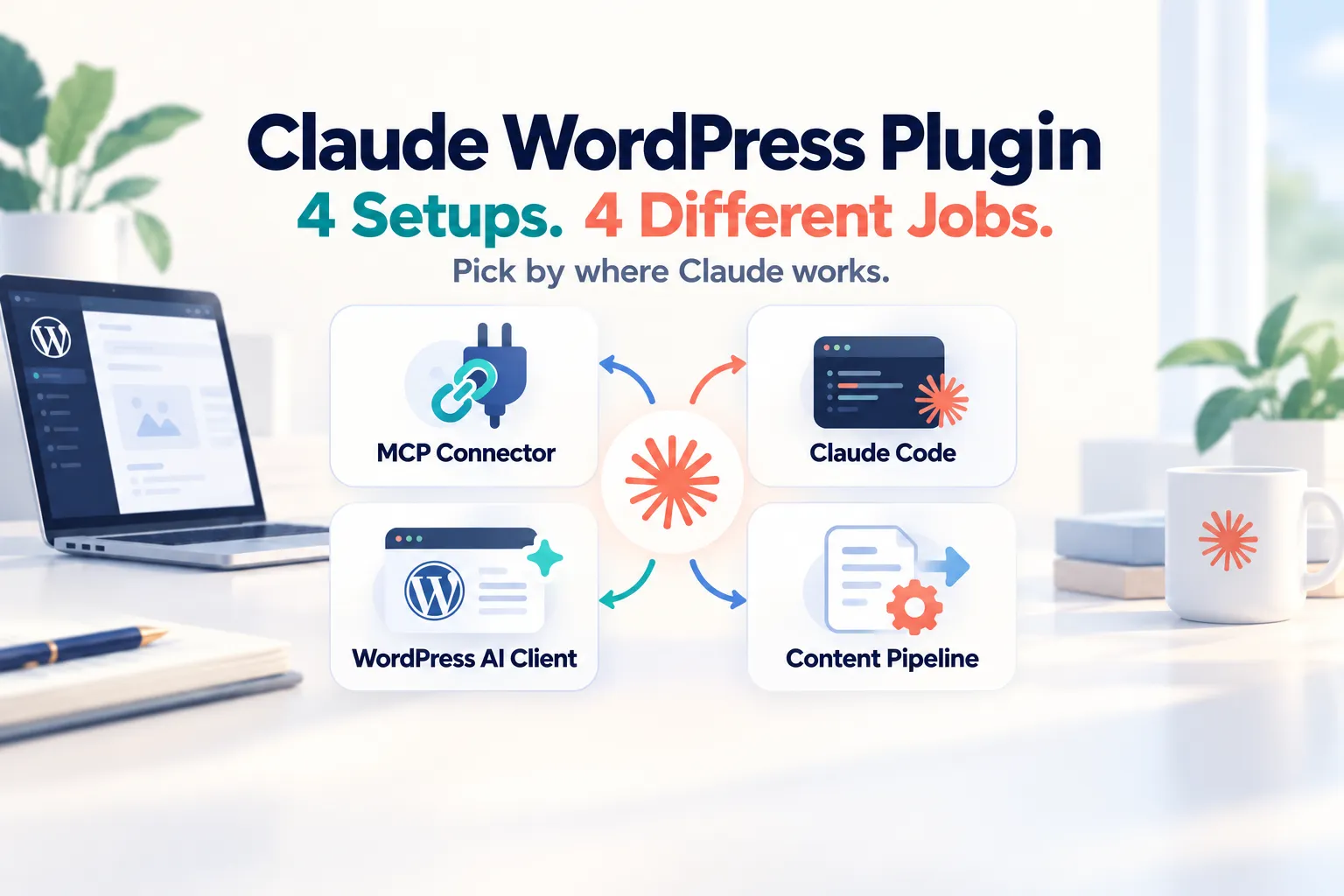
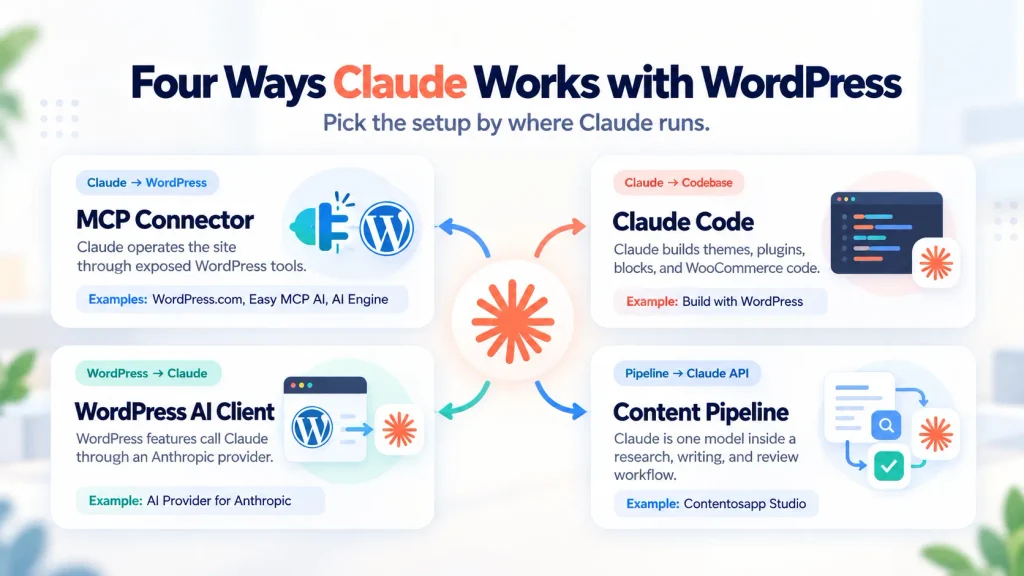
There is no single Claude WordPress plugin that covers everything people mean by that search. In 2026, the phrase points to four different setups: Claude can operate a WordPress site through MCP, Claude Code can build WordPress code, WordPress can call Claude through the AI Client and Anthropic provider, or a content pipeline can use Claude to produce full article drafts.
The easiest way to choose is to ask one question first: where should Claude work? If Claude should act on the site from claude.ai, Claude Desktop, Cowork, or Claude Code, you are looking for MCP. If Claude should write themes, plugins, or blocks, you are looking at Claude Code. If WordPress itself should call Claude inside a plugin feature, you need the WordPress AI Client plus an Anthropic provider. If your goal is researched long-form publishing, you are looking at a content pipeline instead.
That distinction also changes the bill. Anthropic says a paid Claude subscription and the Claude API are separate products. MCP and Claude Code can use your Claude account or plan depending on the client and setup, while WordPress-side Anthropic integrations use an API key and API billing. A set ANTHROPIC_API_KEY can even make Claude Code use API billing instead of included plan usage, so the architecture matters before you install anything.
Claude WordPress Plugin: Four Setups in One View
The word connector causes most of the confusion because it is used in two opposite directions. In Claude, an MCP connector lets Claude call tools on WordPress. In WordPress 7, the Settings → Connectors screen stores credentials that WordPress-side features use to call AI providers. Both are connectors, but the data flow, permissions, and billing are different.
There is also a reachability split. Anthropic’s remote custom connectors connect to your MCP server from Anthropic’s cloud, so a private network, VPN-only staging site, or ordinary localhost URL is not reachable that way. For local development, WordPress now documents an official MCP Adapter route using STDIO with WP-CLI on the same machine, or HTTP/tunneling when a remote agent needs access.
Setup 1: Claude Operates WordPress Through MCP
If what you want is “tell Claude to update my site,” you are in MCP territory. Your WordPress site becomes an MCP server, Claude discovers the tools that server exposes, and Claude calls those tools under the permissions granted to the connection. This is fundamentally different from a WordPress plugin sending text to the Anthropic API.
WordPress.com Claude Connector
The official WordPress.com Claude connector is the most direct path for WordPress.com users and for eligible self-hosted sites connected through Jetpack. WordPress.com is listed in Claude’s connectors directory. The current support guide says Claude can view site information and traffic, create and edit posts and pages, organize categories and tags, manage comments, and update media metadata.
The current WordPress.com MCP tool reference is broader than the early read-only launch. It now documents operations for site settings, content, media, themes and styles, patterns, templates, navigation menus, domains, users, and other account-level functions. Not every WordPress object is editable: for example, some WooCommerce store data, page-builder layouts, and types not exposed through the REST API remain outside the documented content-editing scope.
For safety, WordPress.com states that write operations require confirmation before Claude executes them, including deletes. Deleted posts and pages can remain recoverable in trash for 30 days, while some deleted objects such as media, categories, and tags are permanent. MCP access is available on paid WordPress.com plans; free WordPress.com sites receive MCP access for their first 30 days. Self-hosted sites can use the WordPress.com MCP path when connected through eligible Jetpack plans. Check current plan terms before choosing this route.
Easy MCP AI
Easy MCP AI is a self-hosted MCP server plugin by Themeisle. As of October 2, 2026, WordPress.org lists version 2.0.1, 10,000+ active installations, WordPress 6.0+, and testing through WordPress 7.1.2. It connects Claude on the web, Claude Desktop, Cowork, and Claude Code, along with many other MCP clients.
The plugin’s public feature surface is unusually broad: the listing documents 280+ MCP tools spanning WordPress content, Gutenberg/site editing, WooCommerce, ACF, events, BuddyPress, multiple SEO plugins, Google Analytics, Search Console, Semrush, and other data sources. These are vendor-documented capabilities, not independent benchmark results.
The safety model is also documented in more detail than it was earlier in 2026. Version 2.0.1 added approval prompts for destructive tool calls. The listing documents OAuth 2.1, WordPress capability checks, per-connection permissions, rate limits, an Audit Log, Change History, optional IP restrictions, read-only/full/custom access profiles, and a “Force Draft on Create” option. Change History stores before/after snapshots of AI edits; the Audit Log can record refused and successful tool calls when logging is enabled.
AI Engine
AI Engine is the larger general-purpose AI framework in this comparison. WordPress.org lists version 3.8.3 and 90,000+ active installations as of October 2, 2026. Its MCP server is only one part of the product; the same plugin also includes chatbots, editor/content tooling, model providers, images, knowledge features, and other AI modules.
For Claude Desktop, Meow Apps documents an OAuth 2.1 flow: enable the MCP server, paste the site’s MCP URL into Claude’s custom connector screen, sign in to WordPress, and approve. The guide says the server exposes 30+ tools and that the connection operates through the WordPress user account you approved. Claude Code can use a bearer token with selectable access levels. The same guide now explicitly states that AI Engine’s remote MCP connector also works in Claude Cowork because Cowork uses the same remote custom-connector system.
Do not mix the MCP billing path with AI Engine’s model-provider features. When Claude acts on the site through MCP, the model is running in your Claude client. When AI Engine itself sends prompts to Anthropic for a chatbot or content feature, that WordPress-side request uses the provider account and can create API charges. Same plugin, two directions.
WordPress MCP Adapter
The WordPress MCP Adapter is the developer-oriented building block maintained by the WordPress AI Team. It translates public WordPress Abilities into MCP tools while preserving the permission callback on each ability. As of October 2026 it is distributed from the WordPress GitHub releases rather than the WordPress.org plugin directory.
This option matters because it supports both HTTP and STDIO transports. For an internet-accessible site, an MCP client can use the adapter’s HTTP endpoint. For a local WordPress site on the same machine as the agent, Learn WordPress recommends STDIO through WP-CLI; no public URL is required. If a remote agent must reach a local site, a tunnel such as ngrok or Cloudflare Tunnel can provide a temporary public route.
Choose this category when you are a developer or technical team exposing your own registered abilities, not when you want a large ready-made library of WordPress actions out of the box. The adapter only exposes abilities that are registered as public, and execution still passes through WordPress permissions.
Setup 2: Claude Code Builds WordPress
If your goal is to build rather than operate WordPress, Claude Code is a different category. Build with WordPress is made by WordPress.com and listed in Claude’s plugin marketplace. The listing is explicitly positioned for Claude Code and says it can build themes, plugins, custom blocks, and WooCommerce stores.
The plugin also includes a guided site builder, an auditor for accessibility, design, and performance, plus WooCommerce and Jetpack skills. It works with WordPress Studio for preview and deployment. The marketplace showed 373 installs when this article was verified on October 2, 2026; that is a maintenance/adoption signal, not a quality score.
Anthropic’s plugin platform now spans chat, Claude Desktop, Cowork, and Claude Code, with different component types available across surfaces. However, the Build with WordPress marketplace page specifically instructs users to install it in Claude Code, so that is the supported workflow this guide relies on. Do not assume every WordPress-specific behavior shown on the marketplace page works identically in Cowork or ordinary chat unless the product page documents it.
For billing, supported Claude plans can include Claude Code usage. Anthropic also warns that if ANTHROPIC_API_KEY is set in your environment, Claude Code uses that API key instead of plan authentication, which means API charges apply. That is worth checking on any development machine where you have previously configured an Anthropic key.
Setup 3: WordPress Calls Claude Through the AI Client
This setup reverses the direction again. WordPress 7.0 introduced the Connectors API and the AI Client. Core does not bundle Claude itself. Instead, provider plugins register Anthropic, Google, OpenAI, and other providers so WordPress features can call them through a common interface.
AI Provider for Anthropic is the WordPress community provider plugin for Claude. As of October 2, 2026, WordPress.org lists version 1.0.5, 60,000+ active installations, WordPress 6.9+, and testing through WordPress 7.1.2. Its documented features include Claude text generation, function calling, extended thinking, and dynamic discovery of available Anthropic models.
On WordPress 7, the provider integrates with Settings → Connectors, where WordPress can source an API key from an environment variable, PHP constant, or database setting. The provider’s installation instructions also document ANTHROPIC_API_KEY as an environment variable or constant. The key point is billing: this is an Anthropic API integration. Your Claude Pro, Max, Team, or Enterprise subscription does not include Claude API credit.
Also be clear about what the provider does not do. Installing AI Provider for Anthropic does not by itself create a writing assistant, chatbot, or site-management agent. It supplies Claude models to WordPress’s AI Client. Another plugin or feature built on the AI Client must decide what prompts to send, what permissions to enforce, and what user-facing workflow to provide.
Setup 4: A Content Pipeline Uses Claude to Draft Full Articles
Publisher disclosure: Contentosapp Studio is made by the publisher of this site. The statements below are limited to its public WordPress.org listing and linked product documentation.
Contentosapp Studio is not an MCP connector and does not make Claude a general WordPress operator. It is a seven-agent publishing workflow inside WordPress: Discoverer, Strategist, Researcher, Writer, Editorial Reviewer, Visual Designer, and Social Media. The listing says the workflow researches, sources, writes, reviews, prepares visual direction, and creates distribution copy before delivering content into WordPress.
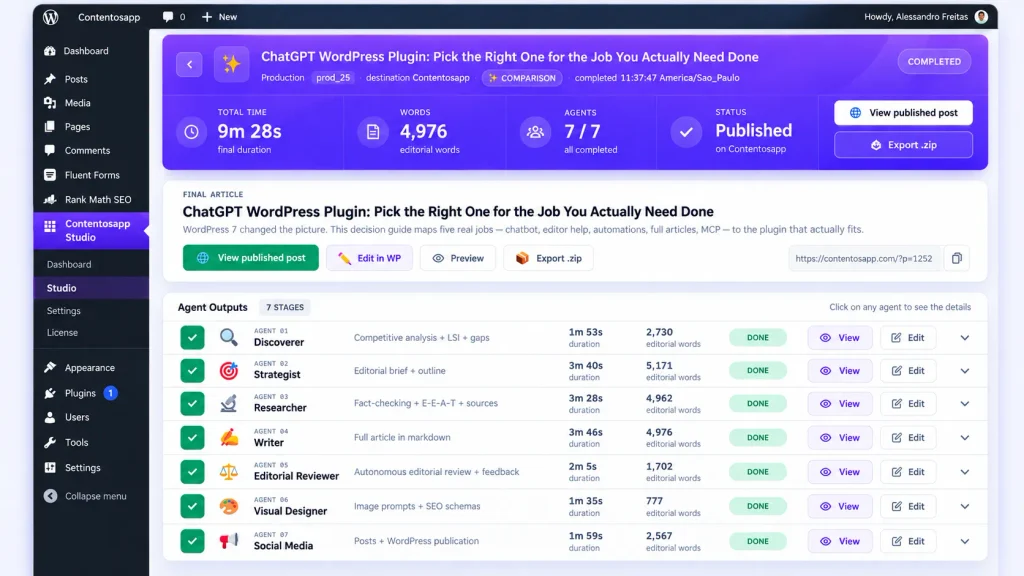
In BYOK mode, the plugin supports user-provided Anthropic Claude, OpenAI, and Google Gemini keys. The listing states there is no plugin markup, no per-article cap, and no local production limit in BYOK mode; provider quotas and billing are the limiting factors. This corrects an older description of the product as “one production at a time.” That limitation is not stated by the current official listing and should not be presented as a verified constraint.
If you do not want to manage an API key, ContentOS Auto is the optional managed route. The current Free plan includes unlimited BYOK plus three one-time ContentOS Auto trial productions; paid managed quotas are controlled by the hosted service, so check current pricing instead of relying on a static article. Supported output languages are English, Brazilian Portuguese, and Spanish.
The documented boundaries are useful: Contentosapp Studio is not a visitor chatbot, does not expose an MCP server, and does not make Claude operate media, comments, themes, or arbitrary site settings. It is for article production. The WordPress.org listing also states that keys entered into the plugin are encrypted at rest in the WordPress database. The publisher’s own case study reports roughly $0.20 per article in AI usage across 25 articles; treat that as a vendor case study rather than an independent benchmark.
If your real decision is which model to run inside a content pipeline, see the six-model blog-writing benchmark. If you are comparing site-operating agents with editorial pipelines, the agentic AI for WordPress guide goes deeper on that architectural difference.
Claude Plan vs. Anthropic API: Who Pays?
Anthropic explicitly separates paid Claude subscriptions from the Claude Console and API. A subscription improves access to Claude’s consumer and work surfaces; it does not automatically provide API credit. The practical billing map looks like this:
Three Ways Claude Usage Can Be Paid
The same Claude model can sit behind very different billing paths. Check which direction the integration runs before assuming your plan covers it.
Claude Account / Plan
Claude itself is the client doing the work — for example through MCP, Claude Desktop, Cowork, or Claude Code.
Anthropic API
WordPress or another application calls Claude with an Anthropic API key and usage is billed separately by the API.
Vendor-Managed AI
The plugin or service manages model access and gives you a quota, allowance, or paid production plan.
| Setup | Claude runs where? | Typical billing path | Important caveat |
|---|---|---|---|
| 1. MCP connector | Claude app / Desktop / Cowork / Code, depending on connector | Claude account/plan usage, plus any WordPress or plugin plan required | Free Claude users get one custom remote connector; product-specific access can have separate requirements |
| 2. Claude Code | Developer machine / IDE / terminal | Included plan usage on supported plans | ANTHROPIC_API_KEY can switch Claude Code to API billing |
| 3. WordPress AI Client | Inside WordPress | Anthropic API key, billed by usage | Claude subscription does not include API credit |
| 4. Content pipeline | Inside WordPress / managed service | BYOK Anthropic API or vendor-managed quota | Managed plan terms are separate from a Claude subscription |
If you want a current API-cost reference, Anthropic’s pricing page listed the following base-token prices on October 2, 2026. These are provider prices, not plugin prices, and they can change:
| Claude model | Input / output per 1M tokens |
|---|---|
| Claude Haiku 4.5 | $1 / $5 |
| Claude Sonnet 5.5 | $2 / $10 |
| Claude Opus 5.5 | $4 / $20 |
| Claude Fable 5.1 | $10 / $50 |
Check the live Anthropic pricing page before budgeting. Prompt caching, batch processing, data residency, server-side tools, and other features can change the effective price. For a WordPress-specific BYOK walkthrough, see How to Use Your Own AI API Key in WordPress.
Safety Checklist Before Claude Can Change WordPress
MCP can give an AI assistant the ability to create, edit, publish, delete, install, or configure things on a real site. Treat the connection the way you would treat a new contractor account: scope it, observe it, and make the first tasks reversible.
- Use staging first when the workflow can modify code, themes, plugins, or global design. Build with WordPress is a development tool; review code before deploying it. For MCP site operators, test the exact tool set and permissions before connecting production.
- Use the least-privileged WordPress user that can do the job. WordPress permissions still matter for MCP Adapter abilities, Easy MCP AI connections, and AI Engine’s user-scoped OAuth flow.
- Prefer read-only or draft-only access for editorial experiments. Easy MCP AI documents read-only/full/custom profiles and a Force Draft option. WordPress.com confirms writes. Those controls materially reduce the blast radius of a bad instruction.
- Keep an audit trail. Easy MCP AI documents an Audit Log and Change History. WordPress.com has an account/site activity log, but that is not the same thing as a plugin-specific before/after record for every agent edit.
- Know which deletes are reversible. WordPress.com states that deleted posts and pages can remain in trash for 30 days, while some other deleted objects are permanent. Backups and revisions are still prudent.
- Review custom connectors and third-party MCP servers carefully. Anthropic explicitly warns that custom connectors may connect Claude to services that Anthropic has not verified. Review permissions and trust the server operator before authorizing access.
- Revoke access when the task is over. Use the connector/plugin’s own connected-app or token controls rather than leaving broad credentials active indefinitely.
Which Claude WordPress Setup Fits Your Job?
There is no meaningful overall winner because the four setups solve different problems. Use the criterion that matches the job:
- Manage a WordPress.com or eligible Jetpack-connected site from Claude: evaluate the official WordPress.com connector. Its current documentation covers a broad site-management toolset and confirmation before writes.
- Operate a self-hosted site from Claude with granular permissions, audit history, SEO integrations, and many ready-made tools: evaluate Easy MCP AI. Those capabilities are documented by its WordPress.org listing; they are vendor claims, not an independent benchmark.
- Use MCP as part of a broader WordPress AI framework that also includes chatbots and content tools: evaluate AI Engine. Its MCP path and its WordPress-to-provider AI features are separate billing directions.
- Expose your own WordPress Abilities to AI agents or work locally over STDIO: use the official MCP Adapter as the developer building block.
- Build themes, plugins, blocks, or WooCommerce projects with a coding agent: Build with WordPress is the Claude Code workflow documented by WordPress.com and listed in Claude’s marketplace.
- Let WordPress plugins call Claude through a provider-agnostic API: AI Provider for Anthropic plugs Claude into the WordPress AI Client and Connectors stack.
- Produce researched article drafts with Claude as one model in a multi-agent publishing workflow: Contentosapp Studio is the publisher’s own product for that job; it is not an MCP site operator.
Frequently Asked Questions
Is there a Claude plugin for WordPress?
There are several WordPress plugins and connectors that work with Claude, but no single Anthropic-authored WordPress plugin covers all of the jobs people mean by that phrase. AI Provider for Anthropic connects Claude models to the WordPress AI Client. Easy MCP AI and AI Engine can expose a self-hosted site to Claude through MCP. Build with WordPress is a WordPress.com plugin for Claude Code, and the WordPress MCP Adapter is an official WordPress AI Team building block.
How do I connect Claude to WordPress with MCP?
For WordPress.com, enable MCP access and add the official WordPress.com connector from Claude’s connectors directory. For self-hosted WordPress, an MCP server plugin such as Easy MCP AI or AI Engine gives Claude a site endpoint to connect to. Remote custom connectors must be reachable from Anthropic’s cloud; for a local site, the official WordPress MCP Adapter supports STDIO through WP-CLI on the same machine.
Does Claude Code work with WordPress?
Yes. Build with WordPress is specifically listed for Claude Code and is designed for themes, plugins, custom blocks, WooCommerce work, auditing, previews, and deployment. Claude Code can also connect to WordPress MCP servers such as Easy MCP AI or AI Engine when you want the coding agent to call site tools rather than only edit a local codebase.
Can Claude Cowork use WordPress?
Yes, when the WordPress integration is exposed as a compatible remote MCP connector. Anthropic documents remote custom connectors in Cowork, and Easy MCP AI explicitly lists Cowork. Meow Apps also documents AI Engine’s remote MCP connector working in Cowork. That does not mean every Claude plugin or local STDIO server automatically appears in Cowork; check the specific integration.
Can Claude build a WordPress theme or plugin?
Yes. The Build with WordPress marketplace listing says Claude Code can build themes, plugins, custom blocks, and WooCommerce stores. Treat generated code as development output: use a local or staging environment, inspect diffs, test capabilities and permissions, and review security-sensitive PHP before deployment.
Does my Claude Pro or Max plan cover WordPress, or do I need an API key?
It depends on the direction. Claude-side MCP connections use Claude as the client and consume your Claude account/plan according to that product’s limits. Claude Code can use included plan usage on supported plans. WordPress-side integrations such as AI Provider for Anthropic use an Anthropic API key and API billing. A paid Claude subscription does not include Claude API credit.
What is the difference between a Claude MCP connector and WordPress Settings → Connectors?
A Claude MCP connector lets Claude discover and call tools on an external service such as WordPress. WordPress Settings → Connectors is a WordPress-side framework for storing and managing credentials to external services such as Anthropic. The first direction is Claude → WordPress. The second is WordPress → Claude.
Are there Claude skills or plugins for WordPress development?
Yes. Build with WordPress includes WordPress development capabilities plus WooCommerce and Jetpack skills. Anthropic’s current plugin system can make skills and commands available across supported Claude surfaces, while hooks and sub-agents have narrower surface support. The Build with WordPress product page itself is specifically positioned for Claude Code, so use that as the documented WordPress workflow.
The Practical Takeaway
The keyword claude wordpress plugin is really an architecture question. Decide whether Claude should operate WordPress, build WordPress code, be called by WordPress, or sit inside a content-production workflow. That answer determines the plugin category, the credential path, the billing model, and the safety controls you should evaluate.
For a live site, make the first test small: use staging when practical, create or choose a limited-role account, expose only the tools you need, and verify which billing path is active before running a long task. The ecosystem is changing quickly, so re-check the official source linked in the relevant section before standardizing a workflow across client or production sites.