
Category: Tools & Comparisons

Honest, hands-on comparisons of AI writing and SEO tools for WordPress — tested for one thing: whether the content they produce can actually rank.

  • Agentic AI for WordPress in 2026: Site Operators vs. Content Pipelines Are Not the Same Thing

    Agentic AI for WordPress in 2026: Site Operators vs. Content Pipelines Are Not the Same Thing

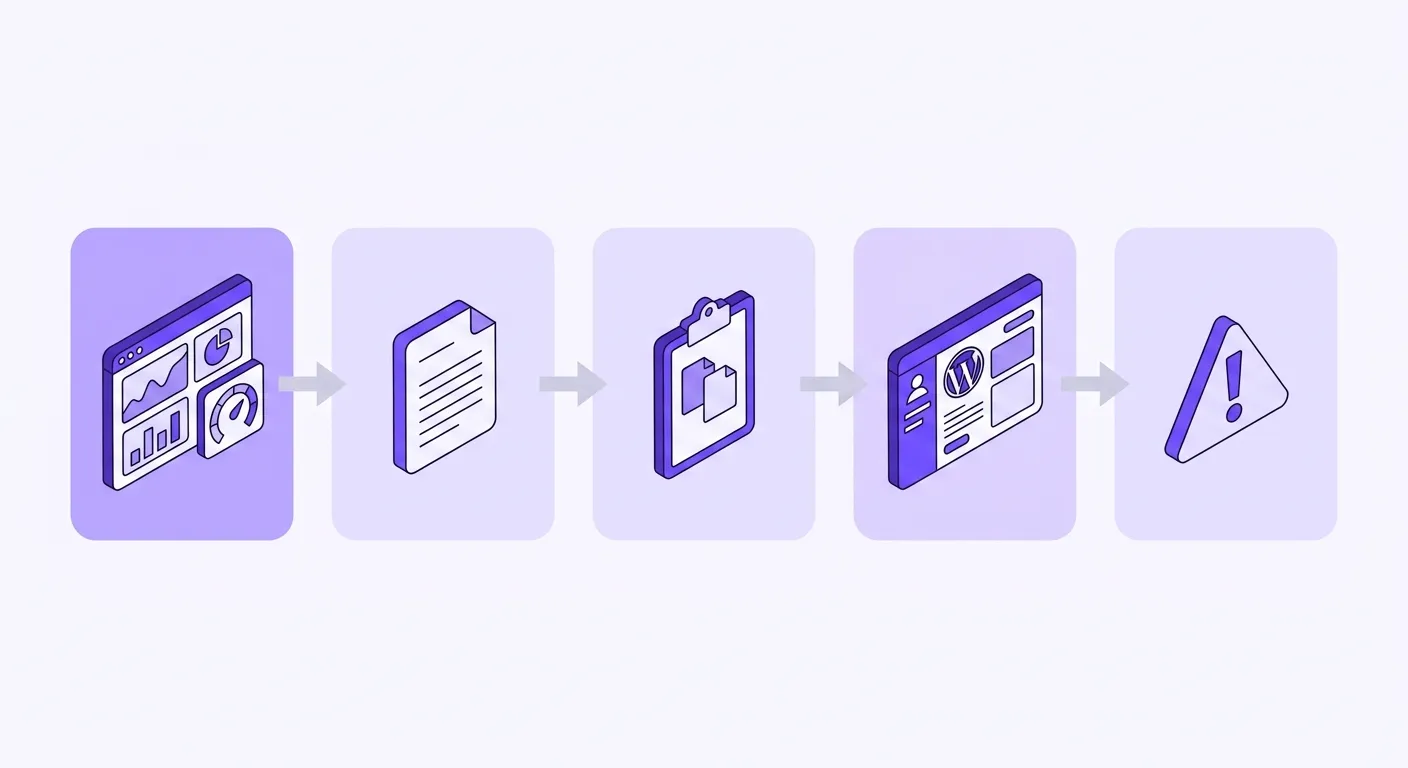
    Elementor just shipped Angie, and the headlines all say the same thing: “agentic AI for WordPress.” If you run a content site, that phrase probably triggered a question you haven’t been able to shake — does this replace what your content pipeline does? Do you need both? Did something just change? The confusion is understandable. “Agentic AI for WordPress” is a real category in 2026, but it already describes two fundamentally different types of tools doing two fundamentally different jobs. Nobody has drawn that line clearly yet.

    This article does exactly that. By the end, you’ll know what “agentic AI” actually means in technical terms, which category Angie belongs to, which category a content pipeline belongs to, and how both fit — without conflict — inside a single WordPress operation. No fake competition. No hype. Just a working map of a category that’s splitting in real time.

    Quick Guide: Agentic AI for WordPress
    • One phrase, two jobs: “Agentic AI for WordPress” already covers two distinct tool categories in 2026 — and they don’t overlap.
    • Site-operations agents (e.g., Angie): Build Elementor widgets, run bulk database operations, debug SMTP failures and PHP conflicts — all through chat. They manage your site.
    • Content-pipeline agents (e.g., Contentosapp Studio): Research keywords, produce structured SEO drafts, handle on-page optimization, and push publish-ready articles. They manage your editorial output.
    • “Agentic” is not a synonym for “AI feature”: It means the tool executes multi-step autonomous tasks toward a goal — without a human prompt at each step. Both categories qualify. The job they’re autonomous about is just different.
    • Neither replaces the other. A working site is the floor; ranked content is what grows it. You need both layers, and they don’t interfere.
    • Match tool to bottleneck: If your site breaks constantly, you need a site-operations agent. If your traffic isn’t growing, you need a content pipeline.

    What “Agentic” Actually Means — and Why the Word Matters

    Most marketing copy uses “agentic” as a fancier way to say “AI-powered.” That’s not what it means. An agentic AI system is one that receives a high-level goal and executes a sequence of autonomous steps to reach it — without needing a human to approve or redirect each individual action along the way. Think of the difference between a sous chef who waits for you to call out every cut, measurement, and timing cue (AI-assisted) versus one who hears “prep the mise en place for tonight’s service” and handles the rest independently (agentic). The output is similar. The supervision required is not.

    Applied to WordPress, this distinction matters because the goal you hand the agent determines everything about what kind of tool you’re dealing with. Angie reads your debug log, identifies recurring error patterns, and can deactivate conflicting plugins — that’s a multi-step autonomous task. A content-pipeline agent takes a target keyword, pulls SERP data, builds a structured brief, writes section by section, and returns a publish-ready draft. Also multi-step. Also autonomous. But the job each one executes without you is completely different, and that difference defines the category — not the word “agentic” by itself.

    Long-exposure photo of a robotic arm completing a full multi-step task on its own, illustrating autonomous agentic AI versus step-by-step assisted tools
    True agentic AI runs the whole sequence from a single goal — perceive, plan, act, observe — without a human prompt at each step. Assisted tools stop and wait after step one.

    Two Categories Under One Phrase

    Site-operations agents manage the WordPress environment itself. Angie is the clearest current example. Angie generates production-ready Elementor widgets, runs bulk operations across product prices, user roles, and custom metadata, and traces SMTP failures and PHP conflicts through chat — all against your real site data, with a confirmed plan before anything executes. It inherits your installed plugins, theme settings, and content structure automatically. What it does not do is write, research, or publish editorial content. The Elementor product page doesn’t position it for blog or SEO article writing, and that’s not an oversight — it’s a deliberate scope decision. This is a tool built to make your WordPress environment work. Even competing tools in this category draw the same line: Frontman, another site-editing agent on WordPress.org, explicitly describes itself as “not another AI chatbot or content generator.”

    Content-pipeline agents manage editorial output. Their job starts where Angie’s ends. A dedicated content pipeline handles keyword research intake, SERP-informed brief generation, section-by-section drafting, E-E-A-T compliance, internal link placement, meta optimization, and schema — producing articles that are ready to index, not ready to edit. What actually produces rank-ready content isn’t a single prompt — it’s a system: keyword and intent research done before the AI touches anything, a structured brief, staged prompting, a surgical human edit pass, and a clean publish checklist. That’s a different workflow category entirely from widget generation or bulk metadata updates. For a full breakdown of what this pipeline looks like in practice, Best AI Content Plugins for WordPress in 2026 maps the landscape across every tool type.

    Site-operations agent
    e.g., Angie, Frontman
    Content-pipeline agent
    e.g., Contentosapp Studio
    Core jobKeep the site working and buildableProduce content that ranks
    What it touchesWidgets, layouts, database, settings, errorsResearch, drafts, on-page SEO, publishing
    Typical tasksBuild an Elementor widget, bulk-update prices, fix a PHP/SMTP errorKeyword research, structured brief, section drafting, schema
    What it does not doWrite research-backed, rankable articlesRebuild layouts or fix code/server errors
    You need it whenRepetitive admin work and recurring errors eat your hoursTraffic isn’t compounding; publishing velocity is the bottleneck

    How These Tools Fit Into a Real WordPress Workflow

    The reason this category split matters for your stack is that these tools occupy entirely different positions in your operation — and they don’t compete for the same slot. A publisher running a content site might use a site-operations agent to clear technical debt: fixing a broken contact form, bulk-updating WooCommerce product prices after a supplier change, generating a custom Elementor widget for a landing page, standardizing URL slugs across a restructured category. These are real time drains. A site-operations agent handles them through chat, against your actual data model, with a test environment isolated from your live site so nothing breaks in production. That’s the infrastructure layer.

    The content pipeline operates on top of a working infrastructure. Once your site functions correctly — pages load, forms submit, redirects resolve — the growth bottleneck shifts to editorial throughput. How many rank-ready articles can you publish per week? How consistently can you hit keyword targets, build topical authority, and serve search intent? That’s what a content-pipeline agent is built to answer. The handoff point is clean: a site-operations agent delivers a functioning WordPress environment; a content-pipeline agent delivers published, search-optimized articles. If you’re unsure what the content-pipeline workflow actually looks like step by step, the guide on how to write SEO articles with AI covers the complete process from keyword to publish.

    What to Look For When Evaluating Either Category

    Identifying which category you actually need right now comes down to finding your real bottleneck — not which tool has the longer feature list. You need a site-operations agent if you’re regularly losing hours to repetitive WordPress admin work: bulk edits that require touching hundreds of records, recurring PHP or API errors you can’t diagnose cleanly, or custom widget builds that eat development time you don’t have. The limiting factor in your operation is infrastructure capacity, not content output. Angie’s free Beta is a reasonable starting point for this evaluation — daily-renewing credits are available now, with paid credits coming later at a date Elementor hasn’t published.

    You need a content-pipeline agent if your site technically works but organic traffic isn’t compounding. Publishing velocity is the bottleneck. You’re producing fewer articles than your keyword targets require, the ones you do publish read like AI slop, or you’re struggling to build topical depth across a niche systematically. The problem isn’t your site — it’s your editorial throughput. For context on how the content-pipeline tool landscape looks right now, Best AI Engine Alternatives for WordPress in 2026 gives an honest ranked comparison of tools built specifically for this job.

    Frequently Asked Questions

    Is Angie by Elementor the same as an AI content writer for WordPress?

    No. Angie is a site-operations agent — it builds Elementor widgets, runs bulk database operations, and debugs technical errors like SMTP failures and PHP conflicts. It is not positioned for blog or SEO article writing, and the Elementor product page makes no claims in that direction. An AI content writer produces keyword-researched, structured articles intended to rank on Google. These are different tools solving different problems.

    Can I use a site-operations agent and a content-pipeline agent on the same WordPress site?

    Yes, and that’s actually the natural setup for a publisher who takes both site reliability and SEO growth seriously. Site-operations agents work at the infrastructure layer — keeping your environment functional. Content-pipeline agents work at the editorial layer — producing articles that compound traffic over time. They don’t interfere with each other because they operate on completely different parts of your WordPress stack.

    What does “agentic AI” actually mean — is it just a marketing term?

    It’s not just marketing, though it gets used that way constantly. An agentic AI system takes a high-level goal and executes a sequence of autonomous steps to complete it — without requiring human approval at every intermediate action. The meaningful distinction is between AI that assists you step by step (AI-assisted) and AI that runs a full task autonomously from a single instruction (agentic). Both Angie and content-pipeline tools qualify as genuinely agentic. What differs is the task they run autonomously.

    Does Angie by Elementor write blog posts or SEO articles?

    No. Angie’s documented capabilities are: generating Elementor widgets and WordPress code snippets, running bulk site operations, debugging errors, and handling site-wide SEO maintenance like populating missing meta descriptions or standardizing URL slugs. That last item is database hygiene — applying existing or templated tags across a site — not keyword-researched content creation. There is no evidence on the Elementor product page that Angie is designed or intended for blog or article writing.

    What is the difference between agentic AI and AI-assisted tools for WordPress?

    AI-assisted tools require you to prompt each step: you ask for a draft, review it, ask for a revision, review again, and so on. Agentic tools take a goal and execute the steps themselves. Angie confirms a plan with you before running, then executes a bulk operation or widget build autonomously. A content-pipeline agent takes a keyword, runs its research and drafting workflow, and delivers a finished article — you direct the goal, not each step. The architecture is genuinely different, and it changes how much hands-on time the tool actually saves you.

    Do I need both a site agent and a content pipeline, or can one replace the other?

    They don’t replace each other because they don’t compete. One manages your WordPress environment; the other manages your editorial output. If your site has serious technical debt or complex custom build requirements, a site-operations agent solves that. If your traffic growth is stuck because you can’t produce enough high-quality content, a content pipeline solves that. Many serious publishers will eventually need both — but which one is urgent depends entirely on where your operation is actually breaking down right now.

    The category split in “agentic AI for WordPress” is now real and documented — not a marketing distinction, but a functional one. Site-operations agents like Angie handle your WordPress environment: widgets, bulk operations, error debugging, infrastructure. Content-pipeline agents handle your editorial operation: research, drafts, optimization, publishing. Elementor built a genuinely useful tool. It just doesn’t write your articles. If that’s the bottleneck — if your site works but your content isn’t ranking — that’s a different problem, and it calls for a different category of tool. Which one applies to where you’re stuck right now?

    References

    External sources

    1. Angie: AI for WordPress creation & management | Elementorhttps://elementor.com/products/angie-ai-for-wordpress/
    2. How to Write SEO Articles With AI: The Complete Workflow That Actually Ranks – Contentosapphttps://contentosapp.com/how-to-write-seo-articles-with-ai/

    Related content

  • Rank Math Content AI vs Contentosapp Studio: What You’re Actually Getting (and Paying)

    Rank Math Content AI vs Contentosapp Studio: What You’re Actually Getting (and Paying)

    You already have Rank Math installed. The SEO side works well. Then you notice “Content AI” promoted inside the dashboard, and it reads like a natural upgrade — same plugin, more power. So you click through and find a pricing page. That’s the moment most publishers realize this comparison matters.

    The confusion around rank math content ai vs contentosapp studio comes from a specific marketing gap: Rank Math’s Content AI looks bundled with the SEO plugin until the moment you’re asked to subscribe separately. This article cuts through that. It’s not a review of Rank Math’s SEO features — those are solid and out of scope. The focus is entirely on what the Content AI add-on actually does, what it costs, and how that stacks up against Contentosapp Studio’s approach of a free plugin where you bring your own API key. By the end, you’ll have a clear read on which tool fits your publishing volume and your budget.

    Key Takeaways
    • Not bundled: Rank Math Content AI is a separate annual subscription — €5.99/mo (Starter) to €16.99/mo (Expert) — not included in the free or Pro plugin.
    • Writing assist, not a pipeline: Content AI helps you write and edit inside the WordPress block editor. It suggests and completes; you still assemble and publish the article yourself.
    • Contentosapp Studio is free to install: No plugin fee, no credit meter. You pay your AI provider directly at their own rate — no markup added.
    • Trial conditions and renewal pricing: The 15-day trial only applies when purchasing a new Rank Math Pro, Business, or Agency membership — not on renewal. And renewal rates step up after year one, so budget accordingly.
    • Pipeline vs. assist: Contentosapp Studio runs a 7-agent sequence and delivers a near-complete draft to your WordPress editor. These are different categories of tool, not competing versions of the same thing.

    What Each Tool Actually Does Inside WordPress

    Rank Math Content AI is an in-editor writing assistant. Once subscribed, it surfaces inside the WordPress block editor — you can ask it to suggest sentences, expand a paragraph, rewrite a section, or generate a meta description. It also includes tools like a Blog Post Wizard and RankBot, covering more than 40 specialized AI-powered tools within a single interface. The key word there is “assist.” You open a blank post, you write, and Content AI helps you fill gaps, stay on-topic, and optimize as you go. The finished article is still your assembly.

    Contentosapp Studio works differently at an architectural level. It runs a seven-agent pipeline — discovery, strategy, research, drafting, editorial review, visuals, and social copy — and when the sequence finishes, a structured draft lands directly in your WordPress editor. You’re not co-piloting the writing; you’re reviewing a near-complete output. This distinction matters more than most comparison articles acknowledge. A writing assist and a content pipeline are different categories of software solving different problems: one reduces friction while you write, the other reduces the writing session itself. Conflating them is exactly what produces buyer regret. For a broader map of where both tools sit in the current landscape, the guide to the best AI content plugins for WordPress in 2026 is worth reading before you decide.

    Rank Math Content AIContentosapp Studio
    What it generatesSuggestions, completions, rewrites at paragraph levelFull structured draft (research through social copy)
    Where it livesInside the block editor, alongside the Rank Math SEO panelWordPress dashboard — separate plugin interface
    What you still do manuallyAssemble, edit, and publish the full articleReview, edit, and refine the delivered draft

    What You Actually Pay: Two Very Different Billing Models

    This is the part Rank Math’s marketing page doesn’t lead with. Content AI is billed as a separate annual subscription — Starter at €5.99/month, Creator at €10.99/month, and Expert at €16.99/month for year one. At renewal, those rates step up on every tier: Starter becomes €6.99/month, Creator €11.99/month, and Expert €18.99/month. That’s not small print — it’s a real recurring cost increase you’ll hit after the first 12 months. The 15-day trial is conditional too: it only applies when you’re purchasing a new Rank Math Pro, Business, or Agency membership — not as a standalone Content AI purchase, and not when you’re renewing an existing plan.

    Contentosapp Studio has a different model entirely. The plugin is free. There’s no subscription, no credit meter, no second bill. You connect your own API key from your chosen AI provider, and you pay that provider at their standard API rate — no markup applied at the Contentosapp layer. That’s what BYOK (bring your own key) means in practice. If you already have an OpenAI or Anthropic account for other workflows, Contentosapp Studio draws from the same balance. The structure is transparent: what your provider charges is what you pay.

    Feature / AxisRank Math Content AIContentosapp Studio
    Base plugin costFree (Rank Math SEO)Free (Contentosapp Studio plugin)
    AI feature cost€5.99–€16.99/mo (annual, yr 1)$0 plugin fee — pay your AI provider directly
    Second subscription required?Yes — separate from Rank Math SEONo
    Pricing modelMetered annual tiersBYOK — no markup
    Trial availability15-day trial with NEW Pro/Business/Agency purchase onlyFree install; no gated trial
    Annual renewal priceSteps up: €6.99/€11.99/€18.99/moUnchanged — plugin stays free
    Usage limitsMonthly “feature uses” quota per plan tierNo quota — bounded only by API spend

    Credit Meters vs. BYOK: The Real Long-Term Cost

    Metered credits feel orderly at low volume. At two or three posts a month, a Starter or Creator plan probably covers your usage without friction. But as your publishing cadence increases, the quota starts to shape your workflow in ways that aren’t obvious upfront — you find yourself rationing rewrites, skipping the Blog Post Wizard on shorter pieces, or upgrading tiers to avoid hitting the ceiling mid-month. Rank Math’s own knowledgebase confirms the quota model is real and central to how Content AI is delivered: plans are structured around monthly “feature uses” that reset each cycle, not an unlimited pool you draw from freely.

    BYOK economics work differently at scale. With Contentosapp Studio, a research-backed draft costs whatever your API provider charges to process that input and output — and the per-article cost breakdown for BYOK tools shows exactly how to run those numbers for your own publishing volume. There’s no tier ceiling to hit, no renewal to negotiate, and no second vendor relationship to manage. The more you publish, the more that cost-per-article figure matters. If you want to understand the BYOK category more broadly before committing, the honest review of BYOK AI writing tools for WordPress gives you the full picture. The arithmetic isn’t complicated — the honest comparison is just rarely laid out side by side.

    Rank Math Content AI metered tiers vs Contentosapp Studio BYOK cost model comparison for WordPress publishers
    Rank Math’s metered tiers reset monthly — unused credits expire. With BYOK, you pay the AI provider directly at cost, with no rollover anxiety.

    Which Fits Your Workflow: An Honest Decision Framework

    Rank Math Content AI is a reasonable add-on for a specific kind of publisher. If you’re writing two to four posts a month, you’re already deep in the Rank Math SEO interface, and what you want is an AI co-pilot while you write — suggestions, paragraph expansions, meta help — then the Creator tier is a manageable cost for what it delivers. The 40+ tools are genuinely useful for that mode of working, and staying inside a single plugin reduces context-switching. The honest caveat: budget for the renewal price, not the year-one price, because that’s what you’ll actually pay once you’re committed.

    Contentosapp Studio makes more sense if your operation runs at higher volume, or if your bottleneck is the writing session itself rather than the quality of your edits. Ten or more posts a month changes the math considerably — and delivering a research-through-draft pipeline to your editor is a different productivity gain than sentence-level suggestions. It’s also worth being clear about what Contentosapp Studio is not: it doesn’t replace Rank Math SEO’s on-page optimization layer, and it wasn’t designed to. These tools can coexist. The question isn’t “which plugin do I keep?” — it’s “do I need a metered writing-assist add-on, or a cost-transparent pipeline?” Your publishing volume and your tolerance for a second subscription are the two variables that answer it.

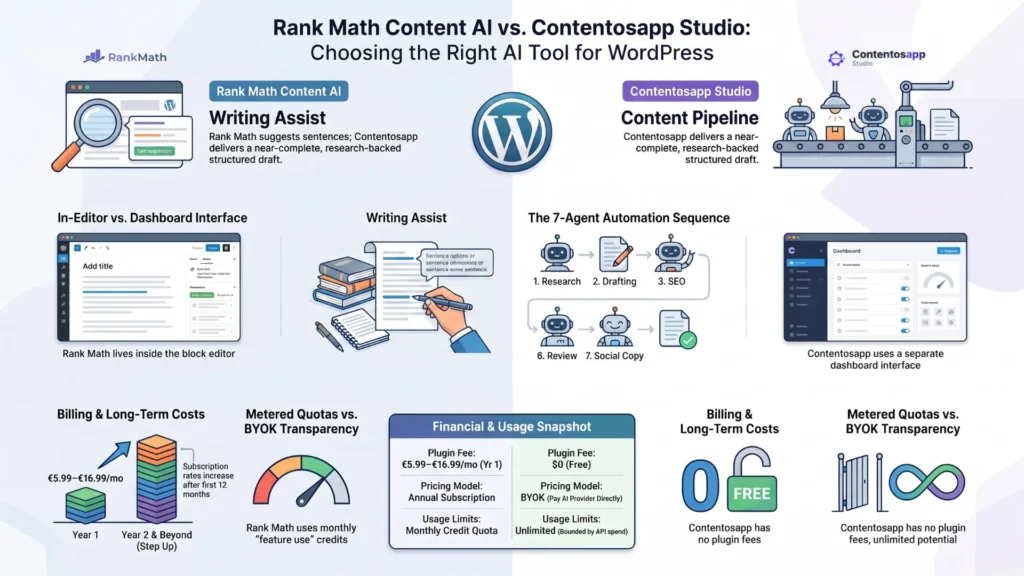
    Comparison infographic between Rank Math Content AI and Contentosapp Studio, highlighting differences in user interface, in-editor writing assistance versus a 7-agent content pipeline, and monthly credit quotas compared to a free BYOK model.
    Visual breakdown: Structural differences, automation workflow, and pricing models between Rank Math Content AI’s writing assistant and Contentosapp Studio’s 7-agent pipeline.

    Frequently Asked Questions

    Is Rank Math Content AI included in the free or Pro version of Rank Math?

    No. Rank Math Content AI is a completely separate subscription. The Rank Math SEO plugin — free, Pro, Business, or Agency — does not include Content AI. You need to purchase a Content AI plan independently, starting at €5.99/month (Starter tier, billed annually at the year-one rate).

    What happens to my Rank Math Content AI credits if I don’t use them all in a month?

    Rank Math Content AI operates on a monthly “feature uses” quota per plan tier. Unused credits typically do not roll over to the next month — the quota resets. This is worth factoring into your plan selection: if your publishing is seasonal or irregular, a metered model may mean you’re paying for capacity you don’t consistently use.

    Does Contentosapp Studio work without a Rank Math subscription?

    Yes. Contentosapp Studio is an independent WordPress plugin with no dependency on Rank Math. You can install and run it alongside any SEO plugin — or none at all. It connects to your AI provider via your own API key, and no Rank Math account or plan is required.

    What AI models does Contentosapp Studio support through BYOK?

    Contentosapp Studio is built around the BYOK model — you supply your own API key from your chosen provider. For the current list of supported models and providers, check the plugin’s settings page after installation, as supported integrations are updated with new plugin versions.

    Can I use both Rank Math Content AI and Contentosapp Studio at the same time?

    Yes, and for some publishers this makes sense. Contentosapp Studio handles the pipeline — research, drafting, visuals, social — while Rank Math SEO (not Content AI) handles on-page optimization scoring. Whether adding a Content AI subscription on top is worth it depends on whether you want AI assist during your editing pass after the pipeline delivers a draft.

    Does the Rank Math Content AI trial apply if I already have a Rank Math Pro subscription?

    No. The 15-day trial for Content AI is only available when purchasing a new Rank Math Pro, Business, or Agency membership — not for existing subscribers and not as a standalone purchase. If you’re already on a Rank Math plan, you’d be subscribing to Content AI at full price from day one.


    The Rank Math SEO plugin is one of the most capable tools in a WordPress publisher’s stack, and nothing in this article argues against using it. The narrower point is this: Content AI is a separate product with separate pricing, a metered credit model, and renewal rates that step up after year one. Whether that’s worth it depends on how you write — not on how good Rank Math SEO is. If you’re running a high-volume content operation and want predictable costs without a credit ceiling, Contentosapp Studio’s BYOK pipeline is built for that mode. If you want AI suggestions while you write, inside the interface you already use, Content AI delivers that — just price it at the renewal rate, not the introductory one. Which describes your operation right now?

    References

    External sources

    1. Content AI – Your Personal AI Assistant by Rank Mathhttps://rankmath.com/content-ai/

    Related content

  • ChatGPT vs AI Content Pipeline for SEO: Where Each One Actually Wins

    ChatGPT vs AI Content Pipeline for SEO: Where Each One Actually Wins

    You have a solid ChatGPT draft open in one tab and a blank WordPress post in the other. The writing is done — or close enough. So why does it still feel like you’re an hour away from hitting publish? That gap is the real subject of the chatgpt vs ai content pipeline for seo debate, and almost no one is talking about it honestly. The conversation fixates on output quality — which tool writes better prose — when the actual bottleneck is everything that happens after the draft lands.

    This article doesn’t try to crown a winner on writing quality. It compares both approaches across the full publishing workflow: research, formatting, internal links, images, brand voice, and the handoff to WordPress. By the end, you’ll have a specific framework and a real break-even number to decide which setup makes sense for how you actually work.

    Key Takeaways
    • Core thesis: ChatGPT is an excellent drafting tool — and a poor publishing system. Those are two different jobs.
    • What ChatGPT doesn’t do: It won’t insert internal links, format headings to your CMS structure, source citations, prep image alt text, or hand a draft to WordPress. All of that is manual.
    • What a dedicated pipeline handles: Research grounding, SEO optimization, WordPress publishing, internal link insertion, brand voice consistency, and social distribution — inside one workflow.
    • The integration tax: Bloggers averaging 60 minutes of post-draft cleanup per article spend 8+ hours/month on invisible editorial labor at just 8 articles/month.
    • Break-even threshold: At roughly 4 articles/month, a dedicated pipeline’s subscription cost is typically lower than the time spent on manual cleanup — even at conservative hourly rates.
    • Decision rule: If your cleanup runs longer than 45 minutes per article, the pipeline math almost certainly favors switching.

    What the Copy-Paste Workflow Is Actually Costing You

    Most bloggers dramatically undercount their per-article time. The ChatGPT draft — the part that feels like “AI saved me hours” — is maybe 30% of the job. Walk through what actually happens after you copy that draft: you clean up the heading structure (ChatGPT doesn’t know your H2/H3 conventions), you remove or verify any hallucinated facts, you track down real sources and hyperlink them, you write the meta description, you source 2–3 images and write alt text for each, you manually insert internal links you can remember off the top of your head, and then you paste the whole thing into WordPress and fix whatever formatting broke in transit. Each of those steps costs 5–15 minutes. Together, they routinely run 60–90 minutes on a standard 1,500-word article — and that’s if nothing goes wrong. For a detailed breakdown of how those per-article costs stack up across your full stack, the AI content cost per article analysis at Contentosapp shows exactly where time and money leak in a typical AI-assisted workflow.

    The more useful frame than “ChatGPT vs. a pipeline tool” is workflow minutes per article. Not subscription cost — time cost. Because your time has a dollar value whether you invoice it or not, and the invisible labor of copy-paste publishing scales against you as output grows. A production-ready content cycle breaks into six stages: research, outline, draft, optimize, distribute, and track in a production-ready content pipeline: research, outline, draft, optimize, distribute, and track. A raw ChatGPT session reliably covers stages 2 and 3. The other four require separate tools, separate workflows, or manual effort. That’s the part the “AI saves time” narrative quietly skips over.

    ChatGPT vs AI content pipeline for SEO — comparison of workflow stages covered by each approach
    Research and drafting are only two of six steps in a typical publish cycle — the copy-paste workflow leaves four of them entirely to you.

    Where ChatGPT Still Wins

    Let’s be honest about this part: ChatGPT is genuinely good, and for certain workflows it remains the right tool. Flexibility is the real advantage. You can change tone mid-draft, ask for a rewrite from a different angle, explore topic tangents conversationally, and iterate without a template forcing your structure. For ideation, brainstorming on unfamiliar subjects, and producing solid first drafts quickly, it’s hard to beat at its price point — — Plus sits at $20/month (verified July 2026), with a free ad-supported tier and an $8 Go plan below it. The iteration loop in a chat interface is fast and frictionless in a way that structured pipeline tools, by design, are not.

    The second real advantage is zero onboarding. You open ChatGPT, you write a prompt, you get a draft. No workspace configuration, no pipeline setup, no agent customization, no learning curve at all. For a blogger publishing 1–3 articles per month on varied topics, the overhead of learning and configuring a dedicated system may genuinely not be worth it. If the manual cleanup is something you don’t mind — if you actually enjoy the editing pass and treat it as quality control — then the case for switching is weaker. The point isn’t that ChatGPT is bad. The point is that it was never designed to be a publishing system, and using it as one has a real, measurable cost.

    Where a Dedicated AI Pipeline Wins

    ChatGPT is WordPress-blind. That’s not a criticism — it’s a design fact. It has no access to your site’s internal link graph, your existing categories, your image library, your heading conventions, or your publishing queue. Every article it produces requires a manual translation from chat output into something your CMS can publish — and that translation is where the time disappears. A dedicated pipeline that runs inside WordPress, or connects directly to it, removes that translation layer entirely. Contentosapp Studio, for example, runs a 7-agent workflow — Discoverer, Strategist, Researcher, Writer, Editorial Reviewer, Visual Designer, and Social Media agent — entirely inside your WordPress dashboard, dropping a structured draft directly into your editor with no copy-paste step. If you want to understand how this kind of full-workflow system fits into a broader SEO content strategy, How to Write SEO Articles With AI: The Complete Workflow That Actually Ranks maps out exactly what a production-grade AI content system looks like from research through to publication.

    Structural consistency at scale is the second major win — and it matters more than most bloggers expect. When you publish 10+ articles a month using a copy-paste workflow, small inconsistencies compound fast: mismatched heading hierarchies, missing alt text, forgotten meta descriptions, internal links that vary by how much you remember in the moment. A dedicated pipeline enforces structure at the template level, before the first word is drafted. That consistency is an E-E-A-T signal — it tells Google your site operates like an editorial system, not a one-off content dump. It also means the human review pass, which you still absolutely need, can focus on quality and accuracy rather than formatting triage. The sentence-level editing pass becomes substantially faster when the structure is already correct.

    Feature comparison table: ChatGPT standalone vs dedicated AI content pipeline for SEO
    A standalone chat tool and a purpose-built content pipeline share a starting point — the draft — but diverge on every step that follows it.

    ChatGPT Standalone vs. Dedicated AI Pipeline — Feature Comparison

    CapabilityChatGPT (Standalone)Dedicated AI Pipeline (e.g., Contentosapp Studio)
    First-draft generation✅ Excellent✅ Excellent
    SERP-backed keyword research❌ Not built-in✅ Agent-specific stage
    E-E-A-T source grounding⚠️ Requires manual prompting✅ Dedicated Researcher agent
    WordPress publishing❌ Copy-paste required✅ Native draft publishing
    Internal link insertion❌ Manual✅ Automated with real URL validation
    Brand voice consistency⚠️ Custom instructions — no per-article enforcement✅ Saved settings, applied automatically
    Image / schema preparation⚠️ In-chat images; no featured-image or schema workflow✅ Visual Designer agent
    Social distribution copy⚠️ Manual follow-up prompts✅ Social Media agent built-in
    Monthly cost$20/mo (Plus) — from $0 with ads; Pro from $100/moFree plugin + BYOK — you pay only your provider’s API usage
    Per-article capUsage limits vary by planNone — BYOK model, no plugin markup
    Human review checkpointDepends on your own workflow✅ Editorial Reviewer agent flags issues

    ChatGPT pricing verified July 2026 at chatgpt.com/pricing — plans change frequently. Full cost math per article: see our AI content cost breakdown.

    The Honest Math: When Does Switching Actually Make Sense

    Here’s the calculation with conservative numbers. Assume 60 minutes of post-draft cleanup per article — that’s on the lower end if you’re being thorough with sources, internal links, images, and formatting. Assume your time is worth $25/hour, which is modest for anyone running a professional content operation. At 8 articles per month, that’s 8 hours of manual work — $200 worth of your time — every single month, just on the integration steps between ChatGPT and WordPress. A dedicated pipeline subscription running $49–$80/month eliminates most of that. The pipeline pays for itself before you finish the second article. And that’s before accounting for the BYOK model that tools like Contentosapp Studio offer: no plugin markup, no per-article cap, and no production limit — you pay only what your AI provider charges for API calls, which at normal blogging volumes is often well under $20/month.

    The threshold where ChatGPT plus manual cleanup is the defensible choice is specific: fewer than 4 articles per month, you genuinely enjoy the editing process as quality control, and you value format flexibility over structural consistency. Below that volume, the subscription cost of a dedicated pipeline doesn’t pencil out, and the flexibility of a chat interface probably suits your workflow. Above that volume — or the moment you’re trying to build a content system that scales rather than a one-off drafting habit — a dedicated pipeline isn’t a luxury. It’s the cheaper option once you count the hours. The “integration tax” — the 15–25 minutes per article spent on copy-paste, link insertion, image work, WordPress formatting, and brand-voice re-prompting — compounds to 4–8 hours of invisible editorial labor per month at 4 articles per week. That labor scales against you as output grows. A pipeline doesn’t write better than ChatGPT. It eliminates the tax.

    Stay with ChatGPT if…

    • You publish fewer than 4 articles a month
    • You genuinely enjoy the manual editing pass
    • You value conversational flexibility over structure

    Switch to a pipeline if…

    • Cleanup runs past 45 minutes per article
    • You publish 4+ articles a month, or plan to
    • You want structure, sources, and publishing handled by the system

    Frequently Asked Questions

    Can ChatGPT publish directly to WordPress?

    Not natively. ChatGPT has no direct integration with WordPress — it produces text in a chat interface, and moving that text to your CMS requires a manual copy-paste step. From there, you still need to apply heading structure, insert internal and external links, write or paste the meta description, add images with alt text, and set categories and tags. Some third-party automation tools can create a bridge between ChatGPT’s API and WordPress, but that requires additional setup and still doesn’t handle SEO-specific steps like keyword optimization or internal link mapping. A dedicated pipeline built inside WordPress — like Contentosapp Studio — removes this step entirely by dropping the draft directly into your editor.

    What does an AI content pipeline do that ChatGPT doesn’t?

    The short list: SERP-backed research, structured SEO optimization, WordPress-native publishing, automated internal link insertion, image preparation, brand voice consistency without per-session reprompting, and social media copy generation. ChatGPT reliably covers the outline and draft stages of content production. The four other stages — research grounding, optimization, distribution, and tracking — require either separate tools or manual effort when you’re working from a standalone chat interface.

    Is a dedicated AI SEO tool worth it for a solo blogger?

    It depends on volume and how you value your time. For a blogger publishing 1–2 articles per month, the overhead of learning a new system probably doesn’t pay off. For someone publishing 4+ articles per month with any intent to scale, the math almost always favors a dedicated pipeline once you account for post-draft cleanup time. The hidden cost of the copy-paste workflow — formatting, sourcing, linking, image work — routinely runs 60–90 minutes per article, which at 8 articles/month becomes a full workday of invisible labor.

    How many articles per month does it take to justify switching from ChatGPT?

    The break-even point using conservative figures ($25/hour, 60 minutes of cleanup per article, ~$49/month pipeline subscription) sits at roughly 4 articles per month. At that volume, the time cost of manual cleanup exceeds the subscription cost of a dedicated tool. Above 6–8 articles per month, the savings compound significantly — especially if the pipeline handles WordPress publishing natively and eliminates the formatting step entirely.

    Does ChatGPT produce content that ranks on Google?

    It can, but not reliably straight from the chat interface. General-purpose LLMs like ChatGPT excel at producing entity-rich prose but lack the SERP-backed data needed for optimization. Content that ranks in 2025–2026 requires demonstrated E-E-A-T signals: real citations, accurate internal linking, structured heading hierarchies, and evidence of human editorial oversight. ChatGPT can contribute to all of those, but none of them happen automatically — each requires a deliberate manual step or a dedicated tool to execute consistently.

    What’s the difference between using ChatGPT for SEO and using a purpose-built AI writing tool?

    The difference is workflow coverage. ChatGPT is a drafting tool — a very good one — but it operates outside your publishing system. A purpose-built AI SEO tool is designed around the full production cycle: research through distribution, with CMS integration at the center. The writing quality from a well-prompted ChatGPT session and from a modern pipeline’s Writer agent may be comparable. What isn’t comparable is everything around it — the research grounding, the source validation, the WordPress handoff, the internal link graph awareness, and the structural consistency enforced across every article rather than rebuilt from scratch each time.

    Conclusion

    ChatGPT isn’t the problem. The problem is treating a chat interface as a publishing system. If you’re copy-pasting drafts into WordPress and spending 45 minutes or more per article on formatting, sourcing, and linking, the pipeline math almost certainly favors switching — not because the writing gets better, but because the integration tax stops compounding against you. At four articles a month the break-even is already there. At eight, you’re losing a full workday every month to steps a dedicated system handles automatically. The bloggers who build repeatable, system-driven workflows will compound their output month over month. Those who treat every article as a fresh ChatGPT session will keep paying the invisible tax — they just won’t see it on any invoice.

    References

    External sources

    1. Contentosapp Studio – AI Content Writer & SEO (BYOK) – WordPress plugin | WordPress.orghttps://wordpress.org/plugins/contentosapp-studio/

    Related content

  • GetGenie Alternatives in 2026: Best Options by Use Case (Ranked Honestly)

    GetGenie Alternatives in 2026: Best Options by Use Case (Ranked Honestly)

    You already know what GetGenie does. The reason you’re searching for getgenie alternatives is whether it’s still the right tool for what you’re actually trying to accomplish. For a lot of WordPress publishers, the answer turns out to be no — not because GetGenie is bad, but because its credit-based architecture creates a very specific ceiling that shows up fast the moment you run a real content operation. Twenty thousand AI words per month. Twenty-five keyword analyses. Five topical maps. Those numbers feel fine until you’re three weeks into a content calendar and you’ve already blown through them.

    This article isn’t a generic roundup listing every AI writing tool with a SaaS pricing page. It segments the options by use case — research-first pipelines for competitive SERPs, BYOK setups for operators who want to pay API cost only, and speed-first tools for volume affiliate publishing. If you want the full landscape of AI content plugins in one place, the best AI content plugins for WordPress in 2026 article covers that. Here, the focus is narrower: which tool actually solves the problem GetGenie isn’t solving for you, and why.

    Key Takeaways
    • GetGenie Starter limits: 20,000 AI words, 25 keyword analyses, and 5 topical maps per month — a word budget that most content calendars exhaust within two weeks of real publishing.
    • Research-first tools: KoalaWriter and SEOWriting.ai ingest live SERP data before generating, which changes what the AI actually writes — not just how fast it writes.
    • Genuine BYOK: AI Engine for WordPress routes API calls directly to OpenAI, Anthropic, Google, or Mistral. No vendor credit ceiling, no markup on tokens — ever.
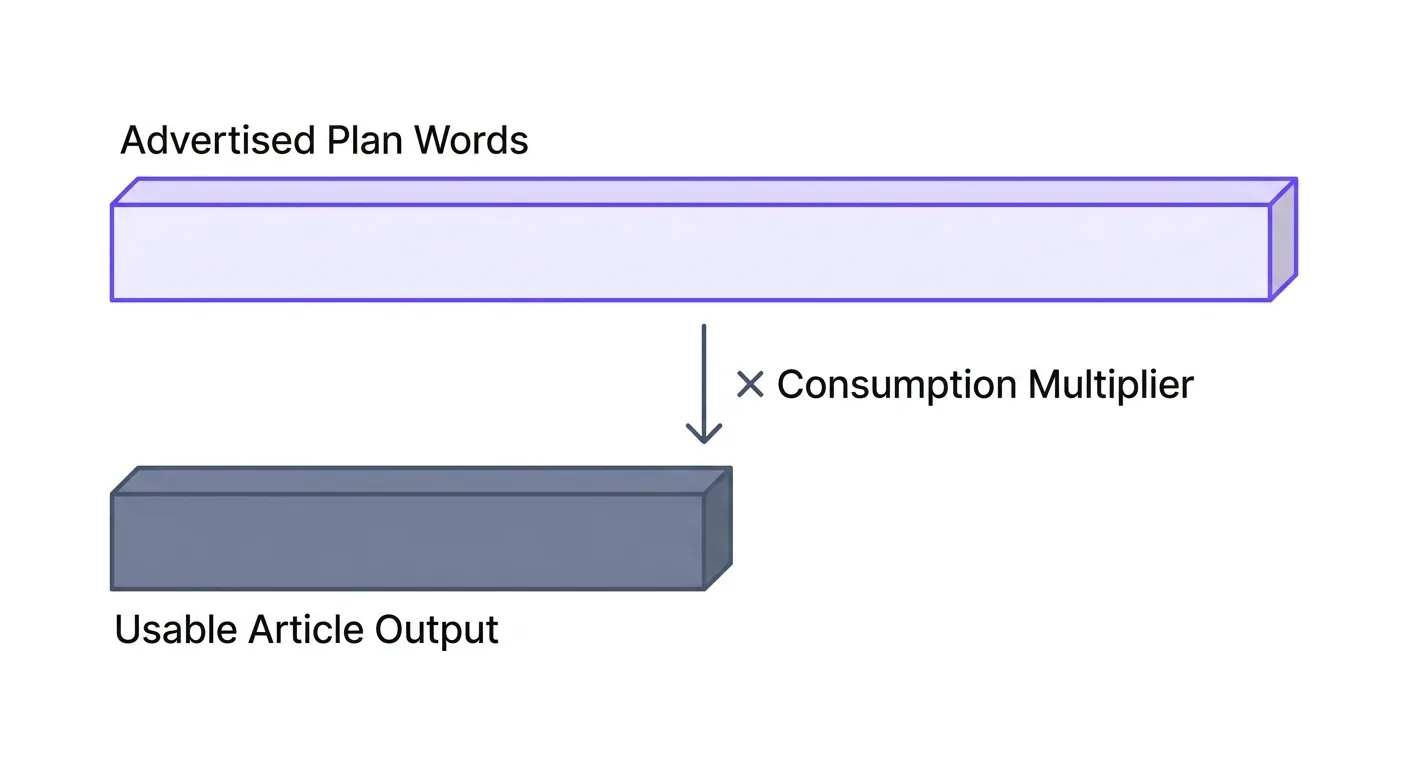
    • KoalaWriter’s hidden word math: The Essentials plan advertises 15,000 words per month, but that halves to roughly 7,500 effective words when you use GPT-5.2 or Claude 4.5 Sonnet.
    • If you’re rewriting more than half of every GetGenie draft, the tool is already costing more than its subscription price suggests. The credit math section below makes that concrete.

    Why GetGenie Users Switch: The Credit Ceiling and Draft Quality Problem

    To be clear about scale first: GetGenie runs on 80,000+ active installs with a 4.8-star rating from 118 reviews on WordPress.org — it’s popular for a reason, and actively maintained. The Starter plan sits at $6/month billed annually — genuinely affordable on its face. But the credit architecture is what trips people up. You get 20,000 AI words per month, 25 keyword analyses via the Blog Wizard, 30 related/NLP/semantic keyword analyses, and 5 topical maps. (The pricing page quantifies SERP-analysis credits only on the Free plan — 5 per month; paid-tier SERP limits aren’t stated in retrievable form, so we don’t guess them.) Run three articles a week with a proper research pass and a rewrite on each, and the word budget is gone in ten to fourteen days. What looked like a $6 tool starts requiring a plan upgrade — or a decision to skip the research steps that make the output actually rank.

    The second problem is less about credits and more about architecture. GetGenie’s core model generates from a prompt. You enter a keyword, configure some options, and the tool drafts from there. That works fine for low-competition queries where a fluent, well-structured draft can compete on its own. It breaks down on anything competitive, where the gap between what’s ranking and what a cold-prompt draft produces is real and significant. The tool isn’t generating with awareness of what the top-10 results cover — which topics, which entities, which semantic clusters. That editing burden lands on you.

    Both failure modes are real, and they’re distinct. If you’re hitting the credit ceiling, the fix is a different pricing model — flat-rate or BYOK. If your drafts are thin and competitive SERPs are the goal, the fix is a different pipeline model — one that reads the SERP before writing, not after. The alternatives below are sorted by which problem they actually solve.

    Research-First Alternatives: Tools That Read the SERP Before They Write

    The functional distinction here matters more than most comparison articles let on. A research-first tool ingests live SERP data — the top-10 results, their headings, their semantic coverage — before a single token of your article gets generated. The model doesn’t start cold. It starts aware of what’s already ranking, which subtopics appear across multiple results, and which entities the content is expected to cover. The downstream editing burden is genuinely different. You’re trimming and sharpening a draft that’s already SERP-aware, not adding substance to a draft that missed the whole conversation.

    KoalaWriter is the clearest example of this architecture in the GetGenie replacement market. The Essentials plan runs $9/month and includes real-time factual data, AI-powered SEO optimization, live Amazon data for affiliate articles, and direct WordPress and webhook integration. That’s a credible feature set at an accessible price. The critical caveat: word count is based on GPT-5 Mini usage. If you switch to GPT-5.2 or Claude 4.5 Sonnet, the word count for each article is counted as 2× higher — meaning the Essentials plan’s advertised 15,000 words collapses to roughly 7,500 effective words per month when using the better models. That’s a number worth knowing before you commit.

    SEOWriting.ai approaches the research-first model differently. According to its own site, it auto-analyzes SERP competitors before generating content, optimizing for both traditional search and AI engines like ChatGPT and Perplexity. The WordPress integration is direct: generate an article and publish or schedule it to a connected site in one click. It also offers 20+ pre-trained models for affiliate content — product roundups, reviews, how-to guides — which is a meaningful differentiator for publishers whose content types are predictable. The free tier exists, which makes it easy to test before spending anything.

    KoalaWriter and SEOWriting.ai as research-first GetGenie alternatives — SERP pipeline comparison
    A research-first pipeline reads competitive SERP signals before generating a single sentence — tools that skip this step are writing into the void on any keyword with real competition.

    BYOK Alternatives: Genuine Cost Control or Marketing Label?

    BYOK — Bring Your Own Key — appears on a lot of plugin feature lists. Most of the time it’s a label, not a structural guarantee. The question to ask is simple: when you enter your OpenAI API key into the tool, does that key hit the OpenAI API directly, or does it route through the vendor’s server with a potential markup? The difference is both a cost issue and a privacy issue. True BYOK means your API calls go direct, your bill comes from OpenAI (or Anthropic, or Google), and the vendor takes no per-token cut. Anything else is a proxy with marketing language.

    AI Engine for WordPress is the most genuinely BYOK implementation in this comparison. Install the plugin, connect your own API keys for OpenAI, Anthropic, Google, Mistral, and more, and every API call your site makes goes directly to those providers. There is no vendor credit ceiling because there are no vendor credits — billing passes entirely to the underlying provider. That’s a structural difference, not a feature difference. Beyond the cost architecture, AI Engine is also a full AI framework: chatbots, content generation, AI forms, knowledge bases with embeddings, function calling, and MCP support for desktop clients connecting via OAuth. It’s not just a writing assistant — it’s an AI layer for the entire WordPress site.

    At current API rates, generating a 2,000-word article draft costs a small fraction of what any credit-based plan charges per article when you factor in keyword analysis, SERP pull, outline, and draft credits consumed — check openai.com/api/pricing for the exact figures since model pricing changes regularly. For publishers running 15–20 articles per month, the math favors BYOK decisively at volume. The AI content cost per article breakdown covers this in more detail, and the BYOK AI writing tools for WordPress comparison goes deeper on which tools actually implement it correctly. For AI Engine specifically, “genuinely BYOK” is the right descriptor — the plugin connects every major provider directly, with no vendor intermediary in the token path.

    Speed-First Alternatives: For Volume Publishing With Less Competitive Keywords

    Not every WordPress publisher is chasing competitive informational queries. A large segment — affiliate sites targeting long-tail, near-zero-competition keywords — needs throughput over research depth. For a 700-word buying guide on a DR-15 site targeting a keyword with 40 monthly searches and no real SERP competition, you don’t need a research pipeline. You need to publish fast, publish consistently, and let the topical coverage compound over time.

    SEOWriting.ai sits in this category as well as the research-first bucket. The bulk article generation feature — auto-post up to 100 articles in a batch to WordPress automatically — is built for exactly this kind of operation. Enter your keywords, configure the settings, click run, and the platform schedules the posts to your connected site. That’s a genuine throughput capability. The figure of 50,000+ businesses and bloggers using the platform is vendor-reported and should be read as a marketing claim rather than an independent benchmark — but the bulk-post feature itself is real and demonstrable.

    The honest caveat for speed-first tools: pointed at competitive SERPs, they produce AI slop at scale. That’s not a bug in their design, it’s a feature being misapplied. If you’re building a topical authority site in a competitive niche and expecting bulk-generated drafts to compete with research-backed long-form content, you’ll spend more time cleaning up than you saved generating. Use speed-first tools for what they’re designed for — high-volume, low-competition, affiliate-oriented publishing — and they work. Use them everywhere and you’ll be rebuilding your content strategy in six months.

    The Real Cost Per Article: Credit Math No One Shows You

    Here’s what comparison articles almost never do: calculate what one publishable article actually costs in GetGenie credits across a realistic workflow. Let’s run the math. A standard informational article on a competitive keyword requires one keyword analysis via Blog Wizard (1 of your 25/month), one outline generation, one first draft, and typically one rewrite pass on sections that are too thin. The AI word burn across draft, rewrite, and any additional generation: conservatively 3,000–5,000 words consumed per 1,500-word published article.

    On the Starter plan at $6/month annually, your 20,000 AI words support 4–6 articles at this consumption rate. Your 25 keyword analyses support 25. The hard ceiling is the word budget — you’re out after four to six properly researched articles per month, not the 25 the analysis credits might naively suggest.

    At $6/month, that’s $1.00–$1.50 per article in tool cost — still cheap in isolation. But upgrade to the Writer plan at $11.40/month for 60,000 words to get real headroom, and the math shifts: you need to publish more to justify the plan.

    Compare this to KoalaWriter’s Essentials at $9/month with no SERP analysis credit cap — you get research pulls on every article you write, limited only by the word count. Or to AI Engine on BYOK, where your generation cost is entirely API-based with no vendor ceiling. The credit-per-article calculation is the most useful number when evaluating GetGenie alternatives, and almost no comparison article ever runs it. Now you have it. The AI content cost per article framework extends this math across tools and team sizes if you need a deeper model.

    GetGenie credit usage and cost per article compared to flat-rate and BYOK alternative pricing models
    Credit architectures routinely hide the real per-article cost behind monthly limits — running the math on a real 20-article calendar almost always surfaces a real per-article cost far above the sticker price.

    Research-First vs. One-Prompt: Why the Pipeline Architecture Matters for Rankings

    This is worth making explicit. When a tool ingests the top-10 SERP results before generating, the model produces output that’s already topically calibrated. It surfaces entities and subtopics Google is actively rewarding in that SERP. It doesn’t miss the supporting clusters that appear across five of the top-10 results. You still edit — but you’re editing for voice, depth, and accuracy, not for structural gaps. That’s a fundamentally different editing task.

    A cold-prompt tool — GetGenie’s core model, and most standard AI writing assistants — starts from your input only. The model’s training data includes general knowledge about almost everything, but it has no runtime awareness of what’s specifically ranking on that query right now. It produces fluent prose. It follows a reasonable structure. And it may miss two or three entire subtopic clusters that every competing result covers, simply because those clusters weren’t prominent in the prompt. You don’t discover the gap until you’re editing, or worse, until you check rankings six months later.

    Pipeline ModelEditing Burden After GenerationBest Use Case
    Research-first (live SERP ingestion)Low–Medium (voice, depth, accuracy)Competitive informational queries
    One-prompt (cold generation)Medium–High (structure, gaps, entities)Low-competition or templated content
    BYOK (user controls model + prompt)Varies by prompt engineeringPower users with custom workflows

    This isn’t just a UX preference. It’s an E-E-A-T and Information Gain argument. A draft that arrives SERP-aware is closer to demonstrating experience and authority on the topic because it’s already shaped around what the topical ecosystem looks like. A cold draft requires you to supply that expertise manually — which is fine if you have it, but time-intensive and frequently missed under deadline pressure.

    Side-by-Side Comparison: GetGenie vs. Top Alternatives

    ToolPipeline ModelWordPress IntegrationStarting PriceBYOKBest For
    GetGenieOne-promptNative plugin~$6/mo (annual)NoAll-in-one: SEO + keyword + writing
    KoalaWriterResearch-first (SERP + Amazon data)Yes (webhook/WP)$9/mo (monthly)NoLong-form SEO content, affiliate
    AI EngineBYOK (you configure)Native pluginFree (API cost only)Yes (genuine)Developers, cost-conscious operators
    SEOWriting.aiResearch-first + bulkYes (auto-post)Free tier availableNoVolume affiliate publishing
    Surfer SEOResearch-first (NLP scoring)Plugin availableSee surferseo.comNoContent optimization + scoring
    FraseResearch-first (brief → outline → draft)No native pluginSee frase.ioNoResearch-heavy long-form content
    Contentosapp StudioResearch-first, 7-agent editorial pipelineNative plugin (writes & publishes inside WP)Free (BYOK — you pay only your provider)Yes (genuine)Research-grounded drafts with real, clickable citations

    Pricing verified July 2026 from each vendor’s public page; where a page doesn’t state a price in retrievable form, we say “see site” instead of guessing.

    A note on how to read this table: the “Best For” column is the most important one. Pipeline model and BYOK support are structural facts — they don’t change based on your use case. Price and WordPress integration are practical filters. The use case column tells you whether the tool was designed to solve your problem or someone else’s. Don’t pick a tool optimized for volume affiliate publishing and expect it to produce research-grounded content that competes on high-intent informational queries. It wasn’t built for that.

    Which Alternative Is Right for Your Situation

    Three publisher profiles map cleanly to three different tools. The right choice depends on your publishing frequency, your keyword difficulty targets, and how much technical setup you’re willing to do once.

    Profile 1 — Competitive niche site, 4–8 articles per month, DR 30+, informational queries: You need research-first. GetGenie’s one-prompt model will leave structural gaps in drafts that you’ll spend hours closing. KoalaWriter’s Essentials plan at $9/month gives you SERP-aware generation and native WordPress publishing. Use GPT-5 Mini to stretch the word count, and upgrade to Professional at $49/month when you consistently run out of words. The research depth at entry-level pricing is hard to beat.

    Profile 2 — High-volume affiliate network, 50–200 articles per month, cost control is the constraint: BYOK via AI Engine is your answer. No credit ceiling, no per-article vendor cost. Your API bill scales with your volume, but the unit cost per article is a fraction of what any credit-based plan charges at the same volume. It requires more setup than a turnkey SaaS tool — you’re configuring prompts, managing models, integrating workflows manually. If that’s a reasonable ask for your operation, AI Engine is the most structurally honest BYOK implementation in the WordPress ecosystem.

    Profile 3 — Solo blogger, long-tail keywords, low competition, monthly publishing: SEOWriting.ai’s free tier is the starting point. Minimal investment, direct WordPress publishing, and enough tooling to produce rank-ready content on low-competition queries without a steep learning curve. If volume picks up and you want bulk generation, the paid tiers unlock the 100-article batch feature. You don’t need a research pipeline at this stage — the keywords you’re targeting don’t require it.

    Switching From GetGenie Without Breaking Your WordPress Workflow

    The practical transition question most people skip: what do you do with your current GetGenie subscription? If you’re mid-billing-cycle, the credits you’ve paid for don’t refund. The honest answer is to run out your remaining SERP analyses and keyword analyses on content you’ve already planned, use the AI words for drafts and rewrites on those pieces, and install your replacement alongside GetGenie in WordPress without deactivating it yet. Most alternatives — KoalaWriter via webhook, AI Engine as a standalone plugin, SEOWriting.ai via its own WordPress integration — coexist with GetGenie in the same dashboard without conflicts.

    Set your GetGenie renewal date as a hard deadline. Two weeks before that date, install the free tier or trial of your shortlisted alternative and run two or three real articles through it — a keyword you care about, competitive enough to matter, full workflow from research to publish. That’s your actual test. Don’t evaluate on a dummy keyword against a content type you don’t produce. Real output on real content is the only meaningful benchmark. If the alternative produces a draft you’d publish after light editing, you’re done. Cancel GetGenie before renewal.

    If you’re building a multi-site operation and want editorial workflow infrastructure inside WordPress — not just a writing plugin — the Contentosapp ecosystem was built for exactly that: an editorial team structure embedded in WordPress, not bolted on from a SaaS interface. Worth a look if single-plugin limitations are part of why you’re evaluating alternatives in the first place.


    Frequently Asked Questions

    Is there a free alternative to GetGenie for WordPress?

    Yes. SEOWriting.ai offers a free tier with no credit card required — enough to test the generation quality on real keywords before committing to a paid plan. AI Engine for WordPress is also free as a plugin; you only pay for the API calls you make through your own OpenAI, Anthropic, or Google account. Both are functional starting points, not just feature-locked previews.

    Can I use GetGenie with my own OpenAI API key?

    GetGenie does not offer a genuine BYOK mode under its current pricing structure. All AI generation on the platform runs through GetGenie’s own credit system — you cannot connect your own API key and bypass their credit metering. If BYOK is a hard requirement, AI Engine for WordPress is the alternative purpose-built for it.

    What is the best AI writing plugin for WordPress SEO in 2026?

    There’s no single answer — the best tool depends on your use case. For research-first long-form content on competitive queries, KoalaWriter is hard to beat at entry-level pricing. For genuine cost control at scale, AI Engine’s BYOK architecture has no credit ceiling and no vendor markup. For bulk affiliate publishing, SEOWriting.ai’s batch-to-WordPress feature is a real differentiator. The comparison table in this article maps each tool to the use case it was actually designed for.

    How does Koala AI compare to GetGenie for blog posts?

    KoalaWriter generates with live SERP and real-time factual data — GetGenie’s core model generates from your prompt alone. For competitive informational blog posts, that pipeline difference matters: KoalaWriter’s drafts arrive with better topical coverage out of the box. The trade-off is the word-count multiplier: when using GPT-5.2 or Claude 4.5 Sonnet, each article consumes 2× the word count, so the Essentials plan’s 15,000 words becomes roughly 7,500 effective words on premium models. Factor that in when comparing plans.

    Does SEOWriting.ai integrate directly with WordPress?

    Yes. According to its own product documentation, SEOWriting.ai can auto-post up to 100 articles in a batch to a connected WordPress site automatically. Articles can be published immediately or scheduled. The integration is direct — no third-party connector required — which is a meaningful differentiator for publishers running high-volume operations.

    What happens to my GetGenie credits if I cancel my plan?

    Credits are tied to your active subscription. If you cancel before the end of your billing period, unused credits typically expire at the end of that billing cycle — they don’t carry over and are not refunded. The safest approach is to time your cancellation for the day before renewal, having fully used your credits in the preceding weeks. Always verify the specific cancellation and refund terms directly on the GetGenie pricing and account pages before acting.

    Which GetGenie alternative works best for affiliate content sites?

    SEOWriting.ai is the most purpose-built option for affiliate content. The platform offers 20+ pre-trained models specifically for affiliate content types — trained on product roundups, reviews, and comparison formats — and the bulk auto-post feature handles volume at a scale that no single-article-generation tool can match. If your affiliate operation is large enough that per-article API costs matter, AI Engine’s BYOK model becomes competitive. KoalaWriter also includes live Amazon data on its plans, which is useful for product-focused affiliate articles.


    The right GetGenie alternative isn’t the one with the most features — it’s the one whose architecture matches how you actually produce content. If SERP analysis credits are your ceiling, a research-first flat-rate tool solves that. If per-word vendor costs are your ceiling, BYOK passes the billing directly to the underlying API with no markup. If throughput is the goal and keyword difficulty is low, speed-first bulk publishing tools were built for that workflow. Run one real article through your shortlisted tool before your next GetGenie renewal date. The output quality — and the editing time it demands — will tell you everything the pricing page won’t.

    References

    External sources

    1. Pricing – GetGenie AIhttps://getgenie.ai/pricing/
    2. Koala AI Pricinghttps://koala.sh/pricing
    3. SEO WRITING – AI Writing Tool for 1-Click SEO Articleshttps://seowriting.ai/
    4. AI Engine – The Chatbot, AI Framework & MCP for WordPress – WordPress plugin | WordPress.orghttps://wordpress.org/plugins/ai-engine/
    5. GetGenie – AI Content Writer with Keyword Research & SEO Tracking – WordPress plugin | WordPress.orghttps://wordpress.org/plugins/getgenie/

    Related content

  • Contentosapp Studio vs Jasper (2026): Different Tools, Different Jobs — Here’s the Honest Call

    Contentosapp Studio vs Jasper (2026): Different Tools, Different Jobs — Here’s the Honest Call

    Most comparisons between Contentosapp Studio vs Jasper start with the wrong question: “which AI writes better?” That is not a useful question. A table saw and a band saw both cut wood — asking which one cuts better misses the point entirely. The real question is whether your job is SEO content production inside WordPress or brand-consistent copy across a marketing team’s channels. Those are different workflows. They call for different tools.

    This article is not going to hedge. You will walk away knowing exactly what each tool was built for, what it actually costs per article, where the workflow gap becomes painful in real production, and which one you should choose based on what you are actually trying to do — not based on which one has a bigger ad budget or a longer G2 review page.

    Quick Summary: Contentosapp Studio vs Jasper
    • Built for different jobs: Jasper is engineered for marketing teams who need brand-voice consistency across ads, email, social, and landing pages. Contentosapp Studio is built for WordPress publishers who need research-backed SEO drafts delivered straight into their CMS.
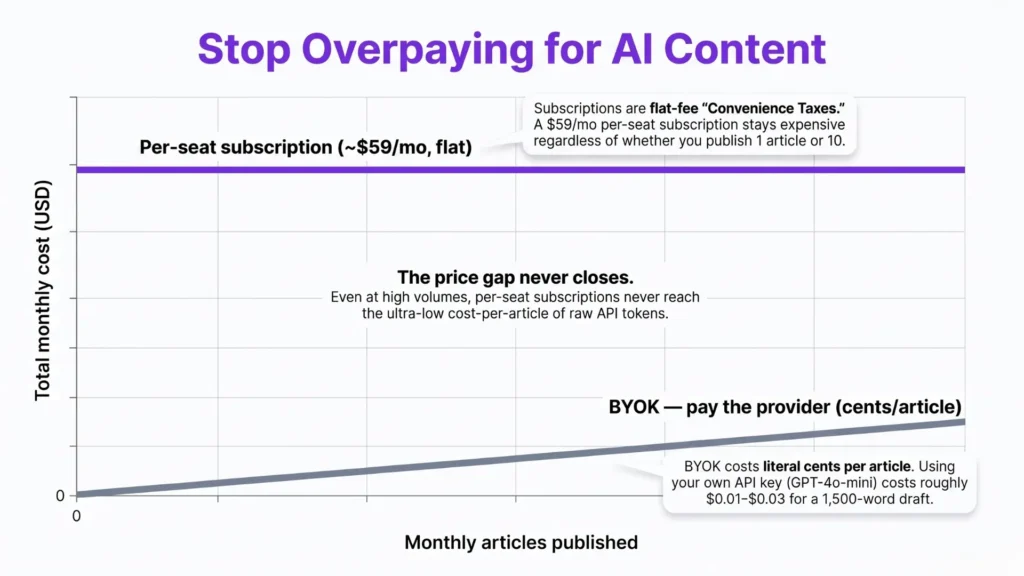
    • Cost model is fundamentally different: Jasper Pro starts at $59/month (annual) regardless of how many articles you publish. Contentosapp Studio is free with your own API key — you pay only the token cost to your provider, typically a few cents per article.
    • WordPress workflow gap is real: Jasper generates content in an external SaaS editor. Getting it into WordPress requires copy-pasting, reformatting, and manual meta entry every time. Contentosapp Studio runs inside the WordPress dashboard — draft created, reviewed, and published without leaving the CMS.
    • Honest verdict: If you run a content site or affiliate blog, Jasper is not built for you. If you manage brand campaigns across multiple channels with a team, Contentosapp Studio is not built for you either. The right call is the one that matches your actual production loop — not the one with the most name recognition.

    What Each Tool Was Actually Built For

    Jasper’s DNA is in marketing copy. Its pricing page describes it as “the generative platform built for marketing success” — and the feature set reflects that clearly. Brand-voice training via style-guide upload, multi-channel templates for ads, emails, social posts, and landing pages, team collaboration workspaces, campaign management. Jasper is clearly built for a specific buyer: a marketing professional or team, not a one-person content operation publishing three posts a week. If you genuinely need multi-channel brand consistency at team scale — paid ad copy, email sequences, product descriptions — Jasper executes on that job well. Contentosapp Studio is not the answer for that use case. But if you want a broader view of how the WordPress AI plugin category has developed, the full breakdown of AI content plugins for WordPress in 2026 covers the landscape in detail — this article focuses on this specific matchup.

    Contentosapp Studio was built with a completely different production loop in mind. Its WP.org plugin page describes a seven-agent pipeline — Discoverer, Strategist, Researcher, Writer, Editorial Reviewer, Visual Designer, Social Media — where each article passes through specialized roles before a draft lands in the WordPress editor. The entire system runs inside WordPress, stores production history inside WordPress, and applies brand voice as a reusable setting inside WordPress. That is not an incremental difference from Jasper’s workflow. It is a different category of tool. If you run a content site or affiliate blog, you are not Jasper’s primary customer. You are Contentosapp Studio’s — and that clarity matters more than any feature-by-feature spec comparison.

    Contentosapp Studio vs Jasper workflow comparison — WordPress-native pipeline vs SaaS marketing editor
    The architectural difference isn’t cosmetic — one tool ends with a published post, the other ends with a brand asset ready for distribution across channels.

    The Real Cost Difference: Jasper Seats vs BYOK Per-Article Math

    Here is the number most comparison articles refuse to show you. Jasper Pro is $59/month billed annually, or $69/month billed monthly — a fixed seat fee. It does not matter whether you publish 3 articles that month or 30. The $59 is gone regardless. For a solo blogger publishing 8 posts a month, the implicit cost-per-article is roughly $7.40. Publish 4 and that climbs to $14.75 per article. The math gets worse the less you publish, and it does not improve meaningfully until you are cranking out very high volume.

    Contentosapp Studio runs on BYOK — Bring Your Own Key. You connect your own OpenAI, Google Gemini, or Anthropic Claude API key, and there is no plugin markup, no per-article cap, and no local production limit — any limits come from your own provider account. For a 1,500-word SEO article using GPT-4o, input plus output tokens run roughly $0.02–$0.05 depending on prompt depth and research passes. A full month of 20 articles might cost you $1 in API spend. Compare that to $59. If you want to model the full token math across different AI providers and article lengths, the AI content cost per article breakdown goes deep on exactly this. The volume tipping point is essentially zero — BYOK is cheaper from article one.

    WordPress Publishing Workflow: Where the Gap Becomes Obvious

    This is the friction that never shows up in spec-sheet comparisons. Jasper generates content in its own SaaS editor. When you are done, you copy it. Then you paste it into WordPress. Then you reformat the headings, because paste-from-SaaS rarely survives clean. Then you add the meta description, manually set the focus keyword in your SEO plugin, assign categories and tags, add the featured image, and insert any internal links you wanted the draft to include. That sequence takes 15–20 minutes per article on a good day. For a publisher running 20 posts a month, that overhead compounds to 5–7 hours of pure formatting work — a real production cost that reviewers consistently ignore because it does not appear in a feature checklist.

    Contentosapp Studio is a WordPress plugin listed in the WP.org directory. The draft is created, reviewed by the Editorial Reviewer agent, and pushed straight into the WordPress editor as a production-ready post. It does not live in another browser tab. The plugin also pulls the post’s existing context, target keyword, and stored brand voice settings directly from WordPress — Jasper cannot do that without manual input at the start of every session. If you are already leaning away from Jasper’s subscription model and want to see what else the category offers, the Jasper alternatives for WordPress roundup covers the BYOK-capable options in detail.

    Contentosapp Studio draft delivered directly into WordPress editor — no copy-paste required
    Eliminating the copy-paste step sounds trivial until you’re managing 30 posts a month — at that scale, native WordPress delivery changes the economics of your entire production workflow.

    Feature Comparison at a Glance

    The table below maps the core differences based on verified product documentation. Where a specific Jasper detail was not confirmed in the source, the cell says so rather than guessing.

    FeatureContentosapp StudioJasper (Pro)
    Pricing modelFree + BYOK — you pay only your provider (cents/article)$59/mo (annual) · $69/mo (monthly)
    WordPress-nativeRuns inside the WP dashboardExternal SaaS; copy-paste required
    Per-article capNone (your provider’s limits apply)Not disclosed — check jasper.ai/pricing
    AI providersGemini, OpenAI, Claude (your key)LLM-agnostic (models not disclosed)
    Content pipeline7 specialized agents (research → draft → review → visuals → social)Single workspace with brand-voice layers
    Brand voiceReusable settings stored in WP; per-agent tuningStyle-guide / sample training (category-leading)
    Source groundingResearcher agent grounds drafts in the real sources it citesNot addressed on pricing page
    Structured dataAuto-emits WebPage + Article + FAQ JSON-LD on publishNot addressed on pricing page
    Multi-channel copyNot its focus — blog/SEO draftsAds, email, social, landing pages
    Primary use caseWordPress SEO blog article pipelineMulti-channel marketing copy
    Ideal userWordPress publisher / SEO content producerMarketing team / brand manager

    Jasper cells marked “not disclosed” reflect what its public pricing page states — we don’t guess where it’s silent. Pricing verified June 2026.

    Frequently Asked Questions

    Does Contentosapp Studio require a separate OpenAI subscription to use?

    Yes — and that is the point. Contentosapp Studio uses a BYOK (Bring Your Own Key) model, which means you connect your own API key from OpenAI, Google Gemini, or Anthropic Claude. There is no plugin subscription fee, no markup on tokens, and no per-article cap applied by the plugin itself. You pay your AI provider directly, at their standard rates. For most publishers, that works out to a few cents per article — far below the cost of any bundled AI writing subscription.

    Can Jasper publish directly to WordPress?

    No. Jasper is a standalone SaaS platform with no native WordPress plugin that pushes drafts into your editor. After generating content in Jasper’s interface, you copy it, paste it into WordPress, reformat the headings, add metadata, configure your SEO plugin fields, and handle image placement manually. For a high-volume publisher, that workflow overhead adds up fast — it is a structural friction point that spec-sheet comparisons rarely surface.

    Is Contentosapp Studio free, or is there a paid plan?

    Contentosapp Studio is free to install and use in BYOK mode. The plugin itself carries no subscription fee — the only costs are what you pay directly to your chosen AI provider for the API calls the workflow makes. There are no per-article charges, no word caps imposed by the plugin, and no license required for BYOK mode.

    Does Jasper support SEO optimization features like keyword targeting?

    Jasper includes SEO-oriented templates and content creation modes, but it is not a dedicated SEO tool in the way a plugin like Rank Math or Yoast operates inside WordPress. It does not run inside your CMS or interact with your on-page SEO settings. Contentosapp Studio, as a WordPress plugin, generates drafts with SEO structure baked into the agent pipeline — the Strategist agent builds the keyword map and content brief before the Writer agent touches the draft.

    What does BYOK mean in the context of AI content tools?

    BYOK stands for Bring Your Own Key. Instead of paying a SaaS platform a monthly fee that includes bundled AI model access, you supply your own API key from a provider like OpenAI, Google, or Anthropic. The tool sends your requests directly to that provider, and you are billed at the provider’s standard token rates — typically a fraction of what subscription-based tools charge per article. The trade-off is that you manage your own API account and usage limits, but for most solo publishers, the cost savings are significant.

    Which tool is better for a solo affiliate blogger on a tight budget?

    Contentosapp Studio is the clearer choice for a solo affiliate blogger watching costs. The BYOK model means you pay only for the API tokens consumed per article — typically $0.02–$0.05 per post using current model pricing. Jasper’s entry point is $59/month regardless of output volume. If you are publishing fewer than 30 articles a month, the per-article math strongly favors the BYOK approach. Beyond cost, the WordPress-native workflow eliminates the formatting and copy-paste overhead that adds real time to every post you produce.

    Conclusion

    The choice between Contentosapp Studio and Jasper is not about which AI writes smarter prose. It is about which production system fits the work you are actually doing. If you are a WordPress publisher building an SEO content operation — even a small one — paying a $59/month seat fee for a SaaS tool that requires manual copy-pasting into your CMS is the wrong bet. The BYOK model, combined with a pipeline that lands drafts directly in the WordPress editor, is structurally better for that job. Jasper is a capable platform built for marketing teams who need brand-voice consistency at scale across channels. Both tools deserve to exist. Neither is wrong — they are just aimed at different people. Figure out which person you are, and pick accordingly.

    References

    External sources

    1. Plans & Pricing | Jasperhttps://www.jasper.ai/pricing
    2. Contentosapp Studio – AI Content Writer & SEO (BYOK) – WordPress plugin | WordPress.orghttps://wordpress.org/plugins/contentosapp-studio/

    Related content

  • Frase vs Jasper (2026): SEO Research Engine vs Brand-Voice Copywriter — Which One Does a WordPress Publisher Actually Need?

    Frase vs Jasper (2026): SEO Research Engine vs Brand-Voice Copywriter — Which One Does a WordPress Publisher Actually Need?

    Most WordPress publishers shopping for an AI writing tool eventually land on the same shortlist: Frase vs Jasper. And most comparisons they find treat both as interchangeable “AI content tools” — same category, slightly different features, pick whichever UI you prefer. That framing is wrong, and it’s the reason so many publishers end up buying one tool, discovering a gap, and quietly subscribing to the second one three months later.

    These are not competing products built for the same job. Frase is an SEO research engine with a content publishing layer. Jasper is a brand-voice copywriting platform built for multi-channel marketing teams. The overlap is real but narrow. If you pick the wrong one for your primary constraint — say, you buy Jasper because you want to rank on Google, or you buy Frase because you want tight brand-consistent copy across campaigns — you’ll feel that mismatch almost immediately. This article gives you a clear category distinction, verified 2026 pricing, a real stack-cost calculation, and a direct verdict for three common publisher profiles.

    Quick Summary: Frase vs Jasper (2026)
    • Different categories: Frase is an SEO research engine that researches, drafts, and publishes to your CMS. Jasper is a brand-voice copywriting platform built for marketing campaigns across channels.
    • Pricing gap: Frase Starter runs $39/month (annual); Jasper Pro starts at $59/month (annual). The gap widens fast once you add the tools each one is missing.
    • The hidden stack cost: Jasper Pro + Surfer Essential (for SEO scoring Jasper doesn’t provide) = $138/month minimum. Frase Starter covers SEO research, scoring, and CMS publishing for $39/month — for up to 10 articles.
    • Frase’s 2026 positioning has expanded well beyond brief generation: it now includes Content Guard for decay monitoring, AI Visibility tracking for ChatGPT and Google AI answers, and native publish to WordPress, Webflow, and Wix.
    • The honest verdict: for a solo WordPress publisher focused on organic search, Frase closes more of the loop. For brand marketers running multi-channel campaigns, Jasper is the better fit. Running both is legitimate — but price it out before you commit.

    What Frase and Jasper Actually Are (And Why the Category Matters)

    Frase’s entire architecture is built around the SERP. You enter a keyword, and it pulls data from the top-ranking pages — headings, topics covered, average word count, competitor content scores. The AI writer lives inside that research context, which means your first draft is written against what Google is already rewarding for that query. On top of that, Frase’s 2026 platform has added Content Guard (which monitors live pages for ranking drops and writes the fix for your approval), AI Visibility tracking across ChatGPT and Google AI answers, and native CMS publishing to WordPress, Webflow, Sanity, and Wix. This is not a writing assistant with an SEO tab bolted on. It is a content operating system with research at the center.

    Jasper is built around a completely different problem. According to Jasper’s own positioning, the platform’s core differentiator is brand-voice training — you upload a style guide or feed it existing content, and it analyzes the writing style to replicate your tone across the whole team. It runs on an LLM-agnostic architecture, meaning it is not locked to a single AI model provider, which matters to enterprise marketing teams worried about vendor dependency. The templates span email, ads, social copy, and long-form — it is designed for teams producing high-volume branded content across channels, not for publishers trying to rank a single pillar page. Treating these two tools as direct alternatives is how most buyers end up buying the wrong one.

    Frase vs Jasper 2026 category comparison — SEO research engine vs brand-voice copywriting platform
    Treating Frase and Jasper as interchangeable ‘AI writing tools’ is the single most expensive mistake solo publishers make in their stack decisions.

    Head-to-Head on the Three Jobs WordPress Publishers Actually Need Done

    For a WordPress publisher, three jobs recur every week: (1) keyword and SERP research before a word is written, (2) content brief creation, and (3) on-page SEO optimization of the final draft. Frase wins jobs one and two by design — SERP data pulls directly into the brief, and the AI writer drafts against topic coverage gaps identified from competing pages. The SEO and GEO scoring built into every Frase plan means optimization feedback is in the same window as writing, not a separate tool. Jasper does have a native SEO mode, but SEO scoring is not part of its stated feature architecture — it is a platform built for brand voice, and that remains its primary signal to the market.

    Job three — on-page optimization of the final draft — is where both tools fall short if you have high ranking standards. Frase’s built-in scoring gives you a usable signal, but heavy-weight optimization workflows often still require a dedicated optimizer. Jasper provides no native SEO scoring at all, which is why many Jasper users end up adding Surfer SEO to close that gap. The gap is real for both tools, but it is more expensive to close if Jasper is your starting point — because Frase already handles research, brief, drafting, and a scoring layer in one plan, while Jasper handles none of the research layer by default.

    The Real All-In Cost: What You Pay After Word Caps and Seat Fees

    Here is the stack cost a solo WordPress publisher actually faces, priced from verified 2026 data. Frase’s Starter plan runs $39/month on annual billing — one seat, one site, 10 articles and 50 audit pages per month, with native WordPress publish, SEO and GEO scores, and Content Guard watching 3 pages. If you publish more than 10 articles a month, you are on the Professional plan at $103/month (annual), which gives you 40 articles, 3 seats, and 5 sites. Jasper’s Pro plan runs $59/month on annual billing — brand-voice training, multi-channel templates, and collaboration features. Jasper does not publish article limits in the same format; check current plan details at jasper.ai before committing. What it does not include is SERP research, content briefs built from competing pages, or on-page SEO scoring.

    That last omission is the real cost driver. A publisher running Jasper for writing still needs an SEO layer. Surfer’s Essential plan — the lightest tier — runs $79/month on annual billing (30 documents, basic optimization guidelines). That puts the Jasper + Surfer Essential combo at $138/month minimum, versus Frase Starter at $39/month for a publisher doing 10 articles or fewer. For a deeper breakdown of what each tool actually costs per published article once editing time is factored in, the AI Content Cost Per Article analysis runs that math in detail — including the hourly-rate multiplier that no tool comparison includes. And if you’re building out a full WordPress publishing stack, the Best AI Content Plugins for WordPress in 2026 covers where these tools fit against native plugin alternatives that consolidate more of the workflow at lower total cost.

    ScenarioTools requiredMonthly cost (annual billing)
    SEO-first solo publisher, ≤10 articles/moFrase Starter$39/mo
    Brand-voice copywriting onlyJasper Pro$59/mo
    Jasper + SEO optimization layerJasper Pro + Surfer Essential$138/mo
    SEO content team, 40 articles/moFrase Professional$103/mo
    Full dual-tool stackFrase Professional + Jasper Pro$162/mo
    Unified WP-native pipeline (BYOK)Contentosapp Studio~cents/article*

    *Different category: a WordPress-native pipeline that drafts (grounded) and publishes inside your editor on your own AI key (BYOK), so cost is the provider’s tokens — not a subscription. Not a live SERP-score optimizer like Frase nor a brand-voice engine like Jasper. Free on WordPress.org. Pricing verified June 2026.

    Which Tool Fits a WordPress Publishing Workflow — and When You Need Both

    The clearest way to resolve the Frase vs Jasper decision is to identify which step in your current workflow is broken, not which tool has more features. Three distinct reader profiles cover most cases. First: the SEO-first publisher who needs ranking signals before a single word is written. If your constraint is producing content that targets the right queries, covers the right topics, and gets scored before it publishes — Frase closes that loop without adding tools. The SERP research, drafting, scoring, and CMS publish are all in one platform, and Content Guard’s decay monitoring catches ranking drops before they compound. Second: the brand-driven content marketer or small agency producing high-volume copy for email, paid ads, and social alongside long-form. If brand consistency across channels is the primary constraint and SEO is a secondary concern, Jasper’s brand-voice training and multi-channel template library are genuinely better-suited than Frase’s more SEO-centric workflow.

    Third — and this is the profile most comparisons ignore — is the solo WordPress publisher trying to run a full content operation: research, writing, optimization, publishing, and performance monitoring. For that profile, the honest answer is that neither tool alone closes the loop without a third tool or a meaningful manual step. Stacking both costs $162/month at minimum (Frase Professional + Jasper Pro on annual billing), which is more than most solo publishers need to spend. The real decision is not “Frase or Jasper” — it is whether your current stack is missing an SEO research engine or a brand-voice copywriting platform, and the answer to that tells you which one to buy first. Buying both from day one without that clarity is how a $39/month tool decision quietly becomes a $162/month line item.

    Frase vs Jasper WordPress workflow fit decision matrix for solo publishers in 2026
    The ‘which tool’ question only has a clean answer once you identify your primary bottleneck — search discoverability or brand-consistent copy across channels.

    Frequently Asked Questions

    Is Frase better than Jasper for SEO content?

    Yes, for most WordPress publishers focused on organic search. Frase is built around SERP data — it researches top-ranking content before writing, generates briefs from that data, and includes SEO and GEO scoring in every plan. Jasper has a native SEO mode, but on-page optimization is not a core architectural feature. If ranking is the primary goal, Frase’s workflow is more directly aligned with that outcome than Jasper’s.

    Can Jasper optimize content for search without Surfer SEO?

    Not in any meaningful way by itself. Jasper does not include SERP-based content scoring, topic coverage analysis, or on-page optimization feedback as native features. Publishers using Jasper for SEO content typically add a third tool — Surfer SEO being the most common. Surfer’s Essential plan runs $79/month on annual billing, which pushes the real entry cost of an SEO-ready Jasper setup to at least $138/month.

    What is the actual monthly cost of Frase vs Jasper for a solo blogger?

    For a solo blogger publishing up to 10 articles per month: Frase Starter costs $39/month on annual billing and includes SEO scoring and WordPress publishing. Jasper Pro costs $59/month on annual billing — but without SEO research or optimization built in, most SEO-focused users add Surfer Essential at $79/month, bringing the real Jasper-stack cost to $138/month. The gap between the two scenarios is $99/month, or roughly $1,188/year.

    Does Frase write full articles or just outlines and briefs?

    Both, and then some. Frase’s current positioning describes it as a platform that “researches each topic, drafts it in your voice, and publishes to your CMS” — full articles, not just briefs. The Starter plan allows 10 full articles per month. Brief generation is still part of the workflow, but it feeds directly into a complete draft rather than stopping at a structured outline you then take elsewhere to write.

    Which tool is better for a content marketing agency managing multiple clients?

    Frase at the Professional or Scale tier is the stronger structural fit. The Professional plan supports 3 seats, 5 sites, 40 articles per month, a content calendar, internal linking suggestions, and per-seat expansion at $29/month. Jasper Pro supports team collaboration and brand-voice training across multiple brands — which is valuable for agencies producing campaign copy — but lacks the per-client site organization and content audit infrastructure that Frase’s multi-site model provides.

    Can you use Frase and Jasper together, and does it make financial sense?

    You can, and some teams do — typically using Frase for SERP research, briefing, and optimization scoring, then writing in Jasper for brand-consistent output, then publishing back through Frase. But the cost is real: Frase Professional + Jasper Pro runs $162/month on annual billing, or roughly $1,944/year. That is a legitimate investment for a team that genuinely needs both SEO research depth and high-fidelity brand-voice control. For a solo publisher or small team, evaluate whether a single unified tool handles enough of both jobs before committing to a dual subscription.


    The “Frase vs Jasper” framing implies these tools are fighting for the same slot in your stack. They are not. Frase is an SEO research engine that happens to write and publish. Jasper is a brand-voice copywriting platform that happens to support long-form content. Your publishing workflow is missing one or the other — rarely both at the same time. Identify which step is currently breaking your process: if it’s the research and ranking layer, start with Frase. If it’s brand consistency and multi-channel volume, start with Jasper. If you genuinely need both from day one, price the stack at $162/month before you commit — and ask whether that’s the right spend compared to what a unified publishing platform would cost instead.

    One example of that approach is Contentosapp Studio — a WordPress-native pipeline that researches, drafts and publishes inside your editor on your own AI key, so the cost is the provider’s tokens (cents per article), and it’s free on WordPress.org. It’s a different category from both — not a live SERP optimizer like Frase, not a brand-voice engine like Jasper — but for a solo publisher who wants the whole loop closed inside WordPress at provider cost, it’s worth a look before committing to a $162/month stack.

    References

    External sources

    1. Frasehttps://www.frase.io/pricing
    2. Plans & Pricing | Jasperhttps://www.jasper.ai/pricing
    3. Positive Surfer – Pricinghttps://surferseo.com/pricing/

    Related content

  • Surfer SEO Alternatives in 2026: Cheaper Optimizers and a Better Workflow for WordPress Publishers

    Surfer SEO Alternatives in 2026: Cheaper Optimizers and a Better Workflow for WordPress Publishers

    The workflow is familiar. Optimize in Surfer, write in Google Docs, copy into WordPress, fix the broken formatting, recheck the internal links, then publish. Do that 40 times a month and the “tool cost” line on your P&L starts looking dishonest — because the real cost is the process, not the subscription.

    Most roundups covering Surfer SEO alternatives compare monthly prices and list features. Fine, as far as it goes. But two things get consistently ignored. First, Surfer’s entry plan (Essential, $79/mo billed yearly) costs roughly double Frase’s Starter at $39/mo — and Frase includes direct WordPress publishing on every plan — and Frase includes direct WordPress publishing on every plan, including that cheaper tier. Second, a genuinely different category of tools now eliminates the optimize-then-paste step by operating inside the CMS itself, which changes the calculus more than any price delta does. If you’re evaluating WordPress content tools more broadly, the full breakdown of AI content plugins for WordPress covers the wider landscape well. This article focuses on two things: standalone optimizers that undercut Surfer on price, and integrated tools that fix the workflow problem at its root.

    Key Takeaways
    • Surfer SEO entry pricing: Surfer SEO entry pricing: Essential is $79/mo billed yearly ($99 monthly) for 30 Content Editor articles; Scale is $175/mo yearly for 100. Neither tier publishes directly to WordPress. Neither plan publishes directly to WordPress.
    • The inversion: Frase Starter costs $39/mo billed yearly — about half Surfer’s $79/mo Essential — and publishes directly to WordPress, Webflow, Sanity, or Wix on every plan.
    • Budget optimizer pick: NEURONwriter offers a WordPress plugin, Google Search Console integration, and a 7-day free trial. Best for solo publishers needing semantic SEO scoring without Surfer-level pricing.
    • Premium tier: Clearscope tracks visibility across Google, ChatGPT, and Gemini but requires a demo for pricing — best for established content teams, not solo operators.
    • The real 2026 distinction: Price is only part of the comparison. Whether a tool requires a manual copy-paste step into WordPress — or publishes directly — is the variable that compounds most at volume.

    The Workflow Problem Nobody Puts in the Pricing Table

    Picture a publisher running 40 articles a month. They score each draft in Surfer, move it to Google Docs for editing, then paste into WordPress Gutenberg. Every paste breaks heading styles. Image alt text gets stripped. Internal links that worked in Docs now point to nothing. Someone spends 8–12 minutes per article on cleanup — that’s 6+ hours a month of invisible labor that never appears on the tool’s pricing page. At a conservative $50/hour freelance rate, that’s $300/month in workflow tax on top of the subscription fee  — and that’s before the per-article generation cost, which we break down fully in our true cost of AI content per article analysis. The comparison that matters isn’t Surfer vs. Frase. It’s Surfer + copy-paste overhead vs. a tool that closes the loop inside WordPress.

    This framing matters because most alternatives roundups treat “cheaper” and “better workflow” as the same thing. They’re not. A tool priced at $20/mo that still requires copy-pasting is not automatically the right call for a publisher doing 30+ articles a month. The workflow cost is a systems problem — and it demands a systems answer. Some tools in the alternatives space solve the price problem but leave the paste step untouched. A smaller group solves both. Knowing which category each tool falls into before you compare pricing is the analysis most comparison articles skip.

    Diagram showing the optimize-then-paste workflow friction for WordPress publishers evaluating Surfer SEO alternatives
    Each arrow in this loop is a context switch — and context switches are where publishing momentum dies, one copy-paste at a time.

    What Surfer SEO Alternatives Actually Cost Per Article

    The honest comparison starts with plan tiers and article limits together — not monthly price in isolation. Surfer’s Essential plan costs $79/mo billed yearly and includes 30 Content Editor articles a month. Fully used, that’s about $2.63 per article. Frase’s Starter plan at $39/mo covers roughly 10 articles, so a publisher running 30 needs the Professional tier at $103/mo — about $3.43 per article. So on raw optimizer cost at 30 articles, Surfer Essential edges out Frase Professional — until you add the publish step Frase includes and Surfer doesn’t, plus the copy-paste tax below — until you factor in the publish step that Frase includes and Surfer does not.

    ToolEntry plan (yearly)Articles/mo at entryPublishes to WordPressEffective cost at 10 articles/mo
    Surfer SEO$79/mo (Essential)30No~$7.90
    Frase$39/mo (Starter)~10Yes~$3.90
    Frase — 30/mo volume$103/mo (Professional)~40Yes~$3.43 (at 30/mo)
    NeuronWriter~$19/moVaries by planYes (WP plugin)~$1.90
    Scalenut$30/mo (Starter, self-serve)Varies by planNo (export)~$3.00
    Clearscope~$170/mo (Essentials)Limited by seatNo~$17
    Contentosapp StudioFree (BYOK — your key)Unlimited (your API key)Yes — writes & publishes in WP~$0.30 (API tokens)*

    *Optimizer rows show subscription cost; the Contentosapp Studio row shows BYOK provider-token cost (you pay OpenAI/Anthropic directly, no subscription) — different cost bases, shown for context. Pricing verified June 2026.

    The strongest budget outlier for solo WordPress publishers is NeuronWriter. It integrates directly with WordPress and Google Search Console, positions itself as a semantic SEO optimizer, and offers a 7-day full-access free trial — meaning you can pressure-test it against a real article before committing. Specific pricing isn’t published on their homepage, so check current tiers directly. For a solo publisher under 20 articles/month, NEURONwriter’s entry cost combined with a native WordPress plugin likely beats Surfer Essential on both price and friction.

    The Shortlist: Four Alternatives Worth Evaluating

    NeuronWriter is the recommendation for budget-conscious solo operators who want a feature set close to Surfer’s core optimizer without the price escalation. The WordPress plugin means you can draft, score, and refine inside the editor — not alongside it. The Google Search Console integration adds ranking data directly to the optimization workflow, which Surfer Essential does not include. The limitation: NeuronWriter’s positioning as a semantic SEO tool means its AI writing capabilities are secondary to its scoring engine. If you need a heavy AI-drafting component, it’s a partial solution.

    Scalenut is a self-serve SaaS optimizer with AI writing built in — Starter runs $30/mo billed annually ($59 monthly), scaling to Professional at $100/mo. It bundles SERP analysis, an AI writer, and optimization scoring in one dashboard, plus an optional managed-service tier for agencies that want briefs-to-backlinks handled for them. For a solo publisher replacing Surfer, the self-serve tiers are the relevant comparison — competitive on price, though the WordPress hand-off is still an export step.

    Comparison chart of Surfer SEO alternatives including NeuronWriter, Clearscope, Frase, and Scalenut for WordPress publishers in 2026
    Not all optimizers compete on the same axis — price per article, workflow integration, and AI writing depth each pull in a different direction depending on your publishing operation.

    A Different Category: Tools That Optimize Inside WordPress

    There’s a structural difference between “a tool with a WordPress export option” and “a tool that operates inside WordPress.” The first category — which includes Surfer at every plan tier — requires you to finish your work in the SaaS environment and then transfer it to your CMS. The second category eliminates that handoff entirely. Frase partially crosses this line: it publishes finished content directly to WordPress, Webflow, Sanity, and Wix on every plan, including the $39/mo Starter. That’s a real advantage over Surfer Essential, and it’s why the price inversion matters more than it looks at first glance. But Frase still operates as a separate SaaS environment where research, drafting, and scoring happen — then the content moves to WordPress.

    A different answer to the same workflow problem is a tool like Contentosapp Studio, which runs the whole pipeline — research, writing, and publishing — natively inside the WordPress editor, so there’s no export or paste step. The honest trade-off: it is not a live SERP term-coverage optimizer the way Surfer, Frase or Clearscope are — if your workflow is built around hitting an optimization score, those tools do that specific job better and have years more refinement on it. It’s also the newest entrant here and produces one grounded draft at a time rather than bulk output. The pitch isn’t “a better optimizer” — it’s removing the optimize-here, write-there, publish-elsewhere friction entirely — with grounded, cited drafts, because a high optimization score isn’t the same as a page that actually ranks.

    Frequently Asked Questions

    Is NeuronWriter a good replacement for Surfer SEO?

    For solo WordPress publishers and budget-conscious operators, yes — NeuronWriter is a credible replacement. It offers semantic SEO scoring, a native WordPress plugin, and Google Search Console integration, which covers the core use case Surfer Essential handles. The limitation is that its AI writing layer is less prominent than Surfer’s. If you rely heavily on Surfer’s AI draft generation, evaluate that gap specifically during the 7-day free trial before committing.

    What is the cheapest tool for SEO content optimization in 2026?

    At low article volumes (under 10/month), Frase Starter at $39/mo billed yearly is cheaper than Surfer Essential and includes direct WordPress publishing. At higher volumes (30+ articles/month), the calculus shifts because Frase requires the $103/mo Professional plan to support that throughput. NeuronWriter’s entry pricing is likely competitive for mid-volume solo operators — verify current tiers directly on their site since pricing isn’t published on the homepage.

    Does Frase include AI writing, or is it just an optimizer?

    Frase is a full content operating system, not just an optimizer. According to Frase’s own platform description, it researches each topic, drafts content in your voice, and publishes to your CMS. It also runs content audits, tracks AI visibility across ChatGPT and Google AI, and includes Content Guard — a feature that detects Google rank drops and writes the fix automatically for approval. That’s materially more than a scoring tool.

    Can I use a Surfer SEO alternative directly inside WordPress without copy-pasting?

    Yes — and this is the key architectural distinction most roundups miss. Frase publishes directly to WordPress from within its platform. NeuronWriter has a WordPress plugin that allows optimization inside the editor. Tools like Contentosapp Studio go further by building the entire workflow natively inside WordPress, eliminating the SaaS-to-CMS handoff entirely. If avoiding the copy-paste step is the primary pain point, prioritize this feature above pricing comparisons.

    Is Clearscope worth the price compared to cheaper alternatives?

    For solo publishers and small teams, probably not — and the fact that Clearscope requires a demo call for pricing signals it’s targeting content teams and agencies, not individual operators. Its AI-visibility tracking across ChatGPT and Gemini is class-leading, and the optimization workflow is highly regarded among agency-side SEOs. But if you’re coming off a $79/mo Surfer Essential plan, Clearscope is likely more infrastructure than your operation currently needs.

    What should I look for when switching from Surfer SEO to another tool?

    Three things, in order: (1) Does the tool publish directly to WordPress, or does it require a copy-paste step? (2) What’s the effective per-article cost at your actual monthly volume — not the headline plan price? (3) Does the AI scoring engine handle the keywords you’re actually targeting, or is the content score calibrated for generic queries? Run a free trial against a real article you’re about to publish, not a practice document. That single test will tell you more than any feature comparison table.


    The real cost of your content tool isn’t the monthly subscription — it’s the subscription plus the time it takes to get from a scored draft to a published URL. Surfer SEO built its reputation on content scoring quality, and that quality is real. But the optimize-here, write-there, publish-somewhere-else workflow was designed for a different era of content production. At 10 articles a month, the friction is tolerable. At 40, it’s a staffing problem disguised as a software bill. Before you renew, run a free trial on one of the alternatives above against your actual publishing stack — not a demo environment. The workflow difference tends to become obvious by article three.

    References

    External sources

    1. Positive Surfer – Pricinghttps://surferseo.com/pricing/
    2. Frasehttps://www.frase.io/pricing
    3. NeuronWriter – Leading content optimisation tool with generative AI. – NeuronWriter – Content optimization with #semanticSEOhttps://neuronwriter.com/
    4. Scalenut – AI-SEO & Expert-Led Services for Growthhttps://www.scalenut.com/
    5. Clearscope | Get Discovered on Google & AI Searchhttps://www.clearscope.io/

  • BYOK AI Writing Tools for WordPress in 2026: Genuine Ones, Honestly Tested

    BYOK AI Writing Tools for WordPress in 2026: Genuine Ones, Honestly Tested

    Most AI writing subscriptions are charging you 5× to 20× what the underlying API actually costs. You know this. That’s why “BYOK” — bring your own key — sounds like a fix. And it is, when it’s real. The problem is that “BYOK” has become a marketing badge applied loosely, including by tools that accept your API key and then quietly route every request through their own servers anyway. You get the branding without the actual cost transparency.

    This article cuts through that. It covers what genuine BYOK architecture looks like under the hood, why the distinction matters beyond cost savings alone, and which tools for WordPress genuinely qualify in 2026. You’ll also get the actual cents-per-article math at realistic publishing volumes — because almost no one publishes those numbers — plus a repeatable checklist you can use to vet any “BYOK” claim before handing over your key.

    Key Takeaways: BYOK AI Writing Tools
    • True BYOK means direct passthrough: your request hits the provider’s API endpoint directly — the tool vendor never touches your token stream or adds a margin.
    • The label is unregulated, so verify architecture yourself: some “BYOK” tools accept your key but still proxy every request through their own servers (where logging — and a hidden margin — become possible). Others are genuinely direct. The two-minute network test below tells them apart.
    • Verified WordPress options in 2026: AI Engine, AI Puffer (formerly AI Power), and Opace AI Scribe all qualify architecturally with zero hidden credits and multi-provider support.
    • Cost math at scale: a 1,500-word article via Claude Sonnet 4 costs approximately $0.032 at token rates. At 150 articles per month, that is under $5 — versus $49–$99 on a mid-tier subscription.
    • Model flexibility is underrated: tools that lock you to one provider undercut the entire value of BYOK. The best options let you swap between GPT-4o, Claude, and Gemini per task.
    • Always verify by checking which API endpoint appears in the plugin’s settings — api.openai.com versus a vendor subdomain tells you everything.

    What True BYOK Actually Means (and the Version to Avoid)

    There are two architectures hiding behind the same four-letter label. In the first — call it genuine BYOK — you enter your API key into the tool, and when you trigger a generation, the HTTP request goes from your browser or your WordPress server directly to the provider’s endpoint (api.openai.com, api.anthropic.com, and so on). The tool vendor is never in the loop. They do not see the request, cannot log the tokens, and have zero ability to apply a per-call margin. Your billing statement comes from OpenAI or Anthropic, not from the plugin. In the second architecture — the half-true version — the tool accepts your key, stores it somewhere in their system, and then proxies every API call through their own infrastructure before forwarding it to the provider. From a billing standpoint, you may still pay the provider’s raw rate. But the vendor controls the routing, can log your prompts and completions, and could theoretically apply a markup without surfacing it in your dashboard.

    Here is the test you can run in under two minutes. Open your browser’s developer tools, navigate to the Network tab, trigger a content generation inside the plugin, and look at the outbound requests. If the call goes to a vendor-owned subdomain (something like api.yourtoolname.com or generate.yourtoolname.io), your traffic is being proxied. If it hits the provider’s root domain directly, you are using genuine BYOK. You can also check the plugin settings — tools that route through their own servers rarely advertise the intermediate endpoint, while genuinely direct tools often show you exactly which provider URL is being called. This is the single most reliable field test, and you will not find it in any of the mainstream “BYOK tools” comparison posts currently ranking.

    Diagram comparing direct API passthrough vs vendor-proxied BYOK architecture for WordPress AI writing tools
    Most tools that accept your key still insert a middle layer — that single extra node is where cost transparency disappears and usage visibility breaks down.

    The Actual Cost Math: Subscription Caps vs. API Token Pricing

    Let’s put real numbers on this. At published provider token rates (OpenAI and Anthropic, mid-2026), a 1,500-word article — roughly 800 input tokens and 2,000 output — costs about $0.032 on Claude Sonnet 4, around $0.09 on a reasoning-tier model like OpenAI’s o-series, and closer to $0.36 on a premium model. Run those across volumes and the math gets stark fast: at 50 articles a month, even the premium tier costs about $18 — less than half a mid-tier subscription. At 150 articles, Claude Sonnet 4 totals under $5. We worked the full per-model, per-volume breakdown in our true cost of AI content per article deep-dive; the short version is that token-priced BYOK lands in cents per article at any realistic volume.

    But here is the nuance that competitor articles skip: BYOK is not worth the setup friction for everyone. If you are publishing fewer than 20 articles per month and your time cost matters, a flat-rate subscription with a bundled UI may still make sense. But here is the nuance that competitor articles skip: on raw cost, BYOK is cheaper at essentially any volume — even a handful of articles beats a $49 cap. What sits around 30–40 articles a month is a different crossover: the point where the savings clearly outweigh the effort of managing a key, monitoring usage, and handling rate limits. Below it the money saved is real but may not be worth the setup time; above it — especially at 100+ articles monthly — BYOK wins on both axes. A $49/month subscription capped at 50,000 words cannot scale with you; token-priced BYOK scales linearly and never hits an artificial ceiling. Above it, especially if you are running a content operation at 100+ articles monthly, the difference compounds fast. A $49/month subscription capped at 50,000 words cannot scale with you; token-priced BYOK scales linearly and never hits an artificial ceiling.

    Genuine BYOK AI Writing Tools for WordPress in 2026

    Not every tool that claims BYOK passes the architectural test above. The shortlist below was filtered on three criteria: direct API passthrough (no vendor proxy), support for at least two model providers, and either a native WordPress plugin or tight integration that does not require exporting through a third-party dashboard. Multi-provider support matters more than most publishers realize — the tool that locks you to a single provider gives you cost control but zero flexibility to route prompts to the model that is cheapest or most capable for a given task at a given moment. For the broader landscape of AI content plugins across all categories, the full ranked comparison of AI content plugins for WordPress covers the complete picture — BYOK and non-BYOK alike.

    AI Engine connects directly to OpenAI, Anthropic, Google, Mistral, and more via stable connectors — all from inside your WordPress dashboard. It supports MCP, REST endpoints, and function calling, which makes it the most developer-extensible option on this list. AI Puffer (formerly AI Power) is explicit about its model: “No hidden credits — you use your own account and control your costs.” Its provider list includes OpenAI, Google Gemini, Azure, OpenRouter, DeepSeek, xAI, and Ollama — that last one meaning you can run local inference at zero API cost entirely. Opace AI Scribe is open-source, supports GPT-4.5, o3, Claude Sonnet 4, and Claude Opus 4, and publishes exact token pricing on its plugin page. Cuppa AI is genuine BYOK on the token layer — you connect your own OpenAI or Anthropic key and pay the provider directly, with no per-token markup. The trade-offs are different: it charges a flat monthly software fee ($30–$200/mo) on top, and it’s a hosted external app rather than a WordPress-native plugin, so drafts don’t land straight in your editor. Fair for agencies who want a managed hosted workflow; less ideal if you want everything inside WordPress at zero platform fee. WPWriter is BYOK-first by its own documentation — it supports OpenAI, Anthropic and Google, lets you switch models, and stores your key encrypted (AES-256) locally rather than on its servers. As always, run the two-minute network test to confirm direct passthrough before you commit.

    Comparison table of genuine BYOK AI writing tools for WordPress showing provider support and architecture type
    Not all tools that accept your API key treat it the same way — provider support breadth (OpenAI only vs. multi-provider) is one of the fastest ways to separate genuine BYOK from a partial implementation.

    How to Vet Any “BYOK” Label Before You Commit

    The “BYOK” badge is unregulated. Any tool can apply it. The BYOKList directory catalogs tools that claim BYOK and frames it clearly: “get control of your budget, data usage, AI integrations, and unlock custom models with BYOK flexibility.” That framing is correct — but the directory lists tools by self-reported category, not independently verified architecture. You need your own checklist, because you need your own checklist, because the label alone tells you nothing — a tool can market hard on “no token markup” and still route every call through its own servers, where logging and margins become possible. Verify the architecture yourself rather than trusting the badge..

    Four steps, in order. First: check the API endpoint field in the plugin’s settings. A direct-passthrough tool will show you a URL pointing to the provider’s own domain. A proxied tool either hides this field or shows a vendor subdomain. Second: run the browser network test described earlier — trigger a generation and watch where the HTTP request goes. Third: read the privacy policy specifically for language about “storing,” “transmitting,” or “processing” API keys on the vendor’s servers; direct tools have no reason to retain your key server-side. Fourth: check whether the tool’s pricing page changes when you enter your own key. A tool that still charges per-word or per-article credits after you have entered your API key is not meaningfully BYOK — you are just paying two bills instead of one. Four steps, five minutes, zero ambiguity.

    Frequently Asked Questions

    What does BYOK mean for AI writing tools?

    BYOK stands for “bring your own key.” In the context of AI writing tools, it means you supply your own API key from a provider like OpenAI, Anthropic, or Google, and the tool uses that key to make AI calls on your behalf. The core promise is that you pay the provider’s published rate directly, rather than a subscription markup. Whether a specific tool actually delivers on that promise depends on its architecture — specifically, whether it passes your key directly to the provider or routes requests through its own servers first.

    Is BYOK cheaper than a subscription AI writing plan?

    It depends on your publishing volume. Based on current provider token pricing for models like Claude Sonnet 4 and OpenAI’s o-series, a 1,500-word article can cost as little as $0.032–$0.09 — see our full cost-per-article breakdown. At 150 articles per month, that is under $15 even with o3 — compared to $49–$99 for most mid-tier subscriptions. For publishers doing fewer than 30 articles per month, the savings are real but may not justify the setup and monitoring overhead. Above that threshold, BYOK scales far more efficiently.

    Which BYOK AI writing tools work directly inside WordPress?

    Three plugins have been independently verified as genuine BYOK options with direct API passthrough: AI Engine, AI Puffer (formerly AI Power), and Opace AI Scribe. All three are available through the WordPress plugin repository, have free core versions, and support multiple AI providers. They install and operate entirely within your WordPress dashboard without requiring an external SaaS account for content generation.

    Can I use my own Anthropic or Gemini key, or only OpenAI?

    You are not limited to OpenAI. AI Puffer supports seven providers including Google Gemini, Microsoft Azure, OpenRouter, DeepSeek, xAI, and Ollama for local inference. AI Engine connects to Anthropic, Google, and Mistral alongside OpenAI. Opace AI Scribe supports Claude Sonnet 4 and Opus 4 via the Anthropic API. The ability to swap between providers is one of the most underrated advantages of genuine BYOK — you can route to whichever model is cheapest or best-suited for a given task on a given day.

    How do I know if a tool is actually using my API key or routing through its own servers?

    Open your browser’s developer tools, go to the Network tab, and trigger a content generation. Check the outbound request URL. If it points directly to api.openai.com, api.anthropic.com, or another provider’s root domain, your request is passing through cleanly. If it hits a vendor-owned subdomain or a third-party relay, the tool is proxying your calls. You can also inspect the plugin settings for the API endpoint field — genuine direct-passthrough tools typically display the provider URL, while proxied tools obscure or omit it.

    Are there any risks to entering my API key into a third-party writing tool?

    Yes, and they are worth taking seriously. Any tool that stores your API key server-side could expose it in a data breach or misuse it to make unauthorized calls on your account. Before entering a key, read the privacy policy for language about key storage and transmission. Set spending limits on your API account so runaway usage cannot generate unexpected charges. Prefer tools that store your key locally in your WordPress database (encrypted) rather than transmitting it to an external server. Revoke and regenerate keys if you stop using a tool. These are standard API hygiene practices — BYOK does not introduce new risks, but it makes existing ones more personal.

    Conclusion

    True BYOK has a precise architectural definition, and on raw cost it wins at almost any volume. The real threshold around 30–40 articles a month is about effort, not price: below it the savings may not be worth the setup, above it — especially at 100+ articles monthly — the difference between $0.032 per article and a capped subscription stops being a rounding error and becomes a business-model decision. Above it — especially at 100+ articles monthly — the difference between $0.032 per article and a capped subscription is not a rounding error, it is a business model decision. The tools that will matter most in this category over the next 12 months are the ones combining genuine API passthrough with multi-provider support, because model pricing and capability are both shifting fast. Locking into a single provider today, even via BYOK, is a constraint you will feel by mid-2026. Build your stack accordingly — and remember that cheap to generate isn’t the same as ready to rank: an ungrounded draft still needs the editing pass that keeps it clear of thin-content search risk

    References

    External sources

  • AI Content Cost Per Article: What You’re Actually Paying After Word Caps, Seat Fees, and Editing Time (2026)

    AI Content Cost Per Article: What You’re Actually Paying After Word Caps, Seat Fees, and Editing Time (2026)

    The sticker price of an AI writing tool tells you almost nothing about what one article actually costs. Understanding the real AI content cost per article means going beyond the monthly subscription fee — you need to account for word consumption rates, per-seat multipliers, and the human editing time that every vendor conveniently omits. A $5.50/month plan sounds like a bargain until you realize it caps you at 20,000 words — which, after regenerations and retries, might produce 10 usable articles at best. Then add a human editor to each one. The math changes fast, and most AI content cost discussions stop before they get there.

    You’re choosing between three fundamentally different pricing architectures: per-seat subscriptions like Jasper at $59/month per user, word-capped or credit-based plans like GetGenie and Koala, and BYOK tools that bill you directly at raw OpenAI or Anthropic API rates. These models are not interchangeable, and running the wrong one at your volume is a quiet, compounding budget leak. If you’re still deciding which tool to shortlist before digging into the cost math, the Best AI Content Plugins for WordPress in 2026: Compared, Ranked, No Slop covers the full ranked comparison. But if you already have options on the table and need the real per-article numbers — this is the breakdown.

    Key Takeaways: AI Content Cost Per Article
    • Three pricing models: per-seat subscriptions (Jasper, $59/month), word-capped plans (GetGenie Starter, $6/month for 20K words), and BYOK API access billed at raw token rates.
    • Word caps overstate output: regenerations and retries consume 2.5–4× the final word count — a 50K-word plan typically yields 10–16 publishable articles, not 25.
    • Editing time is the invisible line item: hybrid AI+human workflows dominate in 2026; 20–45 minutes of editing at $30–$60/hr adds $10–$45 per article on top of any subscription fee.
    • BYOK has a crossover point: raw API generation costs $0.08–$0.35 per article, but only beats subscription plans above roughly 30 articles per month.
    • Per-seat fees compound fast — a 3-person team on Jasper Business can pay 3× the listed Pro price, a gap no single-line pricing comparison captures.

    The Three Pricing Models — and Why They’re Structurally Different

    Before any per-article math makes sense, you need a clear-eyed look at what you’re actually buying under each model. Jasper’s Pro plan at $59/month billed annually is a per-seat, unlimited-word subscription — one user pays a flat fee regardless of output volume. That structure rewards heavy users and punishes light ones. GetGenie runs the opposite architecture: the Starter plan caps you at 20,000 AI words per month for $5.50/month (billed annually), the Writer plan at 60,000 words for $10.45/month — what you pay is loosely fixed, but what you can produce is hard-capped. Koala sits in a similar credit-based universe — you buy output, and your throughput is always bounded by what you purchased. BYOK tools sit outside all of this: you connect your own API key and pay the provider’s raw token cost per article, with no word bank and no per-seat fee. Some run as hosted apps (Cuppa, for instance, bills per word on top of the API cost); others, like the WordPress-native Contentosapp Studio, run the BYOK pipeline directly in your editor, so the only cost is the provider’s tokens.

    The reason these models resist direct comparison is what each one actually charges for. A $59/month Jasper seat costs $5.90/article at 10 articles a month and about $1.18 at 50 — the per-article number only falls if you publish more, and it never reaches BYOK territory. A word-capped plan charges you whether or not you fill the cap. BYOK charges only for the tokens a draft actually consumes — cents — at any volume. So on raw cost the ranking barely moves: BYOK is the cheapest almost everywhere. What changes with volume and team size isn’t *who wins on price* — it’s whether a subscription’s bundled convenience is worth paying many times more per article.

    How Word Caps Translate Into Actual Per-Article Cost

    Here’s the number the pricing pages don’t show you: the words you publish are not the words you consume. A 2,000-word article typically burns 5,000–8,000 plan words by the time you account for outline generation, intro rewrites, metadata copy, and regeneration passes when the first output misses the mark. That’s a real-world consumption multiplier of 2.5–4×, and it fundamentally breaks the “divide plan words by article length” math most buyers use.

    Run that against GetGenie’s Writer plan — $10.45/month billed annually for 60,000 AI words. At face value, 60,000 ÷ 1,500 = 40 articles. Apply a realistic 3× generation multiplier and you’re closer to 13 publishable articles a month — an effective cost of about $0.80 per article, not the ~$0.26 the raw arithmetic implies. And the cap bites the moment you scale: pushing past ~13 articles forces the Pro tier at $26.95/month, so your per-article cost rises until you fill the larger 400,000-word bucket. That’s the trap of word-capped pricing — the sticker number and the number you actually pay move in opposite directions. (Pricing verified June 2026.) This is the calculation every competing “AI content cost” breakdown skips.

    Word cap consumption multiplier diagram showing real article output vs. advertised plan word count
    Most word-cap plans assume a 1:1 ratio between purchased words and published output — in practice, regenerations, failed drafts, and prompt overhead routinely consume 2.5–4× the words of the final article.

    The Cost Nobody Shows You: Editing Time

    Every per-article cost estimate published online prices the tool. Almost none of them price the editor. In 2026, hybrid workflows — AI drafts, human edits — are now the default, and that editing labor is a fixed cost disguised as a variable one. Budget 20–45 minutes per article for structural corrections, fact-checking, E-E-A-T signal additions, and internal linking. At a conservative $30/hour blended freelance rate, that’s $10–$22.50 per article. At a standard U.S. editorial rate of $50–$60/hour, you’re looking at $17–$45 per article in labor before a single word hits your CMS.

    The compounding effect at scale is where this becomes a budget decision, not a footnote. At 50 articles per month, editing overhead runs $500–$2,250 per month — easily 5–10× the subscription cost of a word-capped plan. Here’s what that looks like in concrete terms:

    The tool cost nearly disappears at volume. The editing cost doesn’t. That’s the math your vendor’s pricing page will never show you — and it’s why choosing the cheapest subscription tier often produces no real savings at all.

    BYOK API Pricing: When Bringing Your Own Key Actually Saves Money

    BYOK flips the cost structure entirely. Tools that support direct API key integration let you bypass the subscription word bank and pay OpenAI or Anthropic directly at token rates. For a 1,500–2,000-word article, that lands at roughly $0.01–$0.03 in raw tokens — GPT-4o-mini near the floor (~$0.01), GPT-4o around $0.02, Claude Sonnet-class about $0.03. Hosted BYOK apps that add a per-word fee on top (Cuppa, for one) push the all-in figure to ~$0.08+, but the token cost itself is just cents. Anthropic’s Pro plan starts at $17/month billed annually, but that is a consumer chat interface, not raw API access — the API billing is usage-based and separate, which is what BYOK actually taps. OpenAI’s API pricing follows a similar token-rate structure, billed purely on consumption with no seat fee layered on top.

    There’s a catch, but it isn’t a volume threshold. If your BYOK tool is itself free — a WordPress-native plugin you run with your own key — there’s no platform fee to offset, so BYOK is cheaper than a subscription at essentially *any* volume: even at one article a month, $0.03 of tokens beats a $59 seat fee. What you give up isn’t money — it’s convenience: bundled templates, a hosted UI, team controls, and not having to create an API key. So the real decision isn’t “how many articles before BYOK wins on cost.” It’s “is the subscription’s convenience worth paying many times more per article?” For most WordPress publishers who already manage plugins and keys, it isn’t.

    Line chart comparing a flat ~$59/month per-seat subscription against BYOK pay-the-provider pricing that stays a few cents per article as monthly output rises — the two lines never converge.
    A per-seat subscription is a flat fee you pay whether you publish one article or fifty — so its per-article cost only falls with volume, and never reaches the few cents you pay running your own API key. This isn’t a break-even you cross at some magic volume; it’s a convenience tax you either choose to pay or you don’t. (Pricing verified June 2026.)
    Tool / modelPricing typeCost per 1,500-word articleAt 15 articles/moCaps?
    BYOK — GPT-4o-miniPay the provider~$0.01~$0.15None
    BYOK — Claude Sonnet 4.5Pay the provider~$0.03~$0.45None
    Cuppa AIPer-word (bulk)~$0.08~$1.10Plan-based
    Koala AIPer-word (bulk)~$0.75~$11Plan-based
    GetGenieSubscription / credits~$1.27 (at ~$19/mo)~$19Yes — word cap
    JasperPer-seat subscription~$3.93 (at $59/mo)~$59Credit cap

    At 15 articles a month, BYOK runs under $1 while a per-seat subscription runs $59 — and the subscription’s per-article cost only drops if you publish more (it never reaches BYOK’s). The real question isn’t price; it’s whether the bundled convenience is worth ~60×.

    At 50 articles a month, even a standard 30-minute edit adds about $1,000 in labor — typically more than any subscription fee, and a cost that doesn’t shrink no matter which generation tool you picked. The tool cost nearly disappears at volume; the editing cost never does. The cheapest tool is rarely the cheapest workflow: an unsourced draft forces a long human pass to verify and ground every claim — and thin, unedited AI output is exactly what carries search-visibility risk.

    There’s no single “cheapest” tier to crown, because cost isn’t where these models differ — they all lose to BYOK on raw price. What differs is convenience. A solo publisher happy to paste in an API key pays cents per article at any volume; one who isn’t is better served by a capped plan’s hosted simplicity — knowing that’s a convenience premium, not a saving. Agencies at 50+ articles a month feel both sides hardest: BYOK keeps generation cost near zero, but the editing line (model-independent) becomes the real budget — so optimize there, not on the generation tool.

    Frequently Asked Questions

    What is the average AI content cost per article in 2026?

    It depends heavily on which model and pricing architecture you use. On subscription plans, realistic per-article tool costs range from $0.40 to $5.00 depending on volume and plan tier. BYOK API generation via GPT-4o or Claude Sonnet-class models typically runs $0.01–$0.03 in raw API tokens per 2,000-word article at current token rates. Add a human editor at standard U.S. freelance rates and the all-in cost per article lands between $12 and $50 for most hybrid workflows — regardless of which generation tool you chose.

    Do word-cap plans actually give you the number of articles they imply?

    No. The word count advertised is a generation budget, not a publishing budget. Because real AI workflows involve regenerations, outline passes, and metadata creation, your actual word consumption per publishable article runs 2.5–4× the final output length. A 20,000-word plan — like GetGenie’s Starter tier — realistically produces 6–10 articles per month at a 2,000-word average, not the 10 that raw arithmetic suggests.

    Is BYOK always cheaper than a subscription plan for AI content?

    Almost always — on raw cost. A 1,500-word draft costs ~$0.01–$0.03 in tokens, versus $19–$59/month for a capped or per-seat plan. If your BYOK tool is free to run with your own key, there’s no platform fee to offset, so BYOK is cheaper at essentially any realistic volume. The trade-off is convenience, not money: subscriptions bundle templates, a hosted UI and team controls, and spare you from managing an API key.

    How much does editing add to the real cost of an AI-written article?

    At 20–45 minutes of editing per article and standard U.S. freelance editorial rates of $30–$60/hour, expect to add $10–$45 per article in human labor. On a GetGenie Writer plan where the realistic tool cost is roughly $0.80/article, a single 30-minute edit at $30/hr adds $15 — nearly 20× the tool cost itself. The ratio holds across every pricing model: editing, not generation, is where the money goes. This is the single largest gap between marketed AI content costs and real ones, and it applies equally across every pricing model.

    Which pricing model scales best for agencies publishing 50+ articles a month?

    BYOK via a tool that supports direct API keys — a hosted app like Cuppa, or a WordPress-native pipeline run with your own key consistently wins on generation cost at 50+ articles/month, where raw API rates produce meaningful savings over capped plans that would require constant tier upgrades. The key constraint is editing overhead — that cost is model-independent and doesn’t compress with volume. Agencies at this scale should focus budget optimization on the editing side (template workflows, style guides, in-house editors) rather than marginal differences between generation tools.

    Does Jasper’s per-seat fee make sense for solo publishers?

    Rarely. At $59/month for one user with unlimited words, Jasper Pro makes economic sense for solo publishers producing 50+ articles per month who need volume and don’t want to manage API billing. Under that threshold, word-capped plans at $5.50–$10.45/month (billed annually) produce a lower true per-article cost even accounting for the cap. Jasper’s architecture is built for marketing teams that need cross-user brand controls and collaborative campaign workflows — not for a single operator trying to minimize cost-per-piece.


    Most AI content cost conversations end at the pricing page. The real calculation starts there and runs through word consumption multipliers, the seat fee your team will trigger the moment you hire a second editor, and — most critically — the 30 minutes of human work that follows every AI draft. Get the tool cost down to $0.40/article and you’ve saved a dollar. Leave the editing overhead unexamined and you’ve left $15–$45 per article on the table every single month. That number compounds. Figure out which volume tier you actually operate at, match the pricing model to it, and budget the editing line explicitly — it’s the only calculation that tells you what AI content genuinely costs.

    References

    External sources

    1. Plans & Pricing | Jasperhttps://www.jasper.ai/pricing
    2. Pricing – GetGenie AIhttps://getgenie.ai/pricing/
    3. Koala AI – The Best AI Writer and Chatbothttps://koala.sh/
    4. Cuppa AI | Rated #1 Profit-Focused Tool for AI-Powered Brand Growthhttps://cuppa.ai/
    5. Plans & Pricing | Claude by Anthropichttps://www.anthropic.com/pricing

  • Koala AI Alternatives That Actually Rank: 5 Tools Built for Search Quality in 2026

    Koala AI Alternatives That Actually Rank: 5 Tools Built for Search Quality in 2026

    Koala AI is not a bad tool. And to be clear, neither is Cuppa, SEOwriting.ai, or Autoblogging.ai. The reason publishers look for Koala AI alternatives isn’t quality in the abstract — it’s a specific gap: these tools optimize for output speed and volume-per-dollar, which is not the same thing as ranking durability. If your traffic has stalled — or dropped after the 2024 or 2026 core update — the question isn’t whether your tool is cheap enough. It’s whether it was ever designed to produce drafts that hold up in search.

    If you’ve already run bulk AI content and you’re watching impressions plateau or creep back down after a “recovery,” this article is for you. These are the Koala AI alternatives that prioritize draft quality over output speed — tools designed to produce a starting point that holds up under editorial review, not one that requires a full rebuild before it’s safe to publish. Five tools, a concrete quality framework, and a decision matrix to match the right one to your actual workflow.


    Key Takeaways at a Glance
    • The core tradeoff: Koala, Cuppa, and SEOwriting.ai optimize for output speed and volume — a real advantage that comes with a ranking-durability cost post-2024 core updates.
    • What “rank-ready” actually means: A draft with logical heading structure, verifiable factual claims, no hallucinated statistics, and a tone that survives an editor’s pass — not just fluent prose.
    • The hidden cost in tool comparisons: A tool that generates in 4 minutes but needs 45 minutes of editing is not faster than one that takes 12 minutes and needs 10 minutes of cleanup. That gap compounds at scale.
    • Research grounding is the structural divide: Only tools that cite named external sources — not SERP summaries — introduce new information signal into your content.
    • The five alternatives covered: Contentosapp, AI WP Writer, Opace AI Scribe, GetGenie, and AI Engine — each evaluated on draft quality and total workflow cost.

    The Volume Trap: Why Bulk AI Output Is Starting to Cost Rankings

    Line chart: high-volume unsourced AI content spikes then drops after a Google core update, while fewer source-grounded articles climb steadily.
    Volume isn’t ranking: bulk unsourced content tends to fade after core updates; grounded articles hold and climb.

    The economics of bulk AI writing are real. At $0.003 per word, you can flood a niche site with content faster than any human team could manage. That math made sense in 2022. It made some sense in 2023. After the March 2024 Google core update — and then the March 2026 update — it started working against publishers who went all-in on volume without quality controls. The pattern is documented: sites that scaled aggressively on unedited, autoblogged content were disproportionately hit, with large drops in organic visibility documented across multiple post-update analyses. The mechanism is not mysterious. Volume multiplies ranking risk when the underlying content fails E-E-A-T signals, because each weak page dilutes your site’s topical authority cluster rather than reinforcing it. You’re not building a content moat — you’re building noise.

    This is the claim competing listicles won’t make directly: publishing velocity is now inversely correlated with ranking durability for thin-content sites. Even Cuppa AI’s own homepage names the failure mode explicitly — “Push volume and typos slip in, brand voice drifts, Google flags thin copy.” That’s a vendor acknowledging the category’s core risk in their own marketing copy. And on Koala AI’s platform, one of their most-cited power users describes the output as requiring “a quick round of heavy editing by a professional writer and expert in the field” before it’s publish-ready. Volume tools are starting points, not finished products. The question is whether your starting point is close enough to rank-ready that the editing time is worth it — or whether you’re rebuilding from scratch every time.

    Koala AI alternatives volume vs ranking quality tradeoff diagram 2026
    Producing more drafts per dollar is only efficient if those drafts don’t need to be rebuilt before they’re safe to publish — a calculation most bulk-AI users make too late.

    What Makes a Koala AI Alternative Actually Worth Switching To

    Most alternatives roundups compare features: does the tool integrate with WordPress, does it support SERP analysis, does it have a Chrome extension. Those are useful signals — but they measure capability, not output. A rank-ready draft has five measurable properties: a heading structure that mirrors the SERP’s semantic pattern, factual claims that are verifiable or citable, no hallucinated statistics, a reading level appropriate to the topic, and a tone that survives a competent editor’s pass without a full rewrite. Very few tools clear all five consistently. Most clear two or three. That gap is where ranking durability lives.

    The signal most publishers underweight is factual grounding. A draft that reads fluently but contains one fabricated statistic or a misattributed claim isn’t a time-saver — it’s a liability. Google’s Search Quality Rater Guidelines treat accuracy as foundational to both “Expertise” and “Trustworthiness.” Tools that retrieve real external sources per article — rather than generating from SERP summaries of existing content — close this gap structurally. Summarizing what’s already ranking recycles existing claims. Citing a named primary source introduces new information signal. That’s the process architecture difference between a volume tool and a ranking tool, and it’s almost never mentioned in tool comparison articles. For a direct data read on where Google currently draws the line on AI content quality, the breakdown on whether Google penalizes AI content covers the 2026 state of play clearly.

    5 Koala AI Alternatives Built for Drafts That Hold Up in Search

    The five tools below are all WordPress-native — they run inside your site, not as a separate app you copy-paste from. What separates them from Koala isn’t raw speed; it’s control and sourcing: each lets you shape the draft before it publishes, and one of them grounds every claim in a real, cited source by default. For the full field, the 2026 AI content plugins comparison covers more tools and criteria than fit here. Here’s where each fits:

    Contentosapp Studio — Runs a 7-agent pipeline whose dedicated Researcher gathers named external sources for each article (institutional and primary references) and cites them in the draft, so claims are grounded, not invented. WordPress-native; BYOK with OpenAI, Anthropic, or Google Gemini; free with your own key. The honest trade-off: it’s the newest tool here, with a far smaller community and track record than the others, and it produces one quality draft at a time — not 500 from a CSV. Best for publishers who want sourced, editable, rank-ready drafts without leaving WordPress.

    AI WP Writer — A BYOK plugin connecting to OpenAI, Claude, and Gemini, with bulk and scheduling on top. You control the model and the draft — the key difference from a fixed bulk generator — but it doesn’t fetch or cite sources for you; grounding is your edit pass. Best for operators who want multi-model BYOK plus scheduling and are comfortable writing a tight brief.

    Opace AI Scribe — Open-source and BYOK (OpenAI/Anthropic), with every prompt visible and editable at each stage and a “humanizer” pass that softens the pattern-repetition signals of raw AI text. Like the others, it doesn’t pull and cite primary sources — that stays manual. Best for publishers who want full transparency and control over each generation step.

    GetGenie — WordPress-native, with in-editor SEO scoring and live SERP/competitor analysis that pushes you to engage the competitive landscape before writing. Note it’s credit-based, not BYOK (a free tier plus paid plans with word caps), and it optimizes structure rather than grounding claims in cited sources. Best for SEO-led writers who want keyword and competitor data inside the editor.

    AI Engine (Meow Apps) — The most-installed AI plugin for WordPress (100,000+ installs), BYOK across a wide set of providers. It’s a flexible AI framework rather than an opinionated editorial pipeline, so output quality leans entirely on your prompting and editing, and it doesn’t ground or cite claims. Best for developers and power users who want one BYOK layer for many AI jobs. (We go deeper in our AI Engine alternatives guide.)

    Comparison table of Koala AI alternatives by draft quality and editing time 2026
    Editing time per draft is the hidden cost that bulk-AI workflows almost never account for in their cost-per-article math.
    ToolBest forCost per articleGrounds & cites sources?Watch-out
    Koala AI (baseline)Fast SERP-based articles & affiliate roundups~$0.50 / 1,000 wordsNoVolume-first; unsourced claims
    Cuppa AICheapest programmatic / bulk SEO pages~$0.05 / 1,000 wordsNoQuality varies; thin-content risk at scale
    SEOwriting.ai1-click bulk to WordPress / Shopify~$14–$64 / mo (bulk CSV)NoBasic SEO; no real source grounding
    Autoblogging.aiMaximum volume (500 articles per CSV)Credit-basedNoPure volume = highest thin-content risk
    AI WP WriterBYOK multi-model, editable draftsYour API cost (cents)No (manual)Generic headings without a brief
    Contentosapp StudioResearch-grounded, rank-ready WordPress draftsBYOK (~$0.03 / draft)Yes — cites real sourcesNewest/smallest; one quality draft at a time, not 500-CSV bulk

    One column is the whole article: only one of these tools grounds and cites real sources by default. Volume tools optimize for output; that’s the exact gap that turns into thin content under Google’s Helpful Content guidance. (Pricing verified June 2026.)

    Matching the Right Tool to Your Workflow Without Overthinking It

    Most publishers in this situation fall into one of three profiles, and the tool decision follows directly from which one you are. Profile A: you’re running a content team at 10–20 articles per month with an in-house editor. Your bottleneck is draft quality, not speed — a weak draft costs more in editor time than a slower tool would. Prioritize cost and WordPress fit — a BYOK plugin (Contentosapp, AI WP Writer, or Opace) keeps your per-article cost in cents while staying inside WordPress. Profile B: you’re a solo operator publishing 5–8 articles per month on a budget where every dollar of tooling shows up in margin. Prioritize cost and WordPress fit — a BYOK plugin (Contentosapp, AI WP Writer, or Opace) keeps your per-article cost in cents while staying inside WordPress. Profile C: you’re an agency or site operator running 50+ articles per month who needs volume but can’t afford to carpet-bomb Google with thin content. Be honest about the trade: if you genuinely need programmatic volume, the bulk tools (Koala, Cuppa, Autoblogging.ai) are faster and cheaper per article — but you’re accepting the thin-content risk above. If ranking durability matters more than raw count, scale with a BYOK WordPress plugin (AI WP Writer) or a grounded pipeline (Contentosapp) plus a disciplined edit pass, and publish fewer, sturdier articles.

    One practical test worth running before you commit to switching: take the same 800-word brief, run it through your current tool and through the alternative you’re evaluating, then score both drafts against the five rank-ready criteria. If the alternative scores better on four of five — and the editing time is equal or shorter — that’s a sufficient signal to switch. Don’t wait for a core update to make the data decision for you. The SEOwriting.ai platform serving 50,000+ businesses and the AI WP Writer plugin with its scheduled publishing pipeline are both technically capable tools — the question isn’t capability, it’s whether their output clears your quality floor without requiring a full rewrite on the other side.

    Frequently Asked Questions

    Is Koala AI good for SEO content in 2026?

    Koala AI remains a technically capable tool — trusted by over 19,000 content creators and SEOs, and powered by GPT-5 and Claude 4, with real-time SERP analysis and 1-click WordPress publishing. For publishers who have a strong editorial process and fast editing capacity, it produces structurally solid drafts. The risk is in treating it as a publish-without-review pipeline. Even Koala’s most enthusiastic users describe the output as requiring “heavy editing by a professional writer and expert in the field” before publication. If that editing capacity exists in your workflow, Koala is a viable tool. If it doesn’t, the output quality gap shows up in your rankings eventually.

    What is the best Koala AI alternative for WordPress affiliate sites?

    It depends on your publishing volume and editing bandwidth. For solo affiliate operators publishing fewer than 10 articles per month, a BYOK plugin (Contentosapp, AI WP Writer, or Opace) keeps your per-article cost in cents while staying inside WordPress. For higher-volume affiliate sites where research depth matters — product roundups, comparison guides, review articles — Contentosapp’s source-grounded pipeline (or AI WP Writer / Opace if you’d rather ground sources in your own edit pass) reduces the factual accuracy risk that makes affiliate AI content a liability under Google’s Helpful Content guidance. The short answer: if you’re monetizing with affiliate links, factual accuracy is non-negotiable, and that requirement narrows the field quickly.

    Do AI writing tools produce content that passes Google’s helpful content guidelines?

    Google’s Helpful Content system evaluates the output, not the tool used to produce it. AI-generated content that demonstrates E-E-A-T signals — verifiable facts, appropriate expertise level, accurate sourcing, and genuine value to the reader — is treated the same as human-written content that meets those standards. The problem isn’t AI authorship. The problem is that most bulk AI tools optimize for plausibility, not accuracy. Drafts that contain hallucinated statistics or unverifiable claims fail the “trustworthiness” dimension of the Quality Rater Guidelines regardless of how well-structured the headings are.

    How does Contentosapp compare to Koala for long-form articles?

    The primary difference is process architecture. Koala ingests SERP data to calibrate output — which produces structurally strong, topically relevant drafts, but grounds claims in whatever’s already ranking rather than primary sources. Contentosapp runs a 7-agent pipeline where a dedicated Researcher gathers named external sources (government data, institutional references, primary publications) before the Writer agent generates the draft. The output cites those sources inline. For long-form articles where factual depth matters — finance, health, legal-adjacent topics — that sourcing layer is the difference between a draft you can publish and a draft that requires a fact-check pass before it’s safe.

    Can I use AI-generated content for affiliate sites without risking a Google penalty?

    Google does not penalize content for being AI-generated. It penalizes content that is low-quality, thin, or manipulative — and AI tools make it easier to produce that kind of content at scale, which is why bulk AI publishing correlates with ranking risk. The practical answer: AI-generated content for affiliate sites is fine if the draft is factually accurate, the claims are verifiable, the review criteria are based on genuine product knowledge, and the content serves the reader’s decision-making process rather than just matching keyword patterns. Ten well-edited, research-grounded affiliate articles will outperform 100 autoblogged ones over a 12-month window.

    What is the difference between autoblogging tools and research-backed AI writers?

    Autoblogging tools — SEOwriting.ai’s 100-article batch-to-WordPress pipeline, AI WP Writer’s year-ahead scheduling system, and similar bulk generation workflows — optimize for output velocity. They generate from SERP summaries and training data, which means they recycle and repackage existing claims efficiently. Research-backed AI writers build a sourcing layer before generation: they retrieve named primary sources, cite them inline, and produce drafts where factual claims have a traceable origin. The practical difference is editing time and ranking durability. Autoblogging output is faster to generate and slower to edit to a publishable standard. Research-backed output takes longer to generate and shorter to edit — and it introduces new information signal into the content, which is what Google’s Helpful Content guidance rewards.


    After two major core updates targeting thin AI content, volume is a liability calculation — and the math has shifted. If your current tool is fast but your drafts aren’t clearing the five-criteria quality bar consistently, the switching cost is lower than the ranking cost of staying. Run the brief-comparison test described above. Score the output honestly. The right tool isn’t the one with the best feature list — it’s the one that gets you to a publishable draft with the least total time investment and the fewest factual landmines to defuse on the other side.

    References

    External sources

    1. Cuppa AI | Rated #1 Profit-Focused Tool for AI-Powered Brand Growthhttps://cuppa.ai/
    2. Koala AI – The Best AI Writer and Chatbothttps://koala.sh/
    3. Contentosapp – Your editorial team, inside WordPresshttps://contentosapp.com/
    4. SEO WRITING – AI Writing Tool for 1-Click SEO Articleshttps://seowriting.ai/
    5. AI WP Writer – SEO content generator, chatGPT, Gemini – WordPress plugin | WordPress.orghttps://wordpress.org/plugins/ai-wp-writer/

    Related content