
Author: Alessandro Freitas

  • BYOK AI Writing Tools for WordPress in 2026: Genuine Ones, Honestly Tested

    BYOK AI Writing Tools for WordPress in 2026: Genuine Ones, Honestly Tested

    Most AI writing subscriptions are charging you 5× to 20× what the underlying API actually costs. You know this. That’s why “BYOK” — bring your own key — sounds like a fix. And it is, when it’s real. The problem is that “BYOK” has become a marketing badge applied loosely, including by tools that accept your API key and then quietly route every request through their own servers anyway. You get the branding without the actual cost transparency.

    This article cuts through that. It covers what genuine BYOK architecture looks like under the hood, why the distinction matters beyond cost savings alone, and which tools for WordPress genuinely qualify in 2026. You’ll also get the actual cents-per-article math at realistic publishing volumes — because almost no one publishes those numbers — plus a repeatable checklist you can use to vet any “BYOK” claim before handing over your key.

    Key Takeaways: BYOK AI Writing Tools
    • True BYOK means direct passthrough: your request hits the provider’s API endpoint directly — the tool vendor never touches your token stream or adds a margin.
    • The label is unregulated, so verify architecture yourself: some “BYOK” tools accept your key but still proxy every request through their own servers (where logging — and a hidden margin — become possible). Others are genuinely direct. The two-minute network test below tells them apart.
    • Verified WordPress options in 2026: AI Engine, AI Puffer (formerly AI Power), and Opace AI Scribe all qualify architecturally with zero hidden credits and multi-provider support.
    • Cost math at scale: a 1,500-word article via Claude Sonnet 4 costs approximately $0.032 at token rates. At 150 articles per month, that is under $5 — versus $49–$99 on a mid-tier subscription.
    • Model flexibility is underrated: tools that lock you to one provider undercut the entire value of BYOK. The best options let you swap between GPT-4o, Claude, and Gemini per task.
    • Always verify by checking which API endpoint appears in the plugin’s settings — api.openai.com versus a vendor subdomain tells you everything.

    What True BYOK Actually Means (and the Version to Avoid)

    There are two architectures hiding behind the same four-letter label. In the first — call it genuine BYOK — you enter your API key into the tool, and when you trigger a generation, the HTTP request goes from your browser or your WordPress server directly to the provider’s endpoint (api.openai.com, api.anthropic.com, and so on). The tool vendor is never in the loop. They do not see the request, cannot log the tokens, and have zero ability to apply a per-call margin. Your billing statement comes from OpenAI or Anthropic, not from the plugin. In the second architecture — the half-true version — the tool accepts your key, stores it somewhere in their system, and then proxies every API call through their own infrastructure before forwarding it to the provider. From a billing standpoint, you may still pay the provider’s raw rate. But the vendor controls the routing, can log your prompts and completions, and could theoretically apply a markup without surfacing it in your dashboard.

    Here is the test you can run in under two minutes. Open your browser’s developer tools, navigate to the Network tab, trigger a content generation inside the plugin, and look at the outbound requests. If the call goes to a vendor-owned subdomain (something like api.yourtoolname.com or generate.yourtoolname.io), your traffic is being proxied. If it hits the provider’s root domain directly, you are using genuine BYOK. You can also check the plugin settings — tools that route through their own servers rarely advertise the intermediate endpoint, while genuinely direct tools often show you exactly which provider URL is being called. This is the single most reliable field test, and you will not find it in any of the mainstream “BYOK tools” comparison posts currently ranking.

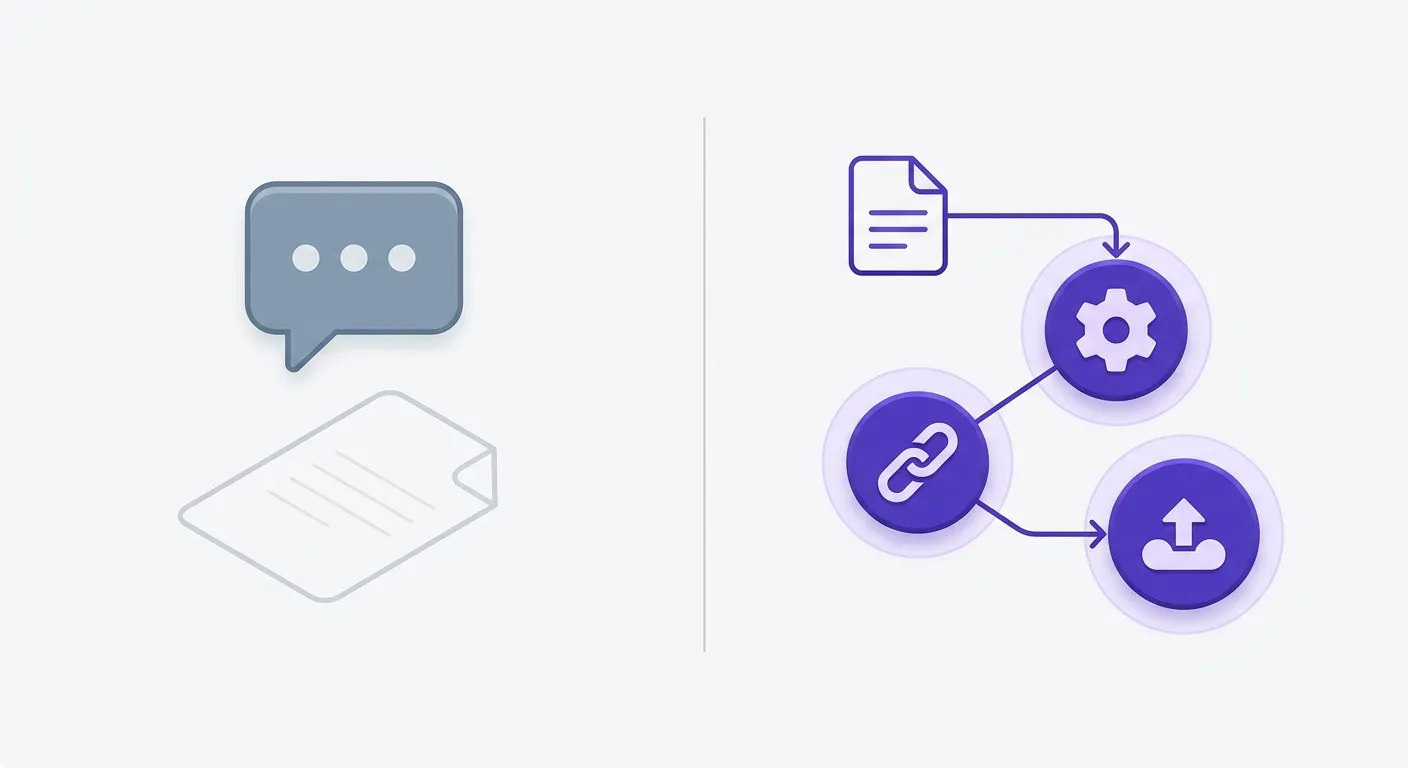
    Diagram comparing direct API passthrough vs vendor-proxied BYOK architecture for WordPress AI writing tools
    Most tools that accept your key still insert a middle layer — that single extra node is where cost transparency disappears and usage visibility breaks down.

    The Actual Cost Math: Subscription Caps vs. API Token Pricing

    Let’s put real numbers on this. At published provider token rates (OpenAI and Anthropic, mid-2026), a 1,500-word article — roughly 800 input tokens and 2,000 output — costs about $0.032 on Claude Sonnet 4, around $0.09 on a reasoning-tier model like OpenAI’s o-series, and closer to $0.36 on a premium model. Run those across volumes and the math gets stark fast: at 50 articles a month, even the premium tier costs about $18 — less than half a mid-tier subscription. At 150 articles, Claude Sonnet 4 totals under $5. We worked the full per-model, per-volume breakdown in our true cost of AI content per article deep-dive; the short version is that token-priced BYOK lands in cents per article at any realistic volume.

    But here is the nuance that competitor articles skip: BYOK is not worth the setup friction for everyone. If you are publishing fewer than 20 articles per month and your time cost matters, a flat-rate subscription with a bundled UI may still make sense. But here is the nuance that competitor articles skip: on raw cost, BYOK is cheaper at essentially any volume — even a handful of articles beats a $49 cap. What sits around 30–40 articles a month is a different crossover: the point where the savings clearly outweigh the effort of managing a key, monitoring usage, and handling rate limits. Below it the money saved is real but may not be worth the setup time; above it — especially at 100+ articles monthly — BYOK wins on both axes. A $49/month subscription capped at 50,000 words cannot scale with you; token-priced BYOK scales linearly and never hits an artificial ceiling. Above it, especially if you are running a content operation at 100+ articles monthly, the difference compounds fast. A $49/month subscription capped at 50,000 words cannot scale with you; token-priced BYOK scales linearly and never hits an artificial ceiling.

    Genuine BYOK AI Writing Tools for WordPress in 2026

    Not every tool that claims BYOK passes the architectural test above. The shortlist below was filtered on three criteria: direct API passthrough (no vendor proxy), support for at least two model providers, and either a native WordPress plugin or tight integration that does not require exporting through a third-party dashboard. Multi-provider support matters more than most publishers realize — the tool that locks you to a single provider gives you cost control but zero flexibility to route prompts to the model that is cheapest or most capable for a given task at a given moment. For the broader landscape of AI content plugins across all categories, the full ranked comparison of AI content plugins for WordPress covers the complete picture — BYOK and non-BYOK alike.

    AI Engine connects directly to OpenAI, Anthropic, Google, Mistral, and more via stable connectors — all from inside your WordPress dashboard. It supports MCP, REST endpoints, and function calling, which makes it the most developer-extensible option on this list. AI Puffer (formerly AI Power) is explicit about its model: “No hidden credits — you use your own account and control your costs.” Its provider list includes OpenAI, Google Gemini, Azure, OpenRouter, DeepSeek, xAI, and Ollama — that last one meaning you can run local inference at zero API cost entirely. Opace AI Scribe is open-source, supports GPT-4.5, o3, Claude Sonnet 4, and Claude Opus 4, and publishes exact token pricing on its plugin page. Cuppa AI is genuine BYOK on the token layer — you connect your own OpenAI or Anthropic key and pay the provider directly, with no per-token markup. The trade-offs are different: it charges a flat monthly software fee ($30–$200/mo) on top, and it’s a hosted external app rather than a WordPress-native plugin, so drafts don’t land straight in your editor. Fair for agencies who want a managed hosted workflow; less ideal if you want everything inside WordPress at zero platform fee. WPWriter is BYOK-first by its own documentation — it supports OpenAI, Anthropic and Google, lets you switch models, and stores your key encrypted (AES-256) locally rather than on its servers. As always, run the two-minute network test to confirm direct passthrough before you commit.

    Comparison table of genuine BYOK AI writing tools for WordPress showing provider support and architecture type
    Not all tools that accept your API key treat it the same way — provider support breadth (OpenAI only vs. multi-provider) is one of the fastest ways to separate genuine BYOK from a partial implementation.

    How to Vet Any “BYOK” Label Before You Commit

    The “BYOK” badge is unregulated. Any tool can apply it. The BYOKList directory catalogs tools that claim BYOK and frames it clearly: “get control of your budget, data usage, AI integrations, and unlock custom models with BYOK flexibility.” That framing is correct — but the directory lists tools by self-reported category, not independently verified architecture. You need your own checklist, because you need your own checklist, because the label alone tells you nothing — a tool can market hard on “no token markup” and still route every call through its own servers, where logging and margins become possible. Verify the architecture yourself rather than trusting the badge..

    Four steps, in order. First: check the API endpoint field in the plugin’s settings. A direct-passthrough tool will show you a URL pointing to the provider’s own domain. A proxied tool either hides this field or shows a vendor subdomain. Second: run the browser network test described earlier — trigger a generation and watch where the HTTP request goes. Third: read the privacy policy specifically for language about “storing,” “transmitting,” or “processing” API keys on the vendor’s servers; direct tools have no reason to retain your key server-side. Fourth: check whether the tool’s pricing page changes when you enter your own key. A tool that still charges per-word or per-article credits after you have entered your API key is not meaningfully BYOK — you are just paying two bills instead of one. Four steps, five minutes, zero ambiguity.

    Frequently Asked Questions

    What does BYOK mean for AI writing tools?

    BYOK stands for “bring your own key.” In the context of AI writing tools, it means you supply your own API key from a provider like OpenAI, Anthropic, or Google, and the tool uses that key to make AI calls on your behalf. The core promise is that you pay the provider’s published rate directly, rather than a subscription markup. Whether a specific tool actually delivers on that promise depends on its architecture — specifically, whether it passes your key directly to the provider or routes requests through its own servers first.

    Is BYOK cheaper than a subscription AI writing plan?

    It depends on your publishing volume. Based on current provider token pricing for models like Claude Sonnet 4 and OpenAI’s o-series, a 1,500-word article can cost as little as $0.032–$0.09 — see our full cost-per-article breakdown. At 150 articles per month, that is under $15 even with o3 — compared to $49–$99 for most mid-tier subscriptions. For publishers doing fewer than 30 articles per month, the savings are real but may not justify the setup and monitoring overhead. Above that threshold, BYOK scales far more efficiently.

    Which BYOK AI writing tools work directly inside WordPress?

    Three plugins have been independently verified as genuine BYOK options with direct API passthrough: AI Engine, AI Puffer (formerly AI Power), and Opace AI Scribe. All three are available through the WordPress plugin repository, have free core versions, and support multiple AI providers. They install and operate entirely within your WordPress dashboard without requiring an external SaaS account for content generation.

    Can I use my own Anthropic or Gemini key, or only OpenAI?

    You are not limited to OpenAI. AI Puffer supports seven providers including Google Gemini, Microsoft Azure, OpenRouter, DeepSeek, xAI, and Ollama for local inference. AI Engine connects to Anthropic, Google, and Mistral alongside OpenAI. Opace AI Scribe supports Claude Sonnet 4 and Opus 4 via the Anthropic API. The ability to swap between providers is one of the most underrated advantages of genuine BYOK — you can route to whichever model is cheapest or best-suited for a given task on a given day.

    How do I know if a tool is actually using my API key or routing through its own servers?

    Open your browser’s developer tools, go to the Network tab, and trigger a content generation. Check the outbound request URL. If it points directly to api.openai.com, api.anthropic.com, or another provider’s root domain, your request is passing through cleanly. If it hits a vendor-owned subdomain or a third-party relay, the tool is proxying your calls. You can also inspect the plugin settings for the API endpoint field — genuine direct-passthrough tools typically display the provider URL, while proxied tools obscure or omit it.

    Are there any risks to entering my API key into a third-party writing tool?

    Yes, and they are worth taking seriously. Any tool that stores your API key server-side could expose it in a data breach or misuse it to make unauthorized calls on your account. Before entering a key, read the privacy policy for language about key storage and transmission. Set spending limits on your API account so runaway usage cannot generate unexpected charges. Prefer tools that store your key locally in your WordPress database (encrypted) rather than transmitting it to an external server. Revoke and regenerate keys if you stop using a tool. These are standard API hygiene practices — BYOK does not introduce new risks, but it makes existing ones more personal.

    Conclusion

    True BYOK has a precise architectural definition, and on raw cost it wins at almost any volume. The real threshold around 30–40 articles a month is about effort, not price: below it the savings may not be worth the setup, above it — especially at 100+ articles monthly — the difference between $0.032 per article and a capped subscription stops being a rounding error and becomes a business-model decision. Above it — especially at 100+ articles monthly — the difference between $0.032 per article and a capped subscription is not a rounding error, it is a business model decision. The tools that will matter most in this category over the next 12 months are the ones combining genuine API passthrough with multi-provider support, because model pricing and capability are both shifting fast. Locking into a single provider today, even via BYOK, is a constraint you will feel by mid-2026. Build your stack accordingly — and remember that cheap to generate isn’t the same as ready to rank: an ungrounded draft still needs the editing pass that keeps it clear of thin-content search risk

    References

    External sources

  • AI Content Cost Per Article: What You’re Actually Paying After Word Caps, Seat Fees, and Editing Time (2026)

    AI Content Cost Per Article: What You’re Actually Paying After Word Caps, Seat Fees, and Editing Time (2026)

    The sticker price of an AI writing tool tells you almost nothing about what one article actually costs. Understanding the real AI content cost per article means going beyond the monthly subscription fee — you need to account for word consumption rates, per-seat multipliers, and the human editing time that every vendor conveniently omits. A $5.50/month plan sounds like a bargain until you realize it caps you at 20,000 words — which, after regenerations and retries, might produce 10 usable articles at best. Then add a human editor to each one. The math changes fast, and most AI content cost discussions stop before they get there.

    You’re choosing between three fundamentally different pricing architectures: per-seat subscriptions like Jasper at $59/month per user, word-capped or credit-based plans like GetGenie and Koala, and BYOK tools that bill you directly at raw OpenAI or Anthropic API rates. These models are not interchangeable, and running the wrong one at your volume is a quiet, compounding budget leak. If you’re still deciding which tool to shortlist before digging into the cost math, the Best AI Content Plugins for WordPress in 2026: Compared, Ranked, No Slop covers the full ranked comparison. But if you already have options on the table and need the real per-article numbers — this is the breakdown.

    Key Takeaways: AI Content Cost Per Article
    • Three pricing models: per-seat subscriptions (Jasper, $59/month), word-capped plans (GetGenie Starter, $6/month for 20K words), and BYOK API access billed at raw token rates.
    • Word caps overstate output: regenerations and retries consume 2.5–4× the final word count — a 50K-word plan typically yields 10–16 publishable articles, not 25.
    • Editing time is the invisible line item: hybrid AI+human workflows dominate in 2026; 20–45 minutes of editing at $30–$60/hr adds $10–$45 per article on top of any subscription fee.
    • BYOK has a crossover point: raw API generation costs $0.08–$0.35 per article, but only beats subscription plans above roughly 30 articles per month.
    • Per-seat fees compound fast — a 3-person team on Jasper Business can pay 3× the listed Pro price, a gap no single-line pricing comparison captures.

    The Three Pricing Models — and Why They’re Structurally Different

    Before any per-article math makes sense, you need a clear-eyed look at what you’re actually buying under each model. Jasper’s Pro plan at $59/month billed annually is a per-seat, unlimited-word subscription — one user pays a flat fee regardless of output volume. That structure rewards heavy users and punishes light ones. GetGenie runs the opposite architecture: the Starter plan caps you at 20,000 AI words per month for $5.50/month (billed annually), the Writer plan at 60,000 words for $10.45/month — what you pay is loosely fixed, but what you can produce is hard-capped. Koala sits in a similar credit-based universe — you buy output, and your throughput is always bounded by what you purchased. BYOK tools sit outside all of this: you connect your own API key and pay the provider’s raw token cost per article, with no word bank and no per-seat fee. Some run as hosted apps (Cuppa, for instance, bills per word on top of the API cost); others, like the WordPress-native Contentosapp Studio, run the BYOK pipeline directly in your editor, so the only cost is the provider’s tokens.

    The reason these models resist direct comparison is what each one actually charges for. A $59/month Jasper seat costs $5.90/article at 10 articles a month and about $1.18 at 50 — the per-article number only falls if you publish more, and it never reaches BYOK territory. A word-capped plan charges you whether or not you fill the cap. BYOK charges only for the tokens a draft actually consumes — cents — at any volume. So on raw cost the ranking barely moves: BYOK is the cheapest almost everywhere. What changes with volume and team size isn’t *who wins on price* — it’s whether a subscription’s bundled convenience is worth paying many times more per article.

    How Word Caps Translate Into Actual Per-Article Cost

    Here’s the number the pricing pages don’t show you: the words you publish are not the words you consume. A 2,000-word article typically burns 5,000–8,000 plan words by the time you account for outline generation, intro rewrites, metadata copy, and regeneration passes when the first output misses the mark. That’s a real-world consumption multiplier of 2.5–4×, and it fundamentally breaks the “divide plan words by article length” math most buyers use.

    Run that against GetGenie’s Writer plan — $10.45/month billed annually for 60,000 AI words. At face value, 60,000 ÷ 1,500 = 40 articles. Apply a realistic 3× generation multiplier and you’re closer to 13 publishable articles a month — an effective cost of about $0.80 per article, not the ~$0.26 the raw arithmetic implies. And the cap bites the moment you scale: pushing past ~13 articles forces the Pro tier at $26.95/month, so your per-article cost rises until you fill the larger 400,000-word bucket. That’s the trap of word-capped pricing — the sticker number and the number you actually pay move in opposite directions. (Pricing verified June 2026.) This is the calculation every competing “AI content cost” breakdown skips.

    Word cap consumption multiplier diagram showing real article output vs. advertised plan word count
    Most word-cap plans assume a 1:1 ratio between purchased words and published output — in practice, regenerations, failed drafts, and prompt overhead routinely consume 2.5–4× the words of the final article.

    The Cost Nobody Shows You: Editing Time

    Every per-article cost estimate published online prices the tool. Almost none of them price the editor. In 2026, hybrid workflows — AI drafts, human edits — are now the default, and that editing labor is a fixed cost disguised as a variable one. Budget 20–45 minutes per article for structural corrections, fact-checking, E-E-A-T signal additions, and internal linking. At a conservative $30/hour blended freelance rate, that’s $10–$22.50 per article. At a standard U.S. editorial rate of $50–$60/hour, you’re looking at $17–$45 per article in labor before a single word hits your CMS.

    The compounding effect at scale is where this becomes a budget decision, not a footnote. At 50 articles per month, editing overhead runs $500–$2,250 per month — easily 5–10× the subscription cost of a word-capped plan. Here’s what that looks like in concrete terms:

    The tool cost nearly disappears at volume. The editing cost doesn’t. That’s the math your vendor’s pricing page will never show you — and it’s why choosing the cheapest subscription tier often produces no real savings at all.

    BYOK API Pricing: When Bringing Your Own Key Actually Saves Money

    BYOK flips the cost structure entirely. Tools that support direct API key integration let you bypass the subscription word bank and pay OpenAI or Anthropic directly at token rates. For a 1,500–2,000-word article, that lands at roughly $0.01–$0.03 in raw tokens — GPT-4o-mini near the floor (~$0.01), GPT-4o around $0.02, Claude Sonnet-class about $0.03. Hosted BYOK apps that add a per-word fee on top (Cuppa, for one) push the all-in figure to ~$0.08+, but the token cost itself is just cents. Anthropic’s Pro plan starts at $17/month billed annually, but that is a consumer chat interface, not raw API access — the API billing is usage-based and separate, which is what BYOK actually taps. OpenAI’s API pricing follows a similar token-rate structure, billed purely on consumption with no seat fee layered on top.

    There’s a catch, but it isn’t a volume threshold. If your BYOK tool is itself free — a WordPress-native plugin you run with your own key — there’s no platform fee to offset, so BYOK is cheaper than a subscription at essentially *any* volume: even at one article a month, $0.03 of tokens beats a $59 seat fee. What you give up isn’t money — it’s convenience: bundled templates, a hosted UI, team controls, and not having to create an API key. So the real decision isn’t “how many articles before BYOK wins on cost.” It’s “is the subscription’s convenience worth paying many times more per article?” For most WordPress publishers who already manage plugins and keys, it isn’t.

    Line chart comparing a flat ~$59/month per-seat subscription against BYOK pay-the-provider pricing that stays a few cents per article as monthly output rises — the two lines never converge.
    A per-seat subscription is a flat fee you pay whether you publish one article or fifty — so its per-article cost only falls with volume, and never reaches the few cents you pay running your own API key. This isn’t a break-even you cross at some magic volume; it’s a convenience tax you either choose to pay or you don’t. (Pricing verified June 2026.)
    Tool / modelPricing typeCost per 1,500-word articleAt 15 articles/moCaps?
    BYOK — GPT-4o-miniPay the provider~$0.01~$0.15None
    BYOK — Claude Sonnet 4.5Pay the provider~$0.03~$0.45None
    Cuppa AIPer-word (bulk)~$0.08~$1.10Plan-based
    Koala AIPer-word (bulk)~$0.75~$11Plan-based
    GetGenieSubscription / credits~$1.27 (at ~$19/mo)~$19Yes — word cap
    JasperPer-seat subscription~$3.93 (at $59/mo)~$59Credit cap

    At 15 articles a month, BYOK runs under $1 while a per-seat subscription runs $59 — and the subscription’s per-article cost only drops if you publish more (it never reaches BYOK’s). The real question isn’t price; it’s whether the bundled convenience is worth ~60×.

    At 50 articles a month, even a standard 30-minute edit adds about $1,000 in labor — typically more than any subscription fee, and a cost that doesn’t shrink no matter which generation tool you picked. The tool cost nearly disappears at volume; the editing cost never does. The cheapest tool is rarely the cheapest workflow: an unsourced draft forces a long human pass to verify and ground every claim — and thin, unedited AI output is exactly what carries search-visibility risk.

    There’s no single “cheapest” tier to crown, because cost isn’t where these models differ — they all lose to BYOK on raw price. What differs is convenience. A solo publisher happy to paste in an API key pays cents per article at any volume; one who isn’t is better served by a capped plan’s hosted simplicity — knowing that’s a convenience premium, not a saving. Agencies at 50+ articles a month feel both sides hardest: BYOK keeps generation cost near zero, but the editing line (model-independent) becomes the real budget — so optimize there, not on the generation tool.

    Frequently Asked Questions

    What is the average AI content cost per article in 2026?

    It depends heavily on which model and pricing architecture you use. On subscription plans, realistic per-article tool costs range from $0.40 to $5.00 depending on volume and plan tier. BYOK API generation via GPT-4o or Claude Sonnet-class models typically runs $0.01–$0.03 in raw API tokens per 2,000-word article at current token rates. Add a human editor at standard U.S. freelance rates and the all-in cost per article lands between $12 and $50 for most hybrid workflows — regardless of which generation tool you chose.

    Do word-cap plans actually give you the number of articles they imply?

    No. The word count advertised is a generation budget, not a publishing budget. Because real AI workflows involve regenerations, outline passes, and metadata creation, your actual word consumption per publishable article runs 2.5–4× the final output length. A 20,000-word plan — like GetGenie’s Starter tier — realistically produces 6–10 articles per month at a 2,000-word average, not the 10 that raw arithmetic suggests.

    Is BYOK always cheaper than a subscription plan for AI content?

    Almost always — on raw cost. A 1,500-word draft costs ~$0.01–$0.03 in tokens, versus $19–$59/month for a capped or per-seat plan. If your BYOK tool is free to run with your own key, there’s no platform fee to offset, so BYOK is cheaper at essentially any realistic volume. The trade-off is convenience, not money: subscriptions bundle templates, a hosted UI and team controls, and spare you from managing an API key.

    How much does editing add to the real cost of an AI-written article?

    At 20–45 minutes of editing per article and standard U.S. freelance editorial rates of $30–$60/hour, expect to add $10–$45 per article in human labor. On a GetGenie Writer plan where the realistic tool cost is roughly $0.80/article, a single 30-minute edit at $30/hr adds $15 — nearly 20× the tool cost itself. The ratio holds across every pricing model: editing, not generation, is where the money goes. This is the single largest gap between marketed AI content costs and real ones, and it applies equally across every pricing model.

    Which pricing model scales best for agencies publishing 50+ articles a month?

    BYOK via a tool that supports direct API keys — a hosted app like Cuppa, or a WordPress-native pipeline run with your own key consistently wins on generation cost at 50+ articles/month, where raw API rates produce meaningful savings over capped plans that would require constant tier upgrades. The key constraint is editing overhead — that cost is model-independent and doesn’t compress with volume. Agencies at this scale should focus budget optimization on the editing side (template workflows, style guides, in-house editors) rather than marginal differences between generation tools.

    Does Jasper’s per-seat fee make sense for solo publishers?

    Rarely. At $59/month for one user with unlimited words, Jasper Pro makes economic sense for solo publishers producing 50+ articles per month who need volume and don’t want to manage API billing. Under that threshold, word-capped plans at $5.50–$10.45/month (billed annually) produce a lower true per-article cost even accounting for the cap. Jasper’s architecture is built for marketing teams that need cross-user brand controls and collaborative campaign workflows — not for a single operator trying to minimize cost-per-piece.


    Most AI content cost conversations end at the pricing page. The real calculation starts there and runs through word consumption multipliers, the seat fee your team will trigger the moment you hire a second editor, and — most critically — the 30 minutes of human work that follows every AI draft. Get the tool cost down to $0.40/article and you’ve saved a dollar. Leave the editing overhead unexamined and you’ve left $15–$45 per article on the table every single month. That number compounds. Figure out which volume tier you actually operate at, match the pricing model to it, and budget the editing line explicitly — it’s the only calculation that tells you what AI content genuinely costs.

    References

    External sources

    1. Plans & Pricing | Jasperhttps://www.jasper.ai/pricing
    2. Pricing – GetGenie AIhttps://getgenie.ai/pricing/
    3. Koala AI – The Best AI Writer and Chatbothttps://koala.sh/
    4. Cuppa AI | Rated #1 Profit-Focused Tool for AI-Powered Brand Growthhttps://cuppa.ai/
    5. Plans & Pricing | Claude by Anthropichttps://www.anthropic.com/pricing

  • Koala AI Alternatives That Actually Rank: 5 Tools Built for Search Quality in 2026

    Koala AI Alternatives That Actually Rank: 5 Tools Built for Search Quality in 2026

    Koala AI is not a bad tool. And to be clear, neither is Cuppa, SEOwriting.ai, or Autoblogging.ai. The reason publishers look for Koala AI alternatives isn’t quality in the abstract — it’s a specific gap: these tools optimize for output speed and volume-per-dollar, which is not the same thing as ranking durability. If your traffic has stalled — or dropped after the 2024 or 2026 core update — the question isn’t whether your tool is cheap enough. It’s whether it was ever designed to produce drafts that hold up in search.

    If you’ve already run bulk AI content and you’re watching impressions plateau or creep back down after a “recovery,” this article is for you. These are the Koala AI alternatives that prioritize draft quality over output speed — tools designed to produce a starting point that holds up under editorial review, not one that requires a full rebuild before it’s safe to publish. Five tools, a concrete quality framework, and a decision matrix to match the right one to your actual workflow.


    Key Takeaways at a Glance
    • The core tradeoff: Koala, Cuppa, and SEOwriting.ai optimize for output speed and volume — a real advantage that comes with a ranking-durability cost post-2024 core updates.
    • What “rank-ready” actually means: A draft with logical heading structure, verifiable factual claims, no hallucinated statistics, and a tone that survives an editor’s pass — not just fluent prose.
    • The hidden cost in tool comparisons: A tool that generates in 4 minutes but needs 45 minutes of editing is not faster than one that takes 12 minutes and needs 10 minutes of cleanup. That gap compounds at scale.
    • Research grounding is the structural divide: Only tools that cite named external sources — not SERP summaries — introduce new information signal into your content.
    • The five alternatives covered: Contentosapp, AI WP Writer, Opace AI Scribe, GetGenie, and AI Engine — each evaluated on draft quality and total workflow cost.

    The Volume Trap: Why Bulk AI Output Is Starting to Cost Rankings

    Line chart: high-volume unsourced AI content spikes then drops after a Google core update, while fewer source-grounded articles climb steadily.
    Volume isn’t ranking: bulk unsourced content tends to fade after core updates; grounded articles hold and climb.

    The economics of bulk AI writing are real. At $0.003 per word, you can flood a niche site with content faster than any human team could manage. That math made sense in 2022. It made some sense in 2023. After the March 2024 Google core update — and then the March 2026 update — it started working against publishers who went all-in on volume without quality controls. The pattern is documented: sites that scaled aggressively on unedited, autoblogged content were disproportionately hit, with large drops in organic visibility documented across multiple post-update analyses. The mechanism is not mysterious. Volume multiplies ranking risk when the underlying content fails E-E-A-T signals, because each weak page dilutes your site’s topical authority cluster rather than reinforcing it. You’re not building a content moat — you’re building noise.

    This is the claim competing listicles won’t make directly: publishing velocity is now inversely correlated with ranking durability for thin-content sites. Even Cuppa AI’s own homepage names the failure mode explicitly — “Push volume and typos slip in, brand voice drifts, Google flags thin copy.” That’s a vendor acknowledging the category’s core risk in their own marketing copy. And on Koala AI’s platform, one of their most-cited power users describes the output as requiring “a quick round of heavy editing by a professional writer and expert in the field” before it’s publish-ready. Volume tools are starting points, not finished products. The question is whether your starting point is close enough to rank-ready that the editing time is worth it — or whether you’re rebuilding from scratch every time.

    Koala AI alternatives volume vs ranking quality tradeoff diagram 2026
    Producing more drafts per dollar is only efficient if those drafts don’t need to be rebuilt before they’re safe to publish — a calculation most bulk-AI users make too late.

    What Makes a Koala AI Alternative Actually Worth Switching To

    Most alternatives roundups compare features: does the tool integrate with WordPress, does it support SERP analysis, does it have a Chrome extension. Those are useful signals — but they measure capability, not output. A rank-ready draft has five measurable properties: a heading structure that mirrors the SERP’s semantic pattern, factual claims that are verifiable or citable, no hallucinated statistics, a reading level appropriate to the topic, and a tone that survives a competent editor’s pass without a full rewrite. Very few tools clear all five consistently. Most clear two or three. That gap is where ranking durability lives.

    The signal most publishers underweight is factual grounding. A draft that reads fluently but contains one fabricated statistic or a misattributed claim isn’t a time-saver — it’s a liability. Google’s Search Quality Rater Guidelines treat accuracy as foundational to both “Expertise” and “Trustworthiness.” Tools that retrieve real external sources per article — rather than generating from SERP summaries of existing content — close this gap structurally. Summarizing what’s already ranking recycles existing claims. Citing a named primary source introduces new information signal. That’s the process architecture difference between a volume tool and a ranking tool, and it’s almost never mentioned in tool comparison articles. For a direct data read on where Google currently draws the line on AI content quality, the breakdown on whether Google penalizes AI content covers the 2026 state of play clearly.

    5 Koala AI Alternatives Built for Drafts That Hold Up in Search

    The five tools below are all WordPress-native — they run inside your site, not as a separate app you copy-paste from. What separates them from Koala isn’t raw speed; it’s control and sourcing: each lets you shape the draft before it publishes, and one of them grounds every claim in a real, cited source by default. For the full field, the 2026 AI content plugins comparison covers more tools and criteria than fit here. Here’s where each fits:

    Contentosapp Studio — Runs a 7-agent pipeline whose dedicated Researcher gathers named external sources for each article (institutional and primary references) and cites them in the draft, so claims are grounded, not invented. WordPress-native; BYOK with OpenAI, Anthropic, or Google Gemini; free with your own key. The honest trade-off: it’s the newest tool here, with a far smaller community and track record than the others, and it produces one quality draft at a time — not 500 from a CSV. Best for publishers who want sourced, editable, rank-ready drafts without leaving WordPress.

    AI WP Writer — A BYOK plugin connecting to OpenAI, Claude, and Gemini, with bulk and scheduling on top. You control the model and the draft — the key difference from a fixed bulk generator — but it doesn’t fetch or cite sources for you; grounding is your edit pass. Best for operators who want multi-model BYOK plus scheduling and are comfortable writing a tight brief.

    Opace AI Scribe — Open-source and BYOK (OpenAI/Anthropic), with every prompt visible and editable at each stage and a “humanizer” pass that softens the pattern-repetition signals of raw AI text. Like the others, it doesn’t pull and cite primary sources — that stays manual. Best for publishers who want full transparency and control over each generation step.

    GetGenie — WordPress-native, with in-editor SEO scoring and live SERP/competitor analysis that pushes you to engage the competitive landscape before writing. Note it’s credit-based, not BYOK (a free tier plus paid plans with word caps), and it optimizes structure rather than grounding claims in cited sources. Best for SEO-led writers who want keyword and competitor data inside the editor.

    AI Engine (Meow Apps) — The most-installed AI plugin for WordPress (100,000+ installs), BYOK across a wide set of providers. It’s a flexible AI framework rather than an opinionated editorial pipeline, so output quality leans entirely on your prompting and editing, and it doesn’t ground or cite claims. Best for developers and power users who want one BYOK layer for many AI jobs. (We go deeper in our AI Engine alternatives guide.)

    Comparison table of Koala AI alternatives by draft quality and editing time 2026
    Editing time per draft is the hidden cost that bulk-AI workflows almost never account for in their cost-per-article math.
    ToolBest forCost per articleGrounds & cites sources?Watch-out
    Koala AI (baseline)Fast SERP-based articles & affiliate roundups~$0.50 / 1,000 wordsNoVolume-first; unsourced claims
    Cuppa AICheapest programmatic / bulk SEO pages~$0.05 / 1,000 wordsNoQuality varies; thin-content risk at scale
    SEOwriting.ai1-click bulk to WordPress / Shopify~$14–$64 / mo (bulk CSV)NoBasic SEO; no real source grounding
    Autoblogging.aiMaximum volume (500 articles per CSV)Credit-basedNoPure volume = highest thin-content risk
    AI WP WriterBYOK multi-model, editable draftsYour API cost (cents)No (manual)Generic headings without a brief
    Contentosapp StudioResearch-grounded, rank-ready WordPress draftsBYOK (~$0.03 / draft)Yes — cites real sourcesNewest/smallest; one quality draft at a time, not 500-CSV bulk

    One column is the whole article: only one of these tools grounds and cites real sources by default. Volume tools optimize for output; that’s the exact gap that turns into thin content under Google’s Helpful Content guidance. (Pricing verified June 2026.)

    Matching the Right Tool to Your Workflow Without Overthinking It

    Most publishers in this situation fall into one of three profiles, and the tool decision follows directly from which one you are. Profile A: you’re running a content team at 10–20 articles per month with an in-house editor. Your bottleneck is draft quality, not speed — a weak draft costs more in editor time than a slower tool would. Prioritize cost and WordPress fit — a BYOK plugin (Contentosapp, AI WP Writer, or Opace) keeps your per-article cost in cents while staying inside WordPress. Profile B: you’re a solo operator publishing 5–8 articles per month on a budget where every dollar of tooling shows up in margin. Prioritize cost and WordPress fit — a BYOK plugin (Contentosapp, AI WP Writer, or Opace) keeps your per-article cost in cents while staying inside WordPress. Profile C: you’re an agency or site operator running 50+ articles per month who needs volume but can’t afford to carpet-bomb Google with thin content. Be honest about the trade: if you genuinely need programmatic volume, the bulk tools (Koala, Cuppa, Autoblogging.ai) are faster and cheaper per article — but you’re accepting the thin-content risk above. If ranking durability matters more than raw count, scale with a BYOK WordPress plugin (AI WP Writer) or a grounded pipeline (Contentosapp) plus a disciplined edit pass, and publish fewer, sturdier articles.

    One practical test worth running before you commit to switching: take the same 800-word brief, run it through your current tool and through the alternative you’re evaluating, then score both drafts against the five rank-ready criteria. If the alternative scores better on four of five — and the editing time is equal or shorter — that’s a sufficient signal to switch. Don’t wait for a core update to make the data decision for you. The SEOwriting.ai platform serving 50,000+ businesses and the AI WP Writer plugin with its scheduled publishing pipeline are both technically capable tools — the question isn’t capability, it’s whether their output clears your quality floor without requiring a full rewrite on the other side.

    Frequently Asked Questions

    Is Koala AI good for SEO content in 2026?

    Koala AI remains a technically capable tool — trusted by over 19,000 content creators and SEOs, and powered by GPT-5 and Claude 4, with real-time SERP analysis and 1-click WordPress publishing. For publishers who have a strong editorial process and fast editing capacity, it produces structurally solid drafts. The risk is in treating it as a publish-without-review pipeline. Even Koala’s most enthusiastic users describe the output as requiring “heavy editing by a professional writer and expert in the field” before publication. If that editing capacity exists in your workflow, Koala is a viable tool. If it doesn’t, the output quality gap shows up in your rankings eventually.

    What is the best Koala AI alternative for WordPress affiliate sites?

    It depends on your publishing volume and editing bandwidth. For solo affiliate operators publishing fewer than 10 articles per month, a BYOK plugin (Contentosapp, AI WP Writer, or Opace) keeps your per-article cost in cents while staying inside WordPress. For higher-volume affiliate sites where research depth matters — product roundups, comparison guides, review articles — Contentosapp’s source-grounded pipeline (or AI WP Writer / Opace if you’d rather ground sources in your own edit pass) reduces the factual accuracy risk that makes affiliate AI content a liability under Google’s Helpful Content guidance. The short answer: if you’re monetizing with affiliate links, factual accuracy is non-negotiable, and that requirement narrows the field quickly.

    Do AI writing tools produce content that passes Google’s helpful content guidelines?

    Google’s Helpful Content system evaluates the output, not the tool used to produce it. AI-generated content that demonstrates E-E-A-T signals — verifiable facts, appropriate expertise level, accurate sourcing, and genuine value to the reader — is treated the same as human-written content that meets those standards. The problem isn’t AI authorship. The problem is that most bulk AI tools optimize for plausibility, not accuracy. Drafts that contain hallucinated statistics or unverifiable claims fail the “trustworthiness” dimension of the Quality Rater Guidelines regardless of how well-structured the headings are.

    How does Contentosapp compare to Koala for long-form articles?

    The primary difference is process architecture. Koala ingests SERP data to calibrate output — which produces structurally strong, topically relevant drafts, but grounds claims in whatever’s already ranking rather than primary sources. Contentosapp runs a 7-agent pipeline where a dedicated Researcher gathers named external sources (government data, institutional references, primary publications) before the Writer agent generates the draft. The output cites those sources inline. For long-form articles where factual depth matters — finance, health, legal-adjacent topics — that sourcing layer is the difference between a draft you can publish and a draft that requires a fact-check pass before it’s safe.

    Can I use AI-generated content for affiliate sites without risking a Google penalty?

    Google does not penalize content for being AI-generated. It penalizes content that is low-quality, thin, or manipulative — and AI tools make it easier to produce that kind of content at scale, which is why bulk AI publishing correlates with ranking risk. The practical answer: AI-generated content for affiliate sites is fine if the draft is factually accurate, the claims are verifiable, the review criteria are based on genuine product knowledge, and the content serves the reader’s decision-making process rather than just matching keyword patterns. Ten well-edited, research-grounded affiliate articles will outperform 100 autoblogged ones over a 12-month window.

    What is the difference between autoblogging tools and research-backed AI writers?

    Autoblogging tools — SEOwriting.ai’s 100-article batch-to-WordPress pipeline, AI WP Writer’s year-ahead scheduling system, and similar bulk generation workflows — optimize for output velocity. They generate from SERP summaries and training data, which means they recycle and repackage existing claims efficiently. Research-backed AI writers build a sourcing layer before generation: they retrieve named primary sources, cite them inline, and produce drafts where factual claims have a traceable origin. The practical difference is editing time and ranking durability. Autoblogging output is faster to generate and slower to edit to a publishable standard. Research-backed output takes longer to generate and shorter to edit — and it introduces new information signal into the content, which is what Google’s Helpful Content guidance rewards.


    After two major core updates targeting thin AI content, volume is a liability calculation — and the math has shifted. If your current tool is fast but your drafts aren’t clearing the five-criteria quality bar consistently, the switching cost is lower than the ranking cost of staying. Run the brief-comparison test described above. Score the output honestly. The right tool isn’t the one with the best feature list — it’s the one that gets you to a publishable draft with the least total time investment and the fewest factual landmines to defuse on the other side.

    References

    External sources

    1. Cuppa AI | Rated #1 Profit-Focused Tool for AI-Powered Brand Growthhttps://cuppa.ai/
    2. Koala AI – The Best AI Writer and Chatbothttps://koala.sh/
    3. Contentosapp – Your editorial team, inside WordPresshttps://contentosapp.com/
    4. SEO WRITING – AI Writing Tool for 1-Click SEO Articleshttps://seowriting.ai/
    5. AI WP Writer – SEO content generator, chatGPT, Gemini – WordPress plugin | WordPress.orghttps://wordpress.org/plugins/ai-wp-writer/

    Related content

  • Jasper Alternatives for WordPress: BYOK Plugins That Write Rank-Ready Drafts for Cents (2026)

    Jasper Alternatives for WordPress: BYOK Plugins That Write Rank-Ready Drafts for Cents (2026)

    Jasper is a polished product. That’s not the argument. The argument is that it was built for marketing teams sharing a brand workspace — not for a solo WordPress operator who needs to publish 15 articles a month without paying $59 per seat for a tool that lives outside their CMS. If you’re here, you’ve probably done the math and it didn’t go well. The real Jasper alternatives for WordPress aren’t other SaaS writing tools with different logos. They’re plugins that live inside your dashboard, connect directly to your AI provider, and bill you at the provider’s published rate — no markup, no opaque credit meter. This article covers why WordPress users are switching, what the actual cost difference looks like with real numbers, and which five plugins are worth your time in 2026. You’ll have enough to make a decision before you finish reading.

    Key Takeaways: Jasper Alternatives for WordPress
    • The core problem: Jasper’s Pro plan costs $59/month per seat (annual billing) with no native WordPress plugin — every draft requires copy-pasting into Gutenberg or Classic Editor.
    • The cost gap: A 1,500-word article via Claude Sonnet 4 through a BYOK plugin costs roughly $0.03 in API fees — not $59/month for the seat that made it possible.
    • True BYOK matters: Some plugins route requests through their own servers and call it BYOK. Real BYOK means your API key calls the provider directly — no middleman markup, no hidden per-request fee, and no data routed through a third-party server.
    • Top WordPress-native options: Contentosapp, AI Engine, GetGenie, AI WP Writer, and Opace AI Scribe all operate inside WordPress — Jasper does not.
    • GetGenie caveat: Its base plans use GetGenie’s own word credits (capped at 20K/month on Starter). BYOK mode is available but not the default.
    • If you manage your own API key, the cost argument for switching is decisive.

    Why WordPress Users Are Leaving Jasper

    Jasper’s pricing page describes a product built for marketing teams that need brand consistency across email, social, and web — a shared workspace where multiple people write in the same voice. That’s a legitimate product. But the pricing model reflects that use case, not yours. At $59/month per seat (annual billing) or $69/month billed monthly, you’re paying for a team tool even if you’re a team of one. None of that spend puts content inside WordPress. You draft in Jasper’s editor, then export, then format in Gutenberg or Classic Editor, then re-apply your SEO plugin’s recommendations from scratch. If you publish 10 articles a month and spend a conservative 8 minutes per article on that reformatting loop, that’s 1.3 hours of dead time — before you’ve written a single meta description. Call it the copy-paste tax. It’s real, it compounds, and it doesn’t appear in any Jasper feature comparison.

    The structural problem runs deeper than inconvenience. Jasper has no WordPress plugin. Your Yoast or RankMath scoring, your custom block templates, your internal link context — none of it is visible while you’re writing. You’re optimizing blind, then pasting the result into an editor that tells you the score after the fact. The content loop is broken at the foundation, and no browser extension patches it cleanly.

    Jasper copy-paste workflow compared to WordPress-native BYOK plugin content loop inside Gutenberg
    Every extra handoff between tools is a place where formatting dies, metadata vanishes, and your publishing rhythm breaks — WordPress-native generation eliminates the round trip entirely.

    The BYOK Cost Reality: What You Actually Pay vs. Jasper’s Markup

    Let’s put actual numbers on this. According to the per-token rates documented on Opace AI Scribe’s plugin page — correct as of June 2025 — Claude Sonnet 4 costs $0.003 per 1,000 input tokens and $0.015 per 1,000 output tokens. A typical 1,500-word article requires roughly 1,000 input tokens (your prompt, outline, keywords) and about 2,000 output tokens for the generated text. That works out to $0.003 + $0.030 = $0.033 per article — or about three cents. At Jasper’s $59/month annual seat rate, that seat cost alone buys you approximately 1,787 Claude Sonnet 4 articles through a true BYOK plugin. No competing comparison article performs that arithmetic directly. Now you have it.

    There’s a nuance worth knowing before you install anything: not all plugins that call themselves BYOK are actually BYOK. Some route your requests through the plugin developer’s backend infrastructure, use your API key as authentication, and reintroduce latency and potentially per-request overhead in the process. True BYOK means your WordPress site makes the API call directly to OpenAI or Anthropic with your key — the plugin never touches your billing, and the provider’s published rate is the only rate that applies. This distinction matters for both cost and data privacy, and it’s almost never explained in plugin marketing copy. Before you commit to any tool on this list, check the plugin’s documentation for explicit “direct API” language.

    The Top Jasper Alternatives for WordPress in 2026

    For WordPress operators who want to stay inside their dashboard, here’s what the field looks like. Each option below is genuinely WordPress-native — meaning you draft, optimize, and publish without leaving your CMS.

    Contentosapp

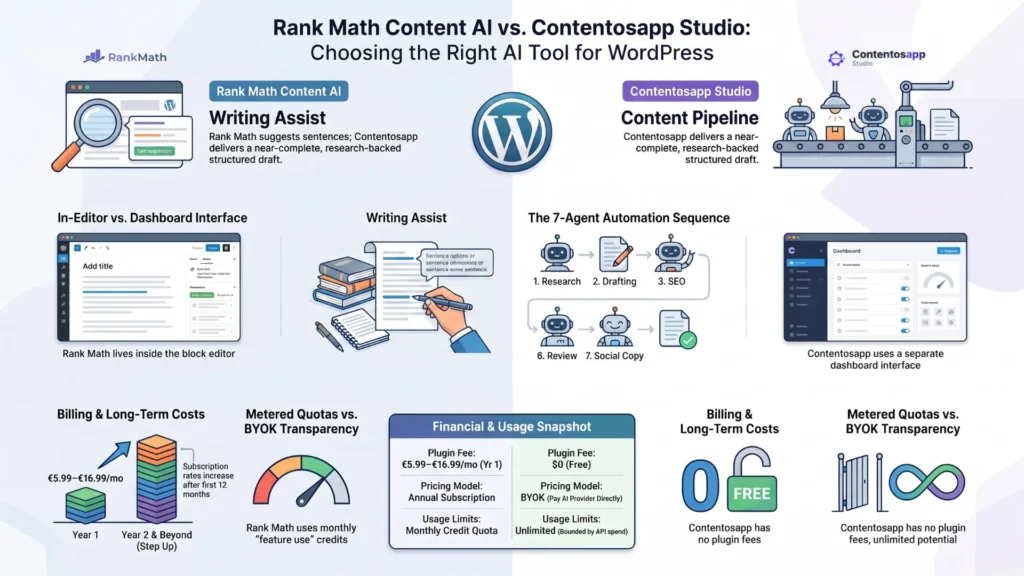
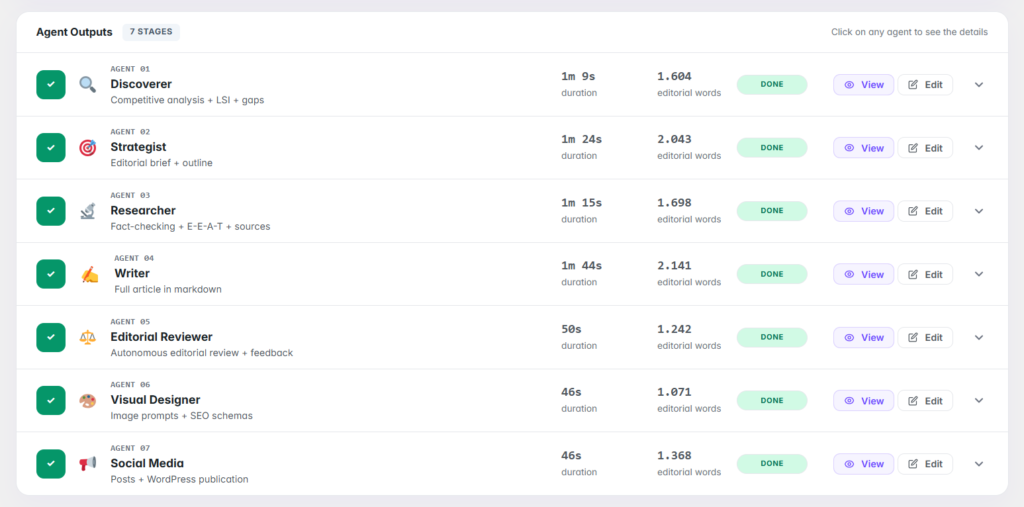
    Contentosapp runs a 7-agent pipeline — Discoverer, Strategist, Researcher, Writer, Editorial Reviewer, Visual Designer, and Social Media — that takes a keyword and outputs a schema-marked, image-ready article published directly to WordPress. It’s true BYOK (OpenAI, Anthropic, Google), free forever on your own key, and the only tool here that produces schema markup as part of its core output rather than as an add-on. If you want the full plugin ecosystem ranked beyond Jasper replacements, the complete comparison of AI content plugins for WordPress covers the broader field with detailed scoring across categories.

    The honest trade-off: Contentosapp is the newest tool here, with a far smaller community and track record than Jasper or AI Engine — you’re betting on the approach, not years of polish.

    AI Engine

    AI Engine connects WordPress with OpenAI, Anthropic, Google, Mistral, and more via stable BYOK connectors, and integrates deeply into the Gutenberg editor. Beyond content generation, it supports chatbots, knowledge base embedding, AI forms, and function calling for developers who want to build custom workflows on top of it. It’s the most extensible option for technical users and supports multi-site management through a single conversation interface.

    AI WP Writer

    AI WP Writer operates inside both the Classic Editor and Gutenberg, supports a wide range of current models including GPT-5, o3, Claude, Gemini, and Grok families (as listed on the plugin’s WordPress.org page at time of writing), and auto-generates a meta title and meta description for every article it produces. It generates up to 18,000 characters per single request and supports scheduled automatic publishing up to a year in advance — which makes it a strong fit for high-volume operations.

    Opace AI Scribe

    Opace AI Scribe is open-source, supports GPT-4.5 and Claude Sonnet 4 and Opus 4, and has keyword research plus a humanizer built into its prompt pipeline from the outset. Its plugin page publishes the exact per-token costs for each supported model — a trust signal rare in this market. Open-source means the request-handling code is publicly auditable, which matters if you’re concerned about where your API key data goes.

    GetGenie

    GetGenie’s Starter plan at $6/month (billed annually) includes 12 SERP analyses, 25 keyword analyses, 5 topical maps per month, and 40+ AI writing templates — the deepest built-in SEO toolset in this group. But read the small print: Starter caps you at 20,000 AI words per month on GetGenie’s own credit model. BYOK mode is available but isn’t the default setup. If you publish at volume, the word cap will surface quickly.

    The table below cuts to what matters for cost-conscious WordPress operators:

    ToolWordPress-nativeTrue BYOKEst. cost / 1,500-word draftWord / credit caps
    Jasper No (external SaaS) No $59/mo per seat (annual) Opaque credit metering
    Contentosapp Yes Yes ~$0.03 (Claude Sonnet 4) None with BYOK
    AI Engine Yes Yes ~$0.03–$0.10 (model-dependent) None with BYOK
    AI WP Writer Yes Yes ~$0.03–$0.40 (model-dependent) None with BYOK
    Opace AI Scribe Yes Yes ~$0.03–$0.18 (model-dependent) None with BYOK
    GetGenie Yes No (bundled credits) From ~$6/mo (own credits) Yes — ~20K words/mo (Starter)

    Defining BYOK plainly for anyone still unsure: you create an account with OpenAI or Anthropic, generate an API key from their dashboard, paste it into the WordPress plugin’s settings page, and from that point all content generation is billed by the provider at their published rates. The plugin never processes your payment. That’s the model that makes the $0.03/article figure possible — and it’s the first filter you should apply to any plugin before installing it.

    Cost comparison: Jasper at $59/month per seat vs a BYOK WordPress plugin at under $1/month — about 100× cheaper.
    At 15 articles per month, a solo operator on a BYOK plugin typically spends under $1 in API calls — a fraction of Jasper’s entry-tier seat cost for a single user.

    How to Choose the Right Plugin for Your Workflow

    Three questions cut through the noise here. First: do you need SEO scoring inside the editor — keyword density feedback, NLP term suggestions, internal link prompts? If yes, your list narrows to GetGenie (which has the deepest built-in SERP and topical analysis) and Contentosapp (which bakes schema and SEO signals into its agent pipeline by default). Second: are you publishing 20+ posts a month? You need batch generation or at minimum a content queue. AI Engine and Contentosapp handle volume; AI WP Writer supports scheduled automatic publishing up to a year in advance. Third: are you on a multi-author site where contributors shouldn’t touch API key settings? Plugin-level role permissions become critical at that point — check the plugin documentation before you install, not after.

    One assertion the top-10 comparison lists consistently miss: the best plugin for your workflow is the one that reduces the number of tabs open during content production — not the one with the most features. A tool that forces you to bounce between a keyword research tab, the plugin UI, a separate humanizer, Grammarly, and then Gutenberg is a Jasper replacement in name only. You’ve just redistributed the friction. Consolidating the content loop inside WordPress is the actual goal. Count the tabs a tool requires before you count its feature list.

    Frequently Asked Questions

    Does Jasper have a WordPress plugin?

    No. Jasper operates as an external SaaS platform. Its official pricing page describes the product as working “seamlessly across platforms” — but that means browser-based use across marketing channels, not a native WordPress integration. There is no Gutenberg block editor add-on or Classic Editor plugin from Jasper. You draft content in their interface and move it to WordPress manually, which is the core workflow problem this article addresses.

    What is the cheapest AI writing tool for WordPress in 2026?

    On pure running cost, any true BYOK plugin (Contentosapp, AI Engine, AI WP Writer, Opace AI Scribe) costs only what your AI provider charges per token. Based on the rates documented on Opace AI Scribe’s plugin page as of June 2025, a 1,500-word article via Claude Sonnet 4 runs roughly $0.03. If you want a paid plan with bundled credits and no API key management, GetGenie’s Starter runs $6/month billed annually. At high output volumes, BYOK at provider rates beats any fixed monthly credit plan decisively.

    What does BYOK mean for an AI writing plugin?

    BYOK stands for Bring Your Own Key. In a WordPress context, it means you supply the plugin with your own API key from OpenAI, Anthropic, or another provider. The plugin uses that key to make generation requests, and the AI provider bills your account directly at their published rates — the plugin takes no per-word or per-request cut. This is distinct from plugins that bundle their own AI credits, where you pay for usage through the plugin’s pricing model rather than directly through the provider.

    Can I use ChatGPT directly instead of a WordPress AI plugin?

    You can, but it recreates exactly the workflow friction this article describes. ChatGPT’s web interface has no Gutenberg integration, no direct publish pipeline, no SEO scoring, and no schema generation. You’d be back to copy-pasting formatted text into WordPress and re-optimizing after the fact. A WordPress-native BYOK plugin uses the same underlying models — often including GPT-5 and o3 — but keeps the entire production loop inside your CMS. Same AI, far less manual work.

    Which Jasper alternative is best for SEO-focused content?

    It depends on what “SEO-focused” means for your operation. If you need SERP-competitive analysis and topical mapping, GetGenie has the deepest built-in toolset. If you need schema markup and a research-backed draft in one automated pipeline, Contentosapp is the strongest option — its 7-agent workflow includes a dedicated Researcher agent that gathers real sources before the Writer agent drafts. Opace AI Scribe has keyword research and a humanizer built in from the first prompt, which matters for E-E-A-T-conscious writers in competitive niches.

    Is it safe to enter my OpenAI API key into a WordPress plugin?

    With reputable plugins operating via true BYOK — where your key is stored in your WordPress database and calls go directly to the provider — the risk profile is similar to storing any API credential in WordPress. Practical precautions: set a spending limit in your OpenAI or Anthropic dashboard, check the plugin’s update frequency and active install count before trusting it with credentials, and prefer open-source plugins like Opace AI Scribe where the request-handling code is publicly auditable. Never enter your key into a plugin that routes traffic through an unidentified third-party server.

    The Switch Is Simpler Than You Think

    Jasper earns its rating from marketing teams that genuinely need it. But if you’re a solo WordPress operator or small agency running a content system, you’re overpaying for shared-workspace infrastructure you don’t use and manually bridging a workflow gap that shouldn’t exist. The plugins in this list — particularly the true BYOK options — put the entire production loop inside WordPress, bill you at the AI provider’s actual rate, and impose no arbitrary cap on what you can publish. At roughly $0.03 per article on Claude Sonnet 4, the cost argument is settled. The decision now is purely about workflow fit — and the three questions in the final section above are the fastest way to get there.

    Whichever tool you pick, the draft still needs a human edit pass — Google doesn’t penalize AI content, but it does penalize thin, unedited output.

    References

    External sources

    1. Plans & Pricing | Jasperhttps://www.jasper.ai/pricing
    2. Opace AI Scribe: SEO Content Creator & Humaizer for OpenAI & Anthropic – WordPress plugin | WordPress.orghttps://wordpress.org/plugins/ai-scribe-the-chatgpt-powered-seo-content-creation-wizard/
    3. Contentosapp – Your editorial team, inside WordPresshttps://contentosapp.com/
    4. AI Engine – The Chatbot, AI Framework & MCP for WordPress – WordPress plugin | WordPress.orghttps://wordpress.org/plugins/ai-engine/
    5. AI WP Writer – SEO content generator, chatGPT, Gemini – WordPress plugin | WordPress.orghttps://wordpress.org/plugins/ai-wp-writer/
    6. Pricing – GetGenie AIhttps://getgenie.ai/pricing/

  • Best AI Engine Alternatives for WordPress in 2026 (Ranked for Content Pipelines)

    Best AI Engine Alternatives for WordPress in 2026 (Ranked for Content Pipelines)

    AI Engine has over 100,000 active installs and a genuinely impressive feature set — chatbots, knowledge base embeddings, MCP support, REST endpoints, function calling. So why are so many WordPress users hunting for AI Engine alternatives for WordPress? Because powerful and useful are not the same thing. Most people shopping for an AI content plugin don’t need to build a SaaS application on WordPress. They need to take a keyword, produce a grounded article, and publish it. AI Engine is brilliant at the former. It’s overkill for the latter.

    This article is specifically for users who want a repeatable editorial pipeline — not a platform for wiring custom AI apps into WordPress. If you’re a solo blogger, affiliate operator, or content-focused site owner, the tools below will save you real setup hours without sacrificing output quality. For a broader look at every major player in the space, the full comparison of AI content plugins for WordPress covers the wider field. Here, we stay focused on the alternatives that actually matter for content production.

    Key Takeaways: AI Engine Alternatives for WordPress
    • AI Engine is a framework, not a pipeline: It’s built for developers wiring AI into custom WordPress apps — most content creators don’t need that depth.
    • Top alternatives in 2026: Contentosapp, GetGenie, AI WP Writer, and Opace AI Scribe are the four tools worth evaluating for editorial workflows.
    • Bertha AI is deprecated: Its WordPress plugin no longer works with the latest version of WordPress — cross it off your list entirely.
    • BYOK doesn’t always mean cheaper: A free BYOK plugin can cost more per article than a structured tool once your time is priced in.
    • Contentosapp runs a 7-agent pipeline that researches real sources, writes, reviews, and publishes directly to WordPress — BYOK and free forever.
    • The 20-minute test matters: Can you go from keyword to structured HTML draft in one session, without leaving your WordPress admin? That single question filters most tools out fast.

    Why Most Users Don’t Actually Need an AI Framework

    Read AI Engine’s own description carefully. The plugin explicitly pitches developers on internal APIs, REST endpoints, function calling, and MCP support — and frames its core value as the ability to “build AI features, automate workflows, or create SaaS applications on WordPress.” That is not a content production tool. That is infrastructure. The distinction matters because most people searching for “AI Engine alternatives” are making a category error: they don’t want a different framework. They want a tool that was never a framework to begin with.

    For a solo blogger or affiliate operator, AI Engine’s flexibility is overhead — not a feature. Every hour spent configuring API connectors, understanding function calling, or building chatbot flows is an hour not spent producing content that ranks. The tools in this article start from the opposite assumption: you have a keyword, you need a grounded draft, and you want to hit publish today. None of them require developer configuration to generate your first article.

    AI Engine alternatives for WordPress compared by content pipeline features in 2026
    A rank-ready content pipeline has exactly three gates: research input, AI-assisted draft, and publish-ready output. Tools that add gates without adding value slow the entire operation down.

    The Best AI Engine Alternatives for WordPress in 2026

    ToolTypeBYOK & modelsPricing modelGrounds & cites sources?Best for
    AI Engine (Meow Apps) — baseline AI framework / chatbot / MCP (+ content) Yes — OpenAI, Anthropic, Google, xAI/Grok, Mistral, OpenRouter, local Free core + paid Pro license No Developers/power users building AI features (100,000+ installs, 4.9★)
    AI WP Writer Workflow + bulk & scheduling Yes — OpenAI, Claude, Gemini, Grok (multi-model) Free to connect + your API costs No High-volume, scheduled publishing across many posts
    Contentosapp Studio 7-agent editorial pipeline (WordPress-native) Yes — OpenAI, Anthropic, Google Gemini BYOK free (your API costs) + optional managed plans Yes — Researcher grounds every claim in a real, cited source Focused, grounded, rank-ready drafts inside WP (newest entrant)
    GetGenie AI writer + SEO (in-editor) No BYOK — bundled AI Subscription/credits: free 2,500 words/mo; paid from ~$19/mo (capped) No (has SERP/competitor analysis) SEO keyword research & competitor analysis in-editor (80,000+ installs, 4.8★)
    Opace AI Scribe Workflow + humanizer (open-source) Yes — OpenAI, Anthropic Free (open-source) + your API costs No Transparent, fully-editable prompts; humanizer pass
    Bertha AI No longer a WP plugin → Chrome extension n/a n/a n/a Deprecated — skip (WP plugin no longer maintained)

    One column does the heavy lifting: across every tool here, grounding and citing real sources is the rare exception, not the rule — and that’s the single biggest reason AI drafts turn into slop. It’s also the gap a focused editorial pipeline is built to close. (Pricing, models, and install counts verified June 2026 — re-check before relying on them.)

    Four tools are worth your time — and one prominent name on many lists is not. Contentosapp is the most pipeline-complete option: a 7-agent system that researches real sources, writes in your voice, designs images, adds schema, and publishes straight to WordPress, fully BYOK and free with your own API keys. It’s the clearest alternative for users who want editorial infrastructure rather than a content widget. The honest trade-off is maturity: it’s the newest entrant here, with a far smaller community and ecosystem than AI Engine’s 100,000-install base — you’re betting on the approach, not a long track record. GetGenie is the best pick if SEO depth is your priority — 80,000+ active installs, rated 4.8, and a live AI Readiness Score that checks NLP keywords, topical authority, headings, and images as you write. It also surfaces competitor content structure directly in the editor, which matters if you’re going after competitive SERPs.

    AI WP Writer handles bulk and scheduled content well — it supports OpenAI, Claude, Gemini, and Grok models (multi-provider), auto-generates meta titles and descriptions, and can schedule a year’s worth of articles in advance. Useful at scale; less suited to careful, one-article-at-a-time editorial work. Opace AI Scribe is the right choice for privacy-conscious operators or agencies — fully open-source, with every prompt visible and editable at each stage. Then there’s Bertha AI. It appears on most roundups. Skip it. Bertha’s WordPress plugin is now deprecated and no longer works with the latest version of WordPress — their own site says so. Using it means migrating to a Chrome extension, which is a completely different workflow. It’s not a WordPress plugin alternative in any meaningful sense anymore.

    BYOK vs. Credit-Based: The Real Per-Article Cost

    Most alternative comparisons stop at the monthly subscription price. That’s the wrong number to optimize. The math that actually matters is cost per published article — and it’s less obvious than it looks. Opace AI Scribe publishes exact per-token pricing by model directly in its plugin description: Claude Sonnet 4 input runs approximately $0.003 per 1,000 tokens; GPT-5 input runs approximately $0.075 per 1,000 tokens. A 1,500-word article via GPT-5 — roughly 2,000 tokens in, 1,200 tokens out — costs somewhere in the range of $0.33 in raw API spend. That number looks small in isolation.

    But here’s what the comparison roundups skip: a raw BYOK plugin with no structured prompting forces you to do the brief, the outline, the tone calibration, and the E-E-A-T layering manually. If that costs you 25 minutes per article, and your time is worth anything, the “free” tool isn’t free. A structured pipeline tool — one that handles brief construction, source research, and editorial review automatically — may add $0.05–$0.10 in API overhead per article but returns those 25 minutes every single time. The cheapest BYOK alternative is not always the lowest-cost workflow. That’s the calculation most operators never run, and it’s the one that should drive your tool selection.

    Infographic comparing BYOK vs credit-based WordPress AI pricing: per-article cost, caps, and model access.
    BYOK vs credit-based: why the monthly price tag isn’t the cost that matters.

    How to Evaluate an Alternative Before You Commit

    No comparison article — including this one — substitutes for 20 minutes of hands-on testing. Here is the protocol that filters most tools out fast. First: can you go from a keyword brief to a structured HTML draft in one session without leaving the WordPress admin? If the tool requires you to draft in an external editor, copy-paste into WordPress, and then reformat headings manually, it’s a content generator, not a pipeline. Second: does the output include semantic heading structure by default — H2s, H3s, logical hierarchy — or does it dump a wall of text and ask you to organize it? Third: does the draft include first-person signals, cited claims, or original angles without you manually layering them in? If a tool fails two of those three checks, it produces AI slop by default. Model quality is irrelevant if the structural inputs aren’t there.

    The single strongest signal is whether the tool forces structured inputs before generating anything at all. Tools that ask only for a keyword and immediately start writing are skipping the work that determines output quality: the intent analysis, the audience definition, the angle selection, the source research. That’s the work Contentosapp’s 7-agent pipeline distributes across specialized stages — Discoverer, Strategist, Researcher, Writer, Editorial Reviewer — before a single word of article prose is produced. It’s also why GetGenie’s competitor SERP analysis panel is genuinely useful: it forces you to engage with the competitive landscape before writing, not after. Tools that skip that step are betting that the model alone is enough. It isn’t.

    Infographic: the 20-minute test — three checks to tell if a WordPress AI plugin makes rank-ready drafts or slop.
    The 20-minute test: three questions that filter most AI plugins out fast.

    Frequently Asked Questions

    Is AI Engine good for content creation, or is it more of a developer tool?

    AI Engine is primarily a developer framework. Its core value propositions — function calling, REST endpoints, MCP support, knowledge base embeddings — are infrastructure features, not editorial ones. You can use it to generate content, but you’ll spend meaningful time on configuration that a purpose-built content plugin handles automatically. If your goal is publishing articles, not building AI-powered WordPress applications, AI Engine is solving the wrong problem for you.

    Which AI Engine alternative works best without a coding background?

    Contentosapp and GetGenie are the most accessible options for non-technical users. Contentosapp requires only an API key to start producing articles — no credit card, BYOK unlimited, free forever. GetGenie operates as a standard WordPress plugin with a guided editor interface. Neither requires command-line access, custom configuration, or developer knowledge to publish a first article.

    Do these alternatives support OpenAI, Anthropic, and Gemini, or are they locked to one provider?

    Most of the tools in this comparison support multiple providers. AI WP Writer runs GPT-5, Claude Opus-4.8, Gemini 3.1 Pro, Grok, and more. Opace AI Scribe supports GPT-5, OpenAI o3, Claude Sonnet 4, and Claude Opus 4. Contentosapp connects to OpenAI, Anthropic, and Google Gemini for image generation. Provider lock-in is not a real constraint in 2026 — almost every serious tool has moved to multi-model support.

    Can I migrate my existing AI Engine workflows to one of these tools?

    Not directly. AI Engine workflows — especially those using function calling, chatbot configurations, or custom MCP setups — are framework-level constructs with no equivalent in content pipeline tools. What you can migrate is your output: if you’ve been using AI Engine primarily to generate article drafts, any of the four alternatives will handle that job without requiring you to rebuild anything. The transition is a fresh start on tooling, not a migration in the technical sense.

    What is the cheapest BYOK-compatible AI content plugin for WordPress in 2026?

    On paper, Opace AI Scribe and Contentosapp are both free to install with BYOK. Contentosapp is explicit: BYOK unlimited, free with your own API keys. Opace AI Scribe is open-source with no paid tier for the plugin itself. In practice, the real per-article cost depends on which model you run and how structured the prompting is — a tool that generates efficiently in fewer tokens will cost less per article than one that burns a large context window on unstructured generation.

    Does Contentosapp replace AI Engine entirely, or does it serve a different use case?

    Different use case, almost entirely. AI Engine builds AI-powered WordPress infrastructure — chatbots, knowledge bases, custom API integrations. Contentosapp produces editorial content: keyword-to-published-article pipelines with sourced research, schema, images, and social copy. There is minimal overlap. If you need a chatbot or custom AI form on your site, AI Engine is still relevant. If you need a repeatable system for publishing grounded, rank-ready articles at scale, Contentosapp is purpose-built for that job and AI Engine is not.

    Conclusion

    AI Engine is not a bad plugin — it’s the wrong plugin for most of the people evaluating it as a content tool. The real question isn’t which framework to use; it’s whether you need a framework at all. For the vast majority of solo operators and affiliate sites, the answer is no. GetGenie handles competitive SEO research. AI WP Writer handles volume and scheduling. Opace AI Scribe handles transparent, fully editable open-source generation. And Contentosapp handles the full editorial pipeline — research, writing, review, images, schema, and publishing — with your own keys and no monthly bill. Pick the one that matches your actual workflow, run the 20-minute test, and stop paying for complexity you’ll never use.

    References

    External sources

    1. AI Engine – The Chatbot, AI Framework & MCP for WordPress – WordPress plugin | WordPress.orghttps://wordpress.org/plugins/ai-engine/
    2. Contentosapp – Your editorial team, inside WordPresshttps://contentosapp.com/
    3. GetGenie: Write, Optimize & Track Content with AIhttps://getgenie.ai/
    4. AI WP Writer – SEO content generator, chatGPT, Gemini – WordPress plugin | WordPress.orghttps://wordpress.org/plugins/ai-wp-writer/
    5. Opace AI Scribe: SEO Content Creator & Humaizer for OpenAI & Anthropic – WordPress plugin | WordPress.orghttps://wordpress.org/plugins/ai-scribe-the-chatgpt-powered-seo-content-creation-wizard/
    6. AI Writing solution for WordPress and Chromehttps://bertha.ai/

  • Best AI Content Plugins for WordPress in 2026: Compared, Ranked, No Slop

    Best AI Content Plugins for WordPress in 2026: Compared, Ranked, No Slop

    Imagine you install a highly-rated AI content plugin — 2,000 active installs, a 4.8-star rating — and spend a month publishing 20 articles through it. The output looks fine on the surface: correct length, headings in the right places, keywords scattered throughout. Then three months pass. Rankings flatline. Traffic doesn’t come. You open a few articles and really read them, and what you find is polished boilerplate: claims without sources, sentences that technically answer the question but say nothing, a heading structure that mimics depth without delivering it. That’s AI slop. And the plugin’s rating never warned you.

    Most “best AI content plugins for WordPress” roundups are written by people who read landing pages and feature lists, not by people who ran live sites and watched the SERPs react. This article is different. It covers how to evaluate these tools using a reproducible quality rubric, which architectural category a plugin falls into (and why that decision matters more than the AI model it uses), what the real cost-per-word looks like at scale when you bring your own API key, and which tools have enough output quality to justify a place in a serious content workflow. By the end, you’ll have a clear install decision, a cost estimate based on real pricing, and a benchmark you can run yourself. If you’re also concerned about the ranking risk side of this equation, the full breakdown of how Google treats AI content is worth reading alongside this guide.

    Key Takeaways: AI Content Plugins for WordPress (2026)
    • What this article tests: Six WordPress AI content plugins scored on a 5-criterion quality rubric designed to separate rank-ready drafts from slop.
    • The architecture choice: Every plugin is either editor-side (helps you write) or workflow-side (writes full drafts for you). Picking the wrong category for your publishing volume is the most common reason AI content workflows stall or degrade in quality.
    • The cost finding: Below 8 articles per month, a subscription plan wins on simplicity. Above that threshold, a BYOK setup using GPT-4o-mini or Claude Haiku typically cuts your monthly AI spend by 50–70%.
    • The editing reality: Only 7% of marketers publish AI content without editing — 93% revise it before it goes live according to Content Marketing Institute’s 2025 research. That gap is the whole game. That number holds across every tool tested here.
    • Your next move: Match your publishing volume to the right architecture type, run the quality rubric on one sample draft, then decide. The decision framework at the end of this article maps both choices clearly.

    What Separates a Rank-Ready AI Plugin from One That Produces Slop

    “AI slop” is a real and specific failure mode. It’s not about word count or grammar — most AI tools produce grammatically clean output. Slop is content that passes a surface check but fails entity coverage, logical coherence, and genuine search-intent alignment. It’s the kind of article that answers the heading question with four paragraphs of nothing. Google’s quality raters have a name for this category, and it’s not flattering.

    Before looking at any specific plugin, you need evaluation criteria. Otherwise you’re just reading feature lists, which is exactly what every other roundup does. The framework used throughout this article scores plugins on five criteria: factual accuracy (does the draft make specific, verifiable claims, or vague ones?), heading structure (does the outline reflect actual subtopics or just restate the primary keyword seven ways?), internal link slots (does the draft leave natural anchor opportunities, or is it a closed information silo?), E-E-A-T signals (does the output create space for first-hand experience, or does it flatten everything to generic advice?), and originality markers (does the content say something the top-10 results don’t already say?). Each criterion gets scored 1–3 in the benchmark section later in this article, and the rubric is designed to be repeatable — you can run it yourself on any plugin’s sample output in about 15 minutes.

    Two structural features also cut across all five criteria. First: does the plugin accept a keyword brief before generating, or does it generate from a headline alone? Brief-first tools produce structurally different output — tighter entity coverage, fewer fabricated claims, more usable heading hierarchies. Second: does the plugin support BYOK (bring your own API key), letting you connect GPT-4o, GPT-5, or Claude Sonnet 4.5 directly? Tools that bundle their own model access typically limit which model version you get and when it updates. Both features are logged in the comparison table below.

    Editor-Side vs. Workflow-Side AI: The Architecture Decision You Need to Make First

    No competing roundup on this topic names this distinction explicitly — but it’s the most important decision you’ll make before installing anything. Every AI content plugin for WordPress belongs to one of two architectural categories, and confusing them is what causes most workflow failures.

    Infographic comparing editor-side vs workflow-side AI content plugins for WordPress: publishing volume, BYOK cost, and editing needs. best AI content plugins for WordPress
    Editor-side vs. workflow-side AI plugins — match the architecture to your monthly publishing volume before you pick a tool.

    Editor-side plugins inject AI assistance directly into the Gutenberg or Classic Editor. They help you write paragraph by paragraph, rewrite selected text, suggest completions, or expand bullet points. Think of them as a very capable autocomplete layer on top of your existing writing process. They’re fast for small edits and don’t require a full content brief — but they don’t produce full drafts, they don’t enforce any structure, and the quality ceiling is your own editorial judgment applied in real time, sentence by sentence. If you’re publishing 2–4 articles per month and doing significant original research for each piece, editor-side tools add genuine value without disrupting your process.

    Workflow-side plugins operate at the article level, not the sentence level. You input a keyword (and ideally a brief), and the plugin produces a full draft — structured outline, headings, body sections, sometimes meta fields populated. The quality floor is much higher than raw prompted text, but the quality ceiling depends entirely on your brief quality and your willingness to edit the output before publishing. These tools are designed for publishers running 8–20 articles per month who need to produce a usable first draft in minutes, not hours. They also carry more ranking risk if you publish without an editing pass, because the volume temptation is real.

    DimensionEditor-SideWorkflow-Side
    Best for2–6 articles/month, research-heavy content8–20+ articles/month, scaling drafts
    Where it runsInside Gutenberg or Classic EditorSeparate dashboard or external app
    Output unitSentence / paragraph assistsFull structured draft
    Setup effortLow — install and writeHigher — often BYOK keys + a brief
    Cost modelUsually flat subscriptionOften BYOK or token-based
    Built-in source citationsNo — you add sources manuallyRarely — most don’t ground claims
    Human editing requiredModerate (you write alongside it)High (critical before publishing)
    Quality ceilingYour editing disciplineYour brief quality + editing discipline
    Example pluginsRank Math Content AI, Jetpack AIAI Engine, Opace AI Scribe, WPWriter

    The architecture choice determines your ceiling for quality, your minimum viable time-per-article, and how much editorial overhead you’re signing up for. Get this decision right first, then evaluate specific tools.

    The Best AI Content Plugins for WordPress: Compared and Ranked

    Here’s the core review. Each plugin gets: its architecture type (from the taxonomy above), what the output actually looks like, real strengths and weaknesses, pricing model, and a direct verdict. No feature padding.

    PluginArchitectureModels (BYOK)Pricing modelGrounds/cites sources?Best for
    AI Engine (Meow Apps)Workflow + chatbot/MCP frameworkOpenAI, Anthropic, Google, xAI, Mistral… + localFree core + paid ProNo (manual)Flexible BYOK AI layer; biggest install base
    Opace AI ScribeWorkflowOpenAI, AnthropicFree + your API costNo (manual)Rank-ready drafts with a humanizer pass
    WPWriter / WPWriterWorkflow + site mgmtOpenAI, Claude, GeminiFree to connect + APINo (manual)Multi-site agencies
    StifLi Flex MCPBridge (MCP, not a generator)ChatGPT, Claude, GeminiFreen/aDriving WP from a desktop AI client, with undo
    AI GenieHybridClaude, OpenAI, local OllamaFree + API or localNo (manual)Privacy / on-prem (local models)
    Rank Math Content AIEditor-sideBundledSubscription (Rank Math)No (manual)Existing Rank Math users
    AI Content Agent (ACA)Workflow (early-stage)BYOKFreeNo (manual)No-cost entry; heavy editing needed

    One column tells the real story: none of the most popular tools ground or cite their claims automatically. That’s not a knock on any single plugin — it’s the category’s blind spot, and it’s exactly why the “unanchored claim” problem above is so common. The fix is always the same: a human editor who verifies before publishing.

    (Caveat: “Pricing/models per each tool’s docs, verified June 2026 — re-check before publishing.”)

    AI Engine (Meow Apps) (Workflow-side / framework) is the most-installed AI plugin in this category — 100,000+ active installs at a 4.9-star rating. It’s BYOK across an unusually wide set of providers (OpenAI, Anthropic, Google, xAI, Mistral, OpenRouter, plus local models via an OpenAI-compatible connector), and bundles a chatbot, content generation, image generation and an MCP layer. Its breadth is the draw — and also its trade-off: it’s a flexible AI framework, not an opinionated editorial pipeline. There’s no brief-first content flow and it doesn’t ground or cite claims for you, so output quality leans entirely on your prompting and editing. Best for: developers and power users who want one BYOK layer for many AI jobs. Watch-out: not beginner-friendly, and “more flexible” means “more on you.”

    Opace AI Scribe (Workflow-side) connects to GPT-5 and Claude Sonnet 4.5, accepts BYOK, and includes a “Humaizer” post-processing layer designed to flatten the pattern-repetition signals that show up in raw AI output. In practice, the Humaizer adds a meaningful editing pass to the generation pipeline — the output has noticeably more sentence-length variation and fewer symmetric paragraph structures than comparable tools. It’s the strongest performer for bloggers who want rank-ready drafts and have the API key setup already. The limitation is onboarding complexity: the BYOK configuration requires more technical comfort than plug-and-play tools.

    WPWriter (Workflow-side) supports ChatGPT (GPT-4o) and Claude, accepts user-supplied API keys, and goes well beyond content generation — it handles site management tasks including plugin installs, image generation, and SEO field population. For a small agency managing multiple WordPress sites, this is a serious time-saver. The content output quality is solid at the draft level but benefits from a brief-first workflow; without structured input, the headings tend toward generic. Free to connect with API costs passed through.

    StifLi Flex MCP (Workflow-side, agentic) is a different category entirely. Rather than generating content inside WordPress, it acts as an MCP server that lets you drive your WordPress site from Claude Desktop, ChatGPT desktop, or Gemini with built-in undo/rollback functionality. This is the safest way to use a desktop AI client to push content to WordPress — the rollback layer protects against hallucinated site edits. It’s not a content generator; it’s a content bridge. If you’re already using Claude Desktop or ChatGPT as your main writing environment and want WordPress integration without copy-pasting, this is worth installing.

    AI Content Agent (ACA) (Workflow-side) is a lightweight free plugin published in late 2025 with a content scheduling focus. It’s early-stage and configurable, but lacks the output refinement layers of Opace or WPWriter. Best for: site owners who want a no-cost entry point and are comfortable doing most of the editing themselves. Don’t use it for commercial content without significant human review.

    AI Genie Plugin (Editor-side / Workflow-side hybrid) supports Claude, OpenAI, and local Ollama models — meaning you can run it with zero API cost using a locally hosted LLM if you have the hardware. The Ollama integration is the most underreported differentiator in any 2026 plugin roundup. Privacy-conscious publishers and developers who want to keep all data on-premise now have a WordPress-native path to do that. Output quality varies with the model you’re running, but the flexibility ceiling is uniquely high.

    Rank Math Content AI (Editor-side) sits inside the Gutenberg editor and provides real-time AI suggestions tied directly to Rank Math’s SEO scoring. It’s not a full-draft generator — it’s an editor-assist layer with SEO context baked in. The integration with Rank Math’s on-page scoring makes it genuinely useful for writers who already use Rank Math as their primary SEO plugin. The output quality is consistent but limited by its editor-side architecture: it helps you write better, it doesn’t write for you.

    For a complete practical workflow using any of these tools, the step-by-step AI article-writing workflow covers brief setup, draft generation, and editing pass structure in detail.

    Real Cost-Per-Word: BYOK Plugins vs. Subscription Plans at Scale

    This section covers what almost no plugin roundup addresses: the actual math. At 10 articles per month averaging 1,500 words each, you’re generating approximately 15,000 words of AI output monthly. Here’s what that costs across three scenarios, calculated from published API pricing.

    Model / PlanOutput $/1M tokensEst. cost/mo (15K words)Est. cost/year
    GPT-4o-mini (BYOK)$0.60~$0.02~$0.24
    Claude Haiku 3.5 (BYOK)$4.00~$0.11~$1.32
    GPT-4o (BYOK)$10.00~$0.30~$3.60
    Claude Sonnet 4.5 (BYOK)$15.00~$0.42~$5.04
    Mid-tier subscription (bundled AI)Flat rate$29–$49$348–$588

    A note on the math: figures assume ~15,000 words/month (≈20K output tokens), a ~2:1 input-to-output ratio, and ~1.33 tokens per word. Input tokens are cheaper than output on every model, so even thorough briefs keep the per-article cost in cents. Output prices: GPT-4o-mini $0.60, Claude Haiku 3.5 $4, GPT-4o $10, Claude Sonnet 4.5 $15 per 1M tokens — verify at each provider’s pricing page before relying on them.

    The practical implication is this: at under 8 articles per month, a flat subscription plan often wins purely on operational simplicity — no API account to manage, predictable billing. Cross the 8–10 article threshold and the BYOK economics flip. At 15,000 words per month, even a premium model like Claude Sonnet 4.5 costs well under $1/month via direct API (≈$0.42). A mid-tier subscription at the same volume costs $29–$49 — 70× to 100×+ more.

    The Slop Test: A 5-Point Rubric You Can Run on Any Plugin

    No other roundup on this topic gives you a reproducible quality rubric — and that’s exactly the problem. Without a defined scoring system, plugin comparisons collapse into vibes and landing-page claims. So here’s the rubric, designed to take about 15 minutes per tool. Generate one 1,500-word draft, then score it 1–3 on each of five criteria: factual accuracy (specific, verifiable claims vs. vague ones), heading structure (real subtopics vs. the keyword restated seven ways), internal link slots (natural anchor opportunities vs. a closed silo), E-E-A-T signals (room for first-hand experience vs. flattened generic advice), and originality markers (something the top-10 results don’t already say). Below is how each tool tends to perform, based on its documented features and output style — use it as a starting point, then run the rubric yourself before you trust any tool with live content.

    PluginTends to do wellWhere it commonly loses points
    AI Engine (Meow Apps)Breadth & flexibility; huge install baseNo brief-first flow; claims aren’t grounded or cited
    Opace AI ScribeHeading structure; humanizer cuts pattern repetitionUnanchored claims; BYOK setup friction
    WPWriter / WPWriterMulti-site workflow; SEO field populationGeneric headings without a structured brief
    Rank Math Content AIInternal-link awareness; live SEO contextEditor-side only — no full draft; thin originality
    AI GenieLocal-model (Ollama) privacy optionQuality swings with the local model you run
    AI Content Agent (ACA)Free, simple entry pointEarly-stage; little refinement; needs heavy editing

    Based on each tool’s documented features and output style as of June 2026 — re-verify before relying on any of it.

    One pattern cuts across the whole category: factual accuracy is the weakest link almost everywhere — not because these tools hallucinate wildly, but because they produce unanchored claims: statements that sound specific without being verifiable. That’s the quiet slop problem. It doesn’t trip a fact-checker at a glance, but it creates E-E-A-T liability when readers — or Google’s quality raters — look closer. The tools that fare best are the ones with real context: editor-side plugins like Rank Math Content AI see your existing content structure, so their internal-link suggestions land better; humanizer passes (Opace) help heading rhythm. But none of them close the grounding gap for you — that’s still the editor’s job.

    Rank Math Content AI scores highest on internal link slots because it’s built inside the editor with your existing content structure visible — it has context no external workflow tool has access to. Opace AI Scribe matches it on overall score because the Humaizer layer pushes heading structure quality up. ACA’s low scores reflect its early development stage, not a fundamental flaw in the approach — a future version with brief-first prompting could score significantly higher. This rubric is repeatable: generate a 1,500-word draft from any plugin, score it on these five criteria, and you have a defensible quality baseline before you publish a single article.

    E-E-A-T Signals and Helpful Content: What These Plugins Help With (and What They Don’t)

    This is where it’s worth being direct about what AI plugins genuinely cannot do, because the marketing copy around most of these tools implies more than is true. Google’s helpful content guidance is explicit: content should demonstrate first-hand experience, expertise, authoritativeness, and trustworthiness. No plugin can inject those signals for you. The experience layer — the hands-on knowledge that comes from actually doing the thing you’re writing about — must come from the human editor. Every time.

    What good workflow-side plugins can do: produce structurally sound drafts that give you a strong editorial scaffold to work from, suggest internal linking opportunities (when built with SEO awareness like Rank Math Content AI), flag sections where claims are thin and human context is needed, and generate output structured for schema markup. That’s real value. It’s not the same as producing rank-ready content end-to-end, but it compresses the time between “keyword identified” and “draft ready for human editing” by 60–80% for an experienced editor. Does Google penalize AI content? — technically no, according to Google’s spam policy documentation. What gets flagged is low-quality, thin content made primarily to rank, regardless of how it was produced. The production method is irrelevant; the quality outcome is everything.

    The practical implication: treat every AI-generated draft as a first draft, not a final draft. The human editing pass isn’t a polish step — it’s the step that adds the E-E-A-T layer the plugin structurally cannot provide. Publishers who skip it are the ones who watch rankings flatline three months in.

    How to Build a Lean AI Content Workflow in WordPress

    The workflow that actually reduces publishing time without degrading quality has five steps. Each one matters, and skipping any of them is where the slop enters.

    Step 1 — Confirm keyword intent before prompting. Don’t start with the AI. Start with the SERP. Open the top 5 results, identify what format they use (list, guide, comparison, how-to), and confirm whether the search intent is informational, commercial, or transactional. This 10-minute step defines the brief that shapes everything downstream — skipping it produces generic output no matter which plugin you use.

    Step 2 — Build a content brief before you generate anything. The brief is the single most important quality control mechanism in an AI workflow. At minimum: primary keyword, secondary keywords, target audience, required subtopics pulled from SERP analysis, tone, and target word count. Workflow-side plugins that accept a structured brief — like Opace AI Scribe — produce materially better output than plugins that generate from a title alone. The difference in heading structure and entity coverage is immediately visible.

    Step 3 — Generate the draft. Run the brief through your chosen plugin, using a BYOK connection to the most capable model your budget allows. GPT-4o or Claude Sonnet 4.5 produces noticeably higher heading structure and entity coverage than mini/haiku models for complex commercial topics.

    Step 4 — Human editing pass: factual accuracy and E-E-A-T enrichment. This is the non-negotiable step. Read every factual claim. Verify any statistic. Add first-hand insight, personal experience examples, or real-world context anywhere the draft is generic. Budget 30–60 minutes per article for this pass — if it’s taking under 20, you’re probably under-editing, and the ranking results three months from now will confirm it.

    Step 5 — On-page SEO finalization. Check meta title and description, confirm heading hierarchy, place internal links at natural anchor points, and verify schema markup fields if your plugin supports them. For a complete version of this workflow including prompt templates and brief structure, the full AI article-writing process guide covers each step in depth.

    Red Flags: When an AI Plugin Will Hurt Your Rankings

    Some plugin behaviors are reliable predictors of ranking risk. Here’s what to watch for before you build a publishing workflow around any tool.

    No brief — generation from headline alone. Try it yourself: type a title, hit generate, and read the output. You’ll almost always get the broadest, shallowest interpretation of the topic — correct in shape, empty in substance. If a plugin starts generating the moment you enter a title with no structured input step, brief-first generation has been skipped by design, and that’s a baseline quality problem, not a configuration issue.

    Symmetric sentence structures across articles. Pull two articles generated from the same plugin on different topics. If the paragraph rhythm, sentence openers, and transitional patterns look identical across both — even when the subject matter differs — you have a pattern-repetition problem. This doesn’t trigger a direct penalty, but it correlates strongly with thin, undifferentiated content that never picks up long-tail traffic.

    Fabricated statistics. Here’s what this looks like in the wild: a 1,500-word article on content marketing includes a line like “73% of B2B marketers say AI content saves time” with no source, no footnote, no citation slug — just a plausible-sounding number dropped in for authority. Any plugin that produces specific percentages, study citations, or named-source claims without a citation pipeline attached is generating credible-looking fiction. Verify every number before publishing.

    No human-edit workflow in the product design. If the tool’s UX routes you directly from “generate” to “publish” with no editing interface or review step built in, the product is designed for volume, not quality. That design choice tells you exactly what the tool prioritizes — and what it doesn’t.

    Volume output faster than any human can review. A plugin that produces 50 articles in an hour sounds like a feature. Do the math: you cannot review 50 articles in an hour. Any workflow that systematically outpaces your editorial capacity is a ranking-risk pipeline, not a content pipeline. Speed is only an advantage up to the point where human review becomes impossible.

    Which Plugin Is Right for Your Setup? A Decision Framework

    Decision-flow infographic: which AI content plugin for WordPress fits you, branched by volume, agency needs, and privacy.
    A quick decision path: choose your WordPress AI plugin category by publishing volume, multi-site needs, or privacy requirements.

    The right choice depends on your publishing volume, technical comfort level, and editing discipline. Here’s the decision broken down by use case.

    Solo blogger, under 8 articles per month, limited budget. Rank Math Content AI is the natural starting point if you’re already on Rank Math — it costs the least to add and keeps you in your existing editing flow. If you want full drafts, start with AI Content Agent (ACA) for zero cost and commit to a thorough editing pass. BYOK setup is optional at this volume; subscription simplicity wins on predictability.

    Blogger or small agency, 8–20 articles per month, comfortable with API keys. Opace AI Scribe or WPWriter, running on your own OpenAI or Anthropic API key, is the sweet spot. At this volume, BYOK economics are clearly favorable, and the brief-first workflow of these tools produces drafts that are meaningfully faster to edit than raw prompted output. Budget $5–$15/month in API costs at moderate publishing volume with mid-tier models.

    Agency with multiple WordPress sites needing centralized control. WPWriter’s multi-site management capabilities make it the most practical option here. For teams already using Claude Desktop as their primary AI client, StifLi Flex MCP adds a safe WordPress bridge with rollback protection — a genuinely useful risk management layer when you’re pushing changes across multiple sites simultaneously.

    Privacy-first or on-premise publishers. If your content involves proprietary data, client-sensitive material, or regulated information you can’t send to a third-party API, AI Genie Plugin with a local Ollama model is currently the only WordPress-native path that keeps every token on your own hardware. Zero API cost. No external data transmission. Output quality depends on the model you can run locally — a recent Mistral or LLaMA 3 variant produces drafts competitive with hosted haiku-tier models for straightforward commercial topics.

    One caveat that applies across all four paths: any of these tools produces slop if you publish without a human review pass. The plugin is a draft engine, not a publishing decision. That editorial judgment belongs to you. Contentosapp is built around exactly this principle — that AI should compress your research and drafting time, not replace the editorial layer that makes content worth ranking.

    Frequently Asked Questions

    What is the best AI writing plugin for WordPress in 2026?

    There’s no single answer — it depends on your architecture need. For full-draft workflow-side generation with SEO integration and BYOK support, Opace AI Scribe and WPWriter are the strongest performers in 2026 testing. For in-editor assistance tied to existing SEO data, Rank Math Content AI is the most integrated option. The best plugin is the one that matches your publishing volume and editorial discipline, not the one with the most features.

    Does WordPress have a built-in AI content generator?

    No. WordPress core does not include a native AI content generator as of 2026. Gutenberg includes some basic AI-assist features in specific blocks, but these are limited and not model-configurable. All serious AI content generation for WordPress requires a third-party plugin or external tool connected via API.

    Is Rank Math Content AI worth paying for?

    For publishers already using Rank Math as their primary on-page SEO plugin, yes — the integration is tight enough that the AI suggestions carry genuine editorial context (your existing keyword targets, content score gaps, internal linking data). For publishers on a different SEO plugin, the value proposition is weaker. It’s an editor-side tool, not a full draft generator, so evaluate it as an editorial assistant rather than a content automation tool.

    What is the difference between an AI content plugin and an external AI writing tool?

    An AI content plugin for WordPress runs (or integrates) directly inside your WordPress dashboard, handling everything from brief input to draft generation to meta field population within a single interface. An external AI writing tool operates outside WordPress and requires copy-pasting or API integration to move content into your site. Plugins win on workflow friction and publishing speed; external tools often win on output quality, especially on platforms built around multi-step editorial workflows.

    Are bring-your-own-API-key plugins better than subscription-based ones?

    At scale, BYOK plugins are almost always more cost-efficient. The break-even threshold is roughly 8–10 articles per month. Below that, subscription plans win on simplicity. Above it, BYOK using GPT-4o-mini or Claude Haiku cuts monthly AI costs to single digits while giving you access to the latest model versions as they release — without waiting for the plugin vendor to support them.

    Can AI-generated content rank on Google without being penalized?

    Yes. Google’s spam policies explicitly state that AI content is not penalized as a category. What gets targeted is low-quality, thin content made primarily to rank, regardless of how it was produced. The authorship method is irrelevant; the quality outcome is what matters. AI-generated content that receives a thorough human editing pass, adds genuine first-hand insight, and addresses real search intent can rank just as well as human-written content.

    How much does it cost to use an AI content plugin at scale?

    expect pennies to roughly $1/month in direct API costs. GPT-4o-mini and Claude Haiku are under $0.15/month for 15,000 words; even GPT-4o or Claude Sonnet 4.5 stay under $1/month (≈$0.30–$0.42). Mid-tier subscription plans with bundled AI typically run $29–$49/month. Several capable BYOK tools are free to install — the plugin cost and the AI model cost are separate line items.

    How do I avoid publishing AI slop on my WordPress site?

    The short version: use a detailed content brief before generating, choose a brief-first plugin that accepts structured input, run the five-criterion quality rubric on your draft before editing, do a thorough human pass that adds first-hand insight and verified facts, and never publish anything that went directly from “generate” to “publish” without review. The rubric in the benchmark section of this article is reproducible — apply it as a pre-publish checklist on every draft, and you’ll catch slop before it gets indexed.


    The fastest way to ruin a content operation is to mistake volume for quality. These plugins can genuinely compress the time between “keyword” and “publish-ready draft” — but only if you match the tool to the right architecture category, run the cost math for your actual publishing volume, and treat the editing pass as non-negotiable. The plugins reviewed here represent the state of the category in 2026: capable, varied, and only as good as the editorial process you build around them. Pick the one that fits your setup, run one test article through the quality rubric, and make your decision with data — not feature lists.

    References

    External sources

    1. Opace AI Scribe: SEO Content Creator & Humaizer for OpenAI & Anthropic – WordPress plugin | WordPress.org English (Canada)https://en-ca.wordpress.org/plugins/ai-scribe-the-chatgpt-powered-seo-content-creation-wizard/
    2. WPWriter – AI-Powered WordPress Content Managerhttps://www.wpwriter.com/
    3. StifLi Flex MCP – MCP Server with undo for ChatGPT, Claude & Gemini – WordPress plugin | WordPress.orghttps://wordpress.org/plugins/stifli-flex-mcp/
    4. AI Content Agent (ACA) – WordPress plugin | WordPress.org English (Canada)https://en-ca.wordpress.org/plugins/ai-content-agent/
    5. GitHub · Change is constant. GitHub keeps you ahead. · GitHubhttps://github.com/

    Related content

  • Internal Linking for AI Content: The Real-URL System That Ends Orphaned Posts and 404s

    Internal Linking for AI Content: The Real-URL System That Ends Orphaned Posts and 404s

    You published 30 articles with AI. Fast, clean, well-structured posts. Then you checked your site and found two problems: half the articles had zero internal links connecting them to anything, and the other half had links pointing to URLs that return 404. Internal linking for AI content isn’t a polish step you add at the end — it’s a structural problem that breaks your entire topical-authority strategy before Google ever crawls the first post.

    The two failure modes have names. Orphan posts: AI writes each article in a vacuum, never referencing other pages on your site because it has no idea what else you’ve published. Hallucinated links: AI generates plausible-looking URLs — the kind that follow your site’s pattern perfectly — but points them at pages that don’t exist. Both failures share one root cause. This article gives you the two-part system — a URL Registry and a Cluster Map — that eliminates both without requiring you to manually audit every post you publish.

    Key Takeaways
    • Root cause: AI has no access to your site’s URL index — so it either ignores internal links entirely or invents URLs that pattern-match your domain but resolve to nothing.
    • Hard data: A study of 16 million URLs found AI assistants send visitors to 404 pages 2.87× more often than Google Search; ChatGPT alone hits a 1.01% broken-link rate on clicked URLs.
    • The URL Registry fix: A plain-text list of every real, published URL on your site — pasted directly into your AI prompt — constrains the model to links that actually exist.
    • The Cluster Map fix: Build a hub-and-spoke diagram before writing begins, assigning each article its hub and sibling links. Internal linking becomes a planning decision, not an editing task.
    • Together, these two artifacts turn a pile of disconnected AI posts into a topical-authority web — no post-publish audit required.

    Why AI Produces Broken Internal Links

    The problem isn’t that AI is careless. It’s that AI has no index of your site. When a language model generates an internal link, it isn’t reading your sitemap or crawling your domain — it’s pattern-matching against URL structures it encountered during training. It knows that cooking blogs tend to use slugs like /recipes/pasta-carbonara/, and affiliate sites often structure URLs as /category/product-name/. So it generates strings that look structurally valid for your domain but point to pages that were never published. The link looks right. It resolves to nothing.

    A 2025 Ahrefs study of 16 million unique URLs confirmed this at scale: AI assistants collectively send visitors to 404 pages 2.87× more often than Google Search. ChatGPT is the worst offender — 1.01% of actually-clicked URLs returned a 404, compared to a 0.15% baseline for Google. That’s a roughly 6.7× gap on real traffic. And that’s the hallucination problem. The orphan problem is quieter but equally damaging: when AI isn’t inventing bad links, it’s producing articles with zero internal links at all, because you gave it no URL data to reference and no instruction to link. Google’s crawl documentation is explicit — links must be standard <a href> anchor elements pointing to URLs that actually resolve. An AI-generated post full of invented slugs, or a post with no links at all, gives Google’s crawlers nothing useful to follow.

    AI assistant hallucinated link rates compared to Google Search baseline — Ahrefs 16M URL study
    Ahrefs analyzed 16 million URLs and found AI assistants hallucinate links at a rate that makes unreviewed AI output structurally unreliable for internal linking — the exact problem a URL Registry solves.

    Building a URL Registry Your AI Can Actually Use

    The fix is structural, not editorial. A URL Registry is a plain-text or spreadsheet document with two columns: Article Title and Full URL. Every post you’ve published goes in. Every time a new post goes live, you add it before you close the browser tab. That’s the entire artifact — but it’s the only thing standing between your AI sessions and another round of invented 404s.

    You paste this registry directly into your AI prompt under a clearly labeled header, like ## AVAILABLE INTERNAL LINKS. Immediately below that, you add one hard constraint: “You may only insert internal links from the list above. Do not invent, infer, or suggest any URLs not present in that list.” That single instruction eliminates hallucination at the source. The AI can’t link to a page that isn’t in the registry because you’ve explicitly forbidden it from doing so. This system slots naturally into a broader AI writing workflow — if you’re building a full content pipeline, the complete approach to writing SEO articles with AI covers how the registry fits alongside research, briefing, and draft generation. And if your goal is for those linked articles to actually rank, the playbook in how to make AI content rank in 2026 addresses the broader quality signals that determine whether your topical clusters gain traction.

    Cluster Mapping: Design the Links Before You Write

    Most operators treat internal linking as an editing task — something you do after the article exists. That framing is the reason AI-written content ends up full of orphans. By the time you’re editing, the AI has already written 1,500 words with no context for what else lives on your site. The right frame is architectural: you design the link structure before the first word is drafted.

    A cluster map is a simple table — Notion, Google Sheets, a plain text file — that lists every planned article in a topic cluster and assigns three things to each: (1) the hub page it links to, (2) one or two sibling spoke articles it links to, and (3) the intended anchor text for each link. Build this once per cluster, update it as new spokes are added, and pull from it every time you open a new AI writing session. This is how you prevent orphans structurally rather than fixing them after the fact. Google’s helpful-content guidance makes clear that content depth and topical completeness are real ranking signals — a cluster where every article connects to every other relevant article is the mechanical expression of that depth. The cluster map is what makes that connection intentional rather than accidental.

    The Prompt Template That Runs the System

    Here’s what the actual prompt structure looks like, ready to adapt for your next session:

    ## AVAILABLE INTERNAL LINKS
    [Article Title 1] — [Full URL]
    [Article Title 2] — [Full URL]
    [Article Title 3] — [Full URL]
    
    ## LINKING INSTRUCTIONS
    You may ONLY insert internal links from the list above.
    Do not invent, infer, or suggest any URL not present in that list.
    Insert 2–3 internal links within body paragraphs — not in a references section.
    Use descriptive anchor text that reflects the linked page's core topic.
    Vary anchor phrasing across links — do not repeat the same anchor text twice.

    Paste your URL Registry under the first header. Pull only the relevant cluster URLs — the hub and one or two siblings — not your entire 200-post site index. Giving AI too many options produces the same noise problem as giving it none.

    The system only holds if the registry stays current. Most operators build it once and stop updating it after the first 20 posts. Then six months later they discover every article published after that date is either orphaned or 404-linked. The fix is a 30-second habit: when a post publishes, you add its title and URL to the master registry doc before navigating away. That single trigger, repeated consistently, is what keeps a 100-post or 200-post site’s internal link structure accurate without any retroactive auditing. Or you can skip the manual registry altogether: a tool like Contentosapp Studio reads the live URLs from your connected WordPress site and lets you insert internal links by selecting from those real pages — so the list is always current and the AI never invents a URL, because it’s choosing from your actual site, not generating one.

    Contentosapp Studio internal-link selector showing real published URLs from the connected WordPress site
    Real-URL grounding in practice: you pick internal links from pages that actually exist on your connected site — the agent never invents a slug.

    Frequently Asked Questions

    Can I just ask ChatGPT to add internal links after the article is written?

    You can, but without a URL Registry in the prompt, ChatGPT will invent links. The Ahrefs study found ChatGPT sends 2.38% of all cited URLs to 404 pages — more than double the baseline rate for Google Search. Asking it to “add relevant internal links” after writing, with no list of real URLs to reference, is exactly the scenario that produces those broken links. The fix is to provide the registry before generation, not to ask for links after the fact.

    How many internal links should each AI-generated article include?

    Two to four contextual links per article is a reasonable target for most niche sites. More important than the number is the quality: each link should connect to a semantically related page, use descriptive anchor text, and appear inside a body paragraph — not in a sidebar, footer, or standalone references block. Google’s link documentation confirms that anchor text is a direct relevance signal, so a single well-placed link with precise anchor text outperforms four links stuffed at the bottom with generic labels.

    What is the best anchor text strategy for AI content internal links?

    Use anchor text that describes the target page’s specific topic — not generic phrases like “click here” or “read more,” and not exact-match keyword repetition across every link pointing to the same page. Vary the phrasing: if your hub page is about keyword research, acceptable anchors include “keyword research process,” “how to find target keywords,” and “building a keyword list” — all pointing to the same URL. This variety signals natural editorial linking to Google rather than manufactured anchor-text patterns.

    Will Google penalize internal links added by AI?

    Google’s ranking systems evaluate whether content is helpful and created to benefit people — not whether it was produced by a human or an AI tool. The issue isn’t that AI added the links; it’s whether those links resolve to real pages and whether the anchor text is meaningful. A broken link or a manipulative anchor pattern creates the same problem regardless of who wrote it. Verify every URL before publishing and you’re working within Google’s published helpful-content standards.

    How do I find which of my AI articles have no internal links pointing to them?

    Run a site crawl with any standard SEO crawler — Screaming Frog, Sitebulb, or Ahrefs Site Audit. Filter for pages with zero inbound internal links. That list is your orphan report. Once you have it, use the cluster map to retroactively assign each orphaned page to its appropriate hub and update the URL Registry so future AI sessions include that page as a valid link target. Do this quarterly if you’re publishing at volume.

    Does internal linking between AI articles actually improve rankings?

    Internal linking distributes PageRank across your site and signals to Google’s crawlers which pages are thematically connected and which are most authoritative. A cluster where spoke pages consistently link to a hub page concentrates topical signals on that hub — which is how many niche sites earn rankings for competitive keywords with moderate domain authority. The mechanism works the same whether the content was written by a human or an AI; what changes is that AI-generated content needs the cluster structure to be designed explicitly, since the tool won’t infer it on its own.

    Conclusion

    The entire internal linking problem for AI content comes down to one missing input: AI doesn’t know your site, so you have to tell it exactly what exists. Build the URL Registry today — export your published URLs into a plain-text doc, two columns, every live post. Build the cluster map before your next article series begins, not after. Then add the constraint instruction to every AI writing prompt that involves links. These three habits take less than an hour to set up and roughly 30 seconds to maintain per publish. Start with the URL export right now — that list is your registry, and it’s the only thing standing between your next AI session and another batch of posts linking to pages that don’t exist.

    References

    External sources

    1. New Study: How Often Do AI Assistants Hallucinate Links? (16 Million URLs Studied)https://ahrefs.com/blog/how-often-do-ai-assistants-hallucinate-links/
    2. SEO Link Best Practices for Google | Google Search Central | Documentation | Google for Developershttps://developers.google.com/search/docs/crawling-indexing/links-crawlable
    3. Creating Helpful, Reliable, People-First Content | Google Search Central | Documentation | Google for Developershttps://developers.google.com/search/docs/fundamentals/creating-helpful-content

    Related content

  • How to Keep AI Content On-Brand: Build a Voice Profile That Works Every Time

    How to Keep AI Content On-Brand: Build a Voice Profile That Works Every Time

    Every AI draft sounds the same. Not because you’re using the wrong tool, not because you need a better prompt — because you’re feeding the model a description of your voice instead of your actual voice. That’s the core problem with how to keep ai content on-brand, and it’s a structural one. Fixing it requires a different type of input, not a longer prompt.

    You type “write in a direct, conversational tone” and get… medium. The kind of medium that fills the internet. Technically functional, stylistically nobody. You spend 15 minutes rewriting it until it sounds like you again — and then you do exactly the same thing next week, and the week after. The problem doesn’t go away, the cost doesn’t drop, and the output still blends into the SERP like every other AI-drafted post in your niche. The fix is a reusable voice profile: a short document — 300 to 450 words — built from three components: real writing samples pulled from your best content, a behavioral do/don’t list, and a one-paragraph persona card. You build it once. You paste it at the start of every session. Your drafts start sounding like you by default, not by coincidence.

    Quick Guide: Keeping AI Content On-Brand
    • The real problem: Tone adjectives like “conversational” map to average internet prose — not your style. The model has nothing specific to pattern-match against.
    • The fix is a document, not a prompt: A reusable voice profile — built once, pasted at every session — makes “on-brand” a default setting, not a per-post rewrite ritual.
    • Three components: 2–3 real writing samples from your best posts, a behavioral do/don’t list with specific sentence patterns (not adjectives), and a one-paragraph persona card.
    • Why it works: Real sample paragraphs trigger few-shot prompting behavior — the model matches your token patterns directly, not abstract style labels it has to guess at.
    • Audit the profile every 8–10 articles. If the AI’s description of your voice drifts from your persona card, update the do/don’t list and add a fresh sample paragraph.

    Why Describing Your Voice in a Prompt Doesn’t Work

    When you type “write in a friendly, direct tone,” you’re giving the model an instruction it cannot precisely follow — not because it’s bad at following instructions, but because “friendly” and “direct” are abstractions. The model has to interpret those words, and it does so statistically: it maps “direct, conversational” to the center of all training data ever associated with those labels. That center is average internet prose. Not yours. Not anyone’s in particular. Everyone’s at once, averaged out. This is the mechanism that produces AI slop — it’s not carelessness, it’s architecture. LLMs predict the most probable next token given a context, and a vague style label points straight at the median.

    Giving the model a tone adjective is like telling a contractor to build “a nice kitchen” without measurements or photos. They’ll produce something competent and generic, because “nice” lives in a probability distribution, not a blueprint. The fix isn’t a more precise adjective — it’s a sample. Two or three paragraphs from your actual published writing give the model token-level patterns to match against: sentence length, punctuation rhythm, the specific vocabulary anchors you habitually use, how you close a paragraph. As OpenAI’s own prompt engineering documentation makes clear, examples in a prompt anchor model behavior in a fundamentally different way than instructions do. That’s not a style preference — it’s a different input type with a different output mechanism. Description asks the model to imagine your voice. Samples show it exactly what your voice looks like in practice.

    Describe your voice and the model hands you the blurry average on the left. Show it real samples and it matches the distinct thing on the right — same model, different input type.
    Describe your voice and the model hands you the blurry average on the left. Show it real samples and it matches the distinct thing on the right — same model, different input type.

    How to Build a Voice Profile You Paste Once and Reuse Forever

    A voice profile is a document — 300 to 450 words is the practical ceiling — that you store in a Notion page, a Google Doc, or a plain text file. You paste it into the system prompt field or custom instructions at the start of every AI session. You never re-explain your voice. You never re-type it from memory. You paste it, then you brief the article. This is the shift that changes how you work: “on-brand” stops being a judgment call you make fresh each time and becomes a default state your workflow produces automatically. And if you’d rather not paste anything at all, a tool with a built-in Brand Voice layer — like Contentosapp Studio — stores the profile once and injects it into every article automatically, so on-brand becomes a saved setting instead of a per-session step.

    Contentosapp Studio Brand Voice settings in WordPress showing saved writing samples, tone, vocabulary, and an author persona applied to every article automatically
    The voice profile as a saved setting: store your samples, your do/don’t, and your persona once — and every article is drafted on-brand, with nothing to paste each session.

    The document has three components that each do a distinct job. First, 2–3 paragraphs pulled verbatim from your best-performing or most authentic posts — real sentences, not summaries or descriptions of those sentences. Second, a behavioral do/don’t list that specifies sentence-level patterns (the next section covers how to build this correctly). Third, a persona card: one short paragraph that names who is writing, who they’re writing for, and what makes the point of view distinct. The compounding effect here is real and measurable. Every article you run through this profile reinforces a consistent brand footprint across your entire content library — a recognizable perspective that signals genuine expertise rather than generated text shaped to resemble expertise. If you’re building a full content production system around AI, the broader workflow for how this profile fits in is covered in detail in how to write SEO articles with AI — but the voice profile is the component most solo publishers skip, and it’s the one that determines whether your site accumulates a recognizable identity or a pile of competent-but-interchangeable posts. That recognizable identity is only half of a coherent site; the other half is structure — connecting those posts through a deliberate internal-linking system so the library reads as a navigable whole, not a content dump.

    The Do/Don’t List: Why Generic Tone Labels Produce Generic Output

    The do/don’t list is the highest-leverage component of your voice profile because it gives the model behavioral constraints — things it can actually execute — rather than aesthetic aspirations it has to interpret. “Be conversational” is an aspiration. “Never open a paragraph with ‘It’s important to note that’; address the reader directly as ‘you’ throughout; end opinion sections with a single declarative sentence, not a summary sentence” — those are constraints. The model can follow a constraint. It cannot follow a vibe.

    Here’s how to build one in under 20 minutes. Pull three sentences from your writing that you consider distinctly yours. For each one, identify what it does structurally: does it use a short punchy close? A second-person challenge? A stated observation with no hedge? Then flip each structural pattern into an explicit don’t. If you write short standalone sentences for emphasis: “never wrap a key point inside a subordinate clause.” If you typically open sections with a direct claim: “don’t begin a section with a question unless it’s genuinely unanswered.” Six to eight pairs is the right range — fewer leaves too much guessing room; more than ten creates noise that the model starts ignoring. Once you have the list, test it against a draft and add a new don’t for each drift pattern you catch. And if the output still feels slightly off even after the profile is in place, the right next step is a sentence-level editing pass to catch the residual drift before anything goes live.

    Example do and don't list for an AI brand voice profile showing specific sentence-level behavioral constraints
    The most effective voice profiles aren’t long — they’re specific. A 10-item behavioral list outperforms a 500-word tone description every time.

    How to Test and Maintain Voice Consistency Across Posts

    A voice profile doesn’t expire, but it does drift — slowly, the way any static document drifts from a moving target. Your writing evolves. New content formats introduce structural patterns your original samples didn’t cover. After 8 to 10 published articles, run a lightweight audit. It takes about ten minutes and it’s the step that determines whether your voice stays consistent or slowly reverts to the statistical mean over a few dozen posts.

    Three steps. First, paste a recent published paragraph into a fresh AI session — no voice profile included — and ask the model to describe the writing style in four or five sentences. Second, compare that description against your persona card. If the characterization matches your intended voice, the profile is working. If it doesn’t, you’ve caught the drift before it compounds into a brand perception problem your audience notices in retrospect. Third, update the do/don’t list with any new structural pattern you’ve noticed emerging in your recent writing. This is the step no competing guide addresses: the profile itself needs to evolve as your writing does, and skipping this audit is exactly why brand voice reverts to generic over time — not because the tool failed, but because the calibration document went stale. The stakes here exceed aesthetics. Google’s guidance on people-first content explicitly asks whether your content provides “insightful analysis or interesting information that is beyond the obvious” and whether it delivers “substantial value when compared to other pages in search results.” Generic AI output fails both tests structurally. Voice consistency isn’t a stylistic preference — it’s a direct input into the criteria Google uses to assess whether your content is worth ranking.


    Frequently Asked Questions

    What is a voice profile for AI content and what should it include?

    A voice profile is a short reusable document — 300 to 450 words is the practical target — that you paste into an AI tool’s system prompt or custom instructions before starting any draft. It contains three core components: 2–3 real writing samples pulled verbatim from your best posts (full paragraphs, not excerpts), a behavioral do/don’t list of specific sentence-level patterns to follow or avoid, and a persona card that describes who is writing and for whom. It exists outside any individual article workflow, so you build it once and reuse it across every session. The key distinction is that it replaces tone description entirely — you stop telling the model how you write and start showing it.

    How many writing samples do I need to calibrate my AI to my brand voice?

    Two to three full paragraphs is the right amount. Each sample should come from content you consider distinctly representative of your current voice — not your oldest posts, which may reflect an earlier style. The goal is to give the model enough token-level patterns to match: sentence length variation, punctuation habits, vocabulary anchors, how you close a paragraph. More than four or five samples introduces inconsistency, especially if the pieces were written at different stages of your writing. Quality of the examples matters more than quantity.

    Can I use a voice profile across different AI tools like ChatGPT and Claude?

    Yes. The sample-based calibration approach works across model families because the underlying mechanism — few-shot prompting via concrete examples — is a foundational technique that isn’t specific to any single model. Anthropic’s Claude prompt engineering documentation confirms that providing real examples is one of the most reliable ways to anchor model behavior. Paste your profile into the system prompt field in ChatGPT, the system block in Claude, or the equivalent persistent context field in whichever tool you use. The behavioral constraints in your do/don’t list translate across all of them.

    How do I know if my AI content is actually matching my brand voice?

    Run the quick audit: paste a recently published paragraph into a fresh AI session — no voice profile loaded — and ask it to describe the writing style in four or five sentences. Then compare that description to your persona card. Match means your profile is calibrated correctly. Mismatch tells you exactly what to fix: which component of the do/don’t list needs a new rule, or which sample paragraph has been superseded by how you write now. This self-assessment works because the model is reflecting back what it detects in the text, stripped of any instructions you gave it — it’s the closest thing to an objective voice audit you can run without a second editor.


    The voice profile isn’t a creative project you schedule for later. It’s an engineering decision with a measurable output: you’re changing the input type from abstract descriptor to concrete example, and the quality of the AI’s output changes because the underlying mechanism changes. Build the document today — it takes about an hour the first time. Keep it under 450 words. Paste it every session. The 15 minutes you currently spend rewriting each draft gets redirected into content that actually moves the needle. And as your library grows, the consistency compounds: a recognizable point of view accumulating across dozens of posts, signaling to both readers and Google’s systems that there’s a genuine perspective behind the work. Start with the samples. Everything else follows from there.

    References

    External sources

    1. Prompt engineering | OpenAI APIhttps://developers.openai.com/api/docs/guides/prompt-engineering
    2. Creating Helpful, Reliable, People-First Content | Google Search Central | Documentation | Google for Developershttps://developers.google.com/search/docs/fundamentals/creating-helpful-content
    3. Prompt engineering overview – Claude API Docshttps://platform.claude.com/docs/en/build-with-claude/prompt-engineering/overview

    Related content

  • How to Use Your Own AI API Key in WordPress: The Honest BYOK Guide

    How to Use Your Own AI API Key in WordPress: The Honest BYOK Guide

    Every subscription AI plugin eventually hits you with the same wall: a monthly fee, a word cap, and a price-per-article that makes scaling your content feel like rationing. Knowing how to use your own AI API key in WordPress — what the industry calls BYOK, or Bring Your Own Key — sounds like the obvious fix. And it often is. But the “96% cheaper!” claims floating around content marketing circles are a marketing number, not a guarantee, and they gloss over three things that actually determine whether BYOK works for your site: your real output volume, how you store the key, and which model you’re actually calling.

    This article gives you the honest version. You’ll see exactly what BYOK means in a WordPress context, the real per-article cost math using current pricing from OpenAI and Anthropic, the security risks WordPress-specific tutorials routinely skip, and a tiered model strategy that determines whether your savings are real or theoretical. If BYOK isn’t right for your current output level, you’ll know that too — before you spend an afternoon configuring it. For a broader look at building an AI content workflow that holds up under Google scrutiny, the complete AI writing workflow guide lays out how BYOK fits into a full production system.

    Key Takeaways: BYOK in WordPress
    • What BYOK means: You authenticate directly with OpenAI, Anthropic, or Google — the plugin is just a UI wrapper. No subscription markup, no proxy server.
    • The honest cost math: A 1,500-word article costs roughly $0.011 with GPT-5.4-mini or $0.035 with GPT-5.4. At 15+ articles/month, BYOK saves real money. Below that threshold, a subscription plugin’s support and zero-setup value may be worth the markup.
    • Security is your responsibility now: Keys stored in WordPress’s database are exposed by backup exports and poorly secured phpMyAdmin access. Store yours as a PHP constant in wp-config.php or a server-level environment variable — not just pasted into the plugin UI.
    • Model choice matters more than the BYOK decision itself: Defaulting to a flagship model when Claude Haiku 4.5 or GPT-5.4-nano handles bulk content just as well can erase most of your savings (often a 10–15x price difference per article at current published rates).
    • Set a hard spend cap at your provider dashboard before your first API call — this one step prevents a compromised key from becoming a real financial event.

    What BYOK Actually Means in a WordPress Context

    BYOK is not a plugin feature — it’s an authentication model. When you bring your own key, your WordPress site sends API requests directly to OpenAI, Anthropic, or Google’s servers using credentials you generated at those providers’ dashboards. The plugin handles the prompt formatting, streaming, and UI; it never touches the billing layer. Contrast that with subscription plugins that proxy your requests through their own infrastructure, apply a per-word or per-credit markup on top of whatever the provider charges them, and call it a flat monthly fee. That markup is the entire economic case for BYOK. What you trade for it is the support layer, the pre-built prompt templates, and the setup hand-holding those services provide.

    Three categories of WordPress plugins support BYOK today: AI writing assistants like Contentosapp, block editor extensions that add generation inside the Gutenberg interface, and SEO plugins with AI-powered features for meta descriptions and outline generation. Setup varies by plugin — some offer a dedicated API settings screen inside the WordPress dashboard; others expect a PHP constant defined in your server configuration. Either way, once authenticated, the plugin calls the provider’s API on your behalf and bills directly to your account. No intermediary, no markup, no monthly word cap.

    The Contentosapp Studio settings screen in WordPress showing the AI provider selector and an API key field with the key masked, used to connect your own OpenAI, Gemini, or Claude key
    BYOK in practice: pick your provider and paste your own key into the plugin’s settings — it then calls the API directly on your account, with no markup. The key is masked in the UI so it’s never shown in plain text.

    The Real Cost Math: When BYOK Saves Money and When It Doesn’t

    Here’s the calculation competitors never show. A 1,500-word article requires roughly 2,000 input tokens (your prompt plus context) and 2,000 output tokens. Using current OpenAI token pricing, GPT-5.4 costs $2.50 per million input tokens and $15.00 per million output tokens — which works out to $0.005 in input cost and $0.030 in output cost, about $0.035 per article. GPT-5.4-mini, at $0.75 input and $4.50 output per million tokens, drops that to roughly $0.011 per article. GPT-5.4-nano is cheaper still at $0.20 input and $1.25 output per million tokens — approximately $0.003 per article. On the Anthropic side, Claude Haiku 4.5 is priced at $1.00 input and $5.00 output per million tokens, landing at around $0.012 per article.

    Model Cost per article (est.) Monthly bill at 50 articles Monthly bill at 200 articles
    GPT-5.4 ~$0.035 ~$1.75 ~$7.00
    GPT-5.4-mini ~$0.011 ~$0.55 ~$2.20
    GPT-5.4-nano ~$0.003 ~$0.15 ~$0.60
    Claude Haiku 4.5 ~$0.012 ~$0.60 ~$2.40

    At those numbers, BYOK is cheaper than a $29/month subscription at essentially any realistic publishing volume — even GPT-5.4 costs less than $8/month at 200 articles. But that comparison is misleading on its own. A subscription plugin isn’t just selling you tokens. It’s selling you a managed interface, pre-engineered prompts, support when something breaks, and zero configuration overhead. If you’re publishing fewer than about 15 articles a month, your total API bill may be under $0.25 — and spending two to three hours setting up BYOK for $0.25 in savings is not a rational trade. The real question isn’t whether BYOK is cheaper on raw token cost (it always is). It’s whether your output volume justifies taking on the self-management it requires.

    Bar chart comparing BYOK per-article API costs vs. subscription plugin pricing across three publishing volumes
    At fewer than 20 articles per month, the per-article cost advantage of BYOK can shrink to near zero once you account for plugin license savings — volume is the deciding variable.

    How to Add Your API Key to WordPress Without Exposing It

    The mechanics are straightforward. Generate a key at your provider’s dashboard — OpenAI’s API keys page, Anthropic’s Console, or Google AI Studio for Gemini. Before you copy that key anywhere, set a spend limit. OpenAI’s production best practices documentation notes that new accounts start with a $100/month approved usage limit, and you can configure a notification threshold to catch runaway usage early. Do this first. A compromised key with no spend cap is a real financial exposure, not a theoretical edge case.

    For storing the key in WordPress, you have three practical options: paste it into the plugin’s Admin UI settings screen, define it as a PHP constant in wp-config.php, or pass it as a server-level environment variable. The Admin UI is the easiest path and works fine for most setups — but OpenAI is explicit that “you must be vigilant about securing these keys,” and the database-storage risk is real. Keys in the WordPress options table are exposed by unencrypted backup exports, readable by any other plugin with database access, and potentially visible through phpMyAdmin on shared hosting environments. Defining the key as a PHP constant in wp-config.php puts it outside the WordPress database entirely — and on a properly configured server, that file sits outside the webroot and isn’t web-accessible. Use a server-level environment variable when your host supports it for the strongest isolation. Rotate keys every 90 days regardless of which method you choose.

    // In wp-config.php — keeps the key out of the WordPress database
    define( 'OPENAI_API_KEY', 'sk-your-key-here' );
    Diagram comparing three WordPress API key storage methods — Admin UI, wp-config.php constant, and environment variable — with security level indicators
    Storing your API key in the WordPress Admin UI is the most convenient option — and the riskiest; environment variables sit at the opposite end of that trade-off.

    Picking the Right Model So Your Savings Are Real

    The most common BYOK mistake isn’t in the setup — it’s defaulting to the flagship model for every task. GPT-5.4 costs $15.00 per million output tokens. GPT-5.4-nano costs $1.25 per million output tokens. For bulk informational content — supporting cluster posts, FAQ sections, how-to guides, meta descriptions — the output quality difference is difficult to detect in practice. You’re choosing between roughly $0.035 and $0.003 per article for content that often performs identically at the search results level. Pairing BYOK with an automated publishing workflow multiplies this decision across dozens of pieces, making the model tier you default to the single biggest driver of your total spend.

    The tiered approach that makes BYOK savings concrete: use your flagship model — GPT-5.4 or Claude Sonnet 4.5, priced at $3.00 input and $15.00 output per million tokens — for money pages, comparison articles, and anything feeding directly to a conversion event. Reserve GPT-5.4-nano and Claude Haiku 4.5 for supporting content, internal link anchor suggestions, FAQ drafts, and meta description generation. This single decision can cut your total BYOK spend by 60–70% compared to using one model across your entire operation. The “96% cheaper than subscription” claim only holds if you’re also choosing the right model for the right task. Migrate to BYOK and default to GPT-5.4 for everything, and your bill grows with your output — the savings evaporate at exactly the scale where you expected them to kick in.

    Frequently Asked Questions

    Do I need a paid API plan to use my own key in WordPress, or does a free tier work?

    Google’s Gemini API offers a rate-limited free tier through Google AI Studio, which works for low-volume testing in WordPress. OpenAI and Anthropic do not offer ongoing free API tiers — new accounts receive initial credits at signup, but any sustained content operation requires a paid plan. For production use, budget a paid account from the start. OpenAI’s billing defaults to a $100/month approved usage limit, which you can adjust through your account’s limits settings page.

    Can I use more than one AI provider’s key in the same WordPress site?

    Yes. Most BYOK-compatible plugins support multiple provider credentials simultaneously. You can configure OpenAI, Anthropic, and Gemini keys in the same installation and route different tasks to different providers. Some AI writing plugins let you set per-task model preferences — useful when you want Claude Haiku 4.5 for bulk supporting content and GPT-5.4 for high-stakes pillar pages. The configuration interface varies by plugin, but the underlying approach is the same: each provider has its own key stored separately.

    What happens if someone steals my API key — am I liable for the charges?

    Yes. You are liable for any usage billed to your key, regardless of who initiated the requests. Neither OpenAI nor Anthropic covers fraudulent charges resulting from key exposure on your end. This is why a hard spend cap at the provider dashboard is non-negotiable before you connect a key to WordPress — not an optional step. If a key is compromised, revoke it immediately from the provider’s dashboard and generate a replacement. The financial risk is the primary argument for using wp-config.php storage over the Admin UI option on shared hosting environments.

    Does using my own API key mean the AI provider can see my WordPress content?

    The content you include in API requests — your prompts, outlines, and draft text — does pass through the provider’s servers. OpenAI, Anthropic, and Google all publish data usage policies that address whether API inputs are used for model training; generally, API data is not used for training by default on paid plans, but you should read each provider’s current terms directly. Your WordPress database, site files, and content that you don’t explicitly send in an API request are not accessible to the provider.

    Which AI model gives the best output quality per dollar for long-form blog posts?

    For supporting informational content, GPT-5.4-nano and Claude Haiku 4.5 offer the strongest quality-to-cost ratio at current pricing — both under $0.015 per 1,500-word article. For pillar pages, comparison posts, or any content where depth and nuance matter, GPT-5.4 or Claude Sonnet 4.5 are worth the step up. “Best per dollar” is genuinely task-dependent: a flat model recommendation ignores the 10–15x cost difference between the nano and flagship tiers, which is the core variable that makes or breaks real BYOK savings.

    Will switching to BYOK break the AI plugin’s existing generated content or settings?

    No. Switching to BYOK changes how the plugin authenticates future API calls — it has no effect on content already generated and saved in WordPress. Your existing posts, customizations, and plugin configurations stay intact. The only thing that changes is where future API requests are billed: previously through the plugin provider’s account (with their markup), now directly to yours. Run one test generation after setup to confirm the connection is live before committing to a full workflow.

    BYOK in WordPress is a genuine cost optimization — but only under the right conditions. If you’re publishing consistently at 15 or more articles per month and willing to manage one extra configuration layer, the math is clear: even a flagship model costs a fraction of what any subscription plugin charges per article. The decision rests on two things most guides skip. First, store your key in wp-config.php or a server-level environment variable, not the WordPress database, and set a hard spend cap before your first API call. Second, match your model tier to the task — nano and Haiku for bulk supporting content, flagship models for your highest-value pages. That one decision is what separates real BYOK savings from the same bill in a different line item. Start with a $10 spend cap, verify the connection, and scale from there.

    References

    External sources

    1. Pricing | OpenAI APIhttps://developers.openai.com/api/docs/pricing
    2. Pricing – Claude API Docshttps://platform.claude.com/docs/en/about-claude/pricing
    3. Production best practices | OpenAI APIhttps://developers.openai.com/api/docs/guides/production-best-practices

    Related content

  • How to Auto-Publish AI Content to WordPress (Without Becoming a Spam Blog)

    How to Auto-Publish AI Content to WordPress (Without Becoming a Spam Blog)

    You have the AI drafts. You’ve done the research, run the prompts, done the editing pass. Now you’re copy-pasting each post into WordPress, setting the slug, attaching the featured image, picking the category, writing the excerpt — and it’s eating 20 minutes per article. That’s the problem this article solves. If you want to know how to auto-publish AI content to WordPress, the answer is the REST API combined with a draft-first workflow. The REST API handles the plumbing: it moves your content from wherever your AI tool outputs it into WordPress automatically, with every field mapped correctly. The draft-first workflow is what keeps you out of trouble.

    Here’s the distinction that matters. Automating the mechanical steps — formatting, field mapping, scheduling, category assignment — is smart operations. Automating the quality gate, meaning letting unreviewed AI output go directly live, is what gets sites flagged. Google doesn’t penalize AI content as such — it penalizes manipulation and low quality, which is exactly what skipping the review gate produces. That single-field decision in your API call is the line between a growing content operation and a site eating a manual action. This article covers the full technical setup: REST API credentials, the right publish status, scheduling logic, and how to stitch it into a pipeline where the only step that stays human is the final approval click.

    Quick Guide: Auto-Publishing AI Content to WordPress
    • The core mechanism: WordPress’s REST API accepts POST requests with your content, slug, categories, and featured media — no copy-pasting required.
    • The safety field: Always set “status”: “draft” in your API payload, not “publish”. This routes every post through your WordPress draft queue for human review before anything goes live.
    • Authentication: Use Application Passwords — a dedicated WordPress user with Author role only, not your admin account. A leaked credential can then only create drafts, nothing more.
    • Scheduling cadence: Use the “date” field with ISO 8601 format to stagger posts across days. Publishing 40 articles overnight is a scaled-content spam signal regardless of quality.
    • No-code options: Make (formerly Integromat), n8n, and Python’s requests library all support this workflow without custom infrastructure.
    • Google penalizes intent to manipulate rankings — not AI content or automation itself. A reviewed draft pipeline meets the quality bar Google’s systems are looking for.

    The Status Field Is the Most Important Line in Your Automation

    Most tutorials on auto-publishing to WordPress show you a JSON payload, point at the endpoint, and tell you to set "status": "publish". That one default turns your automation into a liability. According to the WordPress REST API Handbook, the status field accepts five values: publish, future, draft, pending, and private. Setting it to draft means the automation becomes a delivery mechanism only — the post lands in your WordPress queue, fully formatted with every field populated, and it waits. You review it. You hit publish. The automation did the boring part; you retained the only part that matters.

    This is not a minor implementation detail. It is the architectural decision that defines whether your pipeline is a managed editorial tool or an unreviewed auto-blog. Change "draft" to "publish" in your payload and you’ve removed the human gate entirely. Every AI-generated post goes live the moment your script runs, with no review, no quality check, and no chance to catch a hallucinated stat or a formatting error before Google crawls it. The minimal viable payload for a safe setup includes title, content, status (set to draft), slug, categories, and featured_mediaall documented fields in the Posts schema. Get those six fields mapped correctly and you’ve replaced 80% of the manual publishing workflow with a single API call.

    Content pipeline splitting at a review gate, routing AI posts into a human-review queue instead of publishing live automatically
    Setting status to draft instead of publish is a one-character decision that determines whether your automation is an asset or a liability.

    Creating a Locked-Down WordPress API User for Your Automation

    Every tutorial tells you to generate an Application Password. None of them tell you which account to generate it on — and that’s the mistake. If you create the Application Password on your admin account, a compromised credential gives an attacker full site access: plugin installation, user deletion, settings changes, everything. The correct setup is a dedicated WordPress user with the Author or Editor role only. That account can create and edit posts. It cannot touch anything else. A leaked key from that account has a contained blast radius — draft posts at most.

    Application Passwords are the official WordPress authentication mechanism for REST API calls, introduced in WordPress 5.6 and now the production standard. To set this up: create a new WordPress user, assign the Author role, log in as that user, navigate to Users → Profile, scroll to the Application Passwords section, and generate a new password named something like “AI Publisher.” Store the credential immediately — it’s shown only once. From that point, every API call from your automation uses HTTP Basic Auth with the format Authorization: Basic base64(username:app_password). One additional advantage that competitors never mention: Application Passwords generate a read-only audit trail. The schema fields last_used (GMT datetime) and last_ip (IP address) let you verify when and where the credential was last used — something standard username/password authentication cannot provide. That audit visibility alone makes Application Passwords the security-superior choice for any automation pipeline, not just the “official” one.

    Scheduling and Cadence: The Part Everyone Skips

    Here’s a risk that almost no auto-publishing guide addresses. Even if every post is reviewed, well-edited, and genuinely helpful, publishing 50 articles in 24 hours through an automated pipeline can still look identical to a spam operation to Google’s systems. Google’s spam policies define spam as techniques used to manipulate Search systems — and scaled-content behavior is precisely the pattern SpamBrain is trained to detect. Quality is necessary but not sufficient. Cadence is part of the signal.

    The fix is one extra field in your API payload: "date". When used alongside "status": "future", this field schedules the post for a specific future datetime in ISO 8601 format — for example, "2025-09-15T09:00:00". In your publishing script, calculate the date for each post in the queue by incrementing by one day per article. One post per day is the conservative, safe-growth cadence for a solo niche site. Two per day is workable if your site already has traffic history. More than that on a young domain without established authority is the publishing equivalent of waving a red flag. A basic loop in Python or a scheduler node in Make or n8n can stagger an entire backlog of reviewed drafts across weeks — automatically — without you touching each one individually. Just remember what happens to all those posts once they’re live: published at volume with no linking plan, they pile up as orphans. Building a real-URL internal linking system into the pipeline keeps each new post connected to the cluster instead of stranded.

    Diagram showing staggered AI content publishing schedule in WordPress using the date field in REST API calls
    Publishing 5 posts all at once is a pattern crawlers notice. Staggering the date field across 5–7 days costs you nothing and signals an organic editorial rhythm.

    Connecting the Workflow: From AI Draft to WordPress Without Copy-Pasting

    The full pipeline has five stages, and only one of them should involve you sitting at a keyboard. Stage one: your AI tool generates the draft based on your brief. Stage two: your script (or no-code automation) calls the WordPress REST API with the reviewed draft, setting status to draft and date to its scheduled slot. Stage three: the post appears in your WordPress draft queue, fully formatted — title, content, slug, excerpt, featured media ID, categories all pre-populated.

    Contentosapp Studio event log showing an AI article being sent as a draft to a connected WordPress site over the REST API, then created as a remote post
    The draft-first pattern in action: the pipeline sends the finished article to the connected WordPress site as a draft over the REST API — it lands in the queue fully formatted, waiting for the one human approval click.

    Stage four: you open the draft, read it, make any edits. Stage five: you click “Schedule” or “Publish.” That last click stays human. Everything else is automated. For the content generation layer that happens before Stage two — prompt structure, research integration, E-E-A-T signals — the complete AI writing workflow at Contentosapp covers that in full. This satellite is about the deployment layer only.

    For the automation script itself, you don’t need custom infrastructure. Three tools handle this without writing a web server from scratch. Make (formerly Integromat) has a native WordPress module that maps fields visually and triggers on a schedule or webhook. n8n has a WordPress node that does the same thing in a self-hosted setup. If you prefer code, Python’s requests library handles the entire API call in under 20 lines — authenticate with Basic Auth, POST to https://yoursite.com/wp-json/wp/v2/posts, pass your JSON payload. All three approaches support the draft-first pattern natively. For the editing step before you trigger the API call, a sentence-level review pass is what separates rank-ready content from AI slop — it’s worth building that step into the workflow explicitly, not treating it as optional. And if you’re worried about whether the automation itself creates Google risk, Google’s own guidance is unambiguous: “Our focus on the quality of content, rather than how content is produced, is a useful guide.” The spam trigger is intent to manipulate rankings — not the use of AI or REST APIs.

    Frequently Asked Questions

    Does auto-publishing AI content to WordPress violate Google’s guidelines?

    Not if the content is reviewed before it goes live. Google’s official guidance states that “using automation — including AI — to generate content with the primary purpose of manipulating ranking in search results is a violation of our spam policies.” The operative phrase is “primary purpose of manipulating ranking.” A reviewed, helpful article published via the REST API is not categorically different from a reviewed article published manually. Google’s SpamBrain targets manipulation intent and quality signals, not the publishing mechanism you used.

    What is an Application Password in WordPress and why do I need one?

    An Application Password is a WordPress-native credential system for authenticating REST API requests from external applications. It generates a unique UUID-based token that you use in the Authorization header of every API call. Standard login passwords don’t work for REST API authentication in modern WordPress setups. The official Application Passwords documentation shows the full schema, including the audit fields last_used and last_ip — which give you visibility into when and where the credential was used. Generate it on a dedicated Author-role account, not your admin account.

    Can I auto-publish directly to “published” status, or does it have to be “draft”?

    Technically, the WordPress REST API supports setting status to publish directly. Nothing in the API prevents it. But doing so means unreviewed AI content goes live the moment your script runs. The draft status is the architectural choice that keeps the human review gate intact. If you want a reviewed post to go live later, set status to future with a date field — WordPress then publishes it automatically at that datetime, with no further gate. So only switch a draft to future after you’ve actually approved it: draft is the review gate; future is for scheduling content you’ve already cleared.

    How many AI posts can I publish per day without triggering spam signals?

    There’s no published threshold from Google, but the principle is clear: scaled content behavior is explicitly flagged in Google’s spam policies as a manipulation technique. For a solo niche site under 12 months old, one post per day is the conservative cadence. Two per day is workable on a site with established traffic and link history. The risk isn’t the number per se — it’s the combination of rapid volume, thin content, and no editorial fingerprint. If every post is reviewed and genuinely helpful, lower cadence is still the safer operational choice.

    What tools can connect an AI writing tool to WordPress without coding?

    Make (formerly Integromat) has a native WordPress module that handles REST API calls visually, no code required. n8n offers a WordPress node in its self-hosted automation environment — similar logic, more control. For those comfortable with a small amount of code, Python’s requests library makes the API call in under 20 lines. All three support draft-first workflows, field mapping (title, content, slug, categories), and scheduled publishing via the date field. Note: XML-RPC is deprecated in modern WordPress — avoid any workflow that relies on it.

    Will auto-published posts have the correct SEO metadata (title tag, meta description, slug)?

    The slug maps directly to the REST API’s slug field, so yes — if your script passes the correct slug, WordPress sets it on creation. The excerpt field functions as a meta description fallback for themes and most SEO plugins. For SEO plugins like Yoast or Rank Math, you’ll need their specific REST API fields (typically in the meta object) to set the Yoast/Rank Math title and description explicitly. The core post fields — title, content, slug, excerpt — map cleanly out of the box. Plugin-specific meta fields require a one-time check of that plugin’s REST API extension documentation.

    Conclusion

    The entire auto-publish setup reduces to three decisions: what field you set for status (always draft until reviewed), which WordPress account holds the Application Password (a dedicated Author-role user, never admin), and how you stagger the date field across your publishing queue (one post per day as the safe default). Get those three right and the automation handles all the mechanical friction — formatting, field mapping, featured media ID, category assignment — while you keep the only decision that matters: whether the content is actually good enough to send live. The review gate isn’t a concession to caution. It’s the operational detail that separates a site that compounds in authority from one Google’s systems eventually tune out.

    References

    External sources

    1. Posts – REST API Handbook | Developer.WordPress.orghttps://developer.wordpress.org/rest-api/reference/posts/
    2. Application Passwords – REST API Handbook | Developer.WordPress.orghttps://developer.wordpress.org/rest-api/reference/application-passwords/
    3. Spam Policies for Google Web Search | Google Search Central | Documentation | Google for Developershttps://developers.google.com/search/docs/essentials/spam-policies
    4. Google Search’s guidance about AI-generated content | Google Search Central Blog | Google for Developershttps://developers.google.com/search/blog/2023/02/google-search-and-ai-content

    Related content